دليل مستخدم مكبر الصوت القابل لإعادة الشحن للحفلات من ميموركس MX-PS802
الموديل: MX-PS802
1. المقدمة
شكرا لك على الشراءasing the Memorex MX-PS802 Rechargeable Party Speaker. This manual provides essential information for the safe and efficient operation of your device. Please read it thoroughly before use and retain it for future reference.
2. معلومات السلامة
- لا تعرض السماعة للماء أو الرطوبة أو درجات الحرارة القصوى.
- تجنب وضع السماعة بالقرب من مصادر الحرارة أو في ضوء الشمس المباشر.
- لا تحاول تفكيك السماعة أو تعديلها. قم بإحالة جميع أعمال الصيانة إلى فنيين مؤهلين.
- استخدم فقط كابل الشحن والمحول المقدمين.
- احفظ السماعة بعيدًا عن متناول الأطفال والحيوانات الأليفة.
- Ensure proper ventilation around the speaker during use.
3. محتويات العبوة
تأكد من وجود جميع العناصر في الحزمة الخاصة بك:
- Memorex MX-PS802 Party Speaker
- كابل الشحن
- دليل المستخدم (هذا المستند)
4. انتهى المنتجview
The Memorex MX-PS802 is an 8-inch rechargeable party speaker featuring Bluetooth 5.3, LED flame lighting, TWS pairing, and multiple input options.
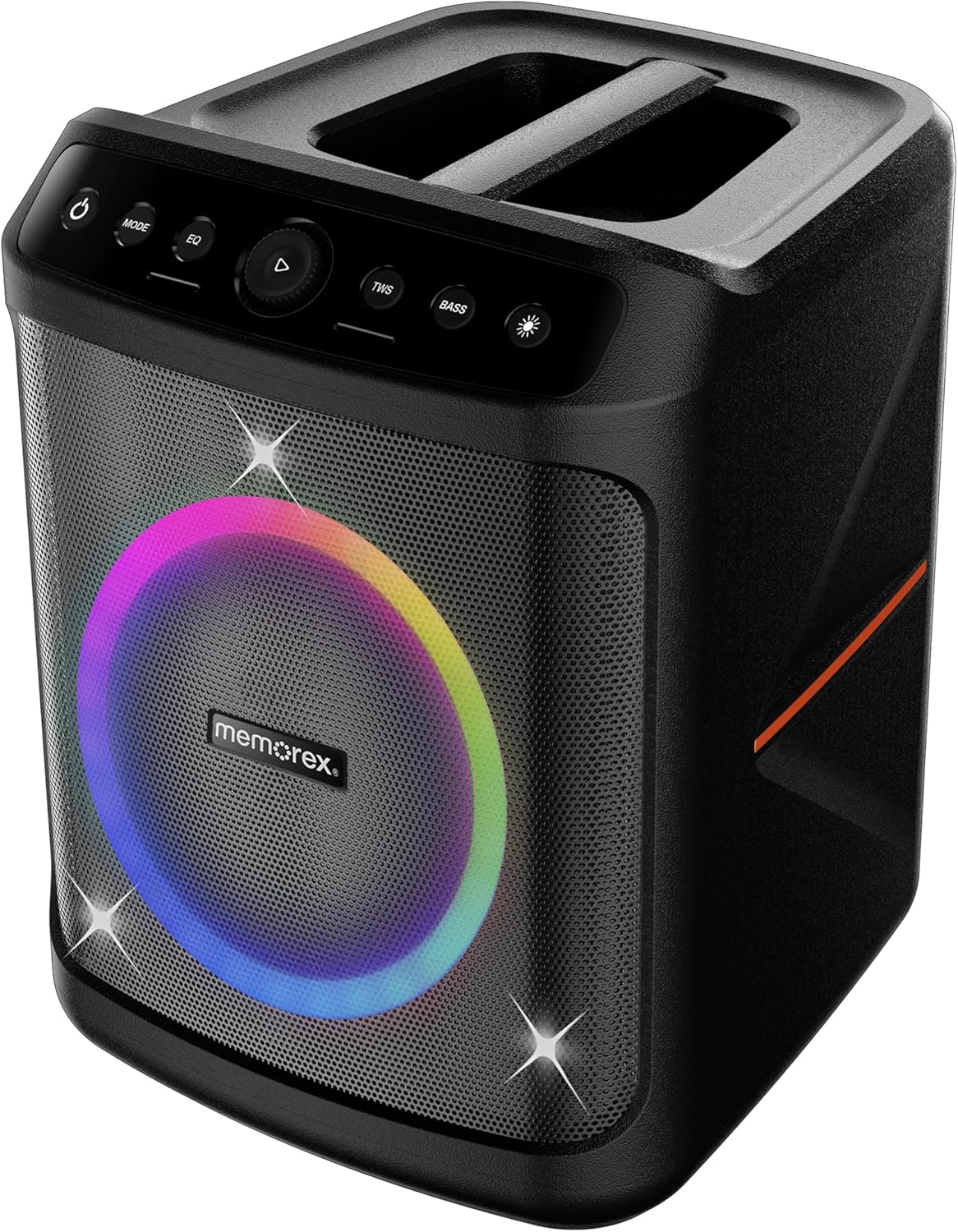
أمام view of the Memorex MX-PS802 speaker, showcasing the illuminated woofer and the top-mounted control panel.
وظائف لوحة التحكم
- زر الطاقة (⏻): اضغط مع الاستمرار لتشغيل/إيقاف تشغيل مكبر الصوت.
- زر الوضع: Short press to switch between input modes (Bluetooth, USB, SD).
- زر EQ: اضغط ضغطة قصيرة للتنقل بين إعدادات المعادل المسبقة.
- Play/Pause/Volume Knob (▶): Press to play or pause audio. Rotate to adjust volume.
- زر TWS: اضغط لبدء عملية الاقتران اللاسلكي الحقيقي.
- زر BASS: Press to activate or deactivate bass boost.
- Light Mode Button (☀): Press to cycle through LED lighting modes or turn lights ON/OFF.
5. الإعداد
5.1 شحن السماعة
- قم بتوصيل كابل الشحن بمنفذ الشحن الخاص بالسماعة.
- قم بتوصيل الطرف الآخر من الكابل بمأخذ كهربائي مناسب.
- The charging indicator will illuminate. Allow the speaker to fully charge before first use (approximately 3-4 hours).
- The indicator will change or turn off once charging is complete.
5.2 تشغيل/إيقاف التشغيل
- To power ON, press and hold the زر الطاقة (⏻) for 2-3 seconds.
- To power OFF, press and hold the زر الطاقة (⏻) again for 2-3 seconds.
6. تعليمات التشغيل
6.1 اقتران بلوتوث
- قم بتشغيل السماعة. ستدخل تلقائيًا في وضع الاقتران عبر البلوتوث، ويُشار إلى ذلك بواسطة مؤشر LED وامض.
- على جهازك المحمول، قم بتمكين Bluetooth وابحث عن الأجهزة المتاحة.
- يختار "Memorex MX-PS802" من القائمة.
- بمجرد الاقتران، سيصدر مكبر الصوت صوت تأكيد، وسيتوقف مؤشر LED عن الوميض.
6.2 تشغيل بطاقة USB/SD
- أدخل ذاكرة فلاش USB أو بطاقة SD (مع ملف MP3) files) into the corresponding port.
- سيتحول مكبر الصوت تلقائيًا إلى وضع USB/SD ويبدأ التشغيل. إذا لم يحدث ذلك، فاضغط على زر التشغيل. وضع زر لاختيار الإدخال الصحيح.
- Use the Play/Pause/Volume knob to control playback and volume.
6.3 إقران ستيريو لاسلكي حقيقي (TWS)
To pair two MX-PS802 speakers for stereo sound:
- Ensure both MX-PS802 speakers are powered on and in Bluetooth mode, but not connected to any device.
- على مكبر صوت واحد (سيكون هذا هو مكبر الصوت الأساسي)، اضغط على تي دبليو اس button. It will emit a pairing tone.
- The two speakers will automatically connect to each other. A confirmation tone will sound once paired.
- الآن، قم بتوصيل جهازك المحمول بالسماعة الرئيسية عبر البلوتوث كما هو موضح في القسم 6.1.
6.4 مدخل الميكروفون والجيتار
- Connect a microphone or guitar to the respective input jacks on the speaker.
- Adjust the volume of the connected instrument/microphone using its own controls or the speaker's main volume knob.
6.5 LED Flame Lighting
- اضغط على زر وضع الإضاءة (☀) to cycle through various LED lighting effects.
- استمر بالضغط لإطفاء الأنوار.
6.6 EQ and Bass Boost
- اضغط على EQ button to select different equalizer presets for optimized sound.
- اضغط على BASS button to toggle the bass boost feature ON or OFF.
7. الصيانة
- تنظيف: استخدم قطعة قماش ناعمة وجافة لتنظيف الجزء الخارجي من مكبر الصوت. لا تستخدم منظفات أو مذيبات كاشطة.
- تخزين: Store the speaker in a cool, dry place away from direct sunlight when not in use for extended periods.
- العناية بالبطارية: To prolong battery life, fully charge the speaker before storing it for long periods and recharge it every 3-6 months.
8. استكشاف الأخطاء وإصلاحها
- لا يوجد طاقة: تأكد من شحن السماعة. قم بتوصيلها بمصدر طاقة وحاول مرة أخرى.
- لا يوجد صوت: تحقق من مستوى الصوت في كل من السماعة والجهاز المتصل. تأكد من تحديد وضع الإدخال الصحيح.
- البلوتوث غير متصل: Ensure the speaker is in pairing mode. Turn off and on Bluetooth on your device. Forget the speaker from your device's Bluetooth list and try pairing again. Ensure no other devices are connected to the speaker.
- فشل اقتران سماعات الأذن اللاسلكية: Ensure both speakers are MX-PS802 models and are not connected to any other Bluetooth device before initiating TWS pairing.
- الصوت المشوه: Reduce the volume on both the speaker and your device. Check for interference from other electronic devices.
9. المواصفات
| ميزة | مواصفة |
|---|---|
| اسم الموديل | MX-PS802 |
| نوع السماعة | Mono (can be paired for Stereo via TWS) |
| حجم السماعة | 8 بوصة |
| الحد الأقصى لقوة خرج السماعة | 800 Watts PMPO (80W RMS) |
| تكنولوجيا الاتصالات اللاسلكية | بلوتوث 5.3 |
| مصدر الطاقة | Battery Powered (Rechargeable Li-ion) |
| أبعاد المنتج | 11.33 × 10.78 × 16.57 بوصة |
| وزن العنصر | 12.12 رطل |
| المكونات المضمنة | رئيس الحزب |
10. الضمان والدعم
The Memorex MX-PS802 Party Speaker comes with a ضمان محدود. Please refer to the warranty card included in your package for specific terms and conditions. For technical support or service inquiries, please contact Memorex customer service through their official webالموقع أو معلومات الاتصال المقدمة مع وثائق الشراء الخاصة بك.


