مقدمة
This manual provides essential information for the safe and efficient operation, maintenance, and troubleshooting of your Leitz IQ Slim Paper Shredder. Please read this manual thoroughly before using the shredder and retain it for future reference.
The Leitz IQ Slim Paper Shredder is designed for home and home office use, offering P4 cross-cut security for confidential documents. It features a compact design, quiet operation, and anti-jam technology to ensure a smooth shredding experience.
معلومات السلامة
تحذير: قد يؤدي عدم اتباع تعليمات السلامة هذه إلى نشوب حريق أو صدمة كهربائية أو إصابة.
- Keep hands, hair, and loose clothing away from the paper entry slot.
- أبقِ الأطفال والحيوانات الأليفة بعيدًا عن آلة التقطيع.
- افصل آلة التقطيع عن الكهرباء عندما لا تكون قيد الاستخدام أو قبل نقلها أو تنظيفها أو إفراغ سلة المهملات.
- لا تقم بتمزيق الأشياء المعدنية أو الملصقات اللاصقة أو الورق المبلل.
- لا تقم بتشغيل آلة التقطيع إذا كان سلك الطاقة تالفًا.
- لا تحاول صيانة آلة التقطيع بنفسك. قم بإحالة جميع أعمال الصيانة إلى فنيين مؤهلين.
- تأكد من وضع آلة التقطيع على سطح مستوٍ وثابت.
يثبت
- فك التعبئة: Carefully remove the shredder from its packaging. Ensure all components are present, including the shredder head, waste bin, and power cord.
- الموقع: Position the shredder on a flat, stable surface in your desired home or office location. Ensure there is adequate space around the unit for ventilation and access to the power outlet.
- تركيب الصناديق: Place the waste bin securely into the shredder base. The shredder head should sit firmly on top of the bin. The unit will not operate if the head is not correctly seated.
- توصيل الطاقة: قم بتوصيل سلك الطاقة بمأخذ كهربائي قياسي.

الشكل 1: أمام view of the Leitz IQ Slim Paper Shredder, illustrating its compact design suitable for home or office environments.
تعليمات التشغيل
انتهت لوحة التحكمview
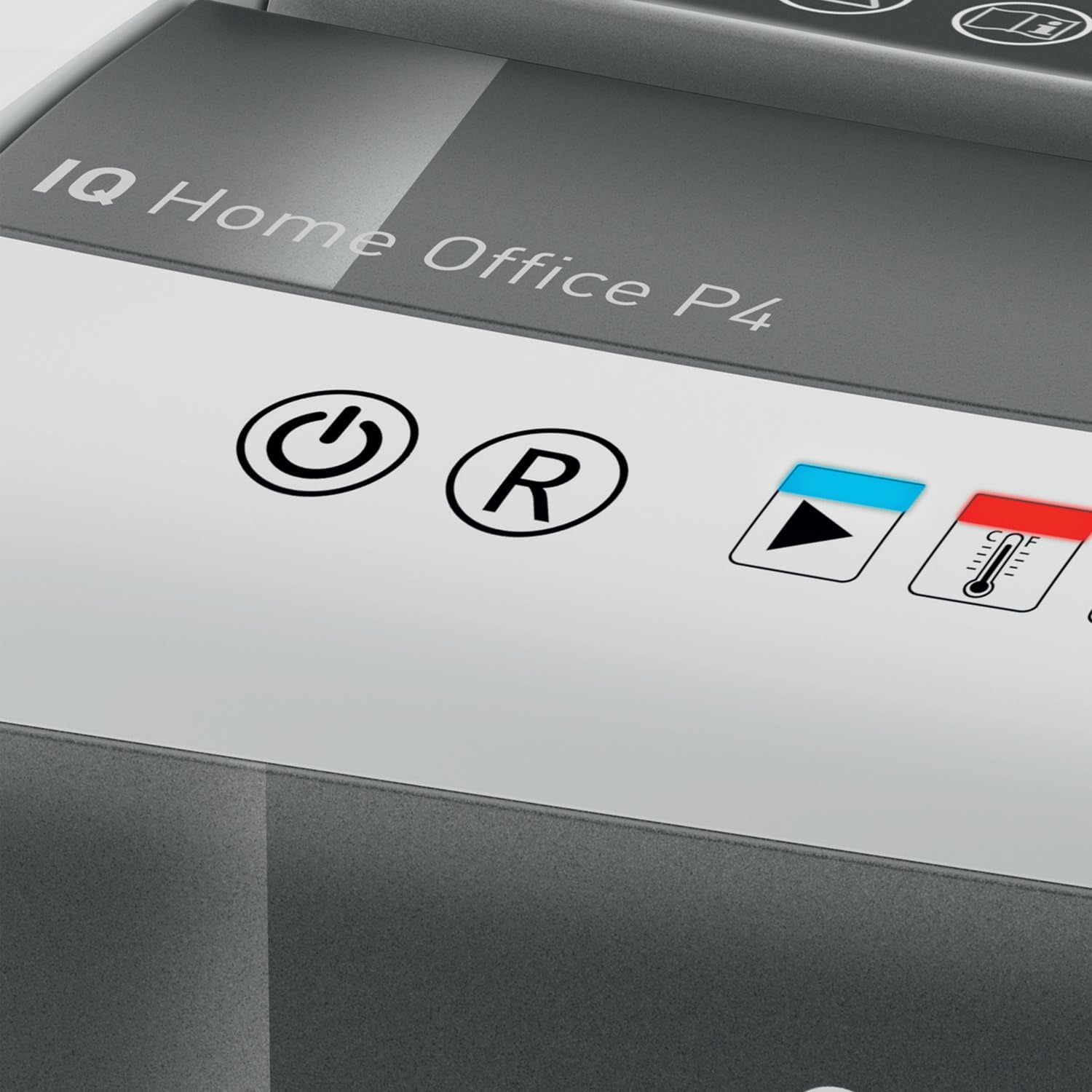
الشكل 2: Close-up of the shredder's touch control panel, showing the power, reverse, and status indicators.
The shredder features intuitive touch controls for easy operation.
- Power Button (⌛): Press to turn the shredder ON or OFF.
- Reverse Button (R): Press to reverse the shredding mechanism, useful for clearing minor paper jams.
- Overload Indicator (Red LED): Illuminates if too much paper is inserted, indicating a potential jam.
- Overheat Indicator (Red LED with Thermometer): يضيء المؤشر عندما تصل آلة التقطيع إلى أقصى وقت تشغيل مستمر وتحتاج إلى التبريد.
تمزيق المستندات
- Ensure the shredder is plugged in and powered ON.
- Insert up to 10 ورقات of letter-size (8.5" x 11") paper into the paper entry slot. The shredder will automatically begin shredding.
- The shredder can also process staples and small paper clips.
- للحصول على أفضل أداء ومنع انحشار الورق، تجنب تجاوز الحد الأقصى لسعة الورق.

الشكل 3: The shredder in operation, demonstrating the secure cross-cut shredding of a confidential document.

الشكل 4: Visual representation of the shredder's capacity, capable of shredding up to 10 letter-size sheets simultaneously.
Continuous Run Time and Cool Down
The shredder has a continuous run time of approximately 6 دقائق. After this period, the overheat indicator LED will illuminate, and the shredder will automatically shut off to prevent damage. Allow the shredder to cool down for at least 30 minutes before resuming operation. This helps prolong the life of the motor.
صيانة
تفريغ سلة المهملات
إفراغها بانتظام 6-gallon (225 sheet capacity) waste bin to prevent paper jams and maintain optimal shredder performance. The transparent window on the bin allows for easy monitoring of the shredded paper level.
- Ensure the shredder is turned OFF and unplugged from the power outlet.
- ارفع رأس آلة التقطيع بحرص من سلة المهملات.
- Empty the shredded paper into a suitable recycling container.
- Replace the shredder head securely onto the waste bin.

الشكل 5: The shredder head lifted from the waste bin, revealing the shredded paper inside and demonstrating the bin's capacity.
تنظيف
To clean the exterior of the shredder, wipe it with a soft, dry cloth. Do not use abrasive cleaners or solvents. For optimal performance, consider using shredder oil sheets periodically to lubricate the cutting blades. Follow the instructions provided with the shredder oil sheets.
استكشاف الأخطاء وإصلاحها
| مشكلة | السبب المحتمل | حل |
|---|---|---|
| آلة التقطيع لا تعمل. | Not plugged in; shredder head not properly seated; power switch off. | Ensure power cord is securely plugged in. Re-seat the shredder head firmly onto the waste bin. Turn the power switch ON. |
| انحشار الورق. | Too much paper inserted; paper folded or crumpled. | اضغط على عكسي (R) button to clear the paper. If necessary, unplug the shredder, carefully remove the shredder head, and manually clear the paper. Do not force paper. |
| Shredder stops during operation and Overheat LED is on. | Exceeded continuous run time. | Allow the shredder to cool down for at least 30 minutes. The LED will turn off when it is ready for use again. |
| آلة التقطيع صاخبة. | Blades require lubrication; waste bin is full. | Use shredder oil sheets to lubricate the blades. Empty the waste bin. |
تحديد
| ميزة | مواصفة |
|---|---|
| رقم الموديل | 170004 |
| نوع أجاد | قطع متقاطع |
| مستوى الأمان | DIN P4 |
| سعة الورقة | Up to 10 sheets (8.5" x 11" paper) |
| سعة الحاوية | 6 جالون (حوالي 225 ورقة) |
| وقت التشغيل المستمر | 6 دقائق |
| وقت التهدئة | حوالي 30 دقيقة |
| سرعة التقطيع | 6 قدم في الدقيقة |
| أشلاء | ورق، دبابيس، مشابك ورق |
| تقنية مكافحة المربى | Automatic stop and reverse |
| عناصر التحكم | عناصر التحكم باللمس |
| أبعاد المنتج (العرض × الارتفاع × العمق) | 10 × 14.7 × 14.5 بوصة |
| وزن العنصر | 15.12 رطل |
| الشركة المصنعة | ماركات أككو |
الضمان والدعم
ضمان محدود
Your Leitz IQ Slim Paper Shredder is covered by a ضمان محدود لمدة سنة واحدة from the date of purchase. This warranty covers defects in materials and workmanship under normal use. It does not cover damage resulting from misuse, abuse, accident, unauthorized service, or normal wear and tear.
يرجى الاحتفاظ بإثبات الشراء الخاص بك لمطالبات الضمان.
دعم العملاء
For technical assistance, warranty inquiries, or to order replacement parts, please contact Leitz customer support. Refer to the contact information provided on the official Leitz webالموقع أو عبوة المنتج الخاص بك.
Online resources and FAQs may also be available on the Leitz brand webموقع: Visit the Leitz Store on Amazon


