1. المقدمة
Welcome to the user manual for your new Google Pixel 9a smartphone. This guide provides essential information to help you set up, operate, maintain, and troubleshoot your device. The Pixel 9a combines advanced AI capabilities with a powerful camera and long-lasting battery, designed to enhance your daily mobile experience.

Figure 1: Google Pixel 9a in Obsidian
2. دليل الإعداد
2.1. ماذا يوجد في الصندوق
- Google Pixel 9a Smartphone
- USB-C to USB-C Cable (1m, USB 2.0)
- أداة SIM

الشكل 2: محتويات الصندوق
2.2. الإعداد الأولي
- إدراج بطاقة SIM: Use the provided SIM tool to open the SIM tray. Insert your nano-SIM card.
- تشغيل الطاقة: اضغط مع الاستمرار على زر الطاقة الموجود على جانب الجهاز حتى يظهر شعار جوجل.
- اتبع الإرشادات التي تظهر على الشاشة: The phone will guide you through connecting to Wi-Fi, signing in to your Google account, and transferring data from your old device.
- شحن البطارية: Connect the USB-C cable to the phone and a compatible power adapter (sold separately) to charge the device.
3. تشغيل جهازك
3.1. ميزات الكاميرا
The Pixel 9a camera is equipped with advanced AI features to capture stunning photos and videos.
Include Me (Inclúyeme)
This feature ensures no one is left out of group photos. Take one group photo, switch photographers, take another, and Pixel will magically merge both photos.

Macro Focus
Use Macro Focus to reveal vivid colors and surprising contrast in photos and videos of the smallest details, such as raindrops, flowers, or splashes.

Best Take (Mejor Versión)
Capture group photos where everyone looks their best. The phone can combine different facial expressions from a burst of photos to create the perfect group shot.

3.2. Gemini AI Assistant
Gemini is your integrated AI assistant, simplifying multitasking and information retrieval across your Google applications.
Single Request, Multiple Apps
Ask Gemini to find information and perform actions for you across your Google apps, streamlining your workflow.

برج الجوزاء مباشر
Interact with Gemini through voice commands for quick assistance and information.

3.3. إدارة البطارية
The Pixel 9a features an intelligent battery designed for extended use.
- The smart battery can last over 24 hours with typical usage.
- فعل Extreme Battery Saver to extend battery life up to 100 hours.

4. الرعاية والصيانة
Proper care ensures the longevity and optimal performance of your Pixel 9a.
- تنظيف: استخدم قطعة قماش ناعمة وخالية من الوبر لتنظيف الشاشة وجسم الجهاز. تجنب المواد الكاشطة أو المواد الكيميائية القاسية.
- درجة حرارة: تجنب تعريض جهازك لدرجات حرارة قصوى (ساخنة أو باردة) لأن ذلك قد يؤثر على عمر البطارية والمكونات الداخلية.
- مقاومة الماء والغبار: The Pixel 9a is rated IP68 for water and dust resistance, meaning it can withstand submersion in up to 1.5 meters of fresh water for up to 30 minutes. However, this is not permanent and resistance may decrease over time with normal wear. Avoid intentional submersion.
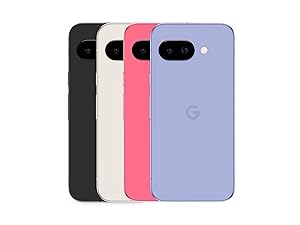
Figure 3: Water Resistance
- المواد المعاد تدويرها: The Pixel 9a is manufactured with recycled materials, contributing to environmental sustainability.
5. استكشاف الأخطاء وإصلاحها
This section addresses common issues you might encounter with your Pixel 9a.
| مشكلة | السبب المحتمل | حل |
|---|---|---|
| عمر البطارية قصير | High screen brightness, excessive app usage, background processes. | Reduce screen brightness, close unused apps, activate Extreme Battery Saver, check battery usage in settings. |
| Setup Issues / Freezing | Software glitch, network connectivity problems during setup. | Restart the device. Ensure a stable Wi-Fi connection. If issues persist, perform a factory reset (data will be erased). |
| Fingerprint Sensor Not Working | Dirty sensor, screen protector interference, un-registered fingerprint. | Clean the sensor. Re-register your fingerprint. Ensure screen protector is compatible with in-display sensors. |
| Camera Quality Concerns | Dirty lens, poor lighting conditions, incorrect settings. | Clean the camera lens. Ensure adequate lighting. Adjust camera settings (e.g., HDR, night mode). |
6. المواصفات الفنية
Detailed specifications for the Google Pixel 9a.
| ميزة | مواصفة |
|---|---|
| نظام التشغيل | أندرويد 15 |
| أبعاد | 7.33 × 15.47 × 0.89 سم |
| وزن | 186 جرام |
| حجم العرض | 6.3 بوصة |
| دقة | 2340 × 1080 |
| كبش | 8 جيجا بايت |
| سعة التخزين | 128 جيجا بايت |
| نموذج وحدة المعالجة المركزية | سناب دراجون |
| تصنيف طاقة البطارية | 5100 mAh (Approximate) |
| وقت التحدث | 30 ساعة |
| الاتصال | 5G |
| موصل الصوت | 3.5 ملم |
| رقم الموديل | GA05769-GB |
| أول تاريخ متاح | 14 أبريل 2025 |
For detailed product information and energy efficiency, refer to the EPREL database:

Figure 4: EU Energy Label
7. الضمان والدعم
Your Google Pixel 9a is manufactured by Google and comes with a standard warranty. For specific warranty terms and conditions, please refer to the documentation included with your device or visit the official Google support webموقع.
- الشركة المصنعة: جوجل
- الدعم الرسمي: For technical assistance, troubleshooting, and warranty claims, please visit the official Google Support page or contact Google customer service.
- مدة الضمان: Information regarding the warranty duration is typically provided at the point of purchase or within the device's packaging.


