مقدمة
This manual provides comprehensive instructions for the Machenike G5PRO Max SE Wireless Gaming Controller. It covers setup, operation, maintenance, and troubleshooting to ensure optimal performance and longevity of your device.
The Machenike G5PRO Max SE is a versatile gaming controller featuring Hall Effect sensing sticks and triggers, 6-axis gyroscope, and tri-mode connectivity (wired, 2.4GHz, Bluetooth). It is designed for use with NS, PC, iOS, and Android devices, offering precise control and an immersive gaming experience.
يثبت
محتويات الحزمة
تأكد من وجود جميع العناصر في العبوة:
- وحدة تحكم الألعاب اللاسلكية Machenike G5PRO Max SE
- قاعدة الشحن
- كابل شحن USB-C إلى USB-A
- محول USB بتردد 2.4 جيجاهرتز
- دليل المستخدم
الشحن الأولي
Before first use, fully charge your controller. The G5Pro Max SE Set Edition bundle includes a charging dock that charges your controller as soon as it's placed down. Simply press the Home button to automatically reconnect when picking it up.
- Connect the USB-C end of the charging cable to the charging dock.
- Connect the USB-A end of the charging cable to a power source (e.g., PC USB port, USB wall adapter).
- Place the controller onto the charging dock. The indicator lights on the controller will illuminate, indicating charging status.
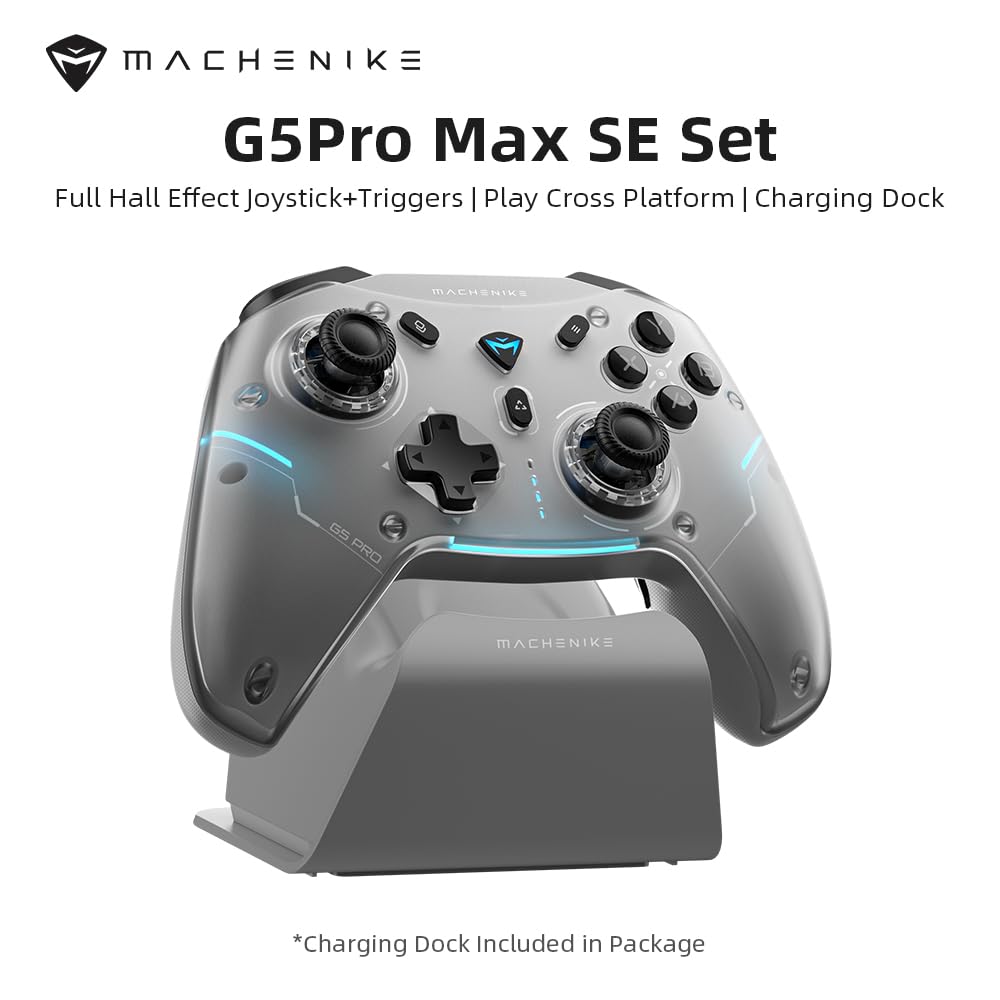
Image: Machenike G5PRO Max SE Controller with its dedicated charging dock.
أوضاع الاتصال
The controller supports three connectivity modes:
- الاتصال السلكي: Connect the controller directly to your device using the USB-C cable.
- 2.4 جيجاهرتز لاسلكي: Use the included 2.4GHz USB adapter for a stable wireless connection. This is ideal for PC and Nintendo Switch.
- بلوتوث: Pair the controller with your iOS, Android, or other Bluetooth-enabled devices.
To switch between modes, use the toggle switch located on the back of the controller. Ensure the switch is set to the correct mode (O, NS, PC, 2.4G) for your intended device.

Image: Diagram illustrating the controller's multi-platform compatibility.
تعليمات التشغيل
Hall Effect Sensing Sticks & Triggers
The controller features Hall Effect sensing sticks and triggers, providing accurate anti-drift control and seamless linear input. This technology ensures high precision and extended lifespan compared to traditional potentiometers.

Image: Close-up of the Hall Effect sensing sticks, highlighting their internal mechanism.

الصورة: مفصلة view of the Hall Effect analog triggers, showing their linear control range.
التحكم في حركة الجيروسكوب بستة محاور
Enhance your gaming experiences with the advanced 6-axis gyro. This technology provides unmatched control as you tilt and rotate the controller, making it an immersive gamepad for PC and other compatible systems.

Image: Controller with visual representation of 6-axis gyro motion sensing.
Smart Charging Dock & Reconnection
The included charging dock not only charges your controller but also offers a smart reconnection feature. Simply place the controller on the dock to charge, and when you pick it up, it will automatically reconnect to the last paired device.

Image: Controller resting on the smart charging dock.
Advanced App Configuration (Keylinker App)
Customize your controller to match your playstyle using the Keylinker App. Download the app to remap buttons, adjust lighting effects, and fine-tune sensitivity settings for joysticks and triggers.

Image: Screenshots of the Keylinker App interface for controller customization.
لوحة وجه مغناطيسية قابلة للفصل
The controller features a full magnetic detachable faceplate, allowing for easy customization and maintenance. This design also helps resolve potential Hall-effect interference.

Image: Illustration of the magnetic detachable faceplate and its removal.
Machenike Co-Play (Single Dongle Dual Controller Support)
يأتي جهاز G5Pro Max SE مزودًا بمفتاح لاسلكي ثنائي النواة، مما يسمح بالاتصال المتزامن بين جهازي تحكم، بما في ذلك التوافق المباشر مع أجهزة التحكم Switch الأصلية والتابعة لجهات خارجية.

Image: Diagram showing two controllers connected via a single dongle.
فيديو المنتج الرسمي
فيديو: انتهاء البث الرسميview of the Machenike G5Pro Max Gaming Controller, demonstrating its features and design.
صيانة
الرعاية العامة
- Keep the controller clean by wiping it with a soft, dry cloth. Avoid abrasive cleaners or solvents.
- قم بتخزين وحدة التحكم في مكان بارد وجاف بعيدًا عن أشعة الشمس المباشرة ودرجات الحرارة القصوى.
- تجنب إسقاط وحدة التحكم أو تعريضها لصدمات قوية.
العناية بالبطارية
- To prolong battery life, avoid fully discharging the controller frequently.
- Charge the controller regularly, even if not in use for extended periods, to maintain battery health.
استكشاف الأخطاء وإصلاحها
مشاكل الاتصال
- وحدة التحكم غير متصلة: Ensure the mode switch on the back of the controller is set correctly for your device (PC, NS, 2.4G, Bluetooth).
- For 2.4GHz, ensure the USB adapter is securely plugged into your device.
- بالنسبة لتقنية البلوتوث، تأكد من تفعيل البلوتوث في جهازك وأن وحدة التحكم في وضع الاقتران.
- حاول إعادة تشغيل كل من وحدة التحكم وجهازك.
Input/Responsiveness Problems
- Stick Drift or Inaccurate Input: Although equipped with Hall Effect sensors to minimize drift, if you experience issues, use the Keylinker App to calibrate the joysticks and triggers.
- الأزرار غير مستجيبة: Ensure the controller is charged. Check for any physical obstructions.
- تحديث البرامج الثابتة: Regularly check for firmware updates via the Keylinker App to ensure optimal performance and bug fixes.
تحديد
| ميزة | التفاصيل |
|---|---|
| نموذج | G5 PRO V2 |
| الاتصال | 2.4GHz, Bluetooth, Wired (USB-C) |
| المنصات المدعومة | NS (Nintendo Switch), PC, iOS, Android |
| عصا التحكم | Hall Effect Sensing Sticks |
| المحفزات | مشغلات تناظرية بتأثير هول |
| التحكم في الحركة | جيروسكوب مدمج سداسي المحاور |
| بطارية | 600mAh Li-Ion (Up to 8 hours playtime) |
| الشحن | Smart Charging Dock (included) |
| أبعاد | 8.66 × 3.15 × 6.69 بوصة |
| وزن | 1.1 رطل |
| الشركة المصنعة | ماشينيكي |
الضمان والدعم
للحصول على معلومات الضمان والدعم الفني، يرجى الرجوع إلى موقع Machenike الرسمي webالموقع أو تواصل مع خدمة العملاء مباشرةً. احتفظ بإثبات الشراء لأي مطالبات بالضمان.
Additional protection plans may be available through your retailer. Please check with your point of purchase for details.
Manufacturer: Machenike


