1. المقدمة
This manual provides detailed instructions for the setup, operation, maintenance, and troubleshooting of your Transformers TF-Crystal 85 Keys Mechanical Keyboard. Please read this manual thoroughly before using the product to ensure proper functionality and longevity.
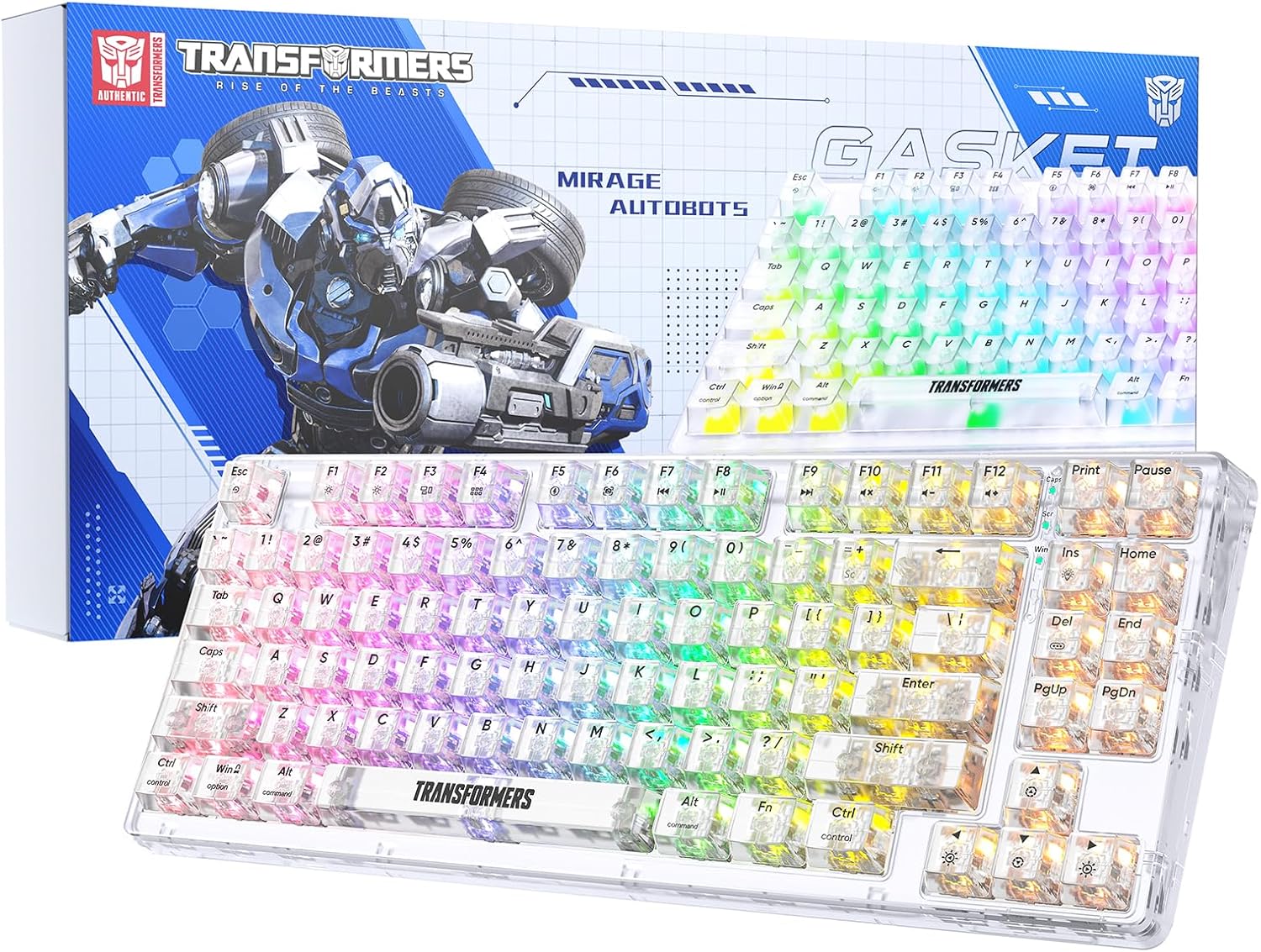
Image 1.1: Transformers TF-Crystal 85 Keys Mechanical Keyboard with its packaging, showcasing the transparent design and RGB lighting.
2. انتهى المنتجview
2.1 الميزات الرئيسية
- تخطيط 85 مفتاحًا: Compact 75% design retaining essential functions, arrow, and navigation keys.
- الاتصال ثلاثي الأوضاع: يدعم تقنية Bluetooth 5.0 والاتصال اللاسلكي بتردد 2.4 جيجاهرتز والاتصالات السلكية USB-C.
- لوحة دوائر مطبوعة قابلة للاستبدال السريع: Compatible with most 3-pin and 5-pin mechanical switches, allowing for easy customization and replacement.
- Linear Switches: Pre-lubricated switches with a 50 million keystroke lifespan for durability and smooth operation.
- هيكل الحشية: Incorporates high-quality gasket materials and a silicone pad to absorb vibrations and reduce typing noise.
- إضاءة خلفية RGB قابلة للتخصيص: Features 20 built-in backlight modes, 16.8 million color options, and dynamic music rhythm effects.
- Programmable Driver: Enables macro customization, key function remapping, and advanced lighting control.
- عمر بطارية طويل: Equipped with a 4000mAh battery, providing up to 240 hours of continuous use in 2.4GHz mode without backlighting.
- التوافق الواسع: Supports Mac, Windows, iOS, Android, PC, Laptop, Smartphone, Tablet, Switch, Xbox, and PlayStation.
- تصميم شفاف: Features transparent keycaps and base for enhanced aesthetic appeal.
3. الإعداد
3.1 شحن لوحة المفاتيح
Before initial use, fully charge the keyboard. Connect the provided USB-C cable to the keyboard's USB-C port and the other end to a powered USB port (e.g., computer, wall adapter). The charging indicator will show the charging status.
3.2 الاتصال عبر وضع لاسلكي بتردد 2.4 جيجاهرتز
- حدد موقع جهاز الاستقبال USB 2.4 جيجاهرتز، والذي يتم تخزينه عادةً في حجرة على لوحة المفاتيح.
- قم بتوصيل مستقبل USB بمنفذ USB متاح على جهاز الكمبيوتر الخاص بك.
- Toggle the mode switch on the keyboard to the 2.4 جيجا موضع.
- The keyboard will automatically connect to your device.
3.3 Connecting via Bluetooth 5.0 Mode
- Toggle the mode switch on the keyboard to the BT موضع.
- اضغط مع الاستمرار Fn + 1 (أو Fn + 2, Fn + 3) for 3-5 seconds until the indicator light flashes rapidly, indicating pairing mode.
- على جهازك (الكمبيوتر، الجهاز اللوحي، الهاتف الذكي)، قم بتمكين البلوتوث والبحث عن أجهزة جديدة.
- Select "TF-Crystal 85" from the list of available devices to pair.
- Once paired, the indicator light will stop flashing and remain solid. You can pair up to three Bluetooth devices using Fn + 1, Fn + 2، و Fn + 3.
3.4 الاتصال عبر وضع USB-C السلكي
- قم بتوصيل كابل USB-C المقدم بمنفذ USB-C الموجود على لوحة المفاتيح.
- قم بتوصيل الطرف الآخر من كابل USB-C بمنفذ USB المتوفر على جهاز الكمبيوتر الخاص بك.
- The keyboard will automatically switch to wired mode and function without battery power.

Image 3.1: Diagram illustrating the three connection modes: Bluetooth 5.0, 2.4GHz wireless, and USB-C wired, compatible with various devices.
4. تعليمات التشغيل
4.1 التبديل بين الأوضاع
Use the physical switch located on the keyboard to select between BT (بلوتوث)، 2.4 جيجا (2.4GHz wireless), and يو اس بي-سي (wired) modes.
4.2 التحكم في الإضاءة الخلفية RGB
The keyboard features customizable RGB backlighting. Use the following key combinations to adjust:
- الجبهة الوطنية + الإضافية: Cycle through 20 different backlight effects.
- الجبهة الوطنية + ديل: Switch backlight colors within certain modes.
- Fn + ↑ / ↓: ضبط سطوع الإضاءة الخلفية (5 مستويات).
- Fn + ← / →: Adjust backlight effect speed (5 levels).
- Fn + Esc (hold for 3s): Reset backlight settings to default.

Image 4.1: Visual guide for controlling RGB backlight effects, brightness, and speed using Fn key combinations.
4.3 Programmable Driver Usage
The keyboard includes a programmable driver for advanced customization. This driver allows you to:
- تحرير الماكرو: Record and edit complex key sequences.
- Key Redefinition: Customize the function of individual keys.
- RGB Effect Customization: Fine-tune lighting modes, colors, and speeds, including music rhythm lighting effects.
Refer to the software's dedicated user interface for detailed instructions on using these features.

Image 4.2: Screenshot of the programmable driver interface, showing options for macro editing, RGB effects, and key redefinition.
4.4 مفاتيح التبديل السريع
The TF-Crystal 85 keyboard features a hot-swappable PCB, allowing you to change mechanical switches without soldering. This supports most 3-pin and 5-pin mechanical switches.
- قم بإيقاف تشغيل لوحة المفاتيح أو افصلها عن جهازك.
- استخدم أداة سحب غطاء المفتاح المتوفرة لإزالة غطاء المفتاح المطلوب بعناية.
- Use the provided switch puller to gently grip the switch from its top and bottom clips, then pull it straight up to remove it.
- قم بمحاذاة دبابيس المفتاح الجديد مع فتحات لوحة الدائرة المطبوعة. تأكد من استقامة الدبابيس.
- اضغط برفق على المفتاح الجديد في مكانه حتى تسمع صوت طقطقة. لا تجبره على ذلك.
- استبدال غطاء المفتاح.

Image 4.3: Illustration of the hot-swappable feature, showing how to remove and insert 3-pin/5-pin switches and the linear switch specifications.
5. الصيانة
5.1 تنظيف لوحة المفاتيح
- افصل لوحة المفاتيح عن جميع مصادر الطاقة قبل التنظيف.
- استخدم قطعة قماش ناعمة وخالية من الوبر وامسحها برفق.ampاغسل أغطية المفاتيح والهيكل بالماء أو محلول التنظيف المعتدل.
- لإزالة الغبار والحطام بين المفاتيح، استخدم الهواء المضغوط أو فرشاة صغيرة.
- Avoid using harsh chemicals or abrasive materials that could damage the keyboard's surface.
5.2 العناية بالبطارية
- تجنب تفريغ البطارية بالكامل بشكل متكرر.
- قم بتخزين لوحة المفاتيح في مكان بارد وجاف عندما لا تكون قيد الاستخدام لفترات طويلة.
- إذا لم يتم استخدام لوحة المفاتيح لفترة طويلة، فقم بشحنها إلى حوالي 50% قبل تخزينها.
6. استكشاف الأخطاء وإصلاحها
| مشكلة | السبب المحتمل | حل |
|---|---|---|
| لوحة المفاتيح لا تستجيب في الوضع اللاسلكي. | Low battery, incorrect mode selected, receiver not connected, Bluetooth not paired. | Charge the keyboard. Ensure the mode switch is set correctly (2.4G or BT). Re-insert the 2.4G receiver. Re-pair Bluetooth. |
| المفاتيح غير مسجلة أو مكتوبة مرتين. | مفتاح معيب، أو حطام أسفل غطاء المفتاح، أو مشكلة في البرنامج. | Clean under the keycap. Try hot-swapping the switch with a known working one. Restart your computer. |
| RGB backlight not working or incorrect. | Backlight turned off, incorrect settings, software conflict. | ضبط السطوع باستخدام الجبهة الوطنية + ↑. Cycle modes with الجبهة الوطنية + الإضافية. Reset backlight with Fn + Esc (hold 3s). Check programmable driver settings. |
| لوحة المفاتيح لا يتم شحنها. | Faulty USB-C cable, power source issue, keyboard port damage. | Try a different USB-C cable. Use a different USB port or power adapter. Ensure the cable is fully inserted. |
7. المواصفات
| ميزة | التفاصيل |
|---|---|
| رقم الموديل | TF-Crystal 85 |
| تخطيط المفتاح | 85 مفتاحًا (75% حجم صغير) |
| الاتصال | بلوتوث 5.0، 2.4 جيجاهرتز لاسلكي، USB-C سلكي |
| نوع المفتاح | Pre-lubricated Linear Mechanical Switches |
| التبديل عمر | 50 ملايين ضغطة |
| قابلة للتبديل السريع | نعم (متوافق مع 3 دبابيس/5 دبابيس) |
| الإضاءة الخلفية | RGB (20 modes, 16.8 million colors) |
| سعة البطارية | 4000 مللي أمبير |
| Battery Life (2.4G, no light) | تصل إلى 240 ساعة |
| Battery Life (Backlit ON) | حوالي 22 ساعات |
| الأبعاد (الطول × العرض × الارتفاع) | 34.7 سم × 14 سم × 4.5 سم |
| التوافق | Mac, Windows, iOS, Android, PC, Laptop, Smartphone, Tablet, Switch, Xbox, PlayStation |

Image 7.1: Visual representation of the keyboard's battery life: 240 hours with backlight off, 22 hours with backlight on, powered by a 4000mAh battery.
8. الضمان والدعم
Transformers is committed to providing exceptional customer service. If you encounter any problems with your TF-Crystal 85 Keys Mechanical Keyboard, our after-sales support team is available to assist you. This includes technical support, exchanges, or installation guidance.
Please contact our customer service for assistance. We guarantee a hassle-free service experience.


