1. المقدمة
This manual provides essential information for the safe and efficient installation, operation, and maintenance of the Weidmuller UR20-FBC-MOD-TCP-ECO I/O Module. Please read this manual thoroughly before attempting to install or operate the device.
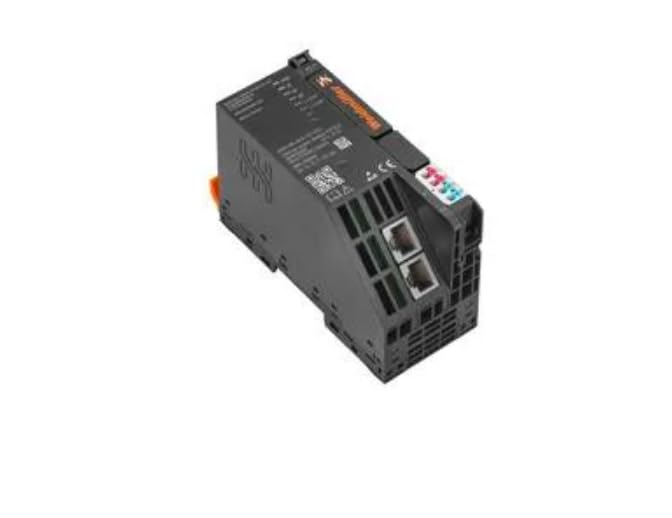
The UR20-FBC-MOD-TCP-ECO is an industrial I/O module designed for robust performance in various automation applications. It features a 24 VDC input voltage and push-in termination style for reliable connections.
2. معلومات السلامة
- Always disconnect power before installing, wiring, or servicing the module.
- يجب أن يتم إجراء التركيب والصيانة بواسطة موظفين مؤهلين فقط.
- Ensure proper grounding to prevent electrical shock and ensure correct operation.
- Operate the module within the specified environmental conditions (temperature, humidity).
- Do not expose the module to excessive moisture or corrosive substances.
3. انتهى المنتجview
The Weidmuller UR20-FBC-MOD-TCP-ECO is a compact I/O module designed for distributed control systems. It integrates seamlessly into industrial networks, providing reliable data acquisition and control capabilities.
3.1 الميزات الرئيسية
- تصميم مدمج للتثبيت لتوفير المساحة.
- Push-in termination technology for quick and reliable wiring.
- نطاق واسع لدرجة حرارة التشغيل (-20 درجة مئوية إلى +60 درجة مئوية).
- Ethernet/TCP communication capabilities.
4. الإعداد والتثبيت
4.1 التركيب
- Ensure the DIN rail is securely mounted in a suitable enclosure.
- قم بمحاذاة مشبك سكة DIN الخاص بالوحدة مع الحافة العلوية لسكة DIN.
- Press the module firmly downwards until it clicks into place on the DIN rail.
- تأكد من أن الوحدة مثبتة بإحكام ولا تتأرجح.
4.2 الأسلاك
The UR20-FBC-MOD-TCP-ECO utilizes push-in termination for electrical connections. Ensure all wires are stripped to the recommended length before insertion.
- مزود الطاقة: Connect a stable 24 VDC power supply to the designated power terminals. Observe correct polarity (+ and -).
- إتصال شبكة: Connect standard Ethernet cables to the RJ45 ports for network communication.
- اتصالات الإدخال/الإخراج: Connect field devices to the appropriate input/output terminals as per your system design. Refer to the system documentation for specific pin assignments.
- Ensure all connections are firm and free from loose strands.
4.3 التشغيل الأولي
After all connections are made and verified, apply power to the module. Observe the status indicator LEDs for proper initialization.
5. التشغيل
Once powered, the UR20-FBC-MOD-TCP-ECO module will establish communication with the connected network controller. The module's operational status can be monitored via its integrated LED indicators.
5.1 مؤشرات الحالة
Refer to the module's labeling for the exact meaning of each LED. Typically, these include:
- مؤشر الطاقة LED: يشير إلى حالة مصدر الطاقة.
- مؤشر LED لحالة الشبكة: Indicates network connection and communication activity.
- I/O Status LEDs: Indicate the status of individual input/output channels.
5.2 شبكة الاتصال
The module communicates over Ethernet using TCP/IP protocols. Configuration of network parameters (e.g., IP address) is typically performed via the connected controller or a dedicated configuration tool.
6. الصيانة
Regular maintenance ensures the longevity and reliable operation of the I/O module.
- تنظيف: Periodically clean the module's exterior with a soft, dry cloth. Do not use abrasive cleaners or solvents. Ensure power is disconnected before cleaning.
- تقتيش: Regularly inspect wiring connections for tightness and signs of damage or corrosion. Check for any physical damage to the module housing.
- تحديثات البرامج الثابتة: Consult the Weidmuller website or your system integrator for information on available firmware updates. Follow all instructions carefully when performing updates.
7. استكشاف الأخطاء وإصلاحها
يقدم هذا القسم إرشادات حول المشكلات الشائعة. في حال وجود مشكلات معقدة، يُرجى التواصل مع الدعم الفني.
| مشكلة | السبب المحتمل | حل |
|---|---|---|
| لا يوجد مؤشر LED للطاقة | No power supply; incorrect wiring; faulty module. | Check 24 VDC power supply; verify wiring polarity; test with a known good power source. |
| Network Status LED off/flashing incorrectly | No network connection; incorrect network settings; faulty cable. | Check Ethernet cable connection; verify network configuration (IP address, subnet mask); replace cable. |
| الإدخال/الإخراج لا يستجيب | Incorrect I/O wiring; faulty field device; software configuration error. | Verify I/O wiring; test field device independently; check controller software configuration. |
8. المواصفات الفنية
| المعلمة | قيمة |
|---|---|
| رقم الموديل | UR20-FBC-MOD-TCP-ECO |
| رقم القطعة | 2659700000 |
| الشركة المصنعة | WEIDMULLER |
| حجم الإدخالtage | 24 فولت تيار مستمر |
| أسلوب الإنهاء | ادفع للداخل |
| أدنى درجة حرارة تشغيل | -20 درجة مئوية |
| الحد الأقصى لدرجة حرارة التشغيل | +60 درجة مئوية |
| وزن العنصر | 6.99 رطل |
9. معلومات الضمان
Weidmuller products are manufactured to high-quality standards. For specific warranty terms and conditions, please refer to the official Weidmuller warranty statement available on their webالموقع أو تواصل مع موزعك المحلي. احتفظ بإيصال الشراء لطلبات الضمان.
10. الدعم الفني
For technical assistance, product inquiries, or service requests, please contact your authorized Weidmuller distributor or visit the official Weidmuller webموقع للحصول على موارد الدعم ومعلومات الاتصال.


