مقدمة
The Ergotron LX Pro Premium Monitor Arm is designed to enhance your workspace by providing flexible and ergonomic positioning for your monitor. This manual provides detailed instructions for the safe and efficient installation, operation, and maintenance of your new monitor arm.
تتضمن الميزات الرئيسية ما يلي:
- Broad compatibility with single screens up to 34 inches diagonal, weighing 4 to 22 pounds, and up to 3.6 inches deep.
- Support for VESA patterns 75x75mm and 100x100mm.
- Versatile mounting options with an included two-piece desk clamp for desks 0.4 to 2.4 inches thick.
- Extensive ergonomic adjustments including 18.3 inches of height adjustment, 360 degrees of rotation, and 85 degrees of tilt.
- Sleek design with improved built-in cable management for a clean workspace.

The LX Pro Series builds on 20 years of industry-leading LX design and quality engineering, offering enhanced features for the next generation of monitor arms.
معلومات السلامة
Please read all instructions carefully before installation and use. Failure to follow these instructions may result in product damage, injury, or property damage.
- Ensure your desk surface is strong enough to support the weight of the monitor arm and your monitor.
- لا تتجاوز الحد الأقصى للوزن وهو 22 رطلاً (10 كجم).
- تأكد من إحكام ربط جميع البراغي والوصلات قبل الاستخدام.
- احتفظ بالأطفال والحيوانات الأليفة بعيدًا عن منطقة التثبيت.
- Use caution when adjusting the arm, especially with a monitor attached, to prevent pinching or sudden movements.
محتويات الحزمة
تأكد من وجود كافة المكونات قبل البدء في التثبيت:
- Monitor Arm Assembly (includes arm, extension, monitor pivot)
- مكتب Clamp (two-piece)
- Standard Base (for desk clamp)
- 5-inch Pole (Standard Pole version) or 12-inch Pole (Tall Pole version)
- طوق القطب
- Hardware Kit (screws, tools, cable management covers)

The LX Pro Monitor Arm features a quick three-step assembly process with fewer parts for intuitive adjustment.
تعليمات الإعداد
1. Attach Desk Clamp إلى المكتب
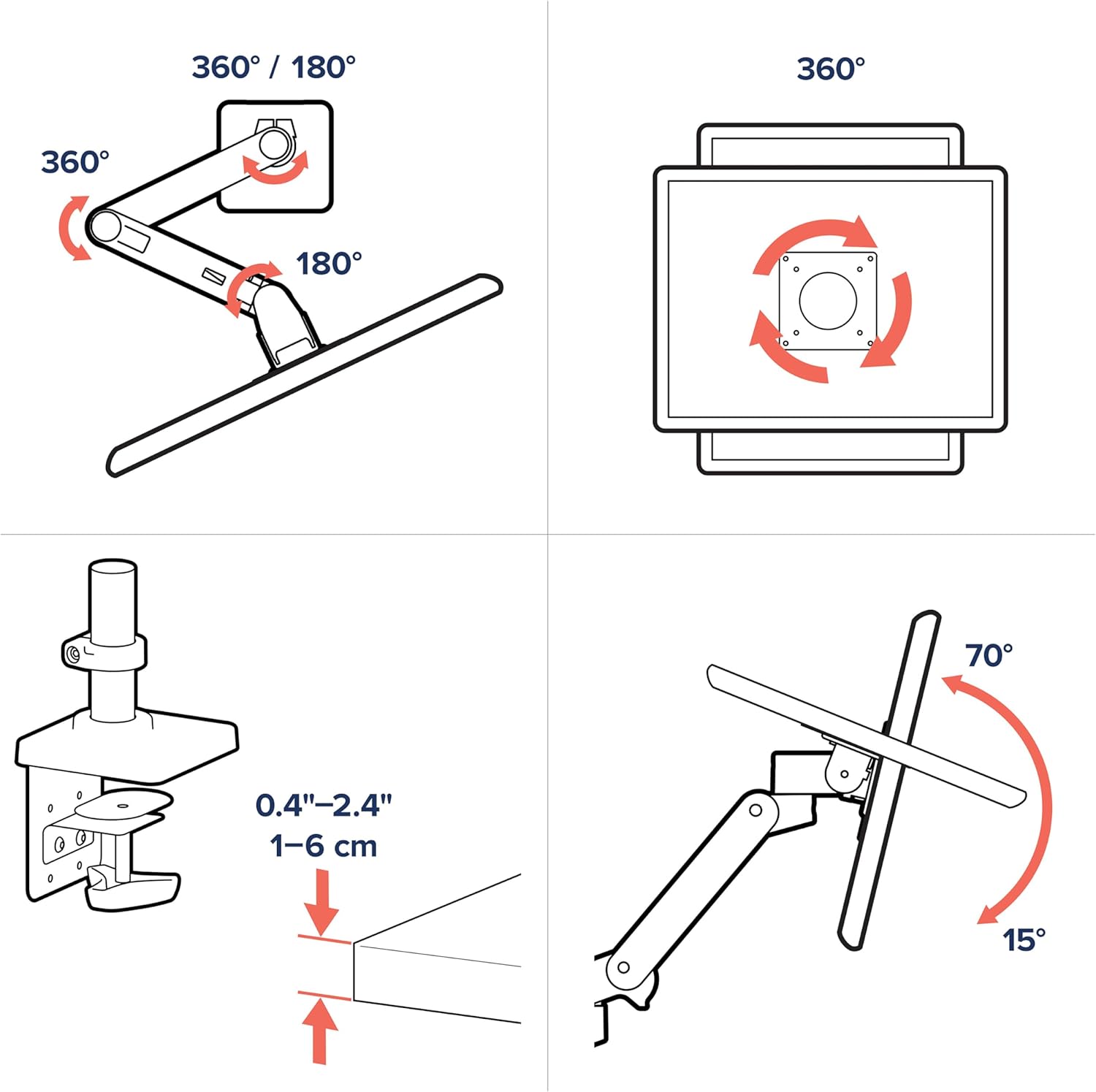
The included two-piece desk clamp allows for easy attachment to the back or side of your desk. It is compatible with desk thicknesses ranging from 0.4 to 2.4 inches (1-6 cm).
- ضع المكتب clamp on your desk edge.
- شد القفلamp securely using the integrated knob until it is firm and stable. No additional tools are typically required for this step.

مكتب clamp attaches to the back or side of the desk, requiring minimal space and no tools for installation.
2. Attach Monitor to Arm
The LX Pro arm supports VESA mounting patterns of 75x75mm and 100x100mm. Ensure your monitor has one of these patterns.
- Carefully align the VESA plate on the monitor arm with the mounting holes on the back of your monitor.
- Secure the monitor to the VESA plate using the screws provided in the hardware kit. Ensure they are tightened firmly.

The monitor arm securely attaches to the back of your display via the VESA mounting pattern.
3. إدارة الكابلات
The LX Pro arm features improved built-in cable management to keep your workspace tidy.
- قم بتوجيه كابلات الشاشة (الطاقة والفيديو وما إلى ذلك) على طول الجانب السفلي من الذراع.
- Use the provided cable management covers to snap them into place, concealing the cables for a streamlined look and preventing snags.

An additional cover safely routes cords, reducing cable clutter for a sleek look while preventing snags.
تعليمات التشغيل
The Ergotron LX Pro arm offers a wide range of motion for optimal ergonomic positioning.
ضبط الارتفاع
Easily raise or lower your monitor to your preferred viewing height. The arm provides 13 inches (33 cm) of vertical lift.
- Gently push or pull the monitor up or down to adjust its height. The arm's constant force technology will hold it in place.
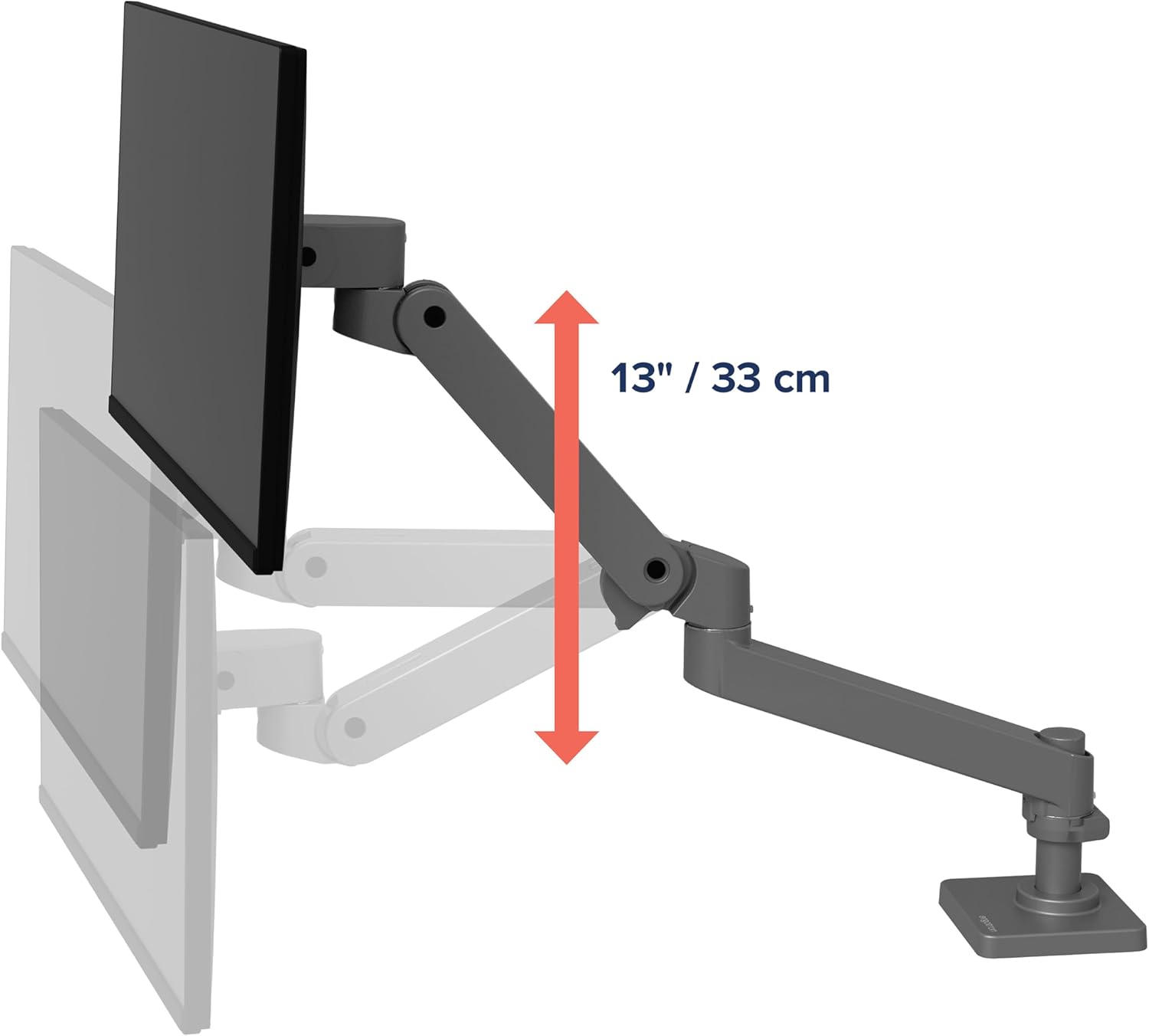
The arm allows for 13 inches (33 cm) of smooth vertical height adjustment.
إمالة ودوران
Adjust the monitor's tilt and swivel to reduce glare and find the most comfortable viewزاوية جي.
- The monitor can tilt up to 70 degrees upwards and 15 degrees downwards.
- Swivel the monitor left or right as needed.

The increased tilt range provides an extra 10 degrees of downward tilt for the perfect viewزاوية جي.
تناوب
The arm allows for 360-degree rotation at the base and 360-degree rotation at the monitor pivot, enabling portrait or landscape viewعمل.
- Rotate the monitor to switch between landscape and portrait orientations.
- The arm can freely rotate 360 degrees at the base. An optional rotation stop can be engaged to limit rotation to 180 degrees, which is useful for protecting walls or cubicles.

Freely rotate the arm 360 degrees at the base or engage the optional rotation stop to protect walls, partitions, or cubicles.
ضبط التوتر
The arm's tension can be adjusted to accommodate monitors of different weights, ensuring smooth and stable movement. The new tension indicator simplifies this process.
- Locate the tension adjustment screw on the arm.
- Rotate clockwise for heavier displays to increase tension.
- Rotate counter-clockwise for lighter displays to decrease tension.
- Use the tension indicator to set the level once and repeat for quick installation of multiple workstations.

Set tension level once and repeat for quick installation of multiple workstations using the new tension indicator.

The arm offers a wide range of motion, including 360-degree rotation, 85 degrees of tilt, and compatibility with desk thicknesses from 0.4 to 2.4 inches.
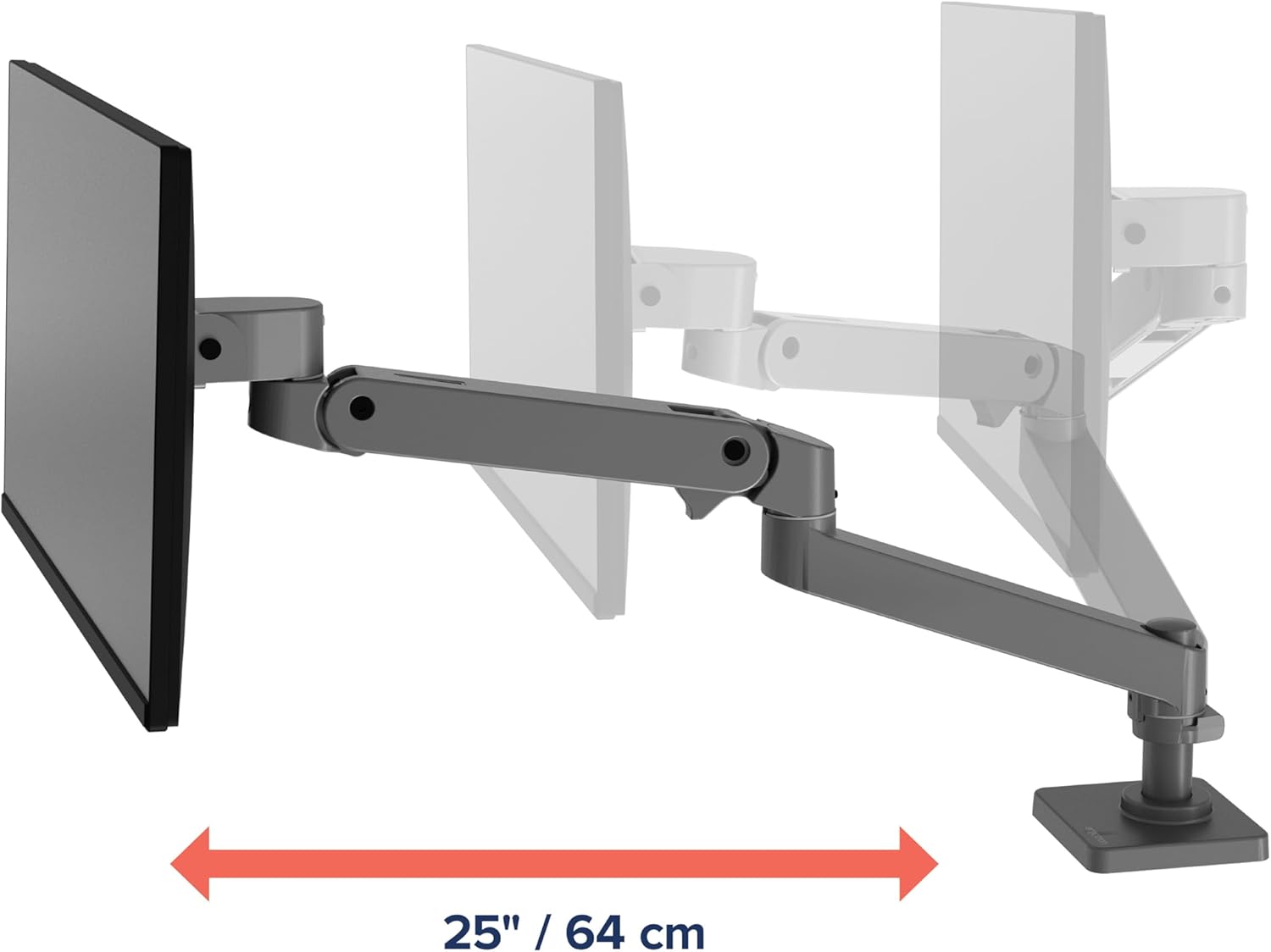
The arm provides an extension range of 25 inches (64 cm) for flexible positioning.
صيانة
Regular maintenance ensures the longevity and optimal performance of your Ergotron LX Pro Monitor Arm.
- تنظيف: استخدمي قطعة قماش ناعمةamp cloth to clean the surfaces of the arm. Avoid abrasive cleaners or solvents that could damage the finish.
- الفحوصات الدورية: افحص جميع البراغي والوصلات دوريًا للتأكد من إحكامها وثباتها. أعد ربطها إذا لزم الأمر.
- تشحيم: The arm's constant force mechanism is designed for maintenance-free operation and does not require lubrication.
استكشاف الأخطاء وإصلاحها
If you encounter issues with your monitor arm, refer to the following common troubleshooting steps:
| مشكلة | السبب المحتمل | حل |
|---|---|---|
| ذراع الشاشة يتدلى أو لا يثبت في مكانه. | Tension is too low for monitor weight. | Increase tension using the adjustment screw (rotate clockwise for heavier displays). Refer to 'Tension Adjustment' section. |
| ذراعي متيبسة للغاية بحيث لا يمكنني تحريكها. | Tension is too high for monitor weight. | Decrease tension using the adjustment screw (rotate counter-clockwise for lighter displays). Refer to 'Tension Adjustment' section. |
| Monitor wobbles at the pivot point. | Loose connection at the monitor pivot or VESA plate. | Ensure all VESA mounting screws are securely tightened. Check the pivot joint for any accessible tightening points as per the assembly guide. |
| مكتب clamp feels unstable. | Clamp not tightened sufficiently or desk surface is too thin/thick. | أعد ربط مشبك المكتبamp. Ensure your desk thickness is within the 0.4 to 2.4 inch range. |
تحديد
Detailed specifications for the Ergotron LX Pro Premium Monitor Arm:
- رقم الموديل: 45-682-293
- أبعاد المنتج: 16.53 × 13.97 × 6.61 بوصة
- وزن السلعة: 8.09 رطل
- Compatible Screen Size: يصل إلى 34 بوصة قطريًا
- قدرة الوزن: من 4 إلى 22 رطلاً (من 1.8 إلى 10 كجم)
- Monitor Depth Compatibility: Up to 3.6 inches (9 cm) for curved monitors
- التوافق مع VESA: 75×75 مم، 100×100 مم
- نوع التركيب: حامل سطح الطاولة (مشبك المكتب)amp)
- مكتب Clamp نطاق السُمك: 0.4 إلى 2.4 بوصات (1 إلى 6 سم)
- نوع الحركة: مفصل
- الرفع العمودي: 13 بوصة (33 سم)
- تمديد الذراع: حتى 25 بوصة (64 سم)
- إمالة المدى: 70 degrees (up) to 15 degrees (down)
- تناوب: 360 degrees at base and monitor pivot
- مادة: معدن
- لون: رمادي غامق
- رمز المنتج العالمي: 698833091595
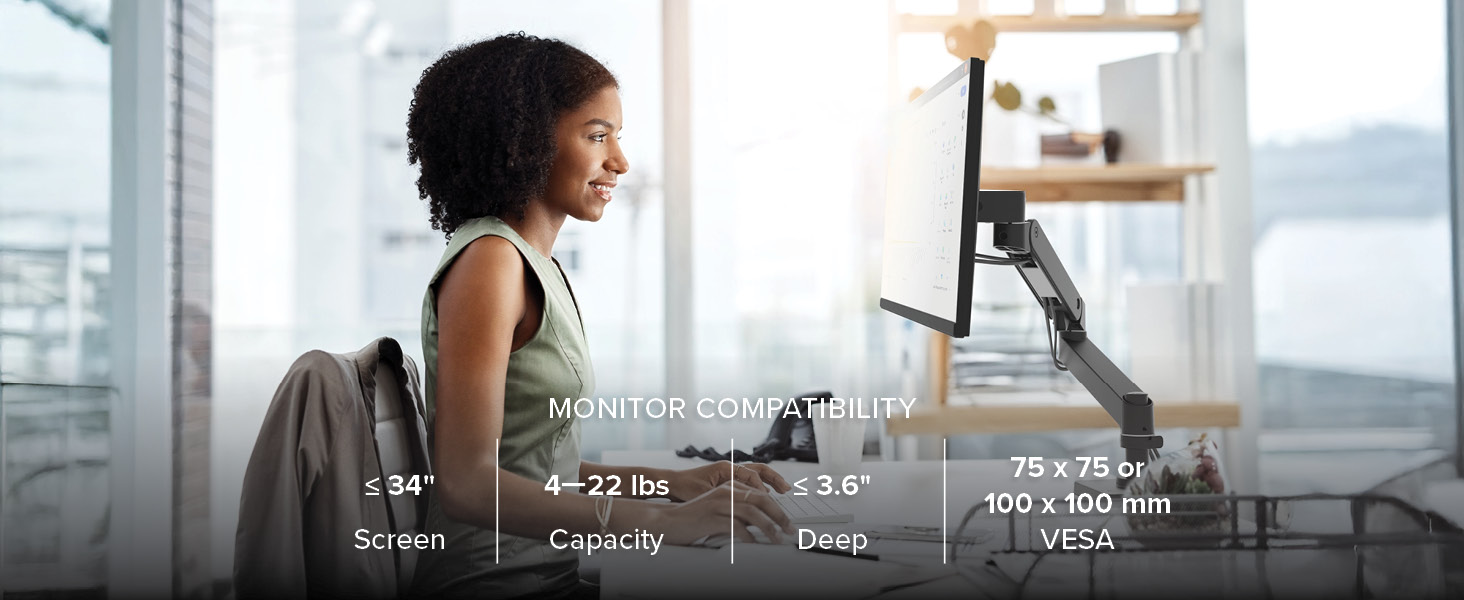
The LX Pro arm offers broad compatibility for various monitor types and sizes.
The arm is designed to accommodate curved monitors up to 3.6 inches (9 cm) deep.

The 5-inch pole (model 45-682) provides a discreet profile, while the 12-inch pole (model 45-695) offers extra space for flexible mounting height.
الضمان والدعم
Ergotron products are built to last and are backed by extensive quality testing.
- ضمان: The Ergotron LX Pro Premium Monitor Arm comes with a 10-year warranty. This warranty covers defects in materials and workmanship under normal use.
- الدعم الفني: For technical assistance, troubleshooting beyond this manual, or warranty claims, please visit the official Ergotron webالموقع أو الاتصال بخدمة دعم العملاء الخاصة بهم.
لمزيد من المعلومات، قم بزيارة www.ergotron.com.


