مقدمة
The My Arcade Atari Pixel Pocket Pro is a portable, officially licensed Atari video game system designed for on-the-go entertainment. This compact device includes 25 classic Atari games, offering a nostalgic gaming experience in a convenient keychain format. This manual provides essential information for setting up, operating, and maintaining your device.
محتويات الحزمة
- My Arcade Atari Pixel Pocket Pro device
- دليل المستخدم (هذا المستند)

Image: The My Arcade Atari Pixel Pocket Pro device shown within its retail packaging, highlighting the product's branding and key features.
المنتج انتهىview
The Pixel Pocket Pro features a 2-inch full-color screen and intuitive button controls for an authentic arcade experience. Its compact design includes a keychain for easy portability.

الصورة: الجبهة view of the My Arcade Atari Pixel Pocket Pro, displaying the screen, directional pad, SELECT, START, VOLUME, and 'A' buttons.
Image: The My Arcade Atari Pixel Pocket Pro with visual callouts indicating 25 officially licensed Atari titles, a 2-inch full-color screen, and power via 3 AAA batteries.
يثبت
تركيب البطارية
- حدد مكان حجرة البطارية في الجزء الخلفي من الجهاز.
- Using a small Phillips head screwdriver (not included), carefully remove the screw securing the battery compartment cover.
- إزالة الغطاء.
- قم بإدخال ثلاث (3) بطاريات AAA (غير متضمنة) في الحجرة، مع التأكد من القطبية الصحيحة (+/-) كما هو موضح داخل الحجرة.
- استبدل غطاء حجرة البطارية وثبته بالمسمار.
ملاحظة: استخدم دائمًا بطاريات جديدة وتخلص من البطاريات القديمة بطريقة مسؤولة. لا تخلط البطاريات القديمة والجديدة أو أنواعًا مختلفة من البطاريات.

الصورة: الخلف view of the My Arcade Atari Pixel Pocket Pro, showing the location of the battery compartment cover.
تعليمات التشغيل
تشغيل/إيقاف الطاقة
- لتشغيل الجهاز اضغط على يبدأ زر.
- لإيقاف تشغيل الجهاز، اضغط مع الاستمرار على يبدأ button for approximately 3 seconds until the screen turns off.
اختيار اللعبة
- After powering on, use the directional pad to navigate through the list of available games.
- اضغط على A زر لاختيار لعبة وبدء اللعب.
التحكم في مستوى الصوت
- استخدم مقدار button to adjust the sound level. Pressing it cycles through different volume settings.
طريقة اللعب
- The directional pad controls movement within the game.
- ال A button typically serves as the action or fire button.
- ال يختار button may be used for in-game options or pausing, depending on the specific game.
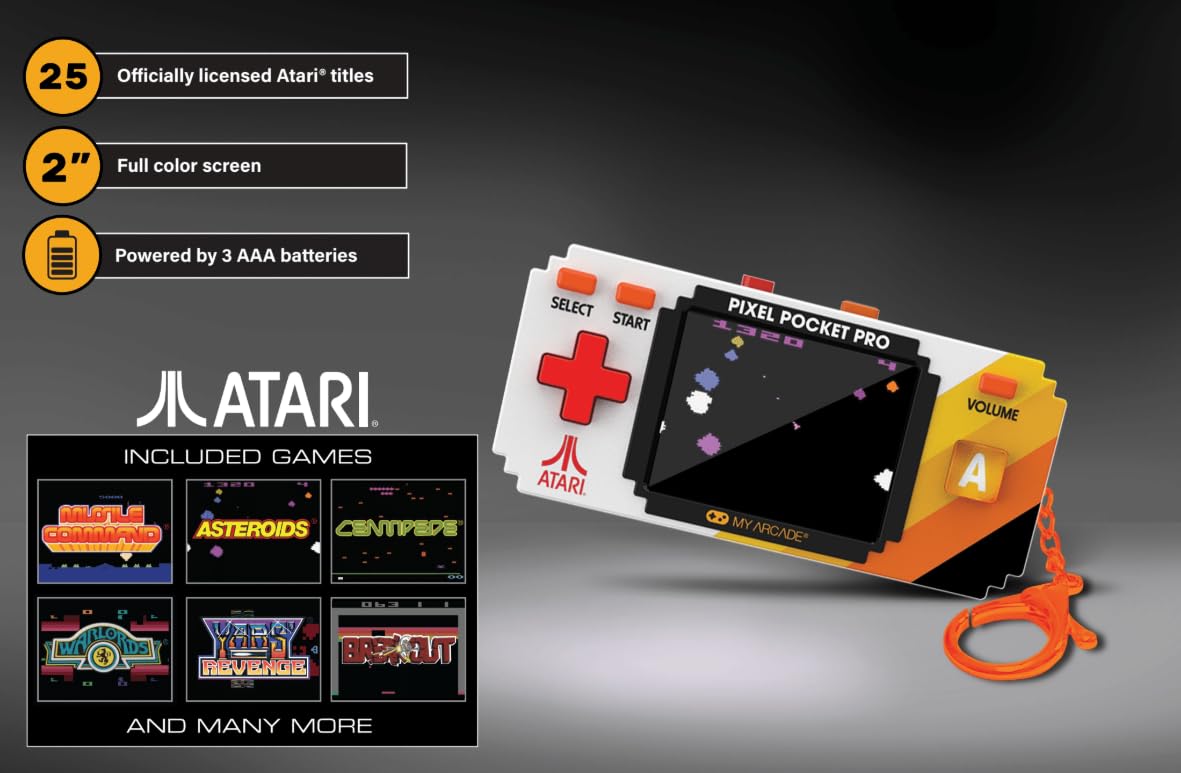
Image: A hand holding the My Arcade Atari Pixel Pocket Pro, demonstrating its portable size and how it is used for gameplay.
صيانة
تنظيف
- امسح الجهاز بقطعة قماش ناعمة وجافة.
- Do not use liquid cleaners or abrasive materials, as these can damage the screen or casing.
العناية بالبطارية
- قم بإزالة البطاريات إذا لم يتم استخدام الجهاز لفترة طويلة لمنع التسرب.
- قم بتخزين الجهاز في مكان بارد وجاف بعيدًا عن أشعة الشمس المباشرة.
استكشاف الأخطاء وإصلاحها
Device Does Not Power On
- تأكد من إدخال البطاريات بشكل صحيح مع مراعاة القطبية الصحيحة.
- استبدلها ببطاريات AAA جديدة.
- تأكد من أن غطاء حجرة البطارية مغلق بشكل آمن.
لا يوجد صوت أو صوت منخفض
- اضغط على مقدار button to increase the sound level.
- تأكد من عدم وجود عائق أمام مكبر الصوت.
Screen Issues (e.g., Blurry, Flickering)
- Ensure the screen is clean and free of smudges.
- Replace batteries, as low power can sometimes affect screen performance.
- إذا استمرت المشكلة ، فاتصل بدعم العملاء.
تحديد
| رقم الموديل | دجونل-7134 |
| ماركة | صالة الألعاب الخاصة بي |
| حجم الشاشة | 2 inches (full color) |
| نوع وحدة التحكم | التحكم بالأزرار |
| مصدر الطاقة | تعمل بالبطارية |
| البطاريات المطلوبة | شنومكس x آا (غير مدرجة) |
| الأبعاد (العرض × الارتفاع × العمق) | 1.75 بوصة × 3.8 بوصة × 1 بوصات (تقريبًا) |
| وزن | 4.5 أونصة (تقريبًا) |
| مادة | بلاستيك |
| عدد الألعاب | 25 Officially Licensed Atari Titles |
الضمان والدعم
For warranty information or technical support, please refer to the contact details provided on the product packaging or visit the official My Arcade webالموقع. احتفظ بإيصال الشراء كإثبات للشراء.
Image: A QR code for collecting more My Arcade products. Scan this code to explore other available items.
Explore more My Arcade products: https://qrco.de/collectthem


