1. المقدمة
This manual provides comprehensive instructions for the Mycket portable DAB/DAB+/FM radio, Model D009. It covers setup, operation, maintenance, and troubleshooting to ensure optimal performance and longevity of your device. Please read this manual carefully before using the product.
The Mycket D009 radio features advanced signal reception technology for clear audio, Bluetooth 5.0 for wireless streaming, USB playback, AUX-in connectivity, a dual alarm clock, and a sleep timer. Its integrated rechargeable battery offers portability for use in various environments.
2. تعليمات السلامة
- لا تعرض الجهاز للمطر أو الرطوبة أو درجات الحرارة العالية.
- تجنب إسقاط الجهاز أو تعريضه لصدمات قوية.
- لا تفكّ الجهاز أو تحاول إصلاحه بنفسك. أسند جميع أعمال الصيانة إلى فنيين مؤهلين.
- احتفظ بالجهاز بعيدًا عن مصادر الحرارة مثل المشعات أو فتحات التدفئة أو المواقد أو الأجهزة الأخرى (بما في ذلك ampالمُضخِّمات) التي تنتج الحرارة.
- Use only the specified charging cable and power adapter (5V via USB) to charge the device.
- Ensure proper ventilation around the device during operation and charging.
- تخلص من البطاريات والمكونات الإلكترونية بطريقة مسؤولة وفقًا للوائح المحلية.
3. انتهى المنتجview
3.1 محتويات العبوة
- 1 x Mycket Portable DAB Radio (Model D009)
- 1 × كابل شحن USB
- 1 × دليل المستخدم
3.2 تصميم الجهاز وعناصر التحكم
Familiarize yourself with the main components and controls of your Mycket radio.

الصورة 1: أمام view of the Mycket D009 portable DAB radio, showing the speaker grille, LCD display, control buttons (MODE, OK, O/M, FAV, 1-4), and the telescopic antenna extended. The right side shows the DC 5V USB-C port, reset button, and headphone jack.
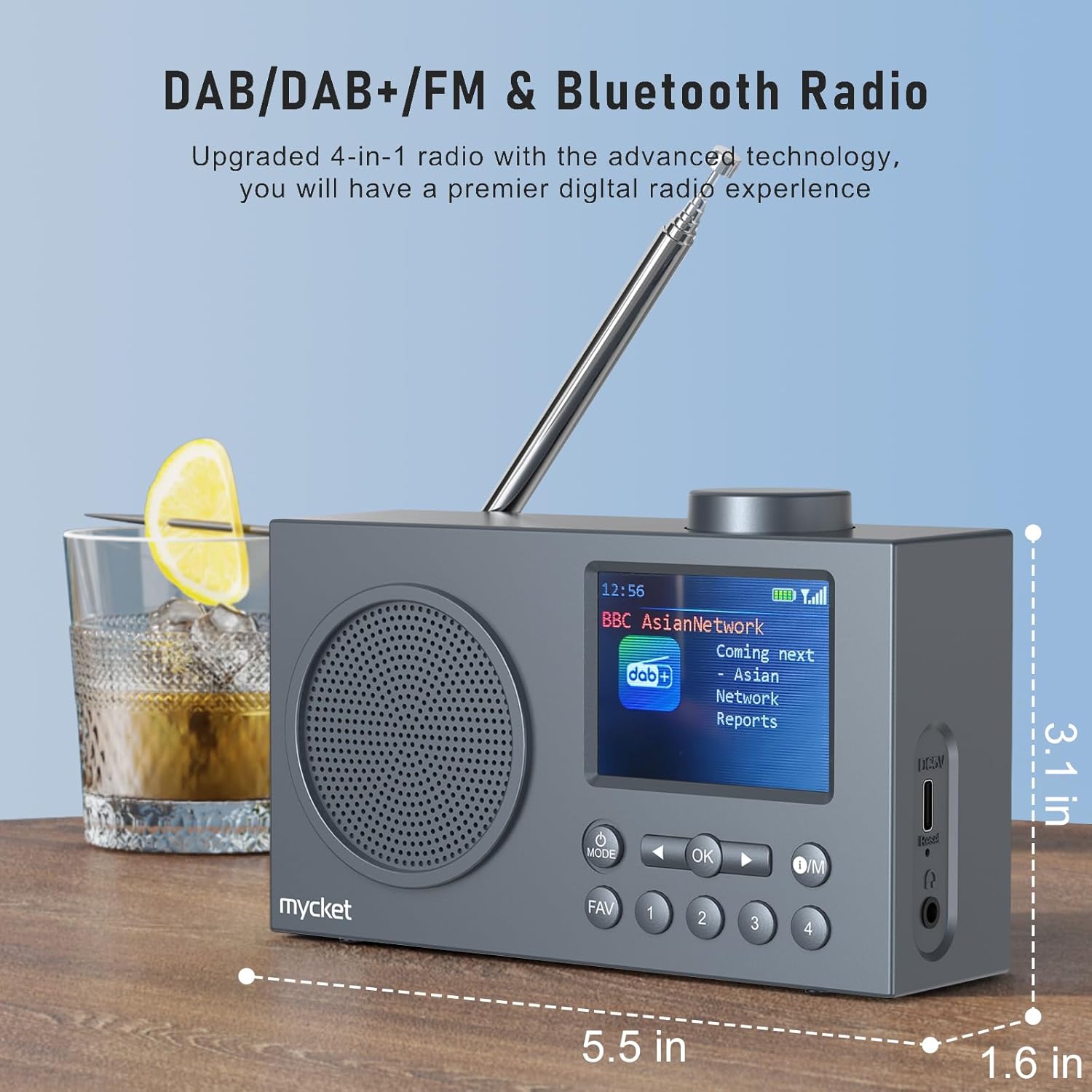
الصورة 2: جانب view of the Mycket D009 radio illustrating its compact dimensions: approximately 5.5 inches (length), 1.6 inches (width), and 3.1 inches (height). The image also highlights its DAB/DAB+/FM and Bluetooth capabilities.
- عرض: 2.4-inch TFT color display for station information, time, and settings.
- المتحدث: Integrated Hi-Fi speaker for audio output.
- هوائي تلسكوبي: للحصول على أفضل استقبال لإشارة الراديو.
- زر الوضع: Switches between DAB, FM, Bluetooth, USB, and AUX modes.
- زر موافق: تأكيد الاختيارات أو الدخول إلى القوائم.
- زر التشغيل/الصيانة: Power On/Off and Menu access.
- زر FAV: Accesses favorite presets.
- أزرار الأرقام (1-4): Direct access to stored presets.
- Navigation Buttons (Left/Right): Navigates menus or tunes stations.
- مقبض الصوت: ضبط مستوى الصوت.
- DC 5V USB-C Port: لشحن البطارية الداخلية.
- زر إعادة الضبط: Resets the device (use a thin object to press).
- مقبس سماعة رأس مقاس 3.5 ملم: للاستماع الخاص.
4. الإعداد
4.1 شحن البطارية
The radio is equipped with a built-in 2200mAh lithium battery. Before first use, fully charge the device.
- Connect the provided USB charging cable to the DC 5V USB-C port on the side of the radio.
- قم بتوصيل الطرف الآخر من كابل USB بمحول طاقة USB متوافق (غير متضمن) أو بمنفذ USB بالكمبيوتر.
- The charging indicator on the display will show the charging status. A full charge typically takes approximately 2.5 hours and provides up to 12 hours of playback time at 70% volume.

الصورة 3: The Mycket D009 radio display showing a full battery indicator, emphasizing its long playback time on a single charge.
4.2 ضبط الهوائي
للحصول على أفضل استقبال لاسلكي، قم بتمديد الهوائي التلسكوبي بالكامل. اضبط موضعه للحصول على أفضل جودة للإشارة.
4.3 التشغيل المبدئي
اضغط مع الاستمرار على تشغيل/صيانة button to power on the radio. The display will light up, and the device will typically start in the last used mode or initiate a DAB scan if it's the first use.
5. تعليمات التشغيل
5.1 أوضاع التحويل
اضغط على وضع button repeatedly to cycle through available modes: DAB, FM, Bluetooth, USB, and AUX.
5.2 تشغيل راديو DAB/DAB+
- قم بالتبديل إلى وضع DAB باستخدام وضع زر.
- The radio will automatically perform a full scan for available DAB/DAB+ stations upon first use or if no stations are found. To initiate a manual scan, press and hold the OK button, then select "Full Scan" from the menu.
- Once the scan is complete, use the navigation buttons (Left/Right) to browse through the list of available stations.
- يضعط OK to select and listen to a station.

الصورة 4: The Mycket D009 radio display showing a DAB station and highlighting the auto-scan and 40 preset features (20 DAB & 20 FM).
5.2.1 Storing DAB Presets
The radio supports up to 20 DAB presets.
- Tune to the desired DAB station.
- Press and hold one of the number buttons (1-4) أو المفضلة button to save the current station to a preset slot. Follow the on-screen prompts to select a slot if using the FAV button.
- To recall a preset, briefly press the corresponding number button or the المفضلة button and select from the list.
تشغيل راديو 5.3 FM
- قم بالتبديل إلى وضع FM باستخدام وضع زر.
- لإجراء مسح تلقائي لمحطات FM، اضغط مع الاستمرار على OK button. The radio will scan and store available stations.
- To manually tune, use the navigation buttons (Left/Right) to adjust the frequency.
- يضعط OK للتأكد من المحطة.
5.3.1 تخزين إعدادات FM المسبقة
The radio supports up to 20 FM presets, similar to DAB presets.
- قم بالضبط على محطة FM المطلوبة.
- Press and hold one of the number buttons (1-4) أو المفضلة button to save the current station.
- To recall a preset, briefly press the corresponding number button or the المفضلة button and select from the list.
5.4 Bluetooth 5.0 Pairing
Connect your smartphone or tablet to the radio via Bluetooth for wireless audio streaming.
- قم بالتبديل إلى وضع البلوتوث باستخدام وضع button. The radio display will show "Bluetooth Pairing" or similar.
- على جهازك المحمول، قم بتمكين Bluetooth وابحث عن الأجهزة المتاحة.
- Select "Mycket D009" from the list of devices.
- Once paired, the radio will confirm the connection, and you can play audio from your device through the radio.

الصورة 5: The Mycket D009 radio displaying "Playing" in Bluetooth mode, next to a smartphone showing "Mycket D009" as a connected Bluetooth device.
5.5 تشغيل USB
تشغيل صوت MP3 fileمباشرة من محرك أقراص USB.
- أدخل محرك أقراص USB يحتوي على ملفات MP3 files في منفذ USB.
- التبديل إلى وضع USB باستخدام وضع زر.
- سيكتشف الراديو تلقائيًا ملفات MP3 ويبدأ تشغيلها files. Use the navigation buttons to skip tracks.
5.6 وصلة AUX-in
قم بتوصيل أجهزة الصوت الخارجية باستخدام كابل صوت 3.5 ملم (غير مرفق).
- Connect one end of a 3.5mm audio cable to the AUX-in port on the radio.
- قم بتوصيل الطرف الآخر بمقبس سماعة الرأس أو مخرج الصوت الخاص بجهازك الخارجي.
- قم بالتبديل إلى وضع AUX باستخدام وضع زر.
- التحكم في التشغيل من جهازك الخارجي.
5.7 وظيفة المنبه
قم بإعداد ما يصل إلى جهازي إنذار مستقلين.
- اضغط مع الاستمرار على تشغيل/صيانة زر للدخول إلى القائمة.
- Navigate to "Alarm Settings" using the navigation buttons and press OK.
- حدد إنذار 1 أو إنذار 2.
- Set the alarm time, source (DAB, FM, or Buzzer), and volume.
- تأكيد الإعدادات بالضغط على OK.
5.8 وظيفة مؤقت النوم
اضبط الراديو على الإيقاف التلقائي بعد فترة زمنية محددة.
- اضغط مع الاستمرار على تشغيل/صيانة زر للدخول إلى القائمة.
- Navigate to "Sleep Timer" and press OK.
- حدد المدة المطلوبة (على سبيل المثال، 15 أو 30 أو 60 دقيقة).
- The radio will automatically power off after the set time.
5.9 استخدام سماعات الرأس
Connect 3.5mm headphones to the headphone jack for private listening. The internal speaker will be muted automatically.
6. الصيانة
- تنظيف: استخدم قطعة قماش ناعمة وجافة لتنظيف الجزء الخارجي من الراديو. لا تستخدم المنظفات الكاشطة أو المذيبات.
- العناية بالبطارية: لإطالة عمر البطارية، تجنب تفريغها بالكامل بشكل متكرر. اشحن الجهاز بانتظام، حتى في حال عدم استخدامه لفترات طويلة.
- تخزين: قم بتخزين الراديو في مكان بارد وجاف بعيدًا عن أشعة الشمس المباشرة ودرجات الحرارة القصوى.
7. استكشاف الأخطاء وإصلاحها
| مشكلة | السبب المحتمل | حل |
|---|---|---|
| لا يوجد طاقة / الراديو لا يعمل. | نفدت طاقة البطارية. | Charge the radio using the provided USB cable. |
| استقبال الراديو ضعيف (DAB/FM). | Antenna not fully extended or positioned correctly. Weak signal area. | Fully extend and adjust the telescopic antenna. Try moving the radio to a different location. Perform a full scan for stations. |
| فشل اقتران البلوتوث. | Radio not in Bluetooth mode. Device too far. Bluetooth not enabled on external device. | Ensure the radio is in Bluetooth mode. Keep devices within range (approx. 10 meters). Enable Bluetooth on your external device and search for "Mycket D009". |
| لا يوجد صوت من مكبر الصوت. | مستوى الصوت منخفض جدًا. سماعات الرأس موصولة. | Increase the volume. Disconnect headphones if not intended for private listening. |
| تشغيل الملفات عبر منفذ USB لا يعمل. | USB drive not inserted correctly. Incompatible file شكل. | تأكد من إدخال محرك أقراص USB بالكامل. تحقق من ذلك. files بتنسيق MP3. |
| الجهاز لا يستجيب. | خلل مؤقت في البرنامج. | Press the reset button on the side of the radio using a thin object (e.g., a paperclip). |
8. المواصفات
| ماركة | ميكيت |
| نموذج | د009 |
| أوضاع الراديو | DAB، DAB+، FM |
| نسخة البلوتوث | 5.0 |
| خيارات التشغيل | FM, DAB, DAB+, Bluetooth, USB MP3, AUX-in |
| طاقة خرج السماعة | 5 واط |
| وحدة مكبر الصوت | 4 Ω10 W 78 mm x 1 |
| عرض | شاشة LCD ملونة TFT مقاس 2.4 بوصة |
| الإعدادات المسبقة | 40 (20 DAB، 20 FM) |
| نوع البطارية | Built-in Lithium-ion (18650) |
| سعة البطارية | 2200 mAh (3.7V - 2.2 Ah) |
| وقت التشغيل | Approx. 8-9 hours at 70% volume (up to 12 hours) |
| وقت الشحن | حوالي 2.5 ساعات |
| مدخلات الطاقة | 5 فولت عبر USB |
| الأبعاد (المنتج) | الأبعاد التقريبية: 14 سم (طول) × 4 سم (عرض) × 7.8 سم (ارتفاع) |
| توصيلات الإخراج | مقبس سماعة رأس مقاس 3.5 ملم |
9. الضمان والدعم
Mycket products are designed for reliability and performance. This product comes with:
- ضمان 12-Month: Enjoy a hassle-free 12-month warranty from the date of purchase.
- دعم العملاء: For any questions, issues, or support needs, please contact Mycket customer service.
يرجى الاحتفاظ بإثبات الشراء الخاص بك لمطالبات الضمان.


