مقدمة
Thank you for choosing the Aiwa FP-30-2G Flip Phone. This manual provides essential information for setting up, operating, and maintaining your device. The FP-30-2G is a reliable 2G mobile phone designed for essential communication, featuring dual SIM support, Bluetooth 3.0, dual displays, an FM radio, and a dedicated SOS button for emergencies.
يرجى قراءة هذا الدليل بعناية قبل استخدام هاتفك لضمان التشغيل السليم ولزيادة عمره الافتراضي.
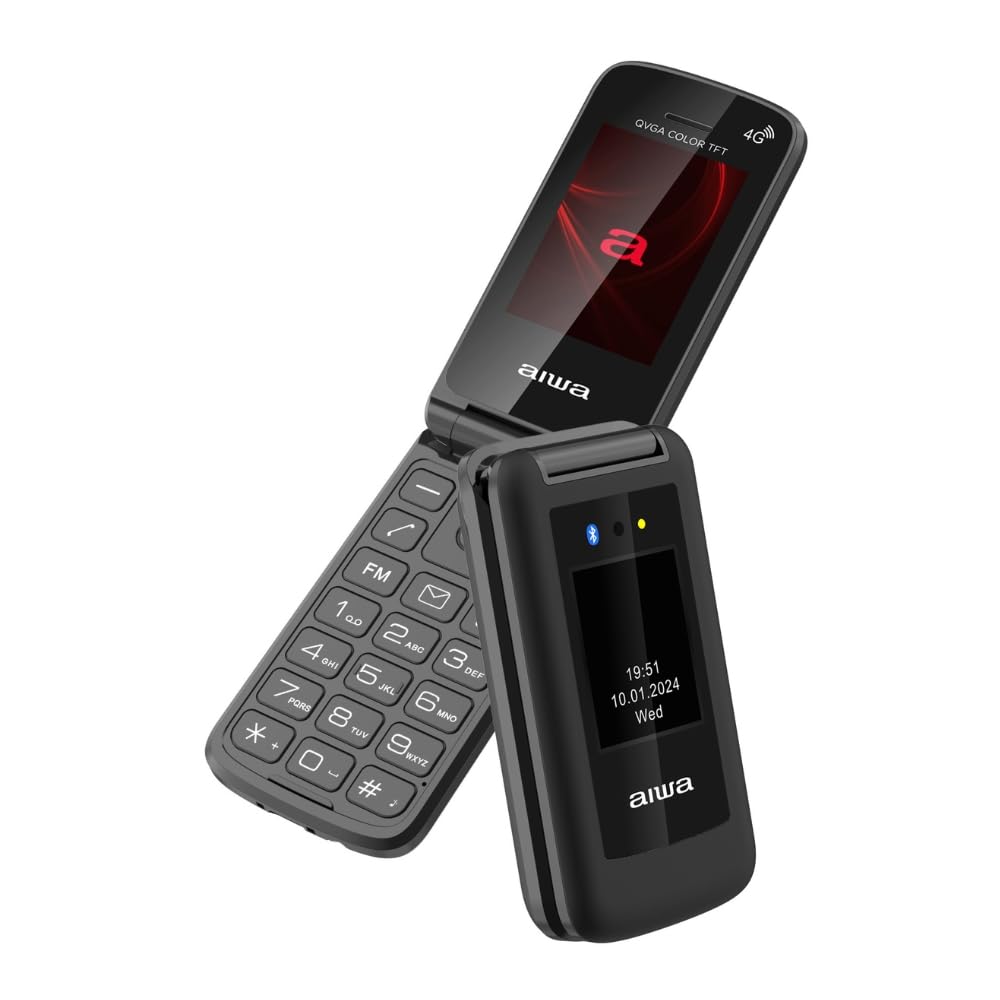
Image: Aiwa FP-30-2G Flip Phone in open position, displaying the main screen and keypad.
1. الإعداد
1.1 محتويات العبوة
تأكد من وجود جميع العناصر في الصندوق:
- Aiwa FP-30-2G Flip Phone
- Battery (BL-5C 1000mAh)
- شاحن أس
- كابل USB-C
- دليل المستخدم (هذا المستند)
1.2 تركيب البطارية وبطاقة SIM
- إزالة الغطاء الخلفي: افتح الغطاء الخلفي للهاتف برفق باستخدام الفتحة الموجودة.
- أدخل بطاقة(بطاقات) SIM: The phone supports Dual SIM. Locate the SIM card slots. Insert your 2G compatible SIM card(s) into the designated slots with the gold contacts facing down and the cut corner aligned as shown in the diagram (refer to phone's internal markings).
- إدخال بطاقة MicroSD (اختياري): If you wish to expand storage (up to 32GB), insert a MicroSD card into the T-Flash card slot.
- أدخل البطارية: Place the BL-5C battery into the battery compartment, ensuring the contacts align with the phone's terminals.
- استبدال الغطاء الخلفي: قم بمحاذاة الغطاء الخلفي بعناية واضغط عليه حتى يستقر في مكانه بإحكام.
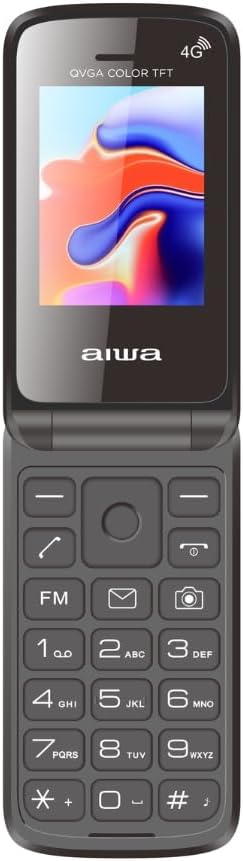
Image: Aiwa FP-30-2G Flip Phone in closed position, front view.
1.3 شحن البطارية
Before first use, fully charge the phone's battery. Use only the provided charger and USB-C cable.
- Connect the USB-C cable to the charging port on the phone.
- Connect the other end of the USB-C cable to the AC charger.
- قم بتوصيل شاحن التيار المتردد بمأخذ الطاقة.
- سيُظهر مؤشر الشحن على الهاتف حالة الشحن. بمجرد اكتمال الشحن، افصل الشاحن.
ملحوظة: The phone has a standby time of up to 180 hours and talk time of up to 4 hours on a full charge.
1.4 تشغيل/إيقاف التشغيل
- لتشغيل: اضغط مع الاستمرار على زر الطاقة/إنهاء المكالمة (عادةً ما يكون لونه أحمر) حتى تضيء الشاشة.
- لإيقاف التشغيل: Press and hold the Power/End Call button until the power-off options appear, then select "Power Off" or simply hold until the phone shuts down.
2. تعليمات التشغيل
2.1 وظائف الاتصال الأساسية
- إجراء مكالمة: Enter the phone number using the keypad and press the Call button (usually green).
- الرد على مكالمة: When the phone rings, press the Call button.
- إنهاء المكالمة: اضغط على زر الطاقة/إنهاء المكالمة.
- ضبط مستوى الصوت: Use the side volume keys during a call.
2.2 إرسال الرسائل النصية القصيرة
- Go to the "Messages" menu.
- Select "Write Message" or "New SMS".
- أدخل رقم المستلم أو اختر من جهات الاتصال.
- اكتب رسالتك باستخدام لوحة المفاتيح الأبجدية الرقمية.
- اضغط "إرسال".
2.3 شاشات عرض مزدوجة
The FP-30-2G features two displays:
- الشاشة الرئيسية: 2.4-inch (240 x 320 QVGA) screen visible when the phone is open. This is your primary interface.
- العرض الخارجي: 1.77-inch (128 x 160) screen visible when the phone is closed. This display shows essential information like time, date, battery status, and incoming call notifications without needing to open the phone.
2.4 زر الطوارئ SOS
The dedicated SOS button provides a quick way to contact pre-set emergency numbers.
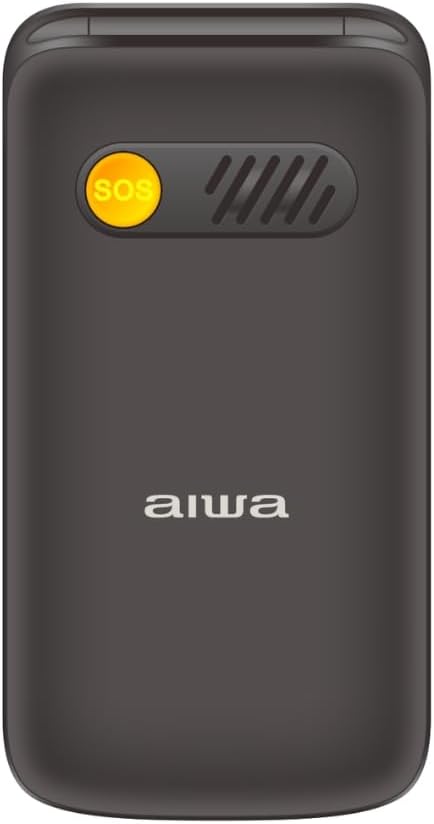
الصورة: الخلف view of the Aiwa FP-30-2G Flip Phone, highlighting the yellow SOS button and speaker grille.
- Setting Up SOS Numbers: Navigate to the "SOS Settings" in the phone's menu. Add up to 5 emergency contact numbers.
- استخدام زر الاستغاثة: In an emergency, press and hold the SOS button on the back of the phone for a few seconds. The phone will automatically call the pre-set emergency numbers in sequence until one answers. It will also send an emergency SMS message to these contacts.
2.5 راديو FM
The phone includes an offline FM radio. To use it:
- يمكنك الوصول إلى تطبيق "راديو FM" من القائمة الرئيسية.
- You may need to connect wired headphones (not included) to act as an antenna for optimal reception.
- استخدم مفاتيح التنقل للبحث عن المحطات أو ضبطها يدويًا.
2.6 بلوتوث 3.0
Connect your phone to Bluetooth headsets or other compatible devices.
- انتقل إلى "الإعدادات" > "البلوتوث".
- قم بتشغيل البلوتوث.
- يختار "بحث عن الأجهزة" أو "إقران جهاز جديد".
- Select your desired device from the list and follow the on-screen prompts to pair.
2.7 Camera and Flashlight
- آلة تصوير: The phone features a 0.3 MP rear camera with flash. Access it from the main menu to take basic photos or QVGA videos.
- مصباح يدوي: A built-in LED flashlight is available. It can usually be activated quickly by pressing and holding a specific key (refer to your phone's quick access keys, often the '0' or a dedicated side button) or through the utilities menu.
3. الصيانة
3.1 تنظيف الجهاز
- Use a soft, dry, lint-free cloth to clean the phone's exterior and screen.
- Do not use liquid cleaners, aerosols, or harsh chemicals, as these can damage the phone.
- حافظ على منفذ الشحن خالياً من الغبار والحطام.
3.2 العناية بالبطارية
- تجنب تعريض البطارية لدرجات حرارة قصوى (ساخنة أو باردة).
- لا تقم بثقب أو تفكيك أو تعديل البطارية.
- إذا لم يتم استخدام الهاتف لفترة طويلة، فقم بشحن البطارية إلى حوالي 50% قبل تخزينه.
- Replace the battery if you notice a significant decrease in performance or swelling.
3.3 العناية العامة
- احمِ الهاتف من السقوط والصدمات.
- Keep the phone dry. Moisture can damage internal components.
- Do not attempt to repair the phone yourself. Refer to qualified service personnel.
4. استكشاف الأخطاء وإصلاحها
If you encounter issues with your Aiwa FP-30-2G, try the following solutions before seeking professional assistance.
| مشكلة | الحل المحتمل |
|---|---|
| الهاتف لا يعمل |
|
| لا توجد إشارة شبكة |
|
| البطارية لا تشحن |
|
| زر الاستغاثة لا يعمل |
|
| Cannot hear FM radio |
|
5. المواصفات
Detailed technical specifications for the Aiwa FP-30-2G:
| ميزة | التفاصيل |
|---|---|
| رقم الموديل | FP-30-2G |
| نطاقات الشبكة | GSM 850/900/1800/1900Mhz (2G) |
| بلوتوث | 3.0 + إي دي آر |
| الشاشة الرئيسية | 2.4 inches, 240 x 320 QVGA, TN Type |
| شاشة خارجية | 1.77 inches, 128 x 160, TN Type |
| آلة تصوير | 0.3 ميجابكسل مع فلاش |
| الذاكرة الداخلية | 32MB + 32MB |
| ذاكرة قابلة للتوسيع | T-Flash Card Slot, up to 32GB |
| دعم بطاقة SIM | شريحتين اتصال |
| بطارية | BL-5C, 1000mAh (Removable) |
| وقت الاستعداد | حتى ساعتين |
| وقت التحدث | حتى ساعتين |
| شاحن | 5V, 500mA with USB-C cable |
| الأبعاد (مغلق) | 103 × 53.5 × 21.05 ملم |
| الوزن (مع البطارية) | 106 جرام |
| نظام التشغيل | Symbian 9.1 (as per specifications, though this is unusual for a modern feature phone) |
| مشغل الصوت | AMR, MID, MP3, WAV |
| مشغل الفيديو | 3GP، MP4، AVI |
| مميزات اخرى | FM Radio, Torchlight, Vibration System, QVGA Video Recorder, Sound Recorder, SMS, Phonebook (500 contacts), Calendar, Calculator, Alarm, Speed Dial (M1/M2/M3), Photo Contacts |

الصورة: الجانب view of the Aiwa FP-30-2G Flip Phone, showing its compact profile.
6. الضمان والدعم
Your Aiwa FP-30-2G Flip Phone comes with a standard manufacturer's warranty. Please refer to the warranty card included in your package for specific terms and conditions, including the warranty period and coverage details.
For technical support, service, or warranty claims, please contact Aiwa customer service through their official website or the contact information provided in your warranty documentation. Do not attempt to open or repair the device yourself, as this may void your warranty.
احتفظ بإيصال الشراء الخاص بك كإثبات للشراء لأغراض الضمان.


