1. المقدمة
Thank you for choosing the ZEBRONICS PIXAPLAY 65 Android Projector. This manual provides essential information for setting up, operating, and maintaining your projector to ensure a premium home theater experience. Please read this manual thoroughly before use and keep it for future reference.
2. ماذا يوجد في الصندوق
تأكد من وجود جميع العناصر في العبوة:
- جهاز عرض - وحدة واحدة
- جهاز تحكم عن بعد - وحدة واحدة
- Power Cord - 1 unit
- HDMI Cable - 1 unit
- Cotton Swab Pack - 1 unit

Image: The ZEBRONICS PIXAPLAY 65 projector shown with its included remote control, illustrating the main components of the package.
3. انتهى المنتجview & المميزات
The ZEBRONICS PIXAPLAY 65 is an advanced Android projector designed for versatile home entertainment. Key features include:
- الإسقاط على شاشة كبيرة: Enjoy a screen size of up to 508 cm (200 inches) for an immersive viewتجربة رائعة.
- سطوع ودقة عالية: Features an 8500 lumens LED lamp with 1080p FHD native resolution and 4K support for clear and detailed images.
- مكبر صوت مدمج: Integrated powerful speaker for audio playback without external speakers.
- Long LED Lamp حياة: الصمام لamp offers a lifespan of 50,000 hours.
- التركيز الإلكتروني: Adjust image focus precisely using the remote control.
- دعم Miracast: Seamlessly mirror content from Android devices.
- واي فاي مزدوج النطاق: Supports both 2.4GHz and 5GHz WiFi for stable streaming.
- معالج رباعي النواة: Ensures smooth operation and quick processing of media.

Image: A graphic summarizing key features of the Pixaplay 65, including 8500 Lumens, 50,000H Lifelong LED Lamp, up to 508cm screen size, Quad-Core Processor, 1080p FHD (Native) resolution, and Miracast capability.

Image: A visual representation demonstrating the projector's 4K Ultra HD support, showing a comparison of 4K, 2K, and FHD resolutions with a motocross scene.

Image: The projector placed on a small stool, with a person sitting nearby, highlighting the built-in speakers and their audio output.
4. دليل الإعداد
4.1 التنسيب
ضع جهاز العرض على سطح مستوٍ وثابت. تأكد من وجود تهوية جيدة حول الجهاز. للحصول على أفضل النتائج، viewقم بوضع جهاز العرض بشكل عمودي على سطح العرض (الجدار أو الشاشة).
4.2 توصيل الطاقة
- قم بتوصيل سلك الطاقة بمنفذ إدخال الطاقة الخاص بجهاز العرض.
- قم بتوصيل الطرف الآخر من سلك الطاقة بمنفذ طاقة مناسب.
- سوف يضيء مؤشر الطاقة الموجود على جهاز العرض.
4.3 التشغيل المبدئي
Press the power button on the projector or the remote control to turn on the device. The projector will boot up and display the home screen.
5. تعليمات التشغيل
5.1 الملاحة
Use the directional buttons (Up, Down, Left, Right) and the OK button on the remote control to navigate through the Android interface and select options.
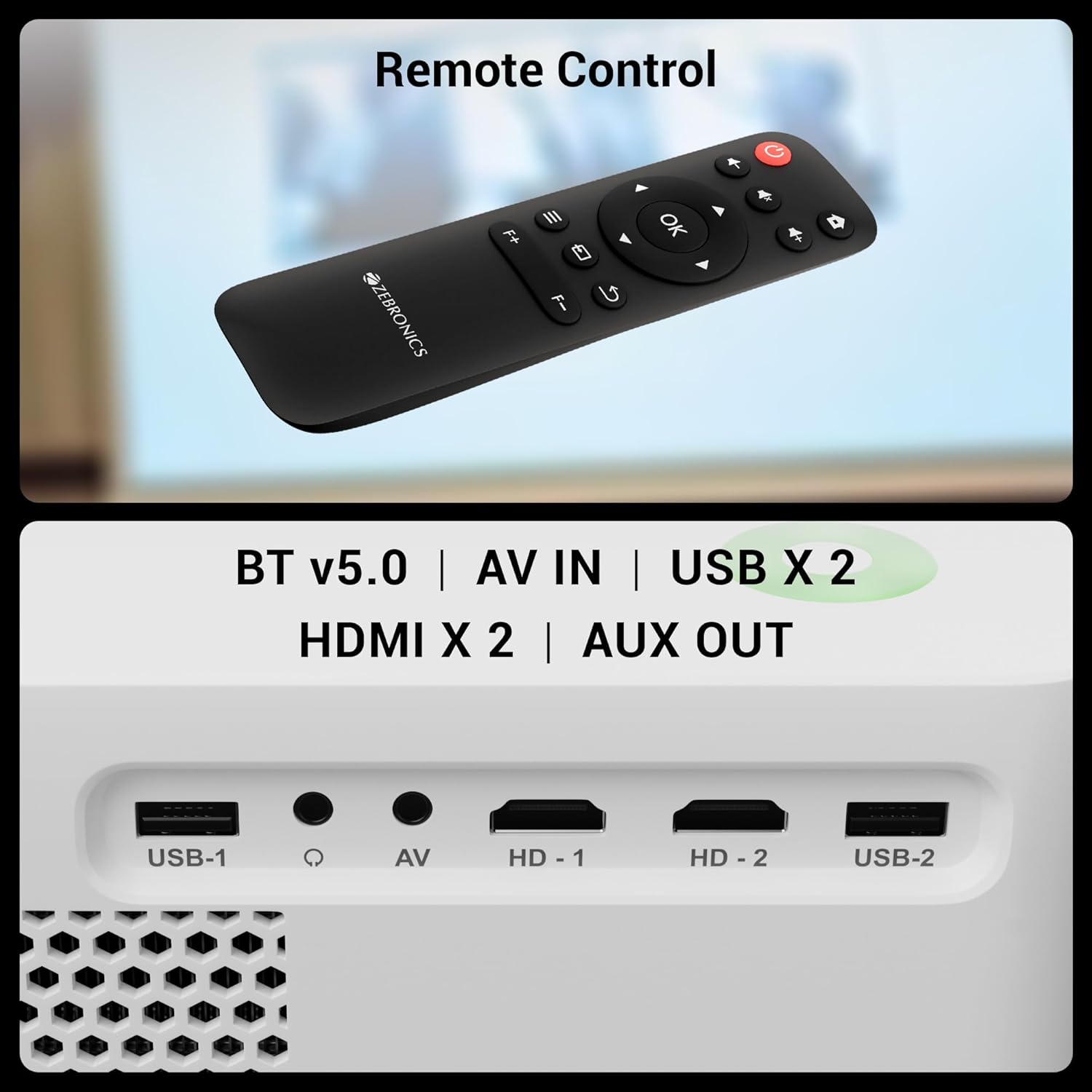
Image: The remote control for the Pixaplay 65 is shown alongside a detailed view of the projector's connectivity ports, including USB, AV IN, and HDMI.
5.2 Electronic Focus Adjustment
To achieve a clear image, use the dedicated focus buttons (F+ / F-) on the remote control to adjust the electronic focus until the projected image is sharp.
5.3 إدارة التطبيقات
The projector runs on Android, allowing you to install and manage various applications. Access the app drawer from the home screen to view and launch installed apps. Connect to WiFi to download new applications from the pre-installed app store.

Image: The projector displaying its smart interface with various application icons, emphasizing its app support and dual-band WiFi capabilities.
6. الاتصال
The PIXAPLAY 65 offers multiple connectivity options:
- HDMI (x2): Connect Blu-ray players, gaming consoles, laptops, and other HDMI-enabled devices.
- يو اس بي (×2): تشغيل الوسائط مباشرة من محركات أقراص USB.
- مدخل AV: قم بتوصيل الأجهزة القديمة باستخدام كابل AV.
- مخرج AUX: قم بتوصيل أنظمة الصوت الخارجية أو سماعات الرأس.
- بلوتوث v5.0: قم بإقرانه مع مكبرات الصوت أو سماعات الرأس التي تعمل بتقنية البلوتوث للحصول على صوت لاسلكي.
- WiFi (2.4GHz & 5GHz): Connect to your home network for online streaming and app downloads.
- Miracast: Wirelessly mirror your Android smartphone or tablet screen to the projector.

Image: A smartphone mirroring a racing game to the projector screen, demonstrating the Miracast functionality for wireless content sharing.
7. الصيانة
7.1 تنظيف العدسة
Use the provided cotton swab pack or a soft, lint-free cloth specifically designed for optical lenses to gently clean the projector lens. Do not use abrasive cleaners or excessive force.
7.2 التنظيف العام
امسح الجزء الخارجي من جهاز العرض بقطعة قماش ناعمة وجافة. تجنب استخدام المنظفات السائلة مباشرة على الجهاز.
7.3 التخزين
عند عدم استخدام جهاز العرض لفترات طويلة، قم بتخزينه في مكان بارد وجاف، بعيدًا عن أشعة الشمس المباشرة والغبار الزائد.
8. استكشاف الأخطاء وإصلاحها
8.1 لا يوجد طاقة
- تأكد من توصيل سلك الطاقة بإحكام بكل من جهاز العرض ومأخذ الطاقة.
- تأكد من أن مأخذ الطاقة يعمل بشكل صحيح.
8.2 لا توجد صورة أو صورة مشوهة
- تأكد من تحديد مصدر الإدخال بشكل صحيح (على سبيل المثال، HDMI 1، USB).
- Adjust the electronic focus using the remote control.
- تأكد من أن عدسة جهاز العرض نظيفة.
- Check the HDMI or other connection cables for secure fit.
8.3 لا يوجد صوت
- قم بزيادة مستوى الصوت على جهاز العرض وجهاز المصدر المتصل.
- If using an external audio system, ensure it is properly connected to the AUX OUT port.
- Check if Bluetooth audio is connected and functioning correctly.
8.4 جهاز التحكم عن بعد لا يعمل
- تأكد من عدم وجود أي عوائق بين جهاز التحكم عن بعد وجهاز العرض.
- استبدال البطاريات في جهاز التحكم عن بعد.
9. المواصفات
Detailed technical specifications for the ZEBRONICS PIXAPLAY 65 Projector:
| ميزة | مواصفة |
|---|---|
| ماركة | الزبرونيك |
| اسم الموديل | Zeb-Pixaplay 65 |
| أبعاد المنتج | 17.3 × 22.6 × 8.6 سم |
| وزن العنصر | 1.35 كجم |
| نوع العرض | شاشة ال سي دي ال اي دي |
| الدقة الأصلية | 1920 × 1080 (FHD) |
| الأعلى. القرار المدعوم | 3840 × 2160 (4K) |
| سطوع | 8500 لومن |
| نسبة العرض إلى الارتفاع | 16:9 |
| معدل التحديث | 60 هرتز |
| Lamp حياة | 50,000 ساعات |
| تكنولوجيا الاتصال | HDMI (x2), AV IN, USB (x2), AUX OUT, Bluetooth v5.0, WiFi (2.4GHz & 5GHz) |
| الأجهزة المتوافقة | أجهزة الكمبيوتر المحمولة، والهواتف الذكية، وأجهزة ألعاب الفيديو، ومشغلات الوسائط، ومشغلات أقراص بلو راي |
| عامل الشكل | محمول |

Image: A diagram illustrating the physical dimensions of the ZEBRONICS PIXAPLAY 65 projector: 17.3cm (height), 22.6cm (width), and 8.6cm (depth).
10. الضمان والدعم
The ZEBRONICS PIXAPLAY 65 Projector comes with a ضمان لمدة سنة واحدة يسري الضمان من تاريخ الشراء. يرجى الاحتفاظ بإيصال الشراء كإثبات للضمان.
للحصول على الدعم الفني أو الخدمة أو مطالبات الضمان، يرجى الاتصال بخدمة عملاء زيبرونيكس من خلال موقعهم الرسمي. website or authorized service centers. Refer to the product packaging or official ZEBRONICS webالموقع للحصول على أحدث معلومات الاتصال.


