مقدمة
This manual provides instructions for the MOFII Bluetooth Wireless Keyboard, Model B0DR2NLFYW. This keyboard is designed for multi-device compatibility, featuring a retro typewriter-style design with round keys and Bluetooth 5.1 connectivity.
يرجى قراءة هذا الدليل جيداً قبل استخدام المنتج لضمان التشغيل السليم ومنع حدوث أي تلف.
محتويات الحزمة
- MOFII Bluetooth Wireless Keyboard
- دليل المستخدم
- Keycap Puller (for maintenance)
يثبت
1. تركيب البطارية
The keyboard requires batteries for operation. Locate the battery compartment on the underside of the keyboard. Insert the required batteries, ensuring correct polarity.

Image: Underside of the MOFII keyboard, showing the battery compartment and adjustable feet.
2. ضبط زاوية لوحة المفاتيح
For ergonomic comfort, you can adjust the keyboard's typing angle. Flip the keyboard over and extend the two small feet located at the top corners of the underside.
Refer to the image above for the location of the adjustable feet.
3. Pairing with Devices (Bluetooth)
The MOFII Bluetooth Wireless Keyboard supports connecting up to three Bluetooth devices simultaneously. Follow these steps to pair your keyboard:
- تأكد من تشغيل لوحة المفاتيح.
- Press and hold one of the Bluetooth channel buttons (BT1, BT2, or BT3) for 3 seconds until the indicator light flashes, indicating pairing mode.
- On your device (iPad, Laptop, PC, Mac, Smartphone), navigate to Bluetooth settings.
- بحث عن "CANDY BT" or a similar device name and select it to connect.
- Once connected, the indicator light for the selected channel will stop flashing and remain solid.

Image: The MOFII keyboard illustrating the Bluetooth pairing process with indicator lights for BT1, BT2, and BT3.
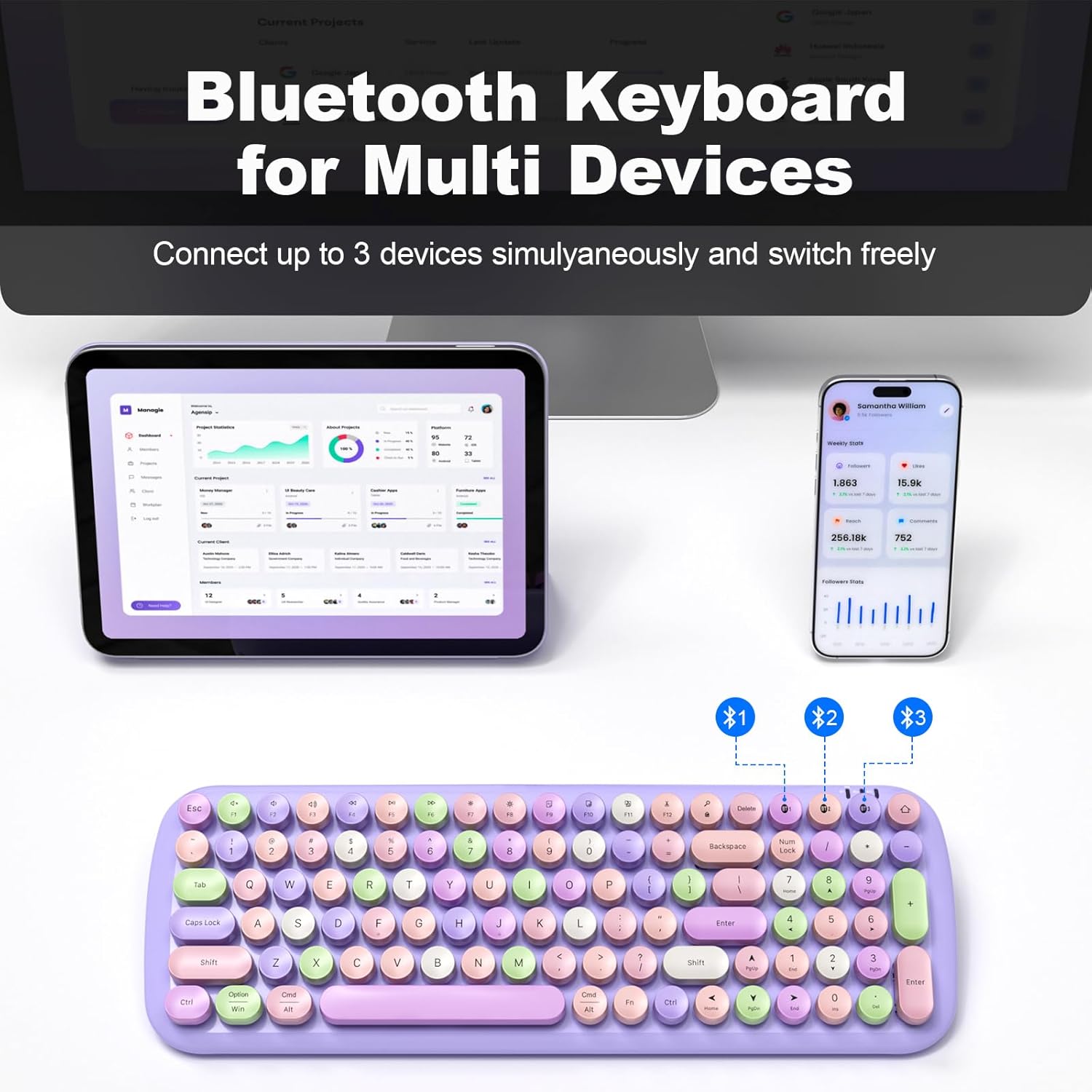
Image: The MOFII keyboard demonstrating multi-device connectivity via Bluetooth, with indicators for three paired devices.
تعليمات التشغيل
1. التبديل بين الأجهزة المتصلة
To switch between your three paired Bluetooth devices, simply press the corresponding BT1, BT2, or BT3 button. The keyboard will automatically connect to the selected device.
2. Keyboard Layout and Special Functions
The keyboard features a full-size layout with round, retro-style keys. It includes standard alphanumeric keys, a numeric keypad, and function keys (F1-F12) with additional multimedia and system control functions accessible via the Fn مفتاح.

الصورة: أكثر منview of the full-size MOFII keyboard layout, highlighting the function keys and their secondary actions.
3. وضع توفير الطاقة
To conserve battery life, the keyboard will automatically enter sleep mode after 5 minutes of inactivity. To wake it up, press any key.
4. التوافق
This keyboard is compatible with a wide range of operating systems and devices, including:
- نوافذ
- نظام التشغيل ماك
- نظام التشغيل iOS (آيباد، آيفون)
- أندرويد (أجهزة لوحية، هواتف ذكية)

Image: The MOFII keyboard wirelessly connected to a Smart TV, illustrating its use for controlling smart devices from a distance.
صيانة
1. تنظيف لوحة المفاتيح
لتنظيف لوحة المفاتيح، امسح السطح برفق بقطعة قماش ناعمة.amp قماش. تجنب استخدام الكيماويات القاسية أو المواد الكاشطة.
2. Detachable Keycaps
The keycaps are detachable for easier cleaning. Use the provided keycap puller to carefully remove individual keycaps. Reattach them by aligning and pressing firmly until they click into place.

الصورة: لقطة مقربة view of the MOFII keyboard showing detachable keycaps and the keycap puller tool for easy cleaning.
3. استبدال البطارية
When the keyboard's performance diminishes or it fails to power on, it may be time to replace the batteries. Open the battery compartment on the underside and replace with new batteries of the correct type and size.
استكشاف الأخطاء وإصلاحها
Keyboard Not Connecting/Pairing:
- Ensure the keyboard has fresh batteries and is powered on.
- تأكد من تمكين البلوتوث على جهازك.
- Confirm the keyboard is in pairing mode (indicator light flashing) by pressing and holding a BT channel button for 3 seconds.
- حاول إلغاء إقران لوحة المفاتيح وإعادة إقرانها من إعدادات البلوتوث في جهازك.
- Ensure the keyboard is within the 33-foot (10-meter) operating range of your device.
المفاتيح لا تستجيب:
- تحقق من مستوى البطارية واستبدلها إذا لزم الأمر.
- تأكد من توصيل لوحة المفاتيح بجهازك بشكل صحيح.
- Clean under the keycaps if debris is suspected to be interfering with key presses.
Keyboard Enters Sleep Mode Too Quickly:
- This is a power-saving feature. Press any key to wake the keyboard. This setting is not user-adjustable.
تحديد
| ماركة | موفى |
| نموذج | B0DR2NLFYW |
| تكنولوجيا الاتصال | بلوتوث 5.1 |
| الأجهزة المتوافقة | iPad, Laptop, PC, iPhone, Tablets, Smartphone (Windows, Mac OS, iOS, Android) |
| نطاق التشغيل | حتى 33 قدم (10 أمتار) |
| مصدر الطاقة | تعمل بالبطارية |
| أبعاد المنتج | 15.35 × 5.31 × 1.38 بوصة |
| وزن العنصر | 1.63 رطل |
| مادة | بلاستيك |
| ميزة خاصة | Round Key, Multi-Device Connectivity |
الضمان والدعم
For warranty information and technical support, please refer to the official MOFII webالموقع أو تواصل مع خدمة العملاء مباشرةً. احتفظ بإيصال الشراء لطلبات الضمان.
Manufacturer: MOFII


