1. المقدمة والمنتجview
Thank you for choosing the Winfita T703 Treadmill. This manual provides essential information for the safe and effective use of your new fitness equipment. The Winfita T703 is designed for home use, offering a comprehensive workout experience with its advanced features.
Key features include a powerful 4.0HP motor, 0-15% automatic incline, a spacious 18'' x 50'' running belt, and Bluetooth connectivity for app integration. It supports users up to 300 lbs and comes with 64 preset programs to diversify your workouts.
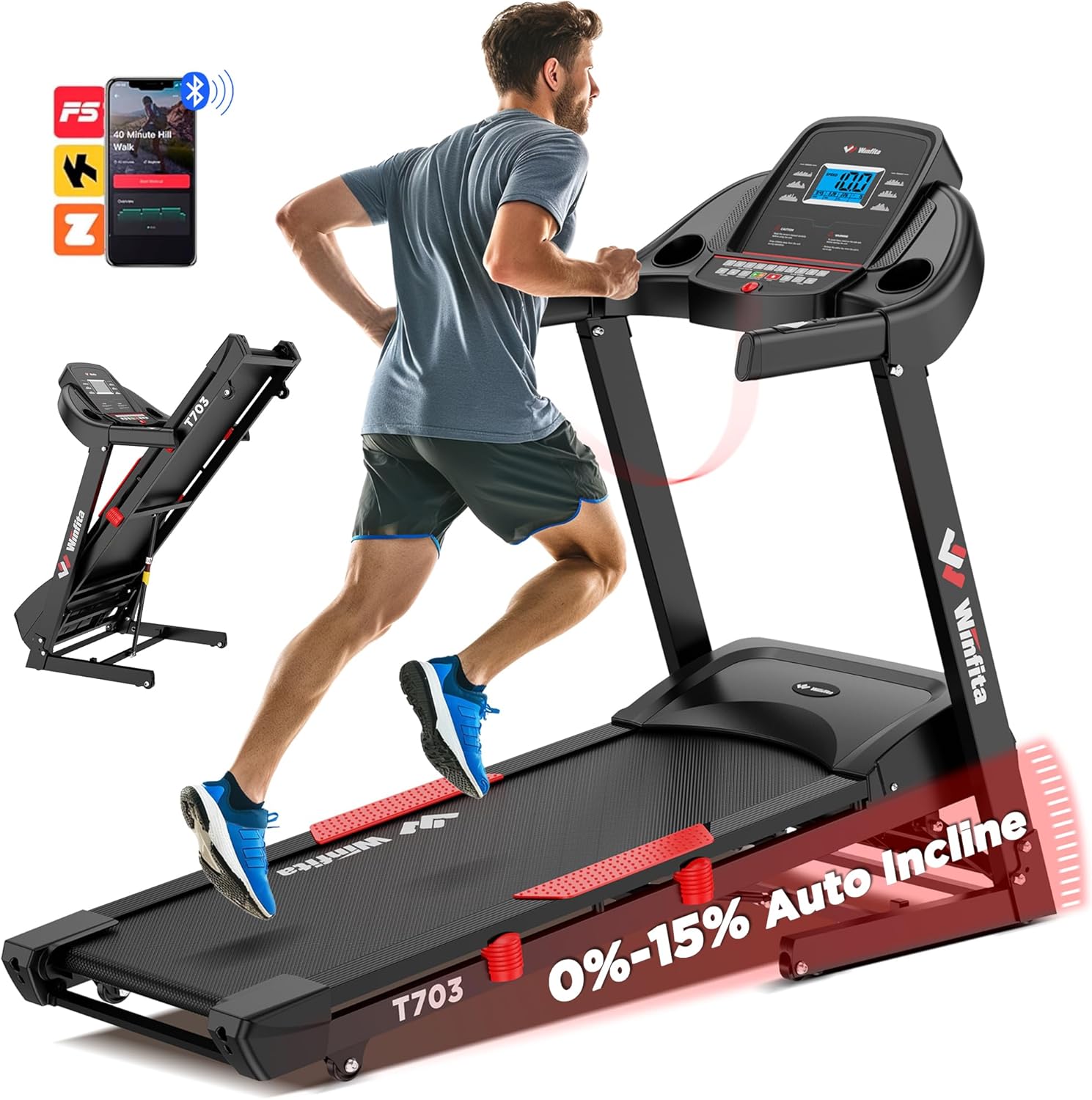
Figure 1.1: Winfita T703 Treadmill. This image shows the overall design of the treadmill, highlighting its robust frame and console.
Video 1.1: Winfita Folding Treadmill for Home with Auto Incline. This video provides a general overview of the treadmill's features and functionality.
2. معلومات السلامة
Before operating the Winfita T703 Treadmill, please read and understand all safety instructions. Failure to follow these instructions may result in injury or damage to the product.
- الموقع: Place the treadmill on a flat, stable surface. Ensure there is adequate clear space around the treadmill (at least 6 feet behind and 2 feet on each side).
- قوة: قم بتوصيل جهاز المشي بمأخذ كهربائي مؤرض بشكل صحيح. لا تستخدم أسلاك التمديد أو المحولات.
- وزن المستخدم: لا تتجاوز الحد الأقصى لوزن المستخدم وهو 300 رطلاً.
- الأطفال والحيوانات الأليفة: Keep children and pets away from the treadmill during operation. Always remove the safety key when the treadmill is not in use.
- الملابس: ارتدِ أحذيةً وملابس رياضية مناسبة. تجنّب الملابس الفضفاضة التي قد تعلق بالأجزاء المتحركة.
- مفتاح الأمان: Always attach the safety key clip to your clothing before starting the treadmill. In case of an emergency, the safety key will detach, stopping the treadmill.
- صيانة: Perform regular maintenance as described in this manual. Unplug the treadmill before cleaning or servicing.
- الحالات الطبية: استشر طبيباً قبل البدء بأي برنامج تمارين جديد، خاصة إذا كنت تعاني من حالات طبية سابقة.

Figure 2.1: Console with Safety Warnings. Note the warning labels on the console, reminding users to read the manual and remove the safety key when not in use.
3. الإعداد والتجميع
The Winfita T703 Treadmill arrives 99% pre-assembled, requiring minimal setup. Follow these steps to complete the assembly:
- فك الصندوق: Carefully remove the treadmill from its packaging. It is recommended to have two people for this step due to the weight of the unit.
- التمركز: Place the main frame on a flat, stable surface where you intend to use it.
- Unfold the Uprights: Gently lift the console and uprights into the upright position. Ensure they lock securely into place.
- Secure the Uprights: Locate the pre-installed bolts and washers on the base of the uprights. Use the provided Allen wrench (5MM) to tighten these bolts. There are typically 6 screws in total that need tightening. Repeat this procedure on both sides of the treadmill.
- Attach Handrails (if separate): If the handrails are not already attached, align them with the designated slots on the uprights and secure them with the provided hardware.
- Connect Safety Key: Attach the red safety key to the designated slot on the console. The treadmill will not operate without the safety key in place.
- توصيل الطاقة: قم بتوصيل سلك الطاقة بمأخذ كهربائي أرضي.
- Lubrication (Initial): Before first use, apply a small amount of the provided silicone oil under the running belt. Lift the belt slightly and apply the oil evenly across the deck. This ensures smooth operation and prolongs belt life.

Figure 3.1: Pre-assembled Treadmill and Tools. This image illustrates the minimal assembly required, showing the main unit and the small tool kit.
Video 3.1: Unboxing video of the Winfita treadmill. This video demonstrates the unboxing process and initial setup steps.
Video 3.2: Just tighten 6 screws to install the treadmill. This video specifically shows the process of securing the uprights with the provided screws.
4. تعليمات التشغيل
The Winfita T703 Treadmill offers various modes and programs to enhance your workout. Familiarize yourself with the console and its functions.
4.1 وحدة التحكمview
The user-friendly console features a 5-inch LCD display that provides real-time data such as speed, incline, time, distance, calories burned, and heart rate. It also includes quick-access buttons for speed and incline adjustments.
Figure 4.1: Multi-Function Console. This image highlights the various buttons and the LCD display for tracking workout metrics.
4.2 بدء التمرين
- تأكد من تثبيت مفتاح الأمان بشكل صحيح على وحدة التحكم وعلى ملابسك.
- Step onto the treadmill's side rails.
- اضغط على يبدأ اضغط على الزر. سيبدأ الحزام بالتحرك بسرعة منخفضة.
- اصعد بحذر على حزام الجري وابدأ بالمشي.
4.3 ضبط السرعة والميل
- سرعة: استخدم السرعة + و سرعة - buttons on the console or handrails to adjust the speed from 0.6 MPH to 10 MPH. Quick speed buttons (e.g., 3, 6, 9, 12 MPH) are also available for rapid changes.
- يميل: استخدم يميل + و INCLINE - buttons on the console or handrails to adjust the automatic incline from 0% to 15% (8.5°). Quick incline buttons (e.g., 3, 6, 9, 12, 15%) are available.

Figure 4.2: Automatic Incline Feature. This image demonstrates the treadmill's ability to adjust incline automatically, ranging from 0% to 15%.

Figure 4.3: Speed Range. This image illustrates the treadmill's speed capabilities, from a slow walk to a brisk run.
4.4 البرامج والأوضاع
The treadmill includes 64 preset programs, 5 user-defined programs, and 3 countdown modes (time, distance, calories) to vary your workouts.
- برامج محددة مسبقًا: اضغط على برنامج button to cycle through the 64 built-in programs. Each program has varying speed and incline profiles.
- User-Defined Programs: Create and save your own custom workout routines. Refer to the detailed instructions in the included user manual for setting up user-defined programs.
- أوضاع العد التنازلي: Select a countdown mode (Time, Distance, or Calories) and set your desired target. The treadmill will stop once the target is reached.
4.5 Bluetooth Connectivity and App Integration
Connect your treadmill to compatible fitness apps via Bluetooth for enhanced tracking and interactive workouts.
- Download a compatible app (e.g., Kinomap, FitShow) from your device's app store.
- قم بتمكين البلوتوث على جهازك المحمول.
- Open the app and follow the on-screen instructions to connect to your Winfita T703 Treadmill.
- Enjoy music through the built-in stereo speakers by connecting your device via Bluetooth.

Figure 4.4: Bluetooth Connectivity. This image highlights the treadmill's compatibility with popular fitness applications for an interactive workout experience.
4.6 إيقاف التمرين
- اضغط على قف button to gradually bring the treadmill to a halt.
- Alternatively, pull the safety key from the console for an immediate stop.
5. الصيانة
Regular maintenance ensures the longevity and optimal performance of your Winfita T703 Treadmill.
- تنظيف: امسح أسطح جهاز المشي بالإعلانamp امسح بقطعة قماش بعد كل استخدام لإزالة العرق والغبار. تجنب المنظفات الكاشطة.
- تشحيم: The running deck requires periodic lubrication with silicone oil. Apply oil every 3 months or after every 50 hours of use, whichever comes first. Lift the running belt and apply the oil evenly across the center of the deck.
- شد الحزام ومحاذاته: Check the running belt tension and alignment regularly. If the belt slips or drifts to one side, refer to the detailed instructions in the full user manual for adjustment procedures.
- غطاء المحرك: Periodically remove the motor cover (unplug the treadmill first) and vacuum any dust or debris that may have accumulated.
6. استكشاف الأخطاء وإصلاحها
يتناول هذا القسم المشاكل الشائعة التي قد تواجهها مع جهاز المشي. في حال وجود مشاكل أكثر تعقيدًا، يُرجى التواصل مع خدمة العملاء.
| مشكلة | السبب المحتمل | حل |
|---|---|---|
| جهاز المشي لا يعمل. | Power cord unplugged, safety key not in place, circuit breaker tripped. | تأكد من توصيل سلك الطاقة بإحكام. أدخل مفتاح الأمان بالكامل. تحقق من قاطع الدائرة الكهربائية المنزلية. |
| زلات حزام الجري. | شد الحزام غير كافٍ، يحتاج الحزام إلى التشحيم. | Adjust belt tension (refer to manual). Apply silicone oil. |
| Loud squeaking sound during operation. | Belt needs lubrication, loose components. | Apply silicone oil. Check and tighten all visible bolts and screws. |
| E02 error code. | مشكلة المحرك أو وحدة التحكم. | Unplug the treadmill for 5 minutes, then plug it back in. If the error persists, contact customer service. |
| الميل لا يتكيف. | Incline motor issue, loose connection. | Check all connections. If the issue persists, contact customer service. |
Video 6.1: Update on repairs on incline. This video shows a customer's experience with an incline issue, which may be helpful for troubleshooting.
Video 6.2: Plugged in, looked fine. Tried to use and get E02 error. This video shows a customer encountering an E02 error, which can help in diagnosing similar issues.
Video 6.3: Loud squeaking sound. This video demonstrates a common squeaking issue, which may indicate a need for lubrication or tightening.
7. المواصفات
Detailed technical specifications for the Winfita T703 Treadmill:
| ميزة | مواصفة |
|---|---|
| قوة حصان | 4.0 حصان |
| مدى السرعة | 0.6 - 10 ميل في الساعة |
| انحدار تلقائي | 0 - 15% (8.5°) |
| أبعاد حزام الجري | 18'' W x 50'' L |
| الحد الأقصى لوزن المستخدم | 300 رطل |
| البرامج | 64 Preset, 5 User-defined, 3 Countdown Modes |
| الاتصال | Bluetooth (Kinomap, FitShow compatible) |
| نوع العرض | شاشة LCD مقاس 5 بوصة |
| الأبعاد المطوية (الطول × العرض × الارتفاع) | 43 بوصة × 28 بوصة × 55 بوصة |
| وزن العنصر | 125 رطل |
| مادة الإطار | سبائك الفولاذ |
| المميزات الخاصة | Built-In Speaker, Shock Absorbent, Wheeled, Foldable |

Figure 7.1: Compact Design and Dimensions. This image provides a visual representation of the treadmill's dimensions and its foldable nature for space-saving storage.
8. الضمان ودعم العملاء
Winfita stands behind the quality of its products. Your Winfita T703 Treadmill comes with a ضمان لمدة سنتين.
For any questions, concerns, or technical support, please do not hesitate to contact our dedicated customer service team. We offer 7/24 Online Customer Service and Lifetime Technical Support.
You can typically find contact information, including email, in the warranty section of the physical user manual included with your product.

Figure 8.1: Customer Service Information. This image outlines the steps to contact customer service for support.


