مقدمة
شكرا لك على الشراءasing the ZEBRONICS Sound Feast 800 Portable Bluetooth Speaker. This manual provides essential information for the safe and efficient operation of your device. Please read it thoroughly before use and retain it for future reference.
تعليمات السلامة الهامة
- لا تعرض مكبر الصوت لدرجات حرارة عالية أو أشعة الشمس المباشرة أو الرطوبة العالية.
- تجنب إسقاط السماعة أو تعريضها لصدمات قوية.
- Keep the speaker away from water and other liquids. While it is splash-proof, it is not fully waterproof and should not be submerged.
- لا تحاول تفكيك السماعة أو إصلاحها أو تعديلها بنفسك. قم بإحالة جميع أعمال الصيانة إلى فنيين مؤهلين.
- استخدم فقط كابل الشحن المرفق أو كابل شحن معتمد مماثل.
- تأكد من توفير تهوية مناسبة عند تشغيل مكبر الصوت.
- نظّف السماعة بقطعة قماش ناعمة وجافة. لا تستخدم منظفات أو مذيبات كاشطة.
- يحفظ بعيدًا عن متناول الأطفال.
محتويات الحزمة
يرجى تحديد المربع للعناصر التالية:
- ZEBRONICS Sound Feast 800 Speaker - 1 unit
- Wireless Microphone - 1 unit
- Charging Cable (Type-C) - 1 unit
- كابل AUX - وحدة واحدة
- دليل رمز الاستجابة السريعة - وحدة واحدة

Image: The ZEBRONICS Sound Feast 800 speaker in black with a purple-lit grille, accompanied by its wireless microphone.
المنتج انتهىview
الميزات الرئيسية
- قوة ديناميكية: 55 Watts output for robust sound.
- Powerful Driver: Equipped with a 16.51 cm (6.5 inch) driver for enhanced audio.
- الاتصال المتعدد: Supports Bluetooth v5.3, USB, mSD, AUX, and FM radio.
- وقت اللعب الممتد: Up to 6 hours of playback on a single charge (at 50% volume with LED off).
- أضواء LED RGB: Multiple light modes to enhance ambiance.
- وظيفة TWS: Connect two Sound Feast 800 speakers for a stereo experience.
- كاريوكي جاهز: Includes a 6.3mm mic input and a wireless microphone.
- Convenient Mobile Holder: Integrated holder for smartphones.
- تصميم مقاوم للرذاذ: يوفر الحماية من الرذاذ.
الضوابط والمنافذ
Familiarize yourself with the control panel and connectivity ports for optimal use.

الصورة: مفصلة view of the speaker's control buttons (Power, Mode, Play/Pause, Volume/Track, RGB light control, Bass) and connectivity ports (6.3mm Mic In, USB, mSD, AUX In, Type-C Charging).
- زر الطاقة: اضغط مع الاستمرار للتشغيل/الإيقاف.
- زر الوضع (M): Short press to switch between Bluetooth, USB, mSD, AUX, and FM modes.
- زر التشغيل/الإيقاف المؤقت: اضغط لفترة قصيرة لتشغيل الصوت أو إيقافه مؤقتًا.
- خفض مستوى الصوت / المسار السابق: اضغط ضغطة قصيرة للانتقال إلى المقطع السابق، واضغط ضغطة طويلة لخفض مستوى الصوت.
- رفع مستوى الصوت / المسار التالي: اضغط ضغطة قصيرة للانتقال إلى المقطع التالي، واضغط ضغطة طويلة لزيادة مستوى الصوت.
- التحكم في ضوء RGB: Button to cycle through different RGB light modes.
- زر الجهير: يقوم بتفعيل أو تعطيل خاصية تعزيز الصوت الجهير.
- زر TWS: يبدأ عملية الاقتران اللاسلكي الحقيقي.
- 6.3mm Mic Input: لتوصيل ميكروفون سلكي.
- منفذ USB: لتشغيل الملفات من محرك أقراص USB.
- فتحة بطاقة mSD: For mSD card playback.
- مدخلات AUX: لتوصيل أجهزة الصوت الخارجية عبر كابل AUX.
- منفذ شحن من النوع C: لشحن مكبر الصوت.
دليل الإعداد
الشحن الأولي
- Before first use, fully charge the speaker. Connect the provided Type-C charging cable to the speaker's charging port and the other end to a USB power adapter (not included).
- The charging indicator will illuminate during charging and turn off once fully charged. A full charge takes approximately 4 hours.
تشغيل/إيقاف التشغيل
- للتشغيل ، اضغط مع الاستمرار على زر الطاقة until the speaker activates.
- لإيقاف التشغيل ، اضغط مع الاستمرار على زر الطاقة يستمر الصوت حتى يتوقف مكبر الصوت عن العمل.
تعليمات التشغيل
وضع بلوتوث
- Turn on the speaker. It will automatically enter Bluetooth mode, indicated by a prompt sound.
- Enable Bluetooth on your mobile device and search for "ZEB-SOUND FEAST 800" in the list of available devices.
- اختر السماعة المراد إقرانها. بمجرد الإقران، ستسمع صوت تأكيد.
- يمكنك الآن تشغيل الصوت من جهازك عبر مكبر الصوت.
USB / mSD Card Mode
- Insert a USB drive or mSD card (with audio files) في المنفذ المخصص على السماعة.
- سيكتشف مكبر الصوت جهاز التخزين تلقائيًا ويبدأ التشغيل. إذا لم يحدث ذلك، فاضغط على زر التشغيل. زر الوضع (M) to switch to USB or mSD mode.
- استخدم المسار السابق / التالي buttons to navigate songs and تشغيل/إيقاف مؤقت للتحكم في التشغيل.
وضع AUX
- Connect one end of the provided AUX cable to the speaker's AUX input and the other end to the audio output of your external device (e.g., smartphone, MP3 player).
- اضغط على زر الوضع (M) للتبديل إلى وضع AUX.
- التحكم في التشغيل ومستوى الصوت من جهازك المتصل.
وضع راديو FM
- اضغط على زر الوضع (M) للتبديل إلى وضع راديو FM.
- اضغط لفترة طويلة على زر التشغيل/الإيقاف المؤقت to automatically scan and save available FM channels.
- استخدم المسار السابق / التالي buttons to switch between saved channels.
خاصية True Wireless Stereo (TWS)
The TWS function allows you to connect two ZEB-SOUND FEAST 800 speakers wirelessly for a stereo sound experience.
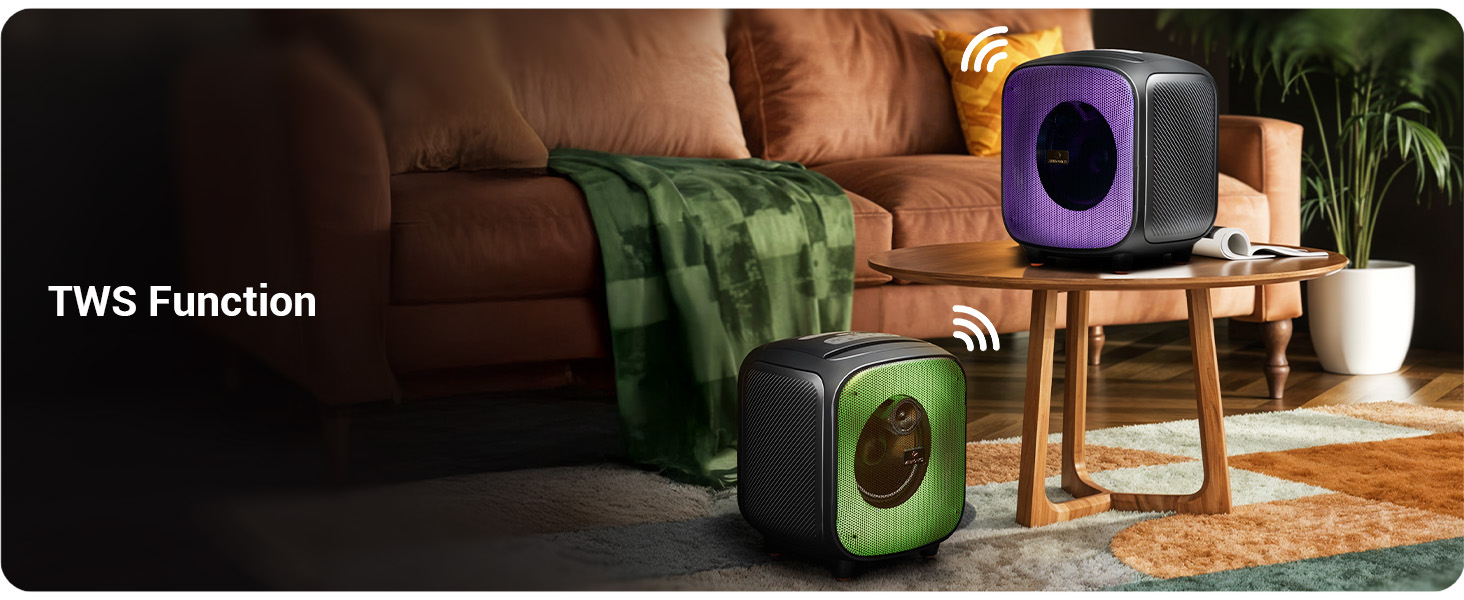
Image: Two Sound Feast 800 speakers positioned in a living room, illustrating the TWS connection.
- Ensure both ZEB-SOUND FEAST 800 speakers are powered on and in Bluetooth mode, but not connected to any device.
- اضغط ضغطة قصيرة على أحد مكبرات الصوت (سيكون هذا هو مكبر الصوت الرئيسي). زر TWS. It will search for the secondary speaker.
- Once connected, you will hear a confirmation sound. The primary speaker's Bluetooth indicator will flash, and the secondary speaker's indicator will be solid.
- Now, connect your mobile device to the primary speaker via Bluetooth as described in the Bluetooth Mode section.
- سيتم تشغيل الصوت بنظام ستيريو من خلال كلا السماعتين.
وظيفة كاريوكي

Image: A woman holding the wireless microphone, demonstrating the karaoke function.
- Ensure the speaker is powered on and playing music (e.g., via Bluetooth, USB, or AUX).
- Turn on the provided wireless microphone. It will automatically connect to the speaker.
- Alternatively, connect a wired microphone to the 6.3mm Mic Input port.
- Adjust the microphone volume and echo effect (if available on the mic) for your desired karaoke experience.
مصابيح RGB LED
The speaker features dynamic RGB LED lights with various modes.
- اضغط لفترة قصيرة على RGB Light Control button to cycle through different light modes.
- Press and hold the button to turn the RGB lights off or on.
صيانة
- تنظيف: Use a soft, dry, lint-free cloth to clean the speaker's exterior. Do not use liquid cleaners, aerosols, or solvents.
- تخزين: عند عدم الاستخدام لفترات طويلة، قم بتخزين السماعة في مكان بارد وجاف، بعيدًا عن أشعة الشمس المباشرة ودرجات الحرارة القصوى.
- العناية بالبطارية: To prolong battery life, avoid fully discharging the speaker frequently. Charge the speaker regularly, even if not in use, to maintain battery health.
- التعرض للماء: While splash-proof, avoid direct exposure to heavy rain or submersion in water. Ensure all ports are dry before charging.
استكشاف الأخطاء وإصلاحها
| مشكلة | السبب المحتمل | حل |
|---|---|---|
| مكبر الصوت لا يعمل. | بطارية منخفضة. | اشحن السماعة بالكامل باستخدام كابل Type-C المرفق. |
| لا يوجد صوت. | مستوى الصوت منخفض جدًا؛ الوضع غير صحيح؛ الجهاز غير متصل. | Increase speaker and source device volume. Ensure correct input mode (BT, AUX, USB, mSD). Re-pair Bluetooth device. |
| فشل اقتران البلوتوث. | السماعة ليست في وضع الاقتران؛ الجهاز بعيد جدًا؛ تداخل. | Ensure speaker is in Bluetooth mode and discoverable. Move device closer to speaker. Turn off other Bluetooth devices. |
| الميكروفون لا يعمل. | Microphone off; battery low (wireless mic); incorrect connection. | Ensure wireless mic is powered on and charged. For wired mic, ensure it's fully inserted into the 6.3mm port. |
| فشل الاتصال بشبكة TWS. | Speakers already paired to a device; speakers too far apart. | Ensure both speakers are disconnected from other devices. Place speakers within close proximity (e.g., 5 meters). |
| Speaker turns off frequently. | Low battery; overheating; unstable power supply. | Charge the speaker. Ensure adequate ventilation. If problem persists, contact customer support. |
تحديد

Image: Diagram showing the dimensions of the ZEBRONICS Sound Feast 800 speaker: 25.5cm Depth, 26.4cm Width, 30.2cm Height.
| ميزة | التفاصيل |
|---|---|
| اسم الموديل | زيب-ساوند فاست 800 |
| نوع السماعة | رئيس المحمولة |
| طاقة الإخراج | 55 واط |
| حجم السائق | 16.51 سم (6.5 بوصة) |
| الاتصال | Bluetooth v5.3, USB, mSD, AUX, FM Radio |
| تكنولوجيا الاتصالات اللاسلكية | بلوتوث |
| مصدر الطاقة | تعمل بالبطارية |
| متوسط عمر البطارية | Up to 6 Hours (at 50% volume, LED off) |
| وقت الشحن | حوالي ساعتين |
| طريقة التحكم | زر |
| إشارة إلى نسبة الضوضاء | 65 ديسيبل |
| استجابة التردد | 60 هرتز |
| أبعاد المنتج (العمق × العرض × الارتفاع) | 25.5 × 26.4 × 30.2 سنتيمتر |
| وزن العنصر | 3.65 كجم |
| لون | أسود |
| المميزات الخاصة | Wireless MIC, Karaoke Function, RGB LED Lights, TWS Function, Mobile Holder, Splash-proof |
الضمان والدعم
The ZEBRONICS Sound Feast 800 comes with a ضمان محدود. For detailed warranty terms and conditions, please refer to the QR Code Guide included in your package or visit the official ZEBRONICS webموقع.
For technical support, service, or any queries regarding your product, please contact ZEBRONICS customer service. Contact information can typically be found on the official ZEBRONICS webالموقع أو على عبوة المنتج.
Manufacturer: Zebronics India Private Limited, No.13/7, Smith Road, Royapettah, Chennai - 600 002.


