1. المقدمة
Welcome to the user manual for your Nothing Phone (3a). This guide provides detailed instructions on setting up, operating, maintaining, and troubleshooting your device to ensure optimal performance and user experience.

Figure 1.1: The Nothing Phone (3a) showcasing its unique transparent back design and Glyph Interface.
2. الإعداد
2.1. فك الصندوق والفحص الأولي
Upon receiving your Nothing Phone (3a), carefully open the packaging and inspect the contents. Ensure all items listed in the "What's in the Box" section are present and undamaged.
- Nothing Phone (3a) device
- كابل USB-C
- أداة إخراج درج بطاقة SIM
- واقي شاشة مثبت مسبقًا
2.2. إدخال بطاقة SIM
- حدد مكان درج بطاقة SIM على جانب الهاتف.
- قم بإدخال أداة إخراج درج بطاقة SIM في الفتحة الصغيرة الموجودة بجوار الدرج واضغط بقوة حتى يخرج الدرج.
- ضع بطاقة Nano-SIM في الدرج مع توجيه جهات الاتصال الذهبية لأسفل.
- قم بإعادة إدخال درج بطاقة SIM في الهاتف بعناية حتى يستقر في مكانه.
2.3. معالج التشغيل الأولي والإعداد
Press and hold the power button on the right side of the phone until the Nothing logo appears. Follow the on-screen instructions to complete the initial setup, including language selection, Wi-Fi connection, Google account sign-in, and data transfer.
3. Operating Your Nothing Phone (3a)
3.1. Nothing OS 3.1 Overview
The Nothing Phone (3a) runs on Nothing OS 3.1, an intuitive and customizable Android-based operating system. It features functional adaptations for an optimized user experience.

Figure 3.1: Visual representation of Nothing OS 3.1's customizable interface.
3.2. نظام الكاميرا
The Nothing Phone (3a) is equipped with an advanced camera system designed to capture high-quality photos and videos.
- الكاميرا الرئيسية: 50-MP OIS (Optical Image Stabilization) main camera for detailed and stable shots.
- كاميرا تليفوتوغرافية: 50-MP telephoto lens with up to 30x Ultra Zoom for capturing distant subjects.
- كاميرا واسعة الزاوية: 8-MP ultra-wide-angle lens for expansive landscape and group shots.
- الكاميرا الأمامية: 32-MP front camera for sharp selfies and video calls.

Figure 3.2: Detailed breakdown of the Phone (3a)'s Elite Camera System components.

Figure 3.3: Illustration of the telephoto zoom lens technology and its capability to capture distant scenes.
3.3. Essential Key and Essential Space
The Essential Key is a new physical button on the side of your device. A short press captures screen content, while a long press allows you to record voice notes, ideas, and inspirations. The Essential Space organizes your captures and provides personalized suggestions.

Figure 3.4: The Essential Key and its integration with the Essential Space for content organization.
3.4. واجهة الحروف الهجائية
The Glyph Interface on the back of the phone provides unique LED light and sound notifications for calls, messages, and other alerts, offering a distinct visual and auditory experience.

Figure 3.5: The Glyph Interface on the rear of the Nothing Phone (3a), demonstrating its illuminated patterns.
4. الصيانة
4.1. إدارة البطارية
The Nothing Phone (3a) features a 5,000 mAh battery with 50W fast charging. To maximize battery lifespan:
- تجنب درجات الحرارة القصوى.
- استخدم كابل USB-C المرفق للشحن.
- تجنب تفريغ البطارية بالكامل بشكل متكرر.

Figure 4.1: Visual representation of the 5,000 mAh battery capacity.
4.2. تنظيف جهازك
Use a soft, lint-free cloth to clean the screen and back of your phone. For stubborn smudges, slightly dampاغسل قطعة القماش بالماء. تجنب استخدام المواد الكيميائية القاسية أو المواد الكاشطة.
4.3. تحديثات البرامج
تحقق بانتظام من تحديثات البرامج وثبّتها لضمان حصول جهازك على أحدث الميزات وتحديثات الأمان وتحسينات الأداء. انتقل إلى الإعدادات > النظام > تحديث البرامج للتحقق من التحديثات.
5. استكشاف الأخطاء وإصلاحها
5.1. المشكلات الشائعة والحلول
| مشكلة | السبب المحتمل | حل |
|---|---|---|
| الهاتف لا يعمل | انخفاض مستوى البطارية، تعطل البرنامج | Charge the phone for at least 30 minutes. Perform a forced restart by holding the power button for 10-15 seconds. |
| تعطل التطبيقات أو تجميدها | App bug, insufficient RAM, outdated software | Clear app cache/data. Close background apps. Update the app or phone software. |
| عمر البطارية ضعيف | High screen brightness, background apps, network issues | Adjust screen brightness. Close unused apps. Disable unnecessary features like GPS/Bluetooth. |
5.2. إعادة ضبط المصنع
If issues persist, a factory reset may be necessary. This will erase all data on your phone, so ensure you have backed up important information. Navigate to الإعدادات > النظام > خيارات إعادة الضبط > مسح جميع البيانات (إعادة ضبط المصنع).
6. المواصفات
Key technical specifications for the Nothing Phone (3a) (Model: A059).
| ميزة | التفاصيل |
|---|---|
| اسم الموديل | لا شيء هاتف (3أ) |
| رقم الموديل | أ059 |
| نظام التشغيل | أندرويد 15، نظام التشغيل Nothing OS 3.1 |
| عرض | 6.77-inch Flexible FHD+ AMOLED, 120 Hz, 1.07 billion colors |
| المعالج | Snapdragon 7s Gen 3 (2.5 GHz, 8-core) |
| كبش | 12 GB (up to 20GB RAM Boost) |
| تخزين | 256 جيجا بايت |
| الكاميرا الرئيسية | 50-MP OIS |
| كاميرا مقربة | 50-MP (30x Ultra Zoom) |
| Ultra-Wide Camera | 8 ميجا بكسل |
| الكاميرا الأمامية | 32 ميجا بكسل |
| بطارية | 5,000 مللي أمبير (شحن سريع بقوة 50 واط) |
| أبعاد | 7.75 × 0.83 × 16.35 سم |
| وزن | 201 جرام |
| مقاومة الماء / الغبار | IP64 |
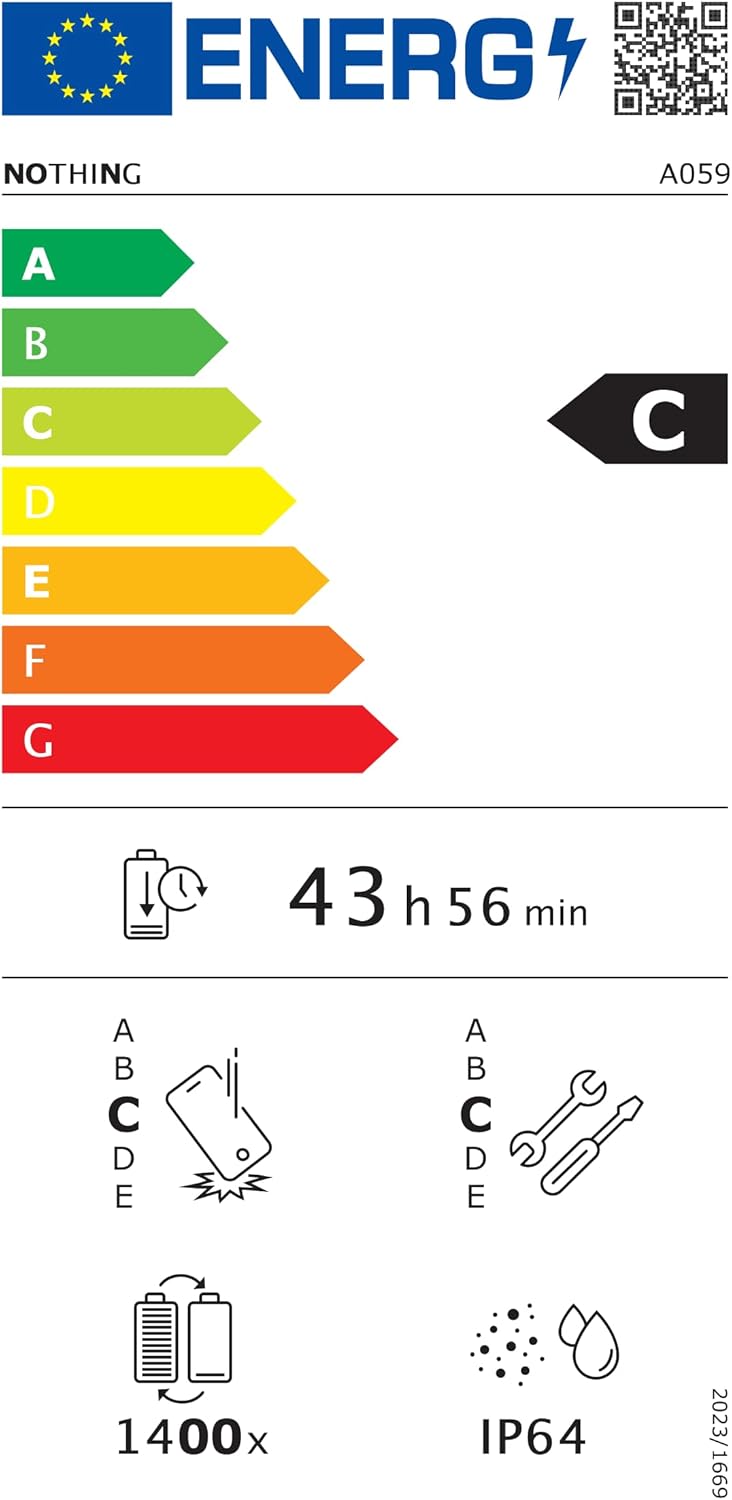
Figure 6.1: EU Energy Label for Nothing Phone (3a), indicating energy efficiency and IP64 rating. More details available at eprel.ec.europa.eu/qr/2179652.
7. الضمان والدعم
Your Nothing Phone (3a) comes with a manufacturer's warranty. Please refer to the warranty card included in your product packaging for specific terms and conditions.
For further assistance, technical support, or warranty claims, please visit the official Nothing support webيمكنك العثور على مزيد من المعلومات على الموقع الإلكتروني أو الاتصال بخدمة العملاء. لا يوجد متجر على أمازون.


