مقدمة
Thank you for choosing the Porodo Lifestyle 4K Digital Camera. This camera is designed to capture your world in stunning detail, offering 4K video recording and high-resolution 50MP images. With features like 16x digital zoom, a flip flash, and a 180° rotating screen, it is ideal for vlogging, photography, and various content creation needs. This manual provides essential information on setting up, operating, and maintaining your camera to ensure optimal performance and longevity.
معلومات السلامة
- لا تعرض الكاميرا لدرجات حرارة قصوى أو لأشعة الشمس المباشرة أو للرطوبة العالية.
- تجنب إسقاط الكاميرا أو تعريضها لصدمات قوية.
- Keep the camera away from water and liquids unless specifically designed for underwater use (this model is not).
- لا تحاول تفكيك الكاميرا أو تعديلها. سيؤدي ذلك إلى إلغاء الضمان.
- استخدم فقط نوع البطارية المحدد وطريقة الشحن المحددة.
- يحفظ بعيدًا عن متناول الأطفال.
محتويات الحزمة
يرجى تحديد المربع للعناصر التالية:
- Porodo Lifestyle 4K Digital Camera
- بطارية قابلة لإعادة الشحن (650 مللي أمبير)
- كابل شحن من النوع C
- دليل المستخدم (هذا المستند)
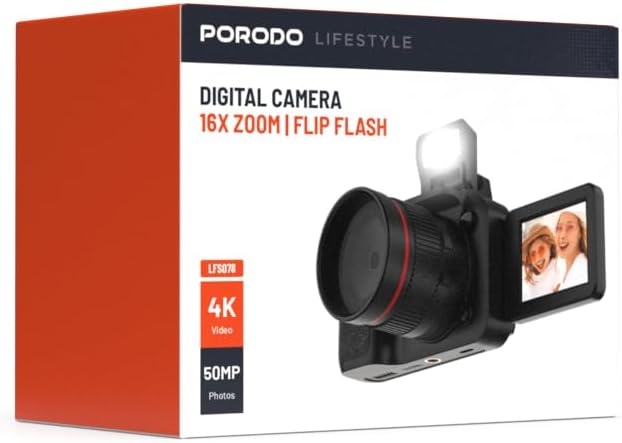
الصورة: الجبهة view of the Porodo Lifestyle 4K Digital Camera retail box, showing the camera and key features.

الصورة: الخلف view of the Porodo Lifestyle 4K Digital Camera retail box, displaying product specifications and features.
المنتج انتهىview
Familiarize yourself with the various parts of your Porodo Lifestyle 4K Digital Camera.

Image: The Porodo Lifestyle 4K Digital Camera shown with its 180° rotating screen flipped open and the integrated flash extended upwards.
- عدسة: Main optical component for capturing images and videos.
- Flip Flash: يوفر إضاءة إضافية في ظروف الإضاءة المنخفضة.
- 180° Rotating Screen (2.2'' Display): يسمح بالمرونة viewing angles, ideal for vlogging and selfies.
- زر الطاقة: يقوم بتشغيل/إيقاف الكاميرا.
- زر المصراع: يلتقط الصور أو يبدأ/يوقف تسجيل الفيديو.
- عناصر التحكم في التكبير: Adjusts the 16x digital zoom.
- أزرار التنقل: For menu navigation and settings adjustment.
- ميناء من النوع C: للشحن ونقل البيانات.
- فتحة لبطاقة ذاكرة: For inserting an SD card (not included).
يثبت
1. تركيب البطارية وشحنها
- حدد موقع غطاء حجرة البطارية في الجزء السفلي من الكاميرا.
- قم بتحريك المزلاج لفتح الغطاء.
- Insert the provided 650mAh battery, ensuring the contacts align correctly.
- Close the battery compartment cover until it clicks securely.
- Connect the camera to a power source using the Type-C charging cable. The charging indicator will illuminate.
- A full charge takes approximately 2.5 hours. The indicator will change or turn off when charging is complete.
2. تركيب بطاقة الذاكرة
A memory card (SD card, not included) is required to store photos and videos.
- حدد مكان فتحة بطاقة الذاكرة، عادةً على الجانب أو الجزء السفلي من الكاميرا.
- Insert the SD card with the metal contacts facing the correct direction (refer to the diagram near the slot if available) until it clicks into place.
- لإزالتها، ادفع البطاقة برفق حتى تخرج.
3. التشغيل الأولي
- اضغط مع الاستمرار على زر الطاقة لبضع ثوانٍ حتى تضيء الشاشة.
- Upon first use, you may be prompted to set the date and time. Use the navigation buttons to adjust and confirm.
تعليمات التشغيل
Basic Photo Mode (50MP)
- شغّل الكاميرا. عادةً ما يكون الوضع الافتراضي هو وضع التصوير.
- Frame your shot using the 2.2'' display.
- Press the Shutter button halfway down to focus (if applicable).
- Press the Shutter button fully to capture a 50MP image.

Image: A person holding the Porodo Lifestyle 4K Digital Camera, demonstrating a typical usage scenario for capturing photos.

الصورة: اخرى view of a person holding the Porodo Lifestyle 4K Digital Camera, illustrating the camera's ergonomic design during use.
Basic Video Mode (4K)
- Switch the camera to video mode (usually via a dedicated button or menu option).
- Press the Shutter button once to start 4K video recording. A recording indicator (e.g., red dot, timer) will appear on the screen.
- اضغط على زر الغالق مرة أخرى لإيقاف التسجيل.

Image: The Porodo Lifestyle 4K Digital Camera highlighting its 4K video resolution capability.
Using the 16X Digital Zoom
- While in photo or video mode, use the zoom controls (often marked with 'W' for Wide and 'T' for Telephoto) to adjust the 16x digital zoom.
- Press 'T' to zoom in and 'W' to zoom out.
Using the Flip Flash
- To activate the flash, manually flip it up from its resting position.
- The camera will automatically use the flash when needed in low-light conditions, depending on your flash settings (e.g., Auto, Fill-in, Red-eye reduction).
- To turn off the flash, gently push it back down until it locks into place.
Using the 180° Rotating Screen
- The 2.2'' display can be rotated 180 degrees.
- Flip the screen out from the side of the camera and rotate it to face forward for selfies or vlogging, or to various angles for creative shots.
- Ensure the screen is securely positioned before shooting.

Image: The Porodo Lifestyle 4K Digital Camera illustrating its 2.2-inch display and 180-degree flip screen functionality.
Playback and Deleting Files
- Enter Playback mode (usually via a dedicated button or menu option).
- استخدم أزرار التنقل للتمرير عبر صورك ومقاطع الفيديو الخاصة بك.
- لحذف file, select it and press the Delete button (often marked with a trash can icon). Confirm deletion when prompted.
الاتصال بالكمبيوتر
- أطفئ الكاميرا.
- Connect the camera to your computer using the provided Type-C cable.
- قم بتشغيل الكاميرا. ستظهر كقرص قابل للإزالة على جهاز الكمبيوتر الخاص بك.
- You can now transfer photos and videos to your computer.
صيانة
تنظيف الكاميرا
- استخدم قطعة قماش ناعمة وخالية من الوبر لتنظيف جسم الكاميرا.
- For the lens and screen, use a specialized lens cleaning cloth and solution. Do not use abrasive materials.
- Avoid spraying cleaning solutions directly onto the camera. Apply to the cloth first.
العناية بالبطارية
- Recharge the battery fully before first use.
- تجنب استنزاف البطارية بالكامل بشكل متكرر لإطالة عمرها.
- If storing the camera for an extended period, charge the battery to about 50% and remove it from the camera.
تخزين
- قم بتخزين الكاميرا في مكان بارد وجاف، بعيدًا عن أشعة الشمس المباشرة ودرجات الحرارة القصوى.
- استخدم حقيبة أو حافظة للكاميرا لحمايتها من الغبار والخدوش.
استكشاف الأخطاء وإصلاحها
| مشكلة | السبب المحتمل | حل |
|---|---|---|
| الكاميرا لا تعمل. | البطارية فارغة أو غير مثبتة بشكل صحيح. | اشحن البطارية. تأكد من تركيب البطارية بالقطبية الصحيحة. |
| لا يمكن التقاط الصور/مقاطع الفيديو. | بطاقة الذاكرة ممتلئة، أو غير مُدخلة، أو تالفة. | أدخل بطاقة ذاكرة. احذف الملفات غير الضرورية. fileقم بتهيئة البطاقة (سيؤدي هذا إلى مسح جميع البيانات). |
| Images/Videos are blurry. | Lens is dirty. Insufficient light. Camera shake. | Clean the lens. Use the flash or shoot in brighter conditions. Hold the camera steady. |
| الفلاش لا يعمل. | Flash is not flipped up. Flash setting is off. | Ensure the flash is manually flipped up. Check flash settings in the menu. |
| الكاميرا متجمدة. | خلل في البرنامج. | قم بإزالة البطارية ثم أعد إدخالها لإعادة ضبط الكاميرا. |
تحديد
Detailed technical specifications for the Porodo Lifestyle 4K Digital Camera:

Image: Visual representation of the camera's core capabilities: 4K video, 50MP photos, and 16x digital zoom.

Image: A detailed table outlining the technical specifications of the Porodo Lifestyle 4K Digital Camera.
- اسم الموديل: Porodo Lifestyle 4K Digital Camera – 50MP, 16x Zoom, Flip Flash, 180° Rotating Screen
- رقم موديل المنتج: 6849108448116
- ماركة: بورودو
- الحد الأقصى Webدقة صورة الكاميرا: 50 ميجا بكسل
- دقة الفيديو: 4 ألف (3840 × 2160)
- التكبير الرقمي: 16X
- التكبير البصري: 1.0
- عرض: 2.2'' (180° Rotating Screen)
- سعة البطارية: 650mAh (1 P76 battery included)
- وقت العمل: تصل إلى 3 ساعة
- وقت إعادة الشحن: حوالي 2.5 ساعات
- منفذ الشحن: النوع-C
- تقنية مستشعر الصور: سيموس
- مدعوم File التنسيقات: JPG (images), AVI (videos)
- تثبيت الصورة: رقمي
- نسبة العرض إلى الارتفاع: 16:9، 4:3
- وصف القياس: بقعة
- أبعاد المنتج: 6 x 13 x 9 cm ؛ 310 ز
- بلد المنشأ: الصين
الضمان والدعم
Porodo products are designed with quality and reliability in mind. For warranty information and technical support, please refer to the official Porodo webالموقع أو اتصل بالموزع المحلي لديك.
الدعم عبر الإنترنت: قم بزيارة متجر بورودو على أمازون للحصول على معلومات وتحديثات عن المنتج.
خيارات الضمان الممتد: Additional warranty plans may be available through authorized retailers. Please check with your point of purchase for details.


