1. انتهى المنتجview
The Marantz AV10 is a high-performance AV Receiver designed to deliver an exceptional home theater experience. It features 15.4 channels, advanced HDMI connectivity, USB, Ethernet, multiroom capabilities, and support for immersive audio formats like Dolby Atmos and DTS:X. The unit is engineered for superior audio quality and seamless integration into modern home entertainment systems.
المميزات الرئيسية:
- جودة صوت استثنائية: Immerse in rich, detailed sound with advanced processing.
- التكامل السلس: Connect all audio and video components effortlessly.
- Cutting-Edge Processing: Experience immersive sound with advanced technologies.
- تحكم بديهي: Fine-tune your audio experience with ease.
- تصميم أنيق: Elegant and robust, complementing modern home theater setups.
- تكنولوجيا مستقبلية: Stay ahead with support for upcoming audio advancements.
2. الإعداد
2.1 التفريغ والتنسيب
Carefully remove the Marantz AV10 from its packaging. Ensure all accessories are present. Place the receiver on a stable, level surface with adequate ventilation to prevent overheating. Avoid placing it near heat sources or in enclosed cabinets without proper airflow.
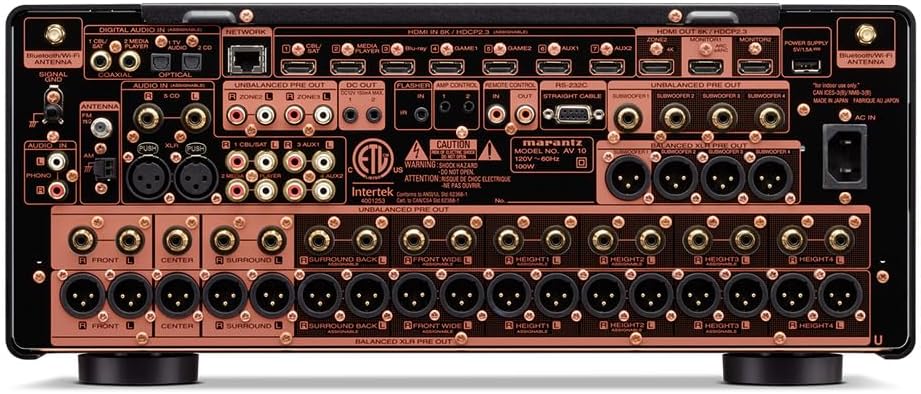
أمام view of the Marantz AV10 AV Receiver, showcasing its sleek design with input and volume knobs, and a central display.
2.2 الاتصالات
Before making any connections, ensure the AV10 receiver and all connected devices are powered off and unplugged from the wall outlet.
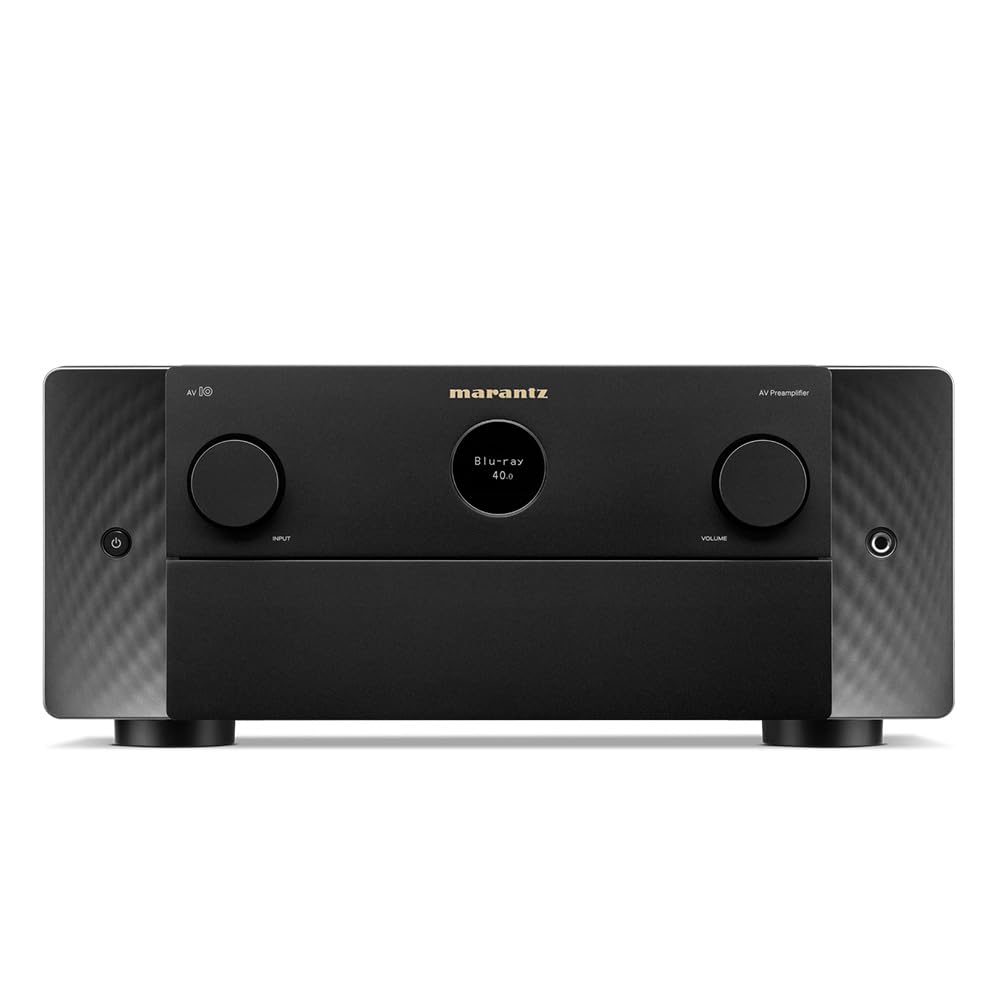
Rear panel of the Marantz AV10 AV Receiver, illustrating the comprehensive array of input and output ports including HDMI, XLR, RCA, Ethernet, and speaker terminals.
- اتصالات HDMI: Connect your video sources (Blu-ray player, game console, streaming device) to the HDMI IN ports. Connect your TV or projector to the HDMI OUT (MONITOR) port. The AV10 supports 8K/60Hz and 4K/120Hz with eARC.
- اتصالات الصوت: Use the appropriate analog or digital audio inputs for devices without HDMI. For high-quality audio, utilize the balanced XLR pre-outs for connecting to external power ampالقاتلون.
- إتصال شبكة: Connect an Ethernet cable to the NETWORK port for wired internet access, or attach the included Wi-Fi antennas for wireless connectivity.
- USB: Use the USB port for media playback from compatible storage devices.
- توصيلات السماعات: Connect your speakers to the corresponding speaker terminals. Ensure correct polarity (+ to + and - to -) for optimal sound. The AV10 supports up to 15.4 channels.
2.3 تكوين السماعات
The Marantz AV10 offers flexible speaker configuration options. Use the on-screen setup assistant (accessible via your TV connected to the HDMI OUT) to guide you through the process. This includes assigning channels, setting speaker sizes, and configuring crossover frequencies.
For optimal sound, utilize the Audyssey MultEQ XT32 room correction system. Connect the supplied setup microphone to the front panel's SETUP MIC jack and follow the on-screen instructions to calibrate your speakers to your room's acoustics.
3. التشغيل
3.1 الضوابط الأساسية
The front panel of the AV10 provides essential controls for daily operation:

Close-up of the input selector knob on the Marantz AV10, used to switch between various audio and video sources.
- زر الطاقة: يقوم بتشغيل الوحدة أو إيقاف تشغيلها.
- محدد المدخلات: Rotates to select the desired input source (e.g., Blu-ray, Game, Media Player).
- مقبض الصوت: ضبط مستوى الصوت الرئيسي.
- عرض: Shows current input, volume level, audio format, and other status information.
The included remote control provides full access to all functions and settings, including menu navigation, sound modes, and zone control.
3.2 نظام صوتي متعدد الغرف
The AV10 supports multi-room audio playback, allowing you to enjoy different audio sources in various zones of your home. Utilize the built-in HEOS technology, Wi-Fi, Bluetooth, or Apple AirPlay 2 to stream music from popular services like Spotify, Pandora, and Amazon Music throughout your home.
3.3 التحكم الصوتي
Control your Marantz AV10 effortlessly using voice commands. The receiver is compatible with major voice assistants, allowing you to adjust volume, change tracks, switch inputs, and more, hands-free.
4. الصيانة
- تنظيف: امسح الجهاز بانتظام بقطعة قماش ناعمة وجافة. لا تستخدم المنظفات الكاشطة أو المذيبات.
- تهوية: تأكد من عدم انسداد فتحات التهوية الموجودة في الجزء العلوي وجوانب الوحدة لمنع ارتفاع درجة الحرارة.
- تحديثات البرامج الثابتة: قم بالتحقق دوريًا من وجود تحديثات للبرامج الثابتة عبر اتصال الشبكة لضمان الأداء الأمثل والوصول إلى الميزات الجديدة.
5. استكشاف الأخطاء وإصلاحها
If you encounter issues with your Marantz AV10, refer to the following common troubleshooting steps:
- لا يوجد طاقة: تأكد من توصيل سلك الطاقة بإحكام وأن مأخذ الطاقة يعمل بشكل صحيح.
- لا يوجد صوت: Check all audio cable connections, ensure the correct input source is selected, and verify speaker connections and volume levels.
- لا يوجد فيديو: Verify HDMI cable connections, ensure the correct input source is selected, and check your TV/projector input settings.
- مشاكل الاتصال بالشبكة: Confirm your Ethernet cable is connected or Wi-Fi antennas are properly attached. Check your router and internet connection.
- جهاز التحكم عن بعد لا يعمل: Replace the batteries in the remote control. Ensure there are no obstructions between the remote and the receiver's IR sensor.
For more detailed troubleshooting, consult the full online manual or contact Marantz customer support.
6. المواصفات
| ميزة | مواصفة |
|---|---|
| ماركة | مارانتز |
| رقم الموديل | AV10 |
| القنوات | 15.4 |
| تكنولوجيا الاتصال | منفذ HDMI |
| إجمالي منافذ HDMI | 10 |
| وضع إخراج الصوت | ستيريو، محيطي |
| تكوين قناة الصوت المحيطي | 5.1 (Supports up to 15.4 with external ampالتنشيط) |
| ترميز الفيديو | H.264، H.265/HEVC |
| ميزة خاصة | غرف متعددة |
| نوع وحدة التحكم | جهاز التحكم عن بعد |
| الأجهزة المتوافقة | Speaker, Tablet, PC, Smartphone, Television, Personal Computer, Game Console |
| وزن العنصر | 37 رطل |
| أبعاد الحزمة | 23 × 22 × 13 بوصة |
7. الضمان والدعم
The Marantz AV10 AV Receiver comes with a manufacturer's warranty. Please refer to the warranty card included in your product packaging for specific terms and conditions. For technical support, product registration, or service inquiries, visit the official Marantz webالموقع أو الاتصال بقسم خدمة العملاء.
Online resources, including a comprehensive user manual and FAQs, are available on the Marantz support page.


