1. المقدمة
The OWON HDS241 is a versatile 3-in-1 handheld device that integrates a single-channel oscilloscope, a 24,000-count digital multimeter, and a 100KHz signal generator. Designed for portability and efficiency, it is suitable for various electrical testing and measurement applications. This manual provides detailed instructions for safe and effective use of your device.
احتياطات السلامة: Always observe general safety rules when operating electrical equipment. Ensure proper connections and use appropriate probes for the measurement task. Do not exceed the maximum input ratings of the device.
2. انتهى المنتجview
The HDS241 combines three essential functions into one compact unit:
- الذبذبات: Features a 40 MHz bandwidth, 250 MSa/s real-time sampling rate, and a waveform refresh rate of up to 10,000 wfms/s. It supports auto-setup, multiple measurement functions, cursor measurement, and a slow sweep mode for long-term signal monitoring.
- مقياس متعدد رقمي: A 4½-digit True RMS multimeter with 24,000 counts. It can measure AC/DC voltage, AC/DC current, resistance, diode, capacitance, and perform continuity tests. Maximum input voltage is AC 750V and DC 1000V.
- مولد الإشارة: A single-channel generator with a frequency range of up to 100 kHz. It supports sine, square, ramp, and pulse waveform outputs with a maximum amplitude of 2.5 Vpp.
The device features a 3.5-inch high-definition color LCD screen for clear display of waveforms and measurement data. Its robust design includes a rubber coating for durability and improved grip.

الشكل 2.1: The OWON HDS241 device, showcasing its 3-in-1 functionality as an oscilloscope, multimeter, and signal generator. Key specifications for each mode are listed alongside the device.

الشكل 2.2: A comprehensive diagram illustrating the various buttons, ports, and display areas of the OWON HDS241, including the viewing area, multi-function keys, channel key, mode change key, system configuration, save button, power button, multimeter input port, horizontal adjustment, measurement range switch, arrow keys, auto range key, hold/run key, signal input connector, probe compensation output, and USB charge/communication interface.
3. الإعداد
3.1 تركيب البطارية وشحنها
The HDS241 is powered by a high-capacity 2000 mAh lithium battery. The device features a low-power consumption design for extended operation.
- الشحن: Connect the device to a power source using the standard USB Type-C port. You can use a compatible adapter or a power bank.
- عمر البطارية: The battery provides long-lasting performance. Actual usage time may vary based on operating conditions.

الشكل 3.1: This image shows the internal battery compartment of the OWON HDS241, revealing two 18650 lithium batteries, and highlights the USB Type-C port for charging and PC connection.
3.2 توصيل المجسات
For oscilloscope measurements, connect the probe to the BNC connector. For multimeter functions, use the provided test leads with the multimeter input ports.
- موصل BNC: The BNC connector features an external rubber coating to enhance safety and prevent external interference. It supports high-voltage probes for accurate and reliable signal capture.
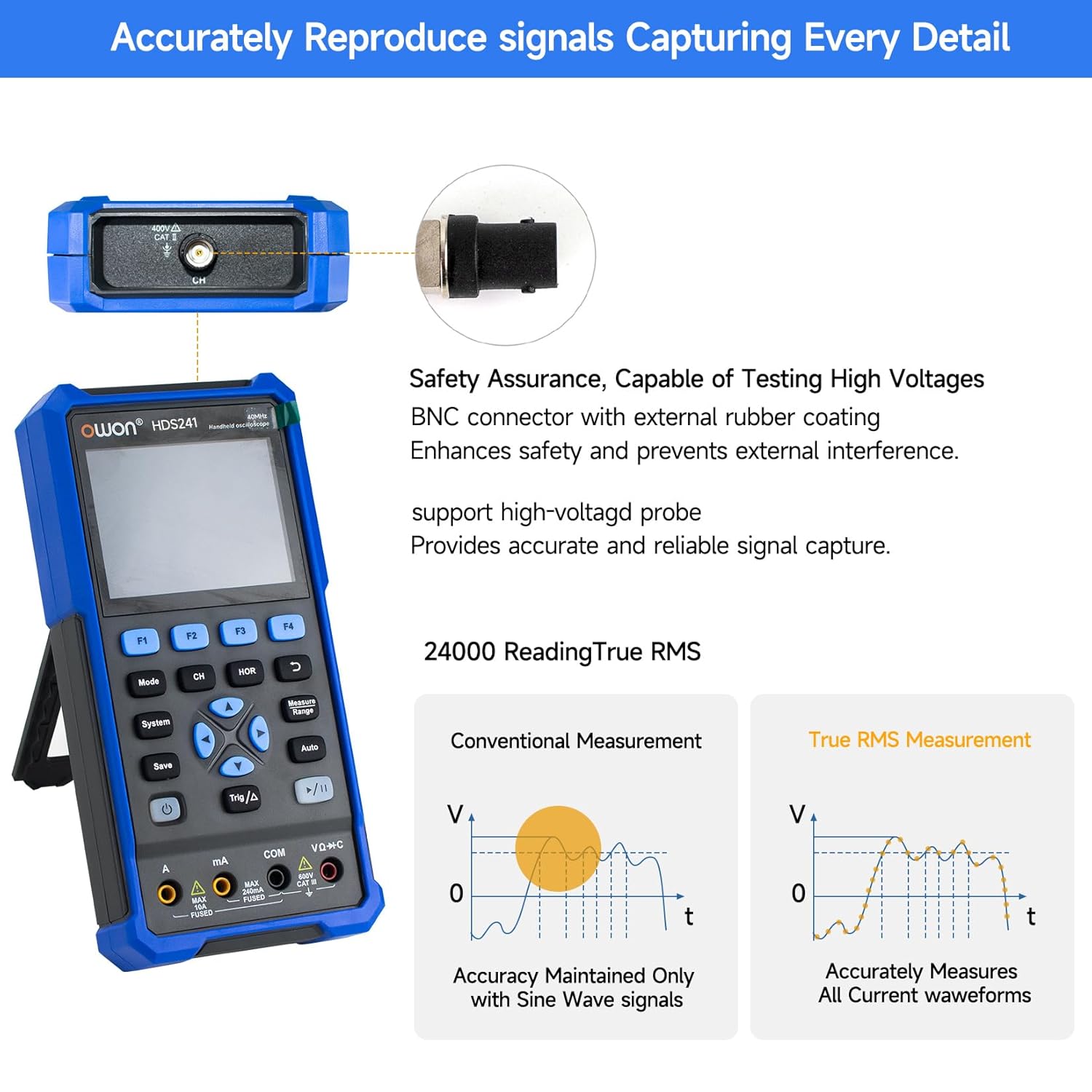
الشكل 3.2: This image highlights the BNC connector with external rubber coating for safety and interference prevention. It also illustrates the difference between conventional measurement (accurate only for sine waves) and True RMS measurement (accurately measures all current waveforms).
3.3 تشغيل/إيقاف التشغيل
Press and hold the power button (refer to Figure 2.2 for location) to turn the device on or off.
4. تعليمات التشغيل
4.1 وضع راسم الإشارة
To enter Oscilloscope mode, press the 'Mode' button until the oscilloscope interface is displayed.
- Basic Waveform Display: Connect the probe to the signal source. The waveform will be displayed on the screen.
- الإعداد التلقائي: Press the 'Auto' button for automatic adjustment of vertical, horizontal, and trigger settings to quickly display a stable waveform.
- وظائف القياس: The HDS241 offers various measurement capabilities:
- القياسات التلقائية: Includes Period, Frequency, Mean, PK-PK, Max, Min, Amplitude, and RMS.
- قياس المؤشر: Use the cursor function to measure voltage difference (ΔV) and time difference (ΔT) between two points on the waveform.
- حفظ البيانات: Connect the device to a computer via the USB Type-C port. The included PC software allows you to save waveform images and data for further analysis.

الشكل 4.1: This image details the oscilloscope's advanced features, including Dual Sampling Mode for interference detection, High Refresh Rate (10,000 wfms/s) and Deep Storage (8K record length), 8 Types of AutoMeasurements (Frequency, Period, Amplitude, Max, Min, Mean, PK-PK, RMS), and Cursor Measurement for ΔV and ΔT. It also shows the Save Function for reference waveforms.

الشكل 4.2: This image displays four examples of waveforms captured by the OWON HDS241: a Mains Waveform with peak highlighted, a TV Signal Wave, a PLC Pulse Wave, and a Multi-Audio Frequency Response Signal, demonstrating its versatility in signal analysis.
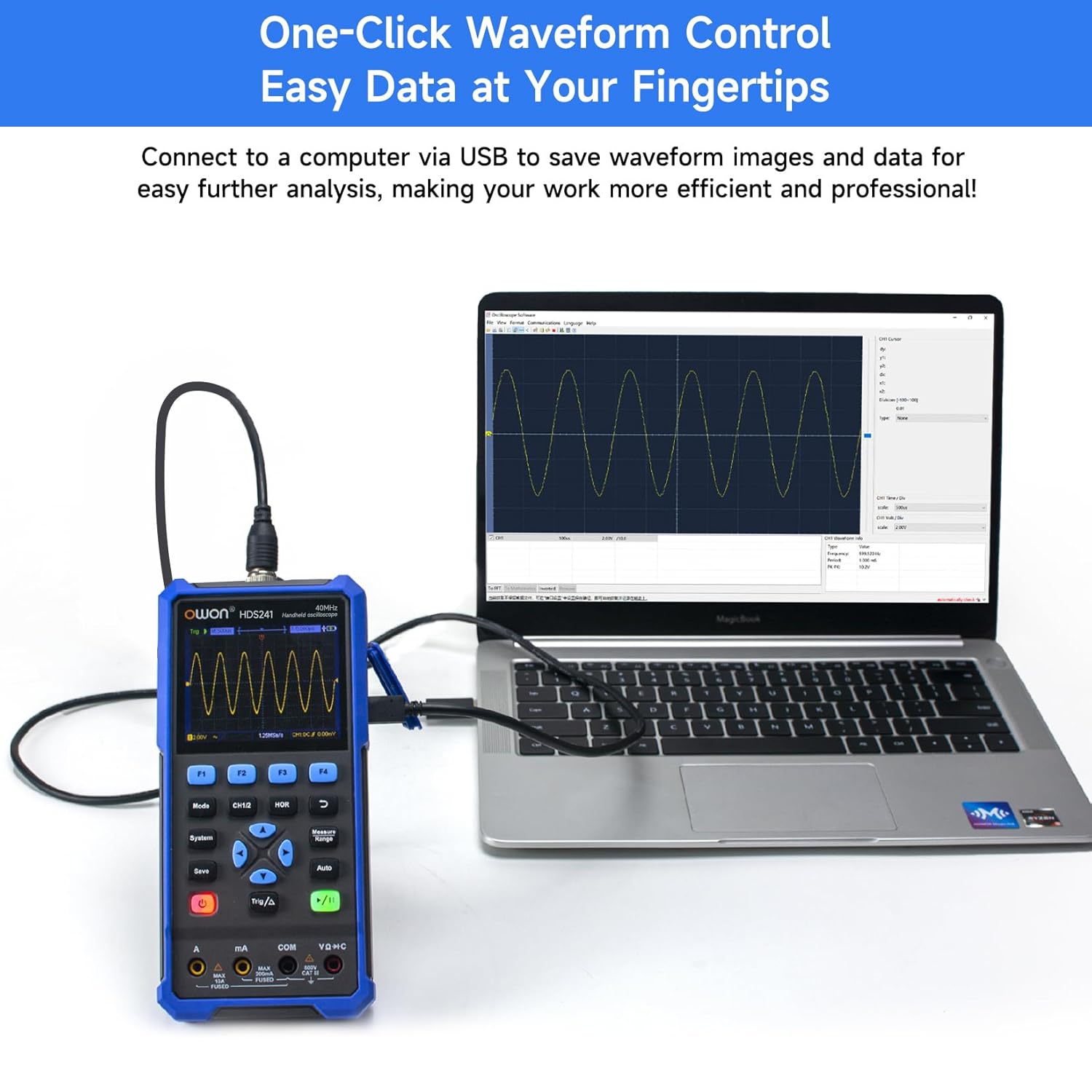
الشكل 4.3: The OWON HDS241 is shown connected to a laptop via a USB cable, demonstrating its capability to save waveform images and data for further analysis on a computer.
4.2 وضع المقياس المتعدد
To enter Multimeter mode, press the 'Mode' button until the multimeter interface is displayed.
- القياسات: The multimeter supports measuring AC/DC voltage, AC/DC current, resistance, diode, capacitance, and continuity. Select the desired measurement function using the appropriate buttons.
- RMS الحقيقي: The HDS241 features True RMS measurement, which is essential for accurately measuring non-sinusoidal AC waveforms.
- نطاق السيارات: The device automatically selects the appropriate measurement range for convenience.

الشكل 4.4: The OWON HDS241 is depicted in an outdoor setting, connected to a car battery with multimeter probes, illustrating its practical application for electrical measurements.
4.3 وضع مولد الإشارة
To enter Signal Generator mode, press the 'Mode' button until the signal generator interface is displayed.
- اختيار شكل الموجة: Choose from sine, square, ramp, or pulse waveforms.
- التردد و Ampخط الطول: Adjust the output frequency (up to 100 kHz) and amplitude (up to 2.5 Vpp) as required for your testing needs.
5. الصيانة
- تنظيف: استخدم قطعة قماش ناعمة وجافة لتنظيف الجهاز. لا تستخدم منظفات أو مذيبات كاشطة.
- العناية بالبطارية: لإطالة عمر البطارية، تجنب تفريغها بالكامل بشكل متكرر. اشحن الجهاز بانتظام، خاصةً إذا كنت ستخزنه لفترة طويلة.
- تخزين: قم بتخزين الجهاز في مكان بارد وجاف بعيدًا عن أشعة الشمس المباشرة ودرجات الحرارة القصوى.
6. استكشاف الأخطاء وإصلاحها
If you encounter issues with your OWON HDS241, consider the following basic troubleshooting steps:
- الجهاز لا يعمل: تأكد من شحن البطارية. وصّل الجهاز بمصدر طاقة باستخدام كابل USB Type-C، ثم حاول مرة أخرى.
- لم يتم عرض أي شكل موجي: Check that the probe is correctly connected to both the device and the signal source. Verify the signal source is active. Try using the 'Auto' button to adjust settings.
- قراءات غير صحيحة لجهاز القياس المتعدد: Ensure the test leads are properly inserted into the correct input jacks for the measurement type (e.g., voltage, current, resistance). Check the integrity of the test leads.
- قراءات غير مستقرة: Ensure connections are secure and there is no external interference.
For further assistance, please contact OWON customer support.
7. المواصفات

الشكل 7.1: This image presents a detailed table of technical specifications for the OWON HDS241, covering its oscilloscope, digital multimeter, and waveform generator functions.
7.1 مواصفات جهاز راسم الإشارة
| ميزة | مواصفة |
|---|---|
| النطاق الترددي | 40 ميجا هرتز |
| قناة | 1 |
| Sampتردد لينغ | 250 ميجا ساك / ثانية |
| Acquisition Model | Sample, Peak detection |
| طول السجل | Max. 8K |
| عرض | شاشة LCD مقاس 3.5 بوصة |
| معدل تحديث شكل الموجة | 10,000 واط/ثانية |
| اقتران المدخلات | DC, AC, Ground |
| معاوقة الإدخال | 1 MΩ±2%, in parallel with 16 pF±10 pF |
| تخفيف المجس | 1x و 10x و 100 x و 1000 x |
| الأعلى. حجم الإدخالtage | 400 فولت (تيار مستمر + تيار متردد، ذروة إلى ذروة) |
| Sensitivity Resolution | 10 مللي فولت/قسم-10 فولت/قسم |
| الدقة الرأسية | 8 بت |
| المقياس الأفقي | 5ns/div-1000s/div, Step 1-2-5 |
| نوع الزناد | حافة |
| وضع الزناد | تلقائي، عادي، فردي |
| القياس التلقائي | Period, Frequency, Mean, PK-PK, Max, Min, Amplitude, RMS |
| قياس المؤشر | ΔV, ΔT |
7.2 Digital Multimeter Specifications
| ميزة | مواصفة |
|---|---|
| Full Scale Reading | 4½ digits (max. 24000 counts) |
| أوضاع الاختبار | المجلدtage, current, resistance, capacitance, diode, continuity |
| الحد الأقصى لحجم الإدخالtage | تيار متردد 750 فولت، تيار مستمر 1000 فولت |
| الحد الأقصى لتيار الإدخال | تيار متردد 10 أمبير ، تيار مستمر 10 أمبير |
| نطاق السيارات | نعم |
| RMS الحقيقي | نعم |
7.3 مواصفات مولد الموجات
| نوع الموجة | تردد الإخراج |
|---|---|
| جيب التمام | 10 هرتز-100 كيلو هرتز |
| مربع | 10 هرتز-100 كيلو هرتز |
| Ramp | 10 هرتز-100 كيلو هرتز |
| نبض | 10 هرتز-10 كيلو هرتز |
| Ampخط الطول | 2Vpp-2.5Vpp |
7.4 المواصفات العامة
- أبعاد: 9.6 × 3.8 × 19.8 سم
- وزن: 1.2 كجم
- بطارية: بطارية ليثيوم 2000 مللي أمبير
- واجهة الشحن: يو إس بي من النوع سي
8. الضمان والدعم
For warranty information, technical support, or service inquiries, please refer to the warranty card included with your product or contact OWON customer service directly. Keep your purchase receipt as proof of purchase.


