1. المقدمة
This manual provides comprehensive instructions for the installation, operation, maintenance, and troubleshooting of your Fanvil 8-Port 2-Wire PoE Switch (Model PN8). Please read this manual thoroughly before using the device to ensure proper functionality and to prevent damage.
2. انتهى المنتجview
The Fanvil PN8 is an 8-port 2-wire Power over Ethernet (PoE) switch designed to transmit both power and data over existing 2-wire cables. This unique capability simplifies installation, especially in environments where traditional Ethernet cabling is not feasible or cost-effective. It supports up to 8 PoE-enabled devices and can transmit data and power over distances up to 300 meters.
2.1 الميزات الرئيسية
- 8 PoE ports for data and power transmission.
- Supports power and data over 2-wire connections.
- Long transmission distance of up to 300 meters.
- User-friendly setup with no complex configuration required.
2.2 تخطيط الجهاز
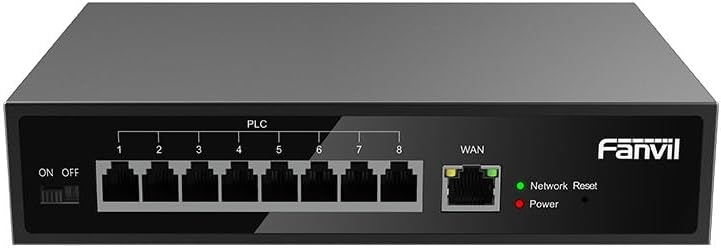
الشكل 1: أمام view of the Fanvil PN8 switch, showing 8 PLC ports, a WAN port, ON/OFF switch, and LED indicators for Network Reset and Power.

الشكل 2: بزاوية view of the Fanvil PN8 switch, highlighting the side ventilation and port layout.
2.3 مؤشرات LED
- Network Reset (Green LED): Indicates network activity or status. A steady light typically means a stable connection, while blinking indicates data transmission.
- Power (Red LED): Illuminates when the device is powered on and receiving electrical current.
3. تعليمات الإعداد
3.1 محتويات العبوة
قبل التثبيت، يرجى التأكد من وجود جميع العناصر في العبوة:
- Fanvil 8-Port 2-Wire PoE Switch (PN8)
- محول الطاقة
- دليل المستخدم (هذا المستند)
- ملحقات التثبيت (إذا كانت متضمنة)
3.2 توصيل المفتاح
- توصيل الطاقة: Connect the provided power adapter to the power input port on the switch and then plug it into a standard electrical outlet (100-240V AC). Ensure the ON/OFF switch is in the OFF position before connecting power.
- اتصال WAN: Connect your main network router or modem to the WAN port on the Fanvil PN8 switch using a standard Ethernet cable.
- توصيل جهاز PoE: Connect your 2-wire PoE-enabled devices (e.g., IP phones, cameras) to any of the 8 PLC ports on the switch. The switch will automatically detect and provide power and data to these devices.
- تشغيل الطاقة: Flip the ON/OFF switch to the ON position. The Power LED should illuminate, indicating the switch is operational.
4. تشغيل المفتاح
Once connected, the Fanvil PN8 switch operates automatically. It provides power and data to connected PoE devices without requiring additional configuration. The LED indicators provide visual feedback on the device's status.
4.1 تشغيل/إيقاف التشغيل
- To power on the switch, ensure the power adapter is connected and flip the ON/OFF switch to the 'ON' position. The red Power LED will light up.
- To power off the switch, flip the ON/OFF switch to the 'OFF' position. The red Power LED will turn off.
5. الصيانة
To ensure optimal performance and longevity of your Fanvil PN8 switch, follow these maintenance guidelines:
- تنظيف: Use a soft, dry cloth to clean the exterior of the switch. Do not use liquid or aerosol cleaners. Ensure the device is powered off before cleaning.
- تهوية: Ensure the switch is placed in a well-ventilated area. Do not block the ventilation openings on the sides of the device.
- بيئة: تجنب تعريض المفتاح لدرجات حرارة قصوى أو رطوبة عالية أو لأشعة الشمس المباشرة.
6. استكشاف الأخطاء وإصلاحها
If you encounter issues with your Fanvil PN8 switch, refer to the following table for common problems and solutions:
| مشكلة | السبب المحتمل | حل |
|---|---|---|
| No power (Power LED off) | Power adapter not connected or faulty; ON/OFF switch is off. | Check power adapter connection and outlet. Ensure ON/OFF switch is in the 'ON' position. |
| لا يوجد اتصال بالشبكة | WAN cable disconnected; faulty cable; upstream network issue. | Verify WAN cable connection. Test with a different cable. Check your router/modem. |
| PoE device not receiving power/data | Device not PoE-compatible; faulty 2-wire cable; device drawing too much power. | Ensure device is PoE-compatible. Test with a different 2-wire cable. Check device power requirements. |
| سرعة الشبكة بطيئة | جودة الكابل؛ ازدحام الشبكة؛ قيود الأجهزة. | Ensure high-quality 2-wire cables are used. Reduce network traffic if possible. |
7. المواصفات الفنية
| مواصفة | قيمة |
|---|---|
| رقم الموديل | رقم المنتج 8 |
| نوع المنتج | 2-Wire PoE Switch |
| الموانئ | 8 |
| حجم الإدخالtage | 100~240 فولت تيار متردد |
| حجم التشغيلtage | 28 فولت |
| انتقال طويلة المسافة | 300 متر |
| أبعاد المنتج | 5.91 × 78.74 × 5.91 بوصة |
| وزن العنصر | 2.49 رطل |
| البطاريات المطلوبة | 1 بطاريات AAAA (مرفقة) |
| ASIN | B0DP5HXVQJ |
| رمز المنتج الموحد | 6937295605105 |
| تاريخ أول توفر | 27 نوفمبر 2024 |
8. الضمان والدعم
للحصول على معلومات الضمان والدعم الفني، يرجى الرجوع إلى الوثائق المقدمة مع عملية الشراء أو زيارة موقع Fanvil الرسمي website. Contact their customer service for assistance with product issues, repairs, or further inquiries.


