1. المقدمة
This manual provides essential instructions for the safe and efficient operation of your RadioShack Home Projector. Please read this manual thoroughly before using the device and retain it for future reference.
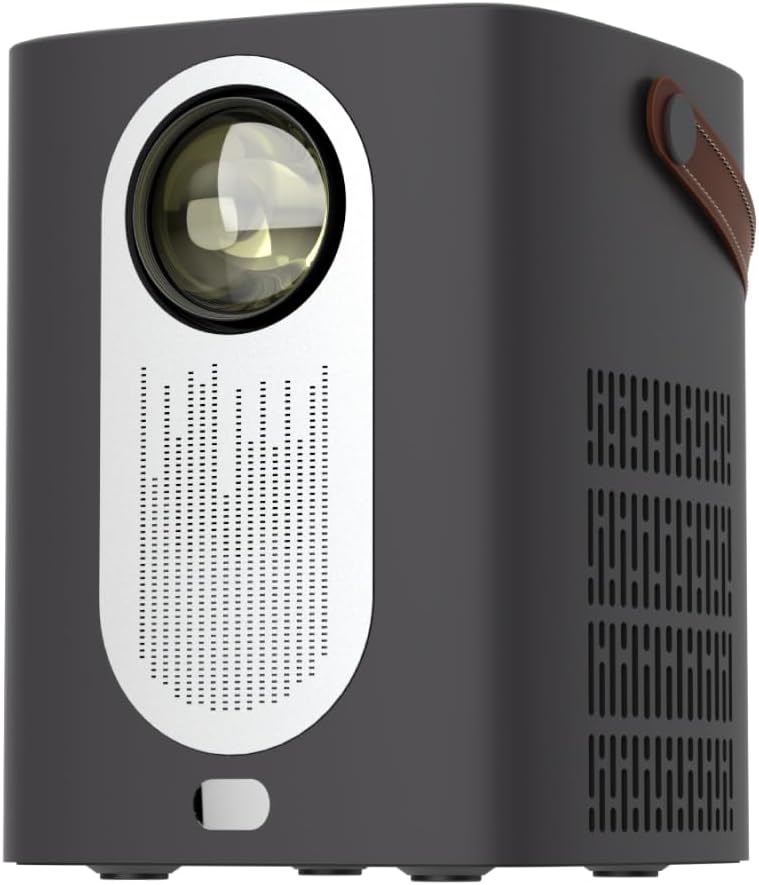
الصورة 1.1: الجبهة view of the RadioShack Home Projector, showcasing its lens and speaker grille.
2. محتويات العبوة
تأكد من وجود جميع العناصر في العبوة:
- 1 x RadioShack Home Projector
- 1 × جهاز التحكم عن بعد
- 1 × كابل الطاقة
- 1 × دليل المستخدم (هذه الوثيقة)

Image 2.1: Illustration of the package contents, including the projector, remote control, power cable, and user manual.
3. انتهى المنتجview
3.1. الميزات الرئيسية
- شاشة عالية الدقة: Supports full HD resolution for clear and detailed images.
- Bright and Long-Lasting: Features impressive brightness and a durable light source.
- اتصال متعدد الاستخدامات: Includes Bluetooth, WiFi, Android Miracast, and iOS Cast for streaming.
- مُحسَّن Viewعمل: Digital focus and keystone correction for optimal image alignment.
- صغير الحجم وقابل للحمل: Lightweight design with a handle for easy transport.
3.2. المنافذ وأدوات التحكم
Familiarize yourself with the projector's input/output ports and controls.

الصورة 3.1: خلفي view of the projector showing USB input for media playback, AV input for DVD players, and HDMI input for various devices like video game consoles, streaming sticks, cell phones, tablets, and laptops.

الصورة 3.2: الجانب view illustrating the compact dimensions (approximately 7 inches tall, 5.3 inches wide) and the integrated leather handle for portability.
4. دليل الإعداد
4.1. التشغيل الأولي
- قم بتوصيل كابل الطاقة بجهاز العرض ومأخذ الطاقة المناسب.
- Press the power button located on the top of the projector or on the remote control to turn on the device. The indicator light will illuminate.
- The RadioShack logo will appear on the projection surface, indicating successful power-on.
Video 4.1: A short demonstration showing the unboxing, connecting the power cable, powering on the projector, and the initial display of the RadioShack logo.
4.2. Placement and Focus
- Place the projector on a stable, flat surface, ensuring the lens is unobstructed.
- Adjust the distance from the projection surface (wall or screen) to achieve the desired image size.
- Use the digital focus adjustment (refer to the remote control or on-screen menu) to sharpen the image.
- Utilize keystone correction if the image appears trapezoidal, to achieve a rectangular projection.
5. تعليمات التشغيل
5.1. توصيل الأجهزة
يدعم جهاز العرض مصادر إدخال متعددة:
- HDMI: Connect devices such as laptops, gaming consoles, streaming boxes, or Blu-ray players using an HDMI cable. Select HDMI as the input source from the projector's menu.
- USB: Insert a USB drive to play compatible video or audio files. Select USB as the input source.
- من: Connect older devices like DVD players using an AV cable. Select AV as the input source.
- بلوتوث: Pair with Bluetooth audio devices for wireless sound output.
- WiFi / Casting: Connect to a Wi-Fi network to enable Android Miracast or iOS Cast for screen mirroring from compatible smartphones and tablets.

Image 5.1: A couple enjoying content projected by the RadioShack Home Projector, demonstrating its use in a home cinema setting.
5.2. وظائف التحكم عن بعد
يتيح جهاز التحكم عن بعد المرفق سهولة التشغيل:
- قوة: تشغيل/إيقاف جهاز العرض.
- مصدر: Select input sources (HDMI, USB, AV, etc.).
- ملاحة: Arrow keys to navigate menus, OK button to confirm.
- مقدار: اضبط مستوى إخراج الصوت.
- التركيز / كيستون: Access digital focus and keystone correction settings.

Image 5.2: The RadioShack Home Projector placed on a table next to its remote control, ready for use.
6. الصيانة
- تنظيف العدسة: استخدم قطعة قماش ناعمة وخالية من الوبر مصممة خصيصًا للعدسات البصرية لمسح عدسة جهاز العرض برفق. تجنب استخدام المواد الكاشطة أو المواد الكيميائية القاسية.
- تنظيف الجزء الخارجي: امسح الجزء الخارجي لجهاز العرض بقطعة قماش ناعمة وجافة. لا تستخدم المنظفات السائلة مباشرةً على الجهاز.
- تهوية: تأكد من خلو فتحات التهوية في جهاز العرض من الغبار والعوائق لمنع ارتفاع درجة الحرارة.
- تخزين: عند عدم استخدام جهاز العرض لفترات طويلة، قم بتخزينه في مكان بارد وجاف، بعيدًا عن أشعة الشمس المباشرة ودرجات الحرارة القصوى.
7. استكشاف الأخطاء وإصلاحها
| مشكلة | السبب المحتمل | حل |
|---|---|---|
| لا توجد صورة معروضة | تم فصل كابل الطاقة؛ تم اختيار مصدر إدخال غير صحيح؛ غطاء العدسة مثبت. | Check power connection; select correct input source (HDMI, USB, AV); remove lens cap. |
| الصورة ضبابية | لم يتم ضبط التركيز؛ جهاز العرض قريب جدًا/بعيد جدًا عن الشاشة. | Adjust digital focus; reposition projector for optimal distance. |
| لا يوجد صوت | Volume too low; external audio device not connected/paired; incorrect audio output selected. | Increase volume; ensure Bluetooth device is paired or wired audio is connected; check audio output settings. |
| جهاز التحكم عن بعد لا يعمل | نفدت البطاريات؛ يوجد عائق بين جهاز التحكم عن بعد وجهاز العرض. | Replace remote control batteries; ensure clear line of sight to the projector's IR receiver. |
8. المواصفات
- ماركة: راديوشاك
- نموذج: Home Projector (ASIN: B0DP1GFG9L)
- دقة العرض: 1280 x 720 (Supports Full HD)
- تقنية الاتصال: AV, HDMI, USB, Bluetooth, WiFi (Android Miracast, iOS Cast)
- المميزات الخاصة: Portable, Digital Focus, Keystone Correction
- الاستخدام الموصى به: السينما المنزلية
- أبعاد المنتج: 5.31 × 5.31 × 7.09 بوصة
- وزن السلعة: 3.91 رطل

Image 8.1: The projector displaying content, highlighting its support for full HD resolution and high-quality sound.
9. الضمان والدعم
For warranty information and technical support, please refer to the official RadioShack webالموقع أو تواصل مع خدمة العملاء. احتفظ بإيصال الشراء كإثبات للشراء.
الدعم عبر الإنترنت: www.radioshack.com


