1. المقدمة
This manual provides essential information for the safe and efficient operation of your WOLFBOX EV Charger Level 2 50 Amp. Please read this manual thoroughly before installation and use, and retain it for future reference. The WOLFBOX EV Charger is designed to provide fast and reliable charging for your electric vehicle, featuring smart controls, a user-friendly display, and robust safety features.

Image 1.1: WOLFBOX EV Charger Level 2 50 Amp, showing the unit, charging cable, and a smartphone displaying the charging app.
2. معلومات السلامة
Your safety is paramount. This device is designed with multiple safety features, but proper installation and usage are critical. Please adhere to the following guidelines:
- التثبيت الاحترافي: For your safety, the WOLFBOX EV Charger must be installed by a qualified and licensed electrician in accordance with all local and national electrical codes.
- قاطع دائرة: The Level 2 EV Charger 50 Amp requires installation on a dedicated circuit breaker rated at 70A or greater.
- الشهادات: The EV charger is CSA certified and meets UL safety standards (UL2594 standard), ensuring compliance with rigorous safety requirements.
- حماية البيئة: The charger features NEMA 4X waterproof protective housing, making it suitable for both indoor and outdoor use and resilient to various weather conditions.
- الحماية الكهربائية: The unit includes Ground Fault Protection, Over-Current Protection, Leakage Current Protection, Thermal Protection, High Voltage Protection, Low Voltage Protection, Over Charge Protection, and Lightning Protection.

Image 2.1: Visual representation of the superior electrical protection features, including ground fault, over-current, leakage current, thermal, high/low voltage, overcharge, and lightning protection.

Image 2.2: The WOLFBOX EV Charger shown in various environmental conditions, highlighting its NEMA 4X waterproof, dustproof, cold-resistant (-22°F), and heat-resistant (122°F) capabilities for outdoor use.
3. ماذا يوجد في الصندوق
Carefully unpack your WOLFBOX EV Charger and ensure all items are present. If any items are missing or damaged, please contact customer support.
- Level 2 EV Charger Unit
- حامل الموصل
- حامل التثبيت على الحائط
- 1 Management Card and 2 RFID Charging Cards
- دليل المستخدم (هذا المستند)
- Ampتسمية العمر
- برغي (x11)
- Plastic Expansion Tube (x11)
- Machine Screw (x2)
- قطعة قفل مضادة للسرقة

Image 3.1: An illustration of all components included in the WOLFBOX EV Charger package, such as the charger unit, cables, mounting hardware, RFID cards, and documentation.
4. دليل التثبيت
The WOLFBOX EV Charger is designed for hardwired installation. Due to the electrical requirements and safety considerations, professional installation by a certified electrician is mandatory.
4.1 قائمة التحقق من التثبيت المسبق
- Ensure you have a dedicated 240V circuit with a 70A or greater circuit breaker.
- Select a suitable indoor or outdoor location for mounting, considering cable reach (25ft cable provided).
- تأكد من أن جميع محتويات الحزمة موجودة وغير تالفة.
4.2 تركيب الشاحن
- استخدم دعامة التثبيت الجدارية المرفقة كقالب لتحديد نقاط الحفر على الحائط.
- Drill holes and insert plastic expansion tubes.
- Secure the wall mount bracket using the self-tapping screws.
- Mount the charger unit onto the bracket.
- Install the connector holder nearby for convenient cable management.
4.3 التمديدات الكهربائية (للفنيين الكهربائيين المحترفين فقط)
The hardwired connection involves connecting the charger's input wires directly to your home's electrical panel. This process requires specialized knowledge and tools. Your electrician will:
- Turn off power at the main breaker.
- Route the electrical conduit and wiring to the charger's location.
- Connect the charger's wires (L1, L2, Ground) to the appropriate terminals in the electrical panel.
- Ensure all connections are secure and meet local electrical codes.
- Restore power and test the installation.
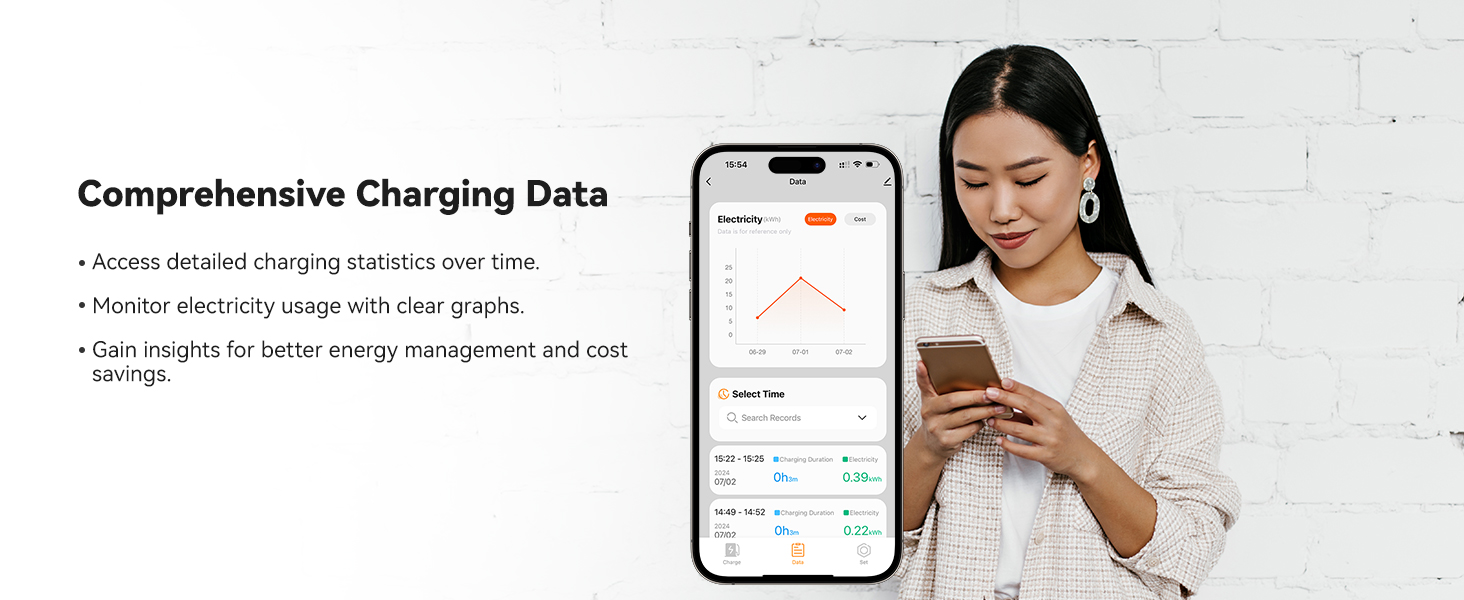
Image 4.1: A professional electrician performing the hardwired installation of an EV charger, emphasizing the need for expert service.
5. تعليمات التشغيل
The WOLFBOX EV Charger offers multiple ways to manage your charging sessions.
5.1 Smart Display Overview
The 4.3-inch LCD screen on the charger displays real-time charging information, including:
- Charging Rate (kW)
- وقت الشحن
- المجلدtagه (الخامس)
- الحالي (أ)
- Charged Amount (kWh)
- درجة حرارة

الصورة 5.1: تفصيلية view of the WOLFBOX EV Charger's 4.3-inch smart LCD display showing charging status, and an RFID card being used for authentication.
5.2 طرق الشحن
You can initiate and manage charging using the following methods:
- التوصيل والشحن: Simply connect the J1772 connector to your EV, and charging will begin automatically.
- بطاقة RFID: Tap one of the provided RFID cards on the charger's sensor to start or stop a charging session. This prevents unauthorized use.
- التحكم في تطبيقات الهاتف المحمول: Connect the charger to your home Wi-Fi network and download the WOLFBOX app to unlock advanced features.
5.3 ميزات تطبيق الهاتف المحمول
The WOLFBOX mobile app provides comprehensive control and monitoring capabilities:
- Real-time Charge Monitoring: View live charging data, including power, voltagهـ، التيار، ودرجة الحرارة.
- الشحن المجدول: Set specific start and end times for charging sessions, ideal for utilizing off-peak electricity rates.
- Adjustable Charge Power: Customize the current intensity (e.g., 16A to 50A) to suit your needs or optimize battery life.
- Remote Charging Control: ابدأ أو أوقف جلسات الشحن من أي مكان.
- Multi-user Access Management: Share device control with multiple users in your household.
- التحكم الصوتي: Integrate with Alexa and Google Assistant for convenient voice commands.
- Comprehensive Charging Data: Access historical charging statistics and monitor electricity usage with graphs.
- الإعدادات الشخصية: قم بتخصيص وحدات درجة الحرارة والتكلفة، وأدخل تفاصيل المركبة، وتحكم في ضوء المؤشر.

Image 5.2: A visual breakdown of the smart app's functionalities, including real-time monitoring, scheduled charging, adjustable power, remote control, multi-user access, and integration with voice assistants.
6. التوافق
The WOLFBOX EV Charger is universally compatible with all electric vehicle models that use the SAE J1772 charging standard.
- J1772 Standard: Compatible with the vast majority of EVs in North America.
- Tesla Vehicles: Tesla EVs require a specific adapter to be compatible with the J1772 connector. Please contact WOLFBOX customer service to inquire about obtaining a Tesla adapter.

Image 6.1: The WOLFBOX EV Charger installed and connected to a white electric vehicle, demonstrating its compatibility with various EV models, including Tesla with an adapter.
7. الصيانة
To ensure the longevity and optimal performance of your WOLFBOX EV Charger, follow these simple maintenance guidelines:
- التنظيف المنتظم: Periodically wipe down the charger unit and cable with a soft, damp قماش. تجنب استخدام المواد الكيميائية القاسية أو المنظفات الكاشطة.
- Inspect Cable and Connector: Regularly check the charging cable and J1772 connector for any signs of wear, damage, or fraying. If damage is observed, discontinue use and contact customer support.
- ابقي واضحا: Ensure the area around the charger is free from obstructions to allow for proper ventilation.
- تحديثات البرامج: The charger supports OTA (Over-The-Air) updates. Ensure your charger's firmware is up-to-date via the mobile app for the best performance and latest features.
8. استكشاف الأخطاء وإصلاحها
If you encounter any issues with your WOLFBOX EV Charger, please refer to the following common troubleshooting steps. If the problem persists, contact customer support.
8.1 المشكلات والحلول الشائعة
- الشاحن لا يعمل:
- Check the circuit breaker in your electrical panel to ensure it hasn't tripped.
- Verify that the charger is securely hardwired. If unsure, consult your electrician. - عدم بدء الشحن:
- Ensure the J1772 connector is fully and securely plugged into your EV's charging port.
- If using RFID, ensure the card is correctly tapped and recognized.
- Check the mobile app for any error messages or paused charging schedules.
- For Tesla vehicles, confirm the adapter is correctly seated and functional. - سرعة الشحن البطيئة:
- Verify the current setting in the mobile app; ensure it's set to your desired ampإيراج.
- Check your vehicle's charging settings, as some EVs allow you to limit charging speed.
- Ensure your home's electrical system can deliver the full 50 Amp سعة. - مشكلات اتصال التطبيق:
- Ensure your charger is within range of your Wi-Fi router.
- Restart your Wi-Fi router and the charger.
- Check for app updates on your smartphone. - رسالة الخطأ على الشاشة:
- Note down the specific error code or message displayed.
- Refer to the full user manual (PDF) for a detailed list of error codes and their solutions.
- If the issue is not resolved, contact customer support with the error details.
9. المواصفات
Technical details for the WOLFBOX EV Charger Level 2 50 Amp (Model E50).
| ميزة | التفاصيل |
|---|---|
| نموذج | إي50 |
| انتاج الطاقة | حتى 12 كيلو وات |
| الناتج الحالي | 16A/24A/32A/40A/48A/50A (Adjustable) |
| حجم الإدخالtage | 200-240 V AC |
| تصنيف قواطع دوائر | 70 أمبير أو أعلى (مطلوب) |
| طول الكابل | 25 قدم |
| نوع الموصل | معيار SAE J1772 |
| نوع التثبيت | سلكي |
| نوع التركيب | حامل الحائط |
| تصنيف الحماية | NEMA 4, IP66 (Waterproof, Dustproof) |
| درجة حرارة التشغيل | -22 درجة فهرنهايت إلى 122 درجة فهرنهايت (-30 درجة مئوية إلى 50 درجة مئوية) |
| الاتصال | Wi-Fi (2.4 GHz 802.11 b/g/n), Bluetooth |
| عرض | شاشة LCD ذكية مقاس 4.3 بوصة |
| شهادات السلامة | CSA, FCC, Energy Star |
| أبعاد | 12.68 بوصة × 7.46 بوصة × 4.76 بوصة |
| وزن العنصر | 13.45 رطل |
| إمكانية الترقية | OTA (Over-The-Air) updates |

Image 9.1: A comprehensive table outlining the technical specifications of the WOLFBOX EV Charger, including power, voltagهـ، التيار، والأبعاد.

Image 9.2: A visual representation of the WOLFBOX EV Charger's dimensions, including width, height, and depth.
10. الضمان والدعم
WOLFBOX is committed to providing high-quality products and excellent customer service.
10.1 معلومات الضمان
Your WOLFBOX EV Charger comes with a ضمان لمدة 36 شهرًا من تاريخ الشراء، مع تغطية عيوب التصنيع. يُرجى الاحتفاظ بإيصال الشراء للمطالبة بالضمان.
10.2 دعم العملاء
For any questions, technical assistance, or warranty claims, please contact WOLFBOX customer support:
- دعم العملاء على مدار الساعة طوال أيام الأسبوع: تتوفر المساعدة المتخصصة في أي وقت تحتاجها.
- المساعدة مدى الحياة: WOLFBOX is committed to supporting you for the life of your product.
Refer to the official WOLFBOX website or your purchase documentation for specific contact methods (email, phone, etc.).

Image 10.1: Highlighting WOLFBOX's commitment to customer support, including 24/7 assistance, lifetime product support, and OTA updates for continued reliability.


