1. المقدمة
This manual provides detailed instructions for the setup, operation, and maintenance of your ECHTPower Wireless Switch Controller. Please read this manual thoroughly before using the product to ensure proper functionality and to maximize your gaming experience. This controller is designed for use with Nintendo Switch, PC, iOS, and Android devices.

Image 1.1: ECHTPower Wireless Switch Controller in purple. This image displays the front view of the controller, highlighting its ergonomic design and button layout.
2. انتهى المنتجview
2.1 محتويات العبوة
- ECHTPower Wireless Switch Controller
- كابل شحن USB-C
- دليل المستخدم (هذا المستند)
2.2 تخطيط وحدة التحكم
Familiarize yourself with the buttons and features of your controller:

الصورة 2.1: الجبهة view of the ECHTPower Wireless Switch Controller. This image shows the left and right analog sticks, D-pad, A/B/X/Y buttons, Home button, Capture button, Plus/Minus buttons, and shoulder buttons.
- عصا التحكم التناظرية اليسرى: For movement and camera control. Features Hall Effect technology for precision.
- عصا التحكم التناظرية اليمنى: For camera control and aiming. Features Hall Effect technology for precision.
- D- الوسادة: الإدخال الاتجاهي.
- أزرار A/B/X/Y: أزرار العمل.
- أزرار اليسار/اليمين: أزرار الكتف.
- أزرار ZL/ZR: مشغلات تناظرية.
- زر الصفحة الرئيسة: يعود إلى الشاشة الرئيسية للنظام.
- زر الالتقاط: Takes screenshots or records video clips.
- +/- الأزرار: وظائف البدء/الاختيار.
- زر M: Macro/Customization button (refer to advanced settings for programming).
- مؤشرات LED: رقم اللاعب وحالة الشحن.

الصورة 2.2: عن قرب view of the Hall Effect joystick. This image highlights the advanced sensor technology used in the analog sticks for enhanced durability and drift-free performance.
The controller features Hall Effect joysticks, which utilize electromagnetic induction for precise, drift-free control and extended lifespan compared to traditional potentiometers.
3. الإعداد والاتصال
3.1 شحن وحدة التحكم
Before first use, fully charge the controller. Connect the supplied USB-C cable to the controller's charging port and the other end to a USB power source (e.g., console, PC, USB wall adapter). The LED indicators will show charging status and turn off when fully charged.
3.2 الاتصال بجهاز نينتندو سويتش
- من القائمة الرئيسية، حدد "وحدات التحكم" > "تغيير القبضة/الترتيب".
- On the next screen, press and hold the SYNC button on the top of the ECHTPower controller for a few seconds until the player LEDs begin to flash.
- بمجرد الاقتران ، سيظل مؤشر (مؤشرات) المشغل المقابلة لرقم وحدة التحكم مضاءً.
Note: The SYNC button is usually a small, recessed button on the top edge of the controller.
3.3 الاتصال بالكمبيوتر (ويندوز)
The controller supports both wired and wireless connections to PC.
3.3.1 اتصال سلكي
- قم بتوصيل وحدة التحكم بجهاز الكمبيوتر الخاص بك باستخدام كابل USB-C.
- ينبغي أن يقوم جهاز الكمبيوتر بالكشف التلقائي عن برامج التشغيل اللازمة وتثبيتها.
- The controller will be recognized as an XInput device.
3.3.2 الاتصال اللاسلكي (بلوتوث)
- تأكد من تمكين تقنية Bluetooth في جهاز الكمبيوتر الخاص بك.
- Go to "Settings" > "Devices" > "Bluetooth & other devices" and select "Add Bluetooth or other device".
- Choose "Bluetooth".
- Press and hold the SYNC button on the controller until the LEDs flash rapidly.
- Select the "Pro Controller" or similar device name from the list on your PC.
- Once paired, the controller LEDs will stop flashing and remain lit.
3.4 الاتصال بأجهزة iOS/Android

Image 3.1: The ECHTPower Wireless Switch Controller shown alongside various devices, including a tablet, smartphone, and laptop, illustrating its multi-device compatibility.
- قم بتمكين Bluetooth على جهاز iOS أو Android.
- Go to Bluetooth settings and search for new devices.
- Press and hold the SYNC button on the controller until the LEDs flash rapidly.
- Select the "Pro Controller" or similar device name from the list on your mobile device.
- Once paired, the controller LEDs will stop flashing and remain lit.
Compatibility may vary with specific games and applications on mobile platforms.
4. تعليمات التشغيل
4.1 الضوابط الأساسية
The controller functions similarly to standard gaming controllers. Refer to the in-game instructions for specific button mappings.
- العصي التناظرية: Used for movement, camera control, and menu navigation.
- D- الوسادة: Used for directional input, often for menu navigation or specific game actions.
- أزرار A/B/X/Y: Primary action buttons, typically for jumping, attacking, interacting, etc.
- أزرار L/R/ZL/ZR: Used for various in-game actions such as aiming, shooting, or special abilities.
- زر الصفحة الرئيسة: Returns to the console's home screen or main menu.
- زر الالتقاط: Captures screenshots or video clips (Nintendo Switch specific).
- +/- الأزرار: Often used for pausing games, opening menus, or selecting options.
4.2 Advanced Features (Hall Effect Joysticks)
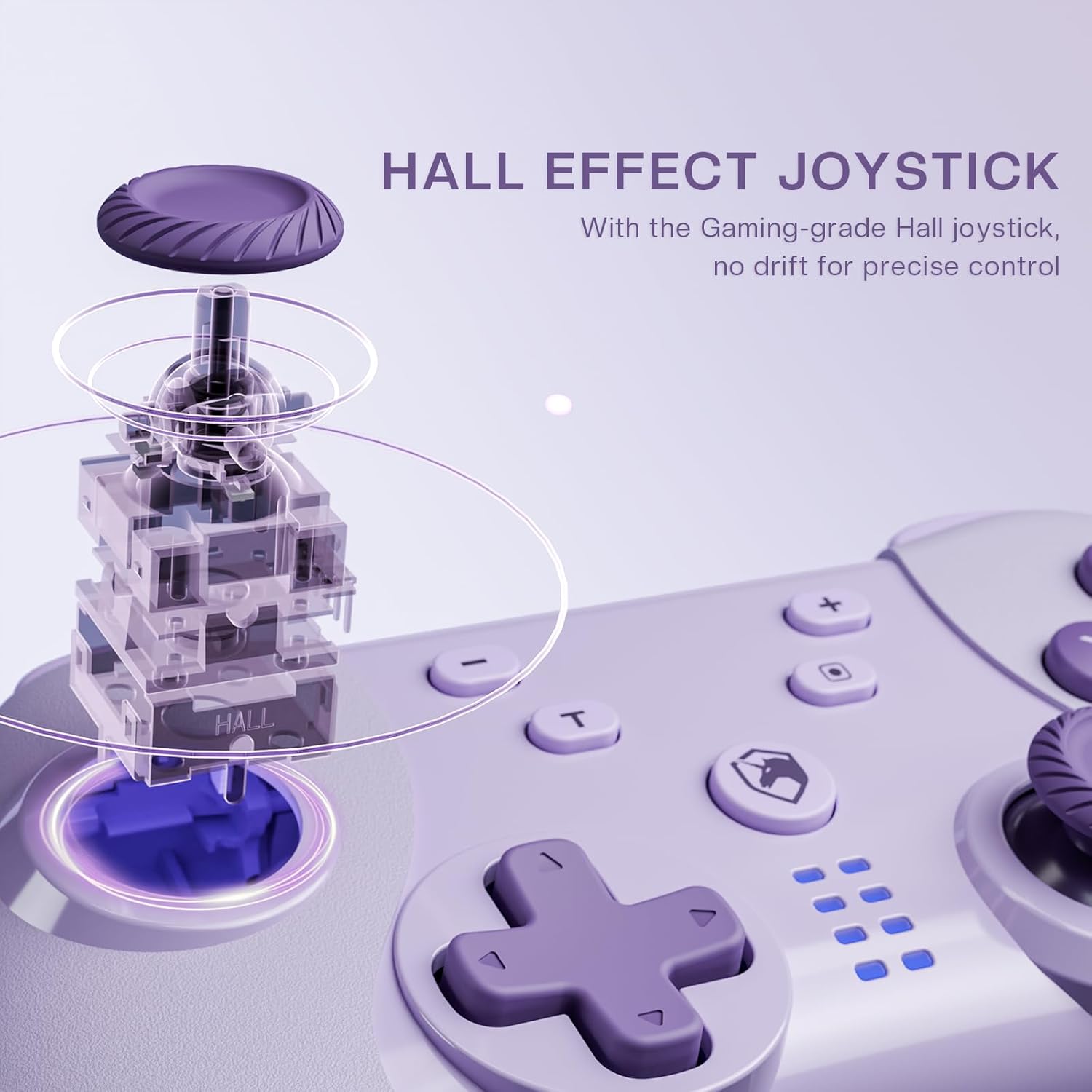
Image 4.1: Diagram illustrating the internal mechanism of a Hall Effect joystick. This image demonstrates how magnetic fields are used for position detection, contributing to drift-free and precise control.
The Hall Effect joysticks provide enhanced precision and durability. This technology uses magnetic fields instead of physical contact, virtually eliminating stick drift and extending the lifespan of the joysticks. No special operation is required; simply enjoy the improved responsiveness and accuracy.
4.3 Macro Function (M Button)
The 'M' button can be programmed for macro functions. Refer to the ECHTPower official website or advanced user guides for detailed instructions on how to program and utilize macro functions for specific gaming scenarios.
5. الصيانة
- تنظيف: استخدم قطعة قماش ناعمة وجافة لتنظيف وحدة التحكم. لا تستخدم مواد كيميائية قاسية أو مواد كاشطة.
- تخزين: قم بتخزين وحدة التحكم في مكان بارد وجاف بعيدًا عن أشعة الشمس المباشرة ودرجات الحرارة القصوى.
- العناية بالبطارية: لإطالة عمر البطارية، تجنب تفريغ وحدة التحكم بالكامل بشكل متكرر. اشحنها بانتظام، حتى في حال عدم استخدامها لفترات طويلة.
- تجنب القطرات: حماية وحدة التحكم من السقوط والصدمات، والتي قد تؤدي إلى تلف المكونات الداخلية.
6. استكشاف الأخطاء وإصلاحها
| مشكلة | السبب المحتمل | حل |
|---|---|---|
| لا يتم تشغيل وحدة التحكم. | بطارية منخفضة. | Charge the controller using the USB-C cable. |
| لا يمكن الاتصال بالجهاز. | Not in pairing mode; Bluetooth interference; device's Bluetooth off. | Ensure controller is in pairing mode (flashing LEDs). Check device's Bluetooth settings. Try restarting both controller and device. |
| تأخر الإدخال أو انقطاع الاتصال. | Distance from device; low battery; wireless interference. | Move closer to the device. Charge the controller. Reduce other wireless devices nearby. |
| انحراف عصا التحكم. | Rare with Hall Effect, but possible calibration issue or extreme wear. | Try recalibrating the joysticks through your device's settings (e.g., Nintendo Switch system settings). If issue persists, contact support. |
7. المواصفات
- نموذج: وحدة تحكم التبديل اللاسلكية
- الاتصال: بلوتوث لاسلكي، USB-C سلكي
- التوافق: Nintendo Switch, PC (Windows), iOS, Android
- Joystick Technology: تأثير هول
- مصدر الطاقة: بطارية قابلة لإعادة الشحن مدمجة
- منفذ الشحن: يو اس بي-سي
- ASIN: B0DNN1BP4F
8. الضمان والدعم
ECHTPower products come with a standard manufacturer's warranty. For specific warranty terms and conditions, please refer to the warranty card included with your product or visit the official ECHTPower webموقع.
If you encounter any issues or have questions not covered in this manual, please contact ECHTPower customer support:
- Webموقع: ECHTPower Official Store on Amazon
- بريد إلكتروني: يرجى الرجوع إلى عبوة المنتج أو الموقع الرسمي webموقع للتواصل عبر البريد الإلكتروني.


