1. انتهى المنتجview
The Dormakaba DP 850 is an intelligent door lock designed for enhanced security and convenience. It features a push-pull handle and an automatic motor lock body. This lock offers multiple access methods and integrated safety features.
تتضمن الميزات الرئيسية ما يلي:
- طرق الوصول المتعددة: Fingerprint, RFID Cards, PIN Code, Bluetooth Low Energy (BLE) via mobile app, and Mechanical Override Keys.
- Innovative Push-Pull Handle: Allows for effortless operation in either direction.
- Automatic Motor Lock Body: Provides secure locking.
- ميزات السلامة المتقدمة: Includes alarms for multiple failed entry attempts, high-temperature warnings, break-in attempts, and child lock functionality.
- بناء متين: Made with a metal body.
2. المكونات
Familiarize yourself with the components of your Dormakaba DP 850 Smart Door Lock:

وصف الصورة: A detailed diagram illustrating the outdoor and indoor units of the Dormakaba DP 850 Smart Door Lock. Key components are labeled with letters A through O for easy identification. The outdoor unit shows the keypad, RFID reader, fingerprint sensor, and handle. The indoor unit displays the battery compartment, emergency power terminal, and various buttons.
مكونات الوحدة الخارجية:
- Battery Warning Lamp: يشير إلى حالة البطارية المنخفضة.
- قارئ بطاقات RFID: لفتح القفل باستخدام بطاقات RFID.
- BLE Display Lamp: Indicates Bluetooth Low Energy status.
- Status Display Lamp: Provides visual feedback on lock status.
- لوحة المفاتيح: لإدخال رموز PIN.
- Fingerprint Sensor (DP850): For biometric unlocking.
- مقبض خارجي: The exterior push-pull handle.
- [Reset] Button: Used for resetting the lock.
مكونات الوحدة الداخلية:
- Emergency Power Supply Terminal: For external power in case of battery depletion.
- [Register] Button: Used for registering new users (fingerprints, cards, PINs).
- [CLOSE] Button: For manual locking from the inside.
- Blocking Indoor Handle: A mechanism to prevent the indoor handle from operating.
- مقبض داخلي: The interior push-pull handle.
- غطاء البطارية: يحمي حجرة البطارية.
- بطارية: Power source for the lock.
3. محتويات العبوة
Verify that all items are present in your Dormakaba DP 850 Smart Door Lock package:
- Dormakaba DP 850 Smart Door Lock Unit (Outdoor and Indoor)
- بطاقة (بطاقات) تحديد الهوية بموجات الراديو (RFID)
- مسامير للتثبيت
- Strip (likely for cable management or sealing)
- Manual Key(s) (3 keys included)
4. الإعداد والتثبيت
Proper installation is crucial for the functionality and security of your smart door lock. It is recommended to utilize professional installation services where available.
4.1 متطلبات الباب
- سمك الباب المناسب: The lock is designed for doors with a thickness between 40mm and 75mm.
- Ensure the door frame and existing mortise cutout are compatible with the DP 850 lock body dimensions.

وصف الصورة: لقطة مقرّبة view of a door edge with the mortise lock installed. Text overlays indicate 'Suitable Door Thickness 40-75mm' and 'Double Deadbolt Security', highlighting these key installation and security features.
4.2 خطوات التثبيت (عامة)
While professional installation is advised, the general steps involve:
- جهز الباب: Ensure the door is clean and the mortise cutout is correctly sized.
- تركيب جسم قفل النقرة: أدخل التجويف في حافة الباب وثبته بالمسامير.
- تركيب الوحدة الخارجية: Mount the outdoor unit, feeding necessary cables through the door.
- Install Indoor Unit: Connect the cables from the outdoor unit to the indoor unit and secure the indoor unit to the door.
- تركيب البطاريات: Open the battery cover on the indoor unit and insert the required batteries (refer to the diagram for battery location).
- وظيفة الاختبار: بعد التركيب، اختبر جميع طرق فتح القفل وتأكد من أن القفل يعمل بسلاسة.
4.3 Free Installation Service
Dormakaba offers free installation services in multiple cities. Please refer to the provided map or contact customer support to check if your location is covered.
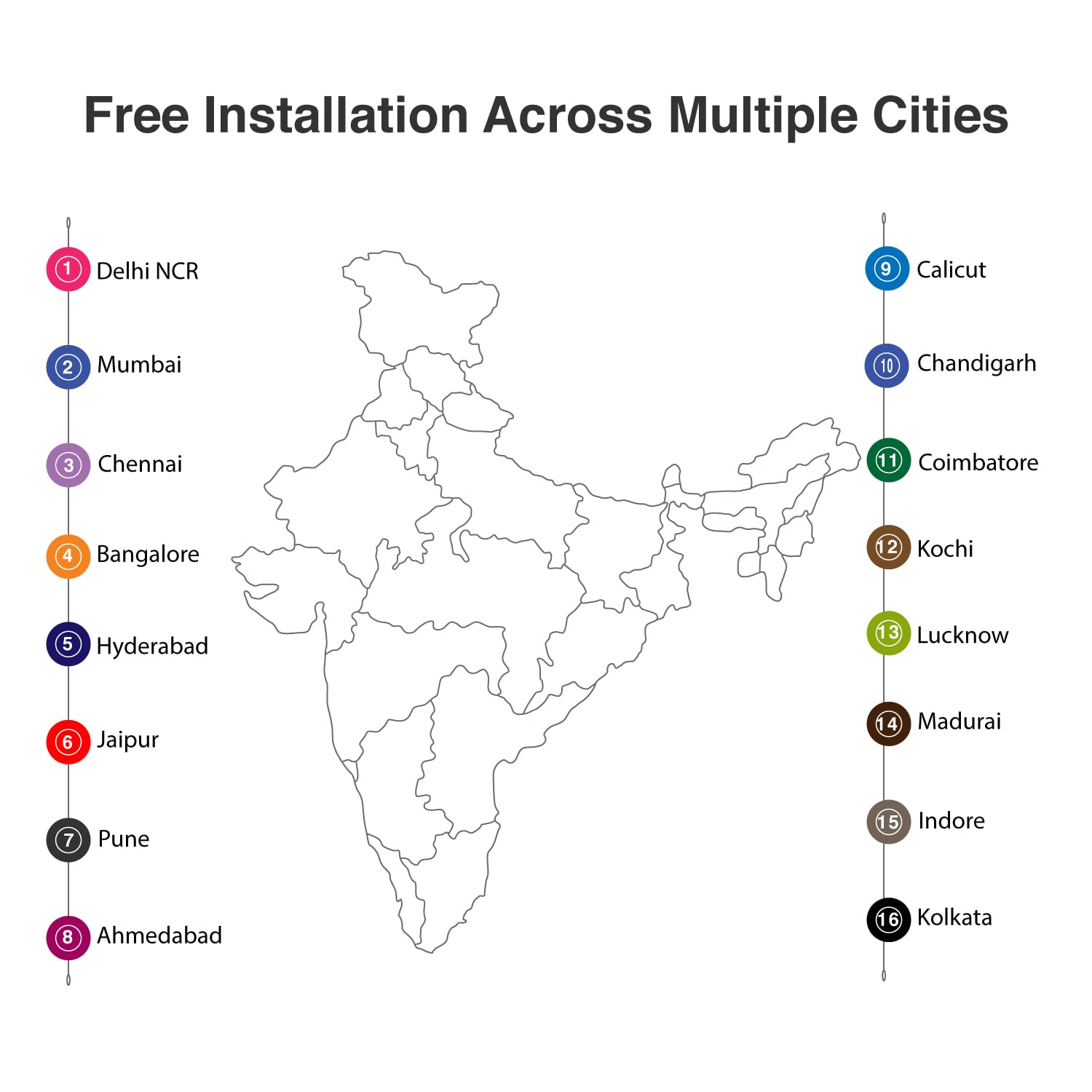
وصف الصورة: A map of India with numbered markers indicating cities where free installation services are available. These cities include Delhi NCR, Mumbai, Chennai, Bangalore, Hyderabad, Jaipur, Pune, Ahmedabad, Calicut, Chandigarh, Coimbatore, Kochi, Lucknow, Madurai, Indore, and Kolkata.
5. تعليمات التشغيل
The Dormakaba DP 850 Smart Door Lock provides six methods for access control.

وصف الصورة: An infographic displaying six distinct unlocking methods for the Dormakaba DP 850 Smart Door Lock. Icons represent Fingerprint, Password, OTP (One-Time Password), Smart App (Bluetooth), Mechanical Key Override, and RFID, illustrating the versatility of access options.
5.1 طرق إلغاء القفل
- بصمة: Place your registered finger on the fingerprint sensor. The lock will unlock upon successful verification. Up to 100 fingerprints can be registered.
- بطاقات RFID: Present a registered RFID card to the RFID card reader area. The lock will unlock. Up to 100 RFID cards can be registered.
- Screen Touch PIN Code: Enter your 4-12 digit PIN code on the keypad, followed by the '#' key. The lock will unlock. Up to 4 PIN codes can be stored.
- BLE (Bluetooth Low Energy) Mobile App: Use the dedicated mobile application on a registered device to unlock the door via Bluetooth. Up to 10 mobile devices can be paired.
- Mechanical Override Keys: In case of emergency or battery failure, insert and turn one of the three provided mechanical keys to unlock the door.
- Push & Pull Handle: The innovative handle allows for intuitive opening. Simply push or pull the handle to open the door once unlocked by any of the above methods.

وصف الصورة: A visual representation of the Dormakaba DP 850 Smart Door Lock's push-pull handle mechanism. The image highlights the ergonomic design that allows the handle to be pushed or pulled for door operation, emphasizing its ease of use.
5.2 تسجيل المستخدم
To register new fingerprints, RFID cards, or PIN codes:
- اضغط على [يسجل] button on the indoor unit.
- Follow the voice prompts or visual cues on the lock's display.
- For fingerprints, place your finger on the sensor multiple times as instructed.
- For RFID cards, present the card to the reader.
- For PIN codes, enter your desired code and confirm it.
- Ensure successful registration is confirmed by the lock.
5.3 قفل الباب
The Dormakaba DP 850 features an automatic motor lock body, which typically locks automatically after the door is closed. You can also manually lock it from the inside by pressing the [CLOSE] زر.
5.4 Child Lock Functionality
To activate or deactivate the child lock, locate the blocking indoor handle mechanism on the indoor unit. Engage this mechanism to prevent the indoor handle from being operated, ensuring children cannot accidentally open the door from the inside.
6. ميزات السلامة
The Dormakaba DP 850 Smart Door Lock incorporates several safety and alarm features to enhance security:

وصف الصورة: An infographic illustrating the various alarm features of the Dormakaba DP 850 Smart Door Lock. Icons and text describe alarms for high temperature, wrong PIN entry, low battery, high voltage prevention, and break-in attempts, highlighting the lock's comprehensive security.
- Alarm for Multiple Failed Entry Attempts: If an incorrect PIN code or unregistered fingerprint/card is attempted multiple times, an alarm will sound, and the lock may temporarily disable entry.
- High-Temperature Warning System: In case of abnormally high temperatures (e.g., fire), the lock may trigger an alarm and automatically unlock to facilitate escape.
- Break-in Attempt Alarm: If the lock detects forced entry or tampering, an alarm will be activated.
- إنذار انخفاض البطارية: The battery warning lamp (A) will illuminate, and an audible alert will sound when the battery level is low, prompting replacement.
- ارتفاع حجمtage Prevention: The lock is designed with protection against high voltagه العواصف.
7. الصيانة
To ensure the longevity and optimal performance of your Dormakaba DP 850 Smart Door Lock, follow these maintenance guidelines:
- تنظيف: امسح سطح القفل بقطعة قماش ناعمة وجافة. تجنب استخدام المنظفات الكاشطة أو المذيبات أو المواد الكيميائية القاسية، لأنها قد تتلف الطلاء والمكونات الإلكترونية.
- استبدال البطارية: When the low battery alarm activates, replace all batteries promptly. Use high-quality alkaline batteries of the specified type. Refer to the Components section for battery location (O) and cover (N).
- Mechanical Key Usage: Keep the mechanical override keys in a safe, accessible location outside the secured area for emergency use. Test them periodically to ensure they function correctly.
- العناية بمستشعر بصمة الإصبع: Keep the fingerprint sensor clean and dry. Avoid scratching its surface.
8. استكشاف الأخطاء وإصلاحها
If you encounter issues with your Dormakaba DP 850 Smart Door Lock, refer to the following common problems and solutions:
- القفل لا يستجيب:
- تحقق من مستوى شحن البطارية. استبدل البطاريات إذا كان مستوى الشحن منخفضاً.
- If completely unresponsive, use the emergency power supply terminal (I) with a 9V battery or the mechanical override key.
- لم يتم التعرف على بصمة الإصبع:
- تأكد من أن إصبعك نظيف وجاف.
- حاول تغيير موضع إصبعك على المستشعر.
- If issues persist, re-register your fingerprint.
- رمز PIN لا يعمل:
- Ensure you are entering the correct PIN code.
- Check if the keypad is illuminated and responsive.
- If multiple incorrect attempts trigger an alarm, wait for the lockout period to expire.
- RFID Card Not Detected:
- Ensure the card is correctly presented to the RFID reader (B).
- Verify the RFID card is registered to the lock.
- Lock Alarms Continuously:
- Identify the type of alarm (e.g., low battery, break-in, high temperature) from the status display lamp or audible cues.
- Address the underlying cause (e.g., replace batteries, secure the door).
- Door Does Not Lock Automatically:
- Check if the door is fully closed and aligned with the frame.
- Inspect the mortise and strike plate for obstructions.
If these steps do not resolve the issue, please contact Dormakaba customer support.
9. المواصفات
| ميزة | مواصفة |
|---|---|
| اسم الموديل | دي بي-850 |
| ماركة | dormakaba |
| نوع القفل | القياسات الحيوية، المزلاج، لوحة المفاتيح |
| مادة | معدن |
| لون | الذهب الأبيض |
| أبعاد العنصر (الطول × العرض × الارتفاع) | 23 × 90 × 420 مليمتر (2.3 × 9 × 42 سم) |
| وزن العنصر | 5.25 كيلوغرام (5 كجم 250 غرام) |
| سمك الباب الموصى به | 40-75 ملم |
| سعة بصمة الإصبع | حتى 100 |
| قدرة بطاقة RFID | حتى 100 |
| سعة رمز PIN | Up to 4 (4-12 digits) |
| BLE Device Capacity | Up to 10 mobile devices |
| طريقة التحكم | المس، صوت |
| بروتوكول الاتصال | بلوتوث |
| المكونات المضمنة | RFID Card, Screws, Strip, Manual Key (3) |
10. معلومات الضمان
The Dormakaba DP 850 Smart Door Lock comes with a ضمان لمدة 1 سنوات from the date of purchase. This warranty covers manufacturing defects and ensures the product functions as intended under normal use. Please retain your proof of purchase for warranty claims. For detailed terms and conditions, refer to the warranty card included in your package or contact Dormakaba customer support.
11. معلومات الدعم والاتصال
For technical assistance, installation queries, or warranty claims, please contact Dormakaba customer support:
- الشركة المصنعة: Dormakaba India Private Limited
- المستورد/المعبئ: Build pro Technologies India Pvt.Ltd
- Refer to your product packaging or the official Dormakaba webللحصول على أحدث تفاصيل الاتصال، بما في ذلك أرقام الهواتف وعناوين البريد الإلكتروني، يرجى زيارة الموقع.


