مقدمة
The HMD Pulse Pro is an advanced unlocked smartphone designed for global use, featuring a powerful 50 MP dual rear camera and an equally impressive 50 MP front camera. It runs on Android 14, offers extended battery life, and boasts a repair-at-home design for user convenience. This manual provides essential information for setting up, operating, maintaining, and troubleshooting your device.
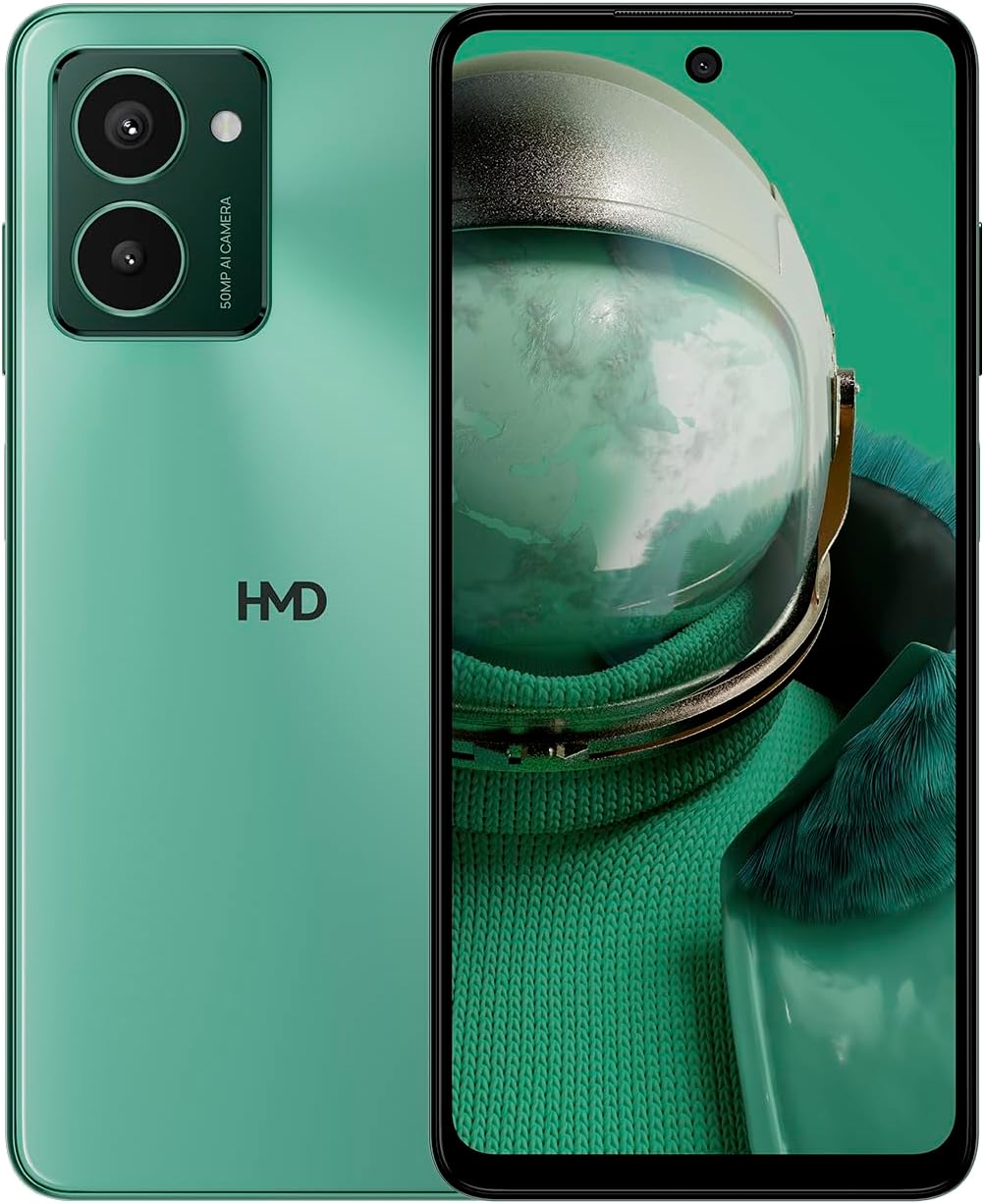
The HMD Pulse Pro smartphone in Glacier Green, showcasing its sleek design and dual camera system on the rear, alongside its vibrant display.
المميزات الرئيسية:
- Striking design with refined lines and a cutting-edge aesthetic.
- Equipped with 50 MP rear and 50 MP front cameras for balanced and high-quality photography.
- Innovative selfie gesture function for easier and more dynamic self-portraits.
- Extended battery life providing up to 59 hours of usage on a single charge.
- International version, unlocked for compatibility with various carriers worldwide.
ماذا يوجد في الصندوق
Upon unboxing your HMD Pulse Pro, please ensure all the following items are present:
- هاتف اتش ام دي بالس برو الذكي
- كابل يو اس بي
- أداة إخراج درج بطاقة SIM
- دليل البدء السريع (قد يكون منفصلاً أو مدمجاً)
يثبت
1. الشحن الأولي
Before first use, it is recommended to fully charge your HMD Pulse Pro. Connect the provided USB cable to the phone's charging port and the other end to a compatible USB power adapter (not always included) or a computer USB port. The device supports fast charging.
2. إدخال بطاقات SIM وبطاقة MicroSD
The HMD Pulse Pro supports dual SIM cards and expandable memory via a microSD card.
- حدد مكان درج بطاقة SIM على جانب هاتفك.
- Insert the SIM tray ejector tool into the small hole next to the tray and gently push until the tray pops out.
- ضع بطاقات Nano-SIM في الفتحات المخصصة لها. تأكد من أن نقاط التلامس الذهبية متجهة للأسفل.
- If using a microSD card for additional storage, place it into its dedicated slot on the tray.
- قم بدفع الدرج بعناية إلى داخل الهاتف حتى يستقر في مكانه.
3. التشغيل والتكوين الأولي
Press and hold the Power button until the HMD logo appears. Follow the on-screen instructions to complete the initial setup, including language selection, Wi-Fi connection, Google account setup, and security settings.
تعليمات التشغيل
الملاحة الأساسية
- شاشة تعمل باللمس: Navigate by tapping, swiping, pinching, and spreading on the 6.65-inch display.
- زر الطاقة: اضغط لتنشيط/إيقاف الشاشة. اضغط مع الاستمرار لإيقاف التشغيل أو إعادة التشغيل.
- أزرار التحكم في الصوت: اضبط مستوى صوت الوسائط، ومستوى صوت المكالمات، ومستوى صوت الإشعارات.
استخدام الكاميرا
The HMD Pulse Pro features a 50 MP dual rear camera and a 50 MP front camera, enhanced with AI capabilities.

A user demonstrating the innovative selfie gesture feature of the HMD Pulse Pro, allowing for hands-free photo capture.

لقطة مقرّبة view of the HMD Pulse Pro's 50 MP front-facing camera, highlighting its AI-powered capabilities for enhanced selfies.
- إطلاق الكاميرا: Tap the Camera app icon or use a quick gesture (if enabled in settings).
- التقاط الصور: Tap the shutter button. Use pinch-to-zoom for optical or digital zoom.
- Selfie Gestures: Utilize pre-defined hand gestures to trigger the front camera shutter without touching the screen. Refer to the in-app camera settings for available gestures.
- الأوضاع: Switch between various modes like Portrait, Night, Panorama, and Video.
إدارة البطارية
The HMD Pulse Pro is equipped with a 5000 mAh battery, offering up to 59 hours of usage.

Two HMD Pulse Pro smartphones standing upright, with text emphasizing the impressive battery life of up to 59 hours.
- الشحن: Use the provided USB cable. A full charge takes approximately 2.5 hours.
- توفير البطارية: Enable Battery Saver mode in Settings > Battery to extend usage time.
- تحسين الاستخدام: Reduce screen brightness, disable unused connectivity (Bluetooth, Wi-Fi, GPS), and close background apps to conserve battery.
صيانة
تنظيف جهازك
To keep your HMD Pulse Pro in optimal condition:
- استخدم قطعة قماش ناعمة وخالية من الوبر لمسح الشاشة والجسم.
- تجنب استخدام المواد الكيميائية القاسية، أو المنظفات الكاشطة، أو البخاخات الهوائية.
- The device is water resistant; however, avoid submerging it in water.
تحديثات البرامج
تحقق من تحديثات البرامج بانتظام وثبتها لضمان حصول جهازك على أحدث الميزات وتحديثات الأمان وتحسينات الأداء. انتقل إلى الإعدادات > النظام > تحديث النظام.
إدارة التخزين
With 256 GB of internal storage, you have ample space. However, regularly manage your files and apps to maintain performance. You can also expand storage using a microSD card.
استكشاف الأخطاء وإصلاحها
This section addresses common issues you might encounter with your HMD Pulse Pro.
| مشكلة | الحل المحتمل |
|---|---|
| الجهاز لن يتم تشغيله | تأكد من شحن البطارية. قم بتوصيلها بالشاحن لمدة 30 دقيقة على الأقل. حاول الضغط باستمرار على زر التشغيل لمدة 10-15 ثانية. |
| التطبيقات تتعطل أو تتجمد | Clear the app's cache (Settings > Apps > [App Name] > Storage > Clear cache). Restart the phone. Update the app or the phone's software. |
| عمر البطارية ضعيف | Check background app usage (Settings > Battery). Reduce screen brightness. Disable unused connectivity features (Wi-Fi, Bluetooth, GPS, NFC). Enable Battery Saver mode. |
| لا يمكن الاتصال بشبكة Wi-Fi/Bluetooth | Toggle Wi-Fi/Bluetooth off and on. Restart your phone and the router/device. Forget the network/device and reconnect. |
| لم يتم الكشف عن بطاقة SIM | Ensure the SIM card is correctly inserted in the tray. Restart the phone. Check with your carrier for network issues. |
إعادة ضبط المصنع
في حال استمرار المشاكل، قد يكون من الضروري إعادة ضبط المصنع. تحذير: سيؤدي هذا إلى مسح جميع البيانات على هاتفك. انسخ بياناتك المهمة احتياطيًا قبل المتابعة.
- انتقل إلى الإعدادات > النظام > خيارات إعادة التعيين.
- حدد "مسح جميع البيانات (إعادة ضبط المصنع)".
- قم بتأكيد قرارك وأدخل رقم التعريف الشخصي (PIN)/النمط/كلمة المرور إذا طُلب منك ذلك.
- سيعاد تشغيل الهاتف ويبدأ عملية إعادة الضبط.
تحديد
Detailed technical specifications for the HMD Pulse Pro smartphone:

The HMD Pulse Pro highlighting its stylish and cutting-edge design, dual SIM support, and 6.56" HD+ HID display with a 90Hz refresh rate. Note: While the image mentions 8GB/128GB, this specific model features 8GB RAM and 256GB internal storage.
| ميزة | التفاصيل |
|---|---|
| اسم الموديل | Pulse Pro (TA-1606) |
| نظام التشغيل | أندرويد 14 |
| حجم العرض | 6.65 بوصة |
| دقة | 720 × 1612 |
| معدل التحديث | 90 هرتز |
| ذاكرة الوصول العشوائي (RAM) | 8 جيجا بايت |
| سعة التخزين | 256 جيجابايت (قابلة للتوسيع) |
| الكاميرا الخلفية | كاميرا مزدوجة بدقة 50 ميجابكسل |
| الكاميرا الأمامية | 50 ميجا بكسل |
| سعة البطارية | 5000 مللي أمبير |
| وقت الشحن | حوالي 2.5 ساعات |
| سرعة وحدة المعالجة المركزية | 1.6 جيجاهرتز |
| الاتصال | بلوتوث، واي فاي، USB، NFC |
| المميزات الخاصة | يدعم الشحن السريع، وشريحتين SIM، وذاكرة قابلة للتوسيع، ونظام تحديد المواقع العالمي (GPS) مدمج، ومقاوم للماء |
| أبعاد | 6.43 × 2.95 × 0.34 بوصة |
| وزن العنصر | 0.249 أونصة (7.06 جرامًا) |
| مقبس الصوت | 3.5 ملم |
| لون | Glacier Green |
الضمان والدعم
ضمان الشركة المصنعة
Your HMD Pulse Pro smartphone is covered by a manufacturer's warranty against defects in materials and workmanship. The specific terms and duration of the warranty may vary by region. Please refer to the warranty card included with your product or visit the official HMD webموقع للحصول على معلومات الضمان التفصيلية.
دعم العملاء
For technical assistance, troubleshooting beyond this manual, or warranty claims, please contact HMD customer support. You can typically find contact information (phone numbers, email, support portals) on the official HMD webالموقع أو من خلال قسم الدعم في إعدادات جهازك.
الموارد المتاحة على الإنترنت: For the latest FAQs, software downloads, and support articles, visit the official HMD support page. (Specific URL not provided in input, so a generic statement is used).


