1. المقدمة
This manual provides comprehensive instructions for the setup, operation, and maintenance of your Aokeo Wireless Microphone System. Designed for various applications including singing, karaoke, church events, and DJ performances, this system offers clear sound quality and stable signal transmission. Please read this manual thoroughly before using the product to ensure optimal performance and longevity.

Figure 1.1: Aokeo Wireless Microphone System components, including the receiver and two handheld microphones.
2. محتويات العبوة
تأكد من وجود جميع العناصر المدرجة أدناه في الحزمة الخاصة بك:
- ميكروفون × 2
- جهاز استقبال × 1
- Aerial x 2
- Anti-slip ring x 2
- كابل الطاقة × 1
- كابل 6.35 مم × 1
- AA battery (random) x 4
- صندوق التعبئة والتغليف × 1
- دليل × 1

Figure 2.1: All components included in the Aokeo Wireless Microphone System package.
3. انتهى المنتجview
3.1 ميزات جهاز الاستقبال
The receiver unit is the central hub for the wireless microphone system, managing signal reception and output. It features individual volume controls for each microphone channel, an LED screen displaying frequency and signal strength, and various output ports for connection to audio equipment.

الشكل 3.1: الأمامي والخلفي view of the receiver with labeled components.
- Microphone Output A/B: Dedicated outputs for each microphone.
- 6.35mm Mic Plug: مخرج الصوت الرئيسي.
- قوة: منفذ إدخال الطاقة.
- جوي: Antennas for stable signal reception.
- Mic A/B Volume Adjustment: Rotary knobs to control individual microphone volumes.
- AF/RF Signal Light: Indicators for audio frequency and radio frequency signals.
- شاشة ليد: Displays channel, frequency, and signal strength.
- مفتاح التشغيل: يقوم بتشغيل/إيقاف جهاز الاستقبال.
3.2 ميزات الميكروفون
The handheld microphones are designed for clear audio capture and durability. They feature a metal mesh head with a blowout prevention sponge, an LED screen for channel display, and are powered by AA batteries.
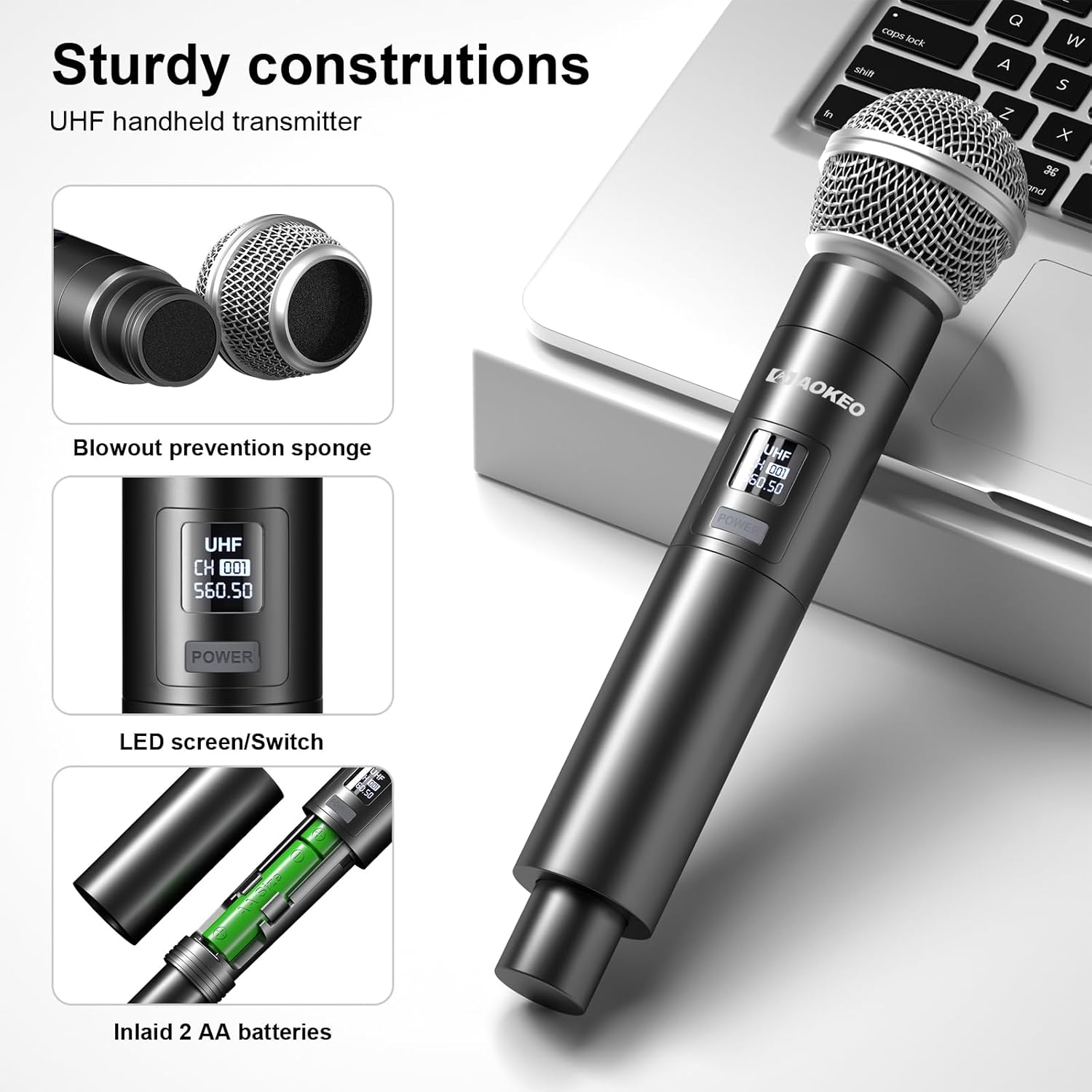
Figure 3.2: Handheld microphone components.
- Metal Mesh Head: يحمي كبسولة الميكروفون ويساعد على تقليل الأصوات الانفجارية.
- Blowout Prevention Sponge: Integrated inside the mesh head to further reduce breath noise and plosives.
- LED Screen/Switch: Displays channel information and serves as the power button.
- حجرة البطارية: Houses 2 AA batteries for power.
4. تعليمات الإعداد
Follow these steps to set up your Aokeo Wireless Microphone System:
- توصيل جهاز الاستقبال: Plug the receiver into a power source using the provided power cable.
- الاتصال بمصدر الصوت: Use the 6.35mm cable to connect the receiver's output to your sound system (e.g., mixer, amplifier, karaoke machine, outdoor speaker). Ensure the connection is secure.

Figure 4.1: Product connection diagram.
- أدخل البطاريات في الميكروفونات: Open the battery compartment of each microphone and insert 2 AA batteries (included), ensuring correct polarity.
- تشغيل الطاقة: Turn on the receiver using its power switch. Then, turn on each microphone using its power switch. The receiver and microphones will automatically synchronize their frequencies.
- ضبط مستوى الصوت: Use the volume knobs on the receiver to adjust the output level of each microphone.
The system is now ready for use. For optimal performance, ensure the receiver's aerials are extended and positioned for best signal reception.
5. دليل التشغيل
5.1 الاستخدام الأساسي
Once set up, the Aokeo Wireless Microphone System operates on a plug-and-play principle. The microphones and receiver automatically pair upon power-on. The system is designed for stable signal transmission up to 100 feet (approximately 30 meters) in an open outdoor environment, and up to 200 feet (approximately 60 meters) in an open space.
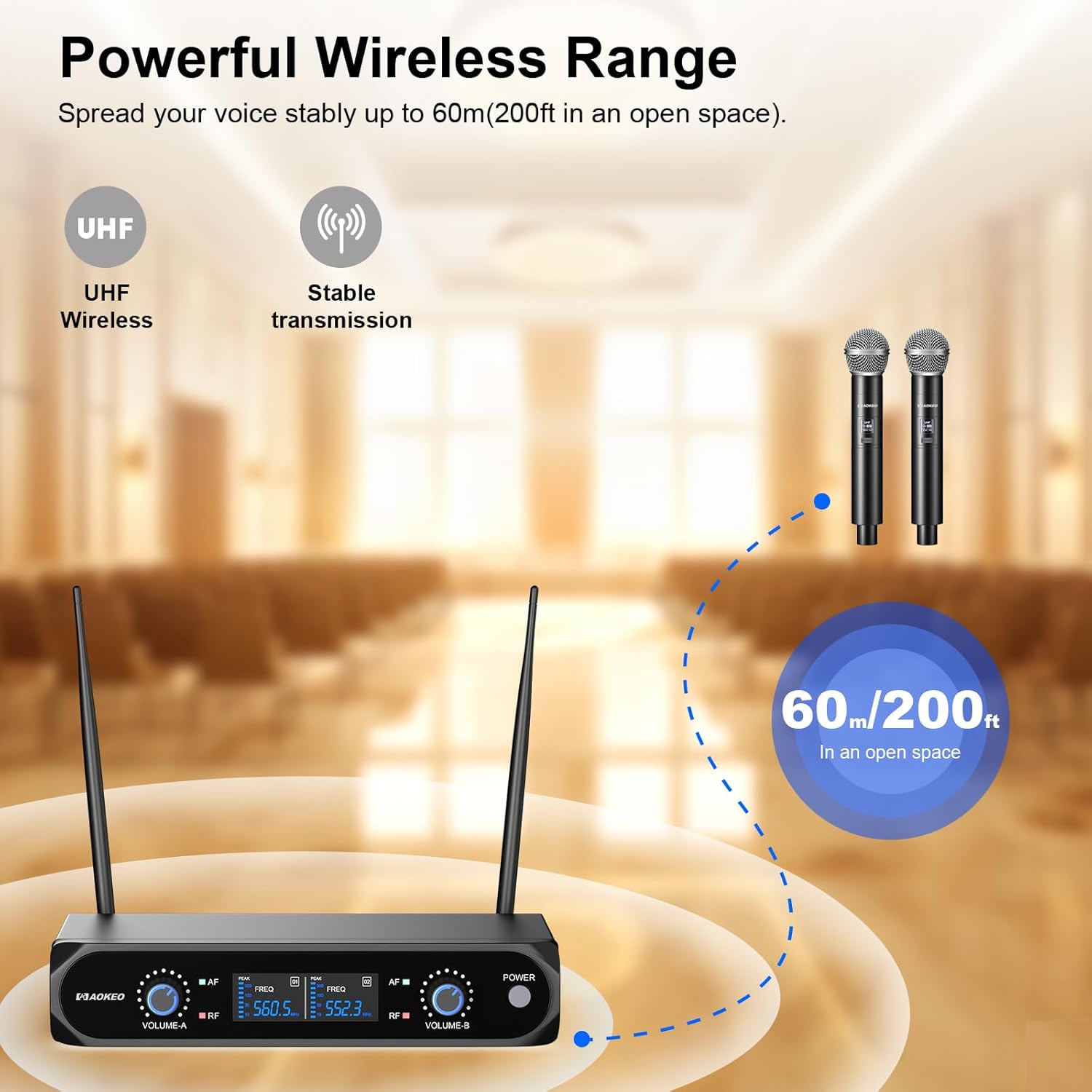
Figure 5.1: Wireless range capability.
5.2 جودة الصوت وتقليل الضوضاء
The system incorporates high-quality chips and automatic noise reduction to ensure clear, pure, and full sound quality. The dynamic microphones are designed for accurate sound pickup, reproducing human voices and instruments effectively.

Figure 5.2: Dynamic microphone sound pickup and noise reduction.
5.3 توافق واسع
The Aokeo Wireless Microphone System is compatible with a variety of audio equipment featuring a 6.35mm interface. This includes karaoke machines, mixers, power amplifiers, outdoor speakers, sound cards, and other multimedia equipment.

Figure 5.3: Compatible devices and interface types.
ملحوظة: To connect to mobile phones, computers, or tablets, an additional 3.5mm (1/8") interface adapter is needed, which is not included in the package.
6. الصيانة والعناية
- تنظيف: Use a soft, dry cloth to clean the microphones and receiver. Avoid using liquid cleaners or solvents, as they may damage the components.
- استبدال البطارية: Replace AA batteries in the microphones when the power indicator shows low battery or when performance degrades. Ensure to use new, high-quality alkaline AA batteries for optimal battery life (over 8 hours of continuous use).
- تخزين: عند عدم استخدام الميكروفونات لفترات طويلة، قم بإزالة البطاريات منها لمنع التسرب. خزّن الجهاز في مكان بارد وجاف بعيدًا عن أشعة الشمس المباشرة ودرجات الحرارة القصوى.
- التعامل: Handle microphones and receiver with care. Avoid dropping or subjecting them to strong impacts, which can damage internal components.
7. استكشاف الأخطاء وإصلاحها
| مشكلة | السبب المحتمل | حل |
|---|---|---|
| لا يوجد صوت من الميكروفون |
|
|
| Intermittent sound or signal dropouts |
|
|
| جودة صوت رديئة (تشويش، ضوضاء ثابتة) |
|
|
8. المواصفات
- ماركة: أوكيو
- رقم الموديل: 854289008802
- عامل شكل الميكروفون: محمول باليد
- مصدر الطاقة: Battery Powered (4 AA batteries required, included)
- إشارة إلى نسبة الضوضاء: 80 ديسيبل
- عدد القنوات: 2
- مستوى الضوضاء: 70 ديسيبل
- وزن السلعة: 2.9 رطل
- أبعاد الحزمة: 13.86 × 10.83 × 2.24 بوصة
- تقنية الاتصال: UHF لاسلكي
- نوع الموصل: 6.35 mm Jack (for receiver output)
- ميزة خاصة: التحكم في مستوى الصوت
- الاستخدامات الموصى بها: داخلي/خارجي
- النمط القطبي: أحادي الاتجاه (قلبي الشكل)
- حساسية الصوت: 120 ديسيبل
9. الضمان والدعم
Aokeo provides خدمة ما بعد البيع لمدة 12 شهرًا for this product. If you encounter any issues with your Aokeo Wireless Microphone System, please contact our customer support. We are committed to assisting you and will replace your product with a new one if necessary.
For support, please refer to the contact information provided on the product packaging or the official Aokeo webموقع.


