1. المقدمة
Thank you for choosing the Donner DDP-95 Digital Piano. This instrument is designed to provide an authentic piano playing experience with modern digital features, suitable for beginners and experienced players alike. This manual provides essential information for the safe and effective use of your digital piano.
1.1 معلومات السلامة
- مزود الطاقة: استخدم محول الطاقة المحدد فقط. تأكد من مستوى الصوتtage يطابق مصدر الطاقة المحلي لديك.
- الموقع: Place the piano on a stable, level surface. Avoid direct sunlight, heat sources, and excessive humidity.
- تنظيف: استخدم قطعة قماش ناعمة وجافة للتنظيف. لا تستخدم المنظفات السائلة أو المذيبات.
- الماء والرطوبة: Keep the instrument away from water or any liquids. Do not operate with wet hands.
- تهوية: تأكد من وجود تهوية مناسبة حول الجهاز لمنع ارتفاع درجة حرارته.
- الخدمة: Do not attempt to repair the instrument yourself. Refer all servicing to qualified personnel.
2. انتهى المنتجview
The Donner DDP-95 features an 88-key weighted keyboard, a 4.3-inch LCD display, and a wide array of tones, rhythms, and teaching modes to enhance your musical journey.
2.1 المكونات الرئيسية
- Digital Piano Unit (Keyboard and Stand)
- 3-Pedal System (Soft, Sostenuto, Sustain)
- راحة الموسيقى
- محول الطاقة
- دليل المستخدم

الشكل 2.1: بيانو دونر الرقمي DDP-95، كما هو موضحasing its full size, integrated stand, and three-pedal unit.

الشكل 2.2: من أعلى إلى أسفل view of the DDP-95 control panel, highlighting the LCD display and various function buttons for wireless connection, split, dual tones, MP3, transpose, chord, drum kit, and metronome.
3. الإعداد
3.1 التجميع
The DDP-95 typically comes with the keyboard and stand as separate components. Follow the included assembly guide for detailed instructions on attaching the keyboard to the stand and securing the pedal unit. Ensure all screws are tightened securely before use.
3.2 توصيل الطاقة
- Connect the DC power adapter to the DC 15V input jack on the rear of the piano.
- قم بتوصيل المحول بمأخذ كهربائي قياسي.
3.3 Connecting Pedals
Connect the pedal unit cable to the 'PEDAL' jack on the rear of the piano. The DDP-95 features a 3-pedal system for Soft, Sostenuto, and Sustain functions.

Figure 3.1: The three-pedal system, including Soft, Sostenuto, and Sustain pedals, designed for an authentic playing experience.
3.4 اتصالات الصوت
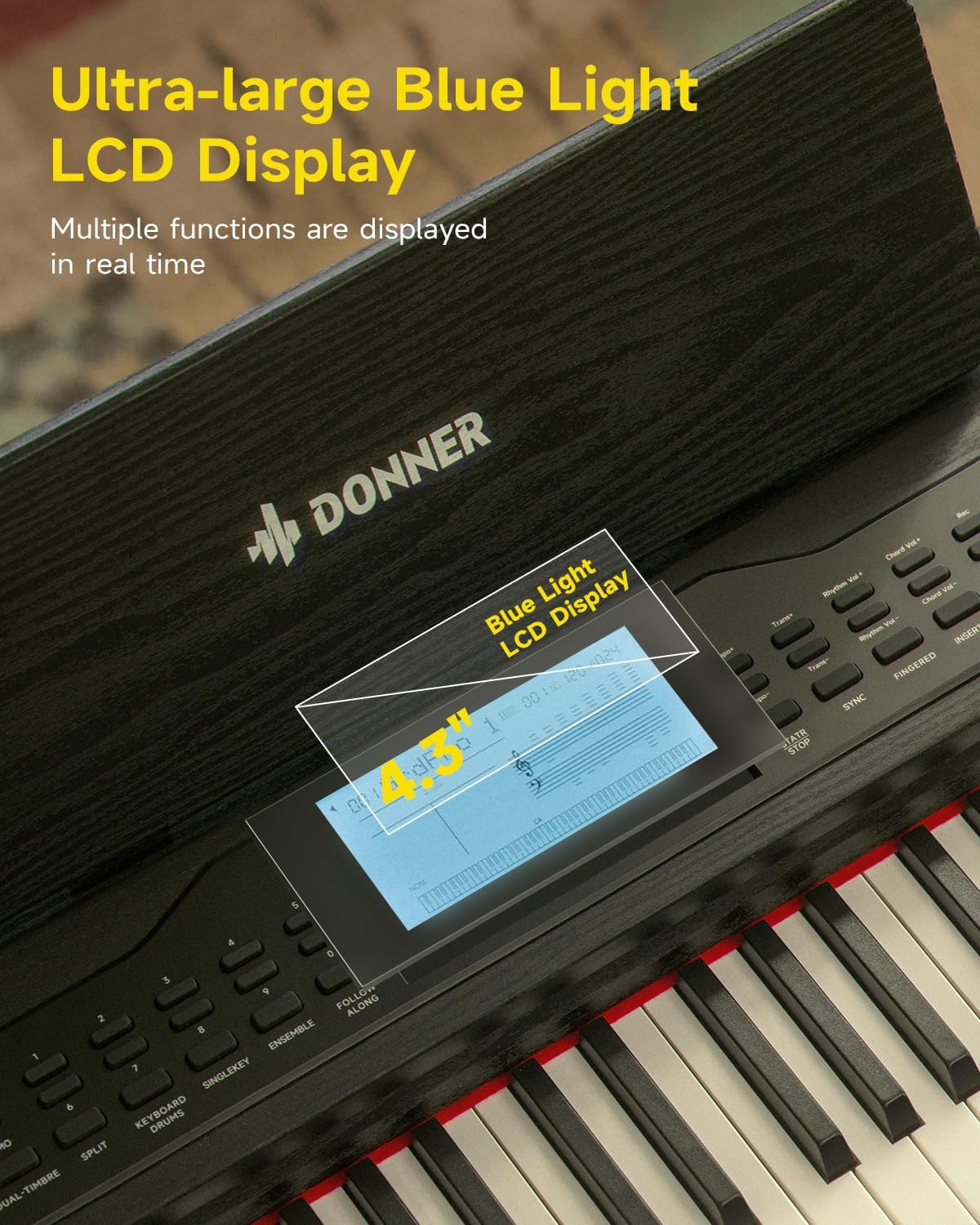
Figure 3.2: Rear panel connections, including (1) DC power jack, (2) Sustain Pedal Jack, (3) Headphone jack, (4) Audio input/output jacks, and (5) USB-MIDI port for connecting to computers, smartphones, and tablets.
- سماعات الرأس: Connect standard 6.35mm stereo headphones to the 'HEADPHONE' jack for private practice.
- مدخل/مخرج الصوت: Use the 'AUDIO IN' and 'AUDIO OUT' 6.35mm jacks to connect to external audio devices like amplifiers, mixers, or other instruments.
3.5 USB-MIDI and Bluetooth Connectivity
- USB-MIDI: Connect the piano to a computer, smartphone, or tablet using a USB-MIDI cable for MIDI data transfer with compatible software.
- بلوتوث: The DDP-95 supports wireless Bluetooth connection for MIDI-compatible applications. Refer to your device's Bluetooth settings and the application's instructions for pairing.
4. تعليمات التشغيل
4.1 التشغيل الأساسي
- تشغيل/إيقاف التشغيل: اضغط على زر "الطاقة" لتشغيل البيانو أو إيقاف تشغيله.
- التحكم في مستوى الصوت: Use the 'VOLUME' knob or buttons to adjust the overall sound level.
- اختيار النغمة: The DDP-95 offers 610 tones. Use the 'TONE' buttons and the LCD display to browse and select different instrument sounds.
- اختيار الإيقاع: Choose from 600 rhythms (including 128 accompaniment styles) using the 'RHYTHM' buttons.
- أغاني العرض التوضيحي: Play through 100 built-in demo songs for inspiration or practice.
- المسرع: قم بتفعيل وظيفة المترونوم للمساعدة في ضبط التوقيت وممارسة الإيقاع.

الشكل 4.1: انتهىview of the DDP-95's extensive sound library, including 610 tones, 600 rhythms, 110 demo songs, and 128-note polyphony.
4.2 شاشة LCD
The 4.3-inch blue light LCD display provides visual feedback on various settings and functions. It can show notes in staff notation, indicate key positions, and offer intuitive prompts.

Figure 4.2: The 4.3-inch blue light LCD display, showing real-time information and musical notation.

Figure 4.3: Detailed breakdown of the LCD display elements: (1) Tone/Demo/Rhythm Name, (2) Number of Bars, (3) Tempo, (4) Rhythmic Volume, (5) Indication of Active Keys, (6) Currently Used Function Icon, (7) Piano Score.
4.3 ميزات لوحة المفاتيح
- 88-Key Fully Weighted Keyboard: Provides an authentic piano feel with hammer action.
- 16-Level Touch Sensitivity: Adjusts the volume and timbre based on how hard or soft you play the keys, allowing for expressive dynamics.

Figure 4.4: Visual representation of the 16-level touch sensitivity, demonstrating how key weight influences sound effects from light to heavy.
4.4 أساليب التدريس
The DDP-95 includes three teaching modes to assist learners:
- مفتاح واحد: Practice individual notes.
- Follow Along: The piano waits for you to play the correct note before proceeding.
- سويا: Practice with an accompaniment, playing your part along with the built-in music.

Figure 4.5: Illustration of the three teaching modes: Single Key, Follow Along, and Ensemble, designed to guide learners progressively.
4.5 التسجيل والتشغيل
The piano allows you to record your performances, with a capacity of up to 5000 bytes. This feature is useful for reviewing your playing, identifying areas for improvement, and capturing musical ideas.
- Press the 'RECORD' button to start recording.
- اضغط على زر "تشغيل" للاستماع إلى أدائك المسجل.
4.6 وظائف إضافية
- لوحة المفاتيح المقسمة: Divides the keyboard into two sections, allowing two different tones to be played simultaneously or for two people to play together.
- Dual Tones: Layers two different tones to create a richer, more complex sound.
- نقل: Shifts the pitch of the entire keyboard up or down in semitone steps.
- وظيفة الوتر: Provides automatic chord accompaniment based on the keys played.
- طقم طبول: Access various drum sounds for rhythm creation.
5. الصيانة
5.1 التنظيف
To maintain the appearance and functionality of your DDP-95 Digital Piano:
- امسح السطح بقطعة قماش ناعمة وجافة وخالية من الوبر.
- بالنسبة للأوساخ العنيدة، قم بإزالة الأوساخ برفق.ampبللي قطعة القماش بالماء، ثم جففيها على الفور.
- Avoid abrasive cleaners, waxes, or solvents as they can damage the finish.
5.2 التخزين
When not in use for extended periods, store the piano in a cool, dry place, away from extreme temperatures and humidity. Cover the keyboard with a dust cover to protect the keys and internal components.
6. استكشاف الأخطاء وإصلاحها
If you encounter issues with your Donner DDP-95, refer to the following common problems and solutions:
| مشكلة | السبب المحتمل | حل |
|---|---|---|
| لا يوجد صوت | مستوى الصوت منخفض جدًا؛ سماعات الرأس موصولة؛ مشكلة في الطاقة. | ارفع مستوى الصوت؛ افصل سماعات الرأس؛ تحقق من توصيل الطاقة. |
| المفاتيح لا تستجيب | Function mode active (e.g., teaching mode); internal error. | Exit special modes; power cycle the instrument. |
| فشل اتصال البلوتوث | الجهاز ليس في وضع الاقتران؛ تداخل؛ مسافة. | Ensure device is discoverable; reduce distance; restart both devices. |
| صوت مشوه | Volume too high; faulty cable; external speaker issue. | Lower volume; check/replace cables; test with different speakers/headphones. |
إذا استمرت المشكلة بعد تجربة هذه الحلول، يرجى الاتصال بدعم عملاء دونر.
7. المواصفات
| ميزة | التفاصيل |
|---|---|
| اسم الموديل | دي دي بي-95 |
| عدد المفاتيح | 88 |
| نوع لوحة المفاتيح | Fully Weighted, Hammer Action |
| حساسية اللمس | 16 مستويات |
| النغمات | 610 |
| الإيقاعات | 600 (128 Accompaniment Styles) |
| الأغاني التجريبية | 100 |
| تعدد الأصوات | 128 ملاحظة |
| عرض | 4.3" Blue Light LCD |
| تسجيل القدرات | حتى 5000 بايت |
| الاتصال | Bluetooth, USB-MIDI, 6.35mm Headphone Jack, 6.35mm Audio In/Out Jacks |
| الدواسات | Soft, Sostenuto, Sustain (3-Pedal System) |
| مصدر الطاقة | التيار الكهربائي DC 15V |
| وزن العنصر | 65.9 رطل (حوالي 29.9 كجم) |
| أبعاد الحزمة | 53.94 × 16.14 × 11.81 بوصة (حوالي 137 × 41 × 30 سم) |
8. الضمان والدعم
8.1 معلومات الضمان
Donner products are manufactured to high-quality standards. For specific warranty terms and conditions, please refer to the warranty card included with your product or visit the official Donner webالموقع. احتفظ بإثبات الشراء الخاص بك لتقديم مطالبات الضمان.
8.2 دعم العملاء
If you have any questions, require technical assistance, or need to report an issue, please contact Donner customer support through their official website or the contact information provided in your product packaging. Provide your model number (DDP-95) and purchase details when seeking support.


