1. المقدمة
The Andesfit Bluetooth Blood Pressure Monitor is designed for accurate and convenient blood pressure measurement at home. This device combines advanced technology with user-friendly features, allowing you to monitor your health effectively and share data with healthcare professionals. It is FDA Cleared and CE Certified, ensuring high quality and safety standards.

Figure 1: Andesfit Blood Pressure Monitor with included cuffs and companion app.
2. ما هو المشمول
Your Andesfit Blood Pressure Monitor package includes the following components:
- Andesfit Blood Pressure Monitor Unit
- Large Blood Pressure Cuff (9-17 inches arm circumference)
- Extra Large Blood Pressure Cuff (13-21 inches arm circumference)
- 4 بطاريات AA (مضمنة)
- USB Type-C Cable (for power, not charging batteries)
- حقيبة التخزين
- دليل المستخدم (هذا المستند)

Figure 2: All components included in the Andesfit Blood Pressure Monitor package.
3. الإعداد
3.1 تشغيل الجهاز
The monitor can be powered using the included AA batteries or via the USB Type-C cable. USB power is prioritized if both are connected.
- تركيب البطارية: Open the battery compartment on the back of the monitor. Insert the 4 AA batteries, ensuring correct polarity (+/-). Close the compartment.
- طاقة USB: Connect the provided USB Type-C cable to the monitor's USB port and plug the other end into a compatible USB power source (e.g., wall adapter, power bank). Note: The USB port is for power supply only and does not charge the batteries.

Figure 3: Dual power mode options for the monitor.
3.2 تركيب الكفة
Select the appropriate cuff size (Large or Extra Large) for your arm. Connect the cuff's air tube securely into the air jack on the side of the monitor unit.

Figure 4: The two included cuff sizes for optimal fit.
3.3 تثبيت التطبيق (اختياري ولكن يُنصح به)
For enhanced tracking and data management, download the "ANDESFITBP" app from your smartphone's app store (Apple App Store or Google Play Store). The app allows for unlimited data storage and easy sharing.
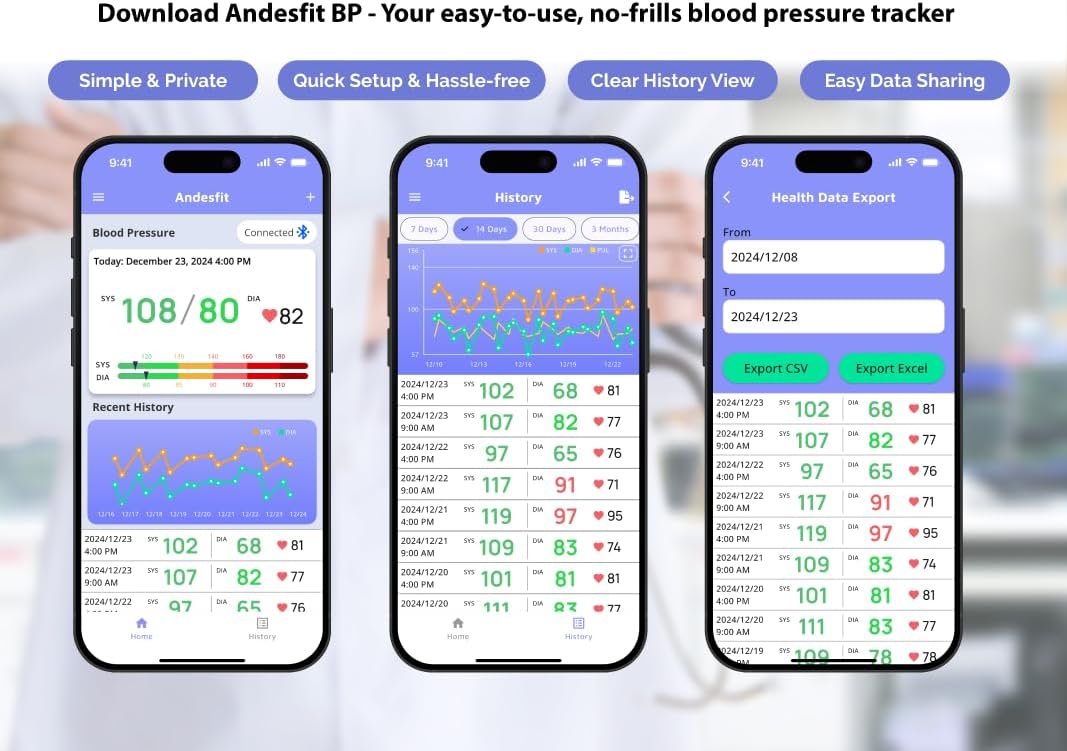
الشكل 5: انتهىview of the Andesfit BP app features.
ملحوظة: The app does not require personal data input or login, ensuring your privacy. Data is stored locally on your device and can be synced with Apple Health or Google Fit.
4. تعليمات التشغيل
4.1 أخذ القياس
- الاستعداد للقياس: اجلس بشكل مريح مع دعم ظهرك وقدميك مستويتين على الأرض. ضع ذراعك على طاولة بحيث يكون الكفة بمستوى القلب. تجنب الكلام أو الحركة أثناء القياس.
- تطبيق الكفة: Wrap the cuff around your bare upper arm, ensuring the air tube is positioned correctly (usually aligned with your middle finger). The cuff should be snug but not too tight.
- بدء القياس: Press the "START/STOP" button on the monitor. The cuff will automatically inflate and then slowly deflate as it measures your blood pressure.
- قراءة النتائج: Your Systolic (SYS), Diastolic (DIA), and Pulse (PUL) readings will be displayed on the large 6-inch color LED screen. The screen also features a WHO color-coded indicator for easy interpretation of your blood pressure level.
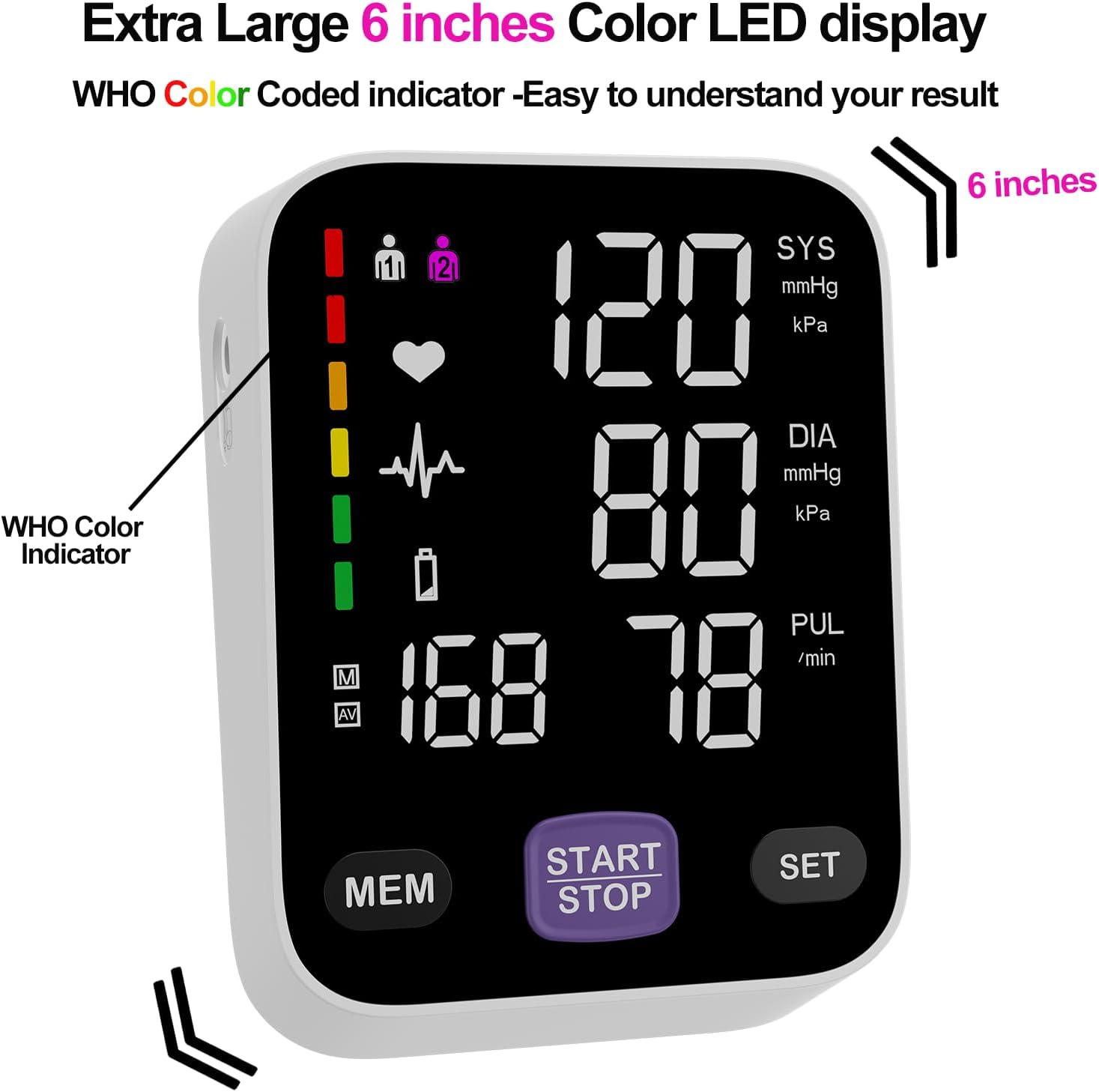
Figure 6: The monitor's large color LED display with WHO color indicator.
4.2 Using the App with the Monitor
Once the app is installed and Bluetooth is enabled on your smartphone, simply switch on your blood pressure monitor and open the app. The app will automatically connect to the device. Your measurement readings will be synced and stored in the app, providing a comprehensive history of your blood pressure trends.
You can export your data as CSV files to share with your doctor or for personal record-keeping.
Video 1: Official Andesfit video demonstrating the Bluetooth blood pressure monitor and app connectivity.
5. الصيانة
- تنظيف: امسح الشاشة والسوار بقطعة قماش ناعمة وجافة. لا تستخدم منظفات كاشطة أو تغمر الجهاز في الماء.
- تخزين: Store the device in the provided storage bag in a cool, dry place, away from direct sunlight and extreme temperatures.
- استبدال البطارية: Replace all 4 AA batteries when the low battery indicator appears on the display.
6. استكشاف الأخطاء وإصلاحها
If you encounter issues with your Andesfit Blood Pressure Monitor, please refer to the following common solutions:
| مشكلة | السبب المحتمل | حل |
|---|---|---|
| لا يوجد عرض/الجهاز لا يعمل | Batteries are low or incorrectly installed; USB cable not connected properly. | Replace batteries or ensure correct polarity. Check USB cable connection. |
| قراءات غير دقيقة | Improper cuff placement; movement or talking during measurement; incorrect posture. | Ensure cuff is correctly applied and snug. Remain still and silent during measurement. Sit upright with feet flat. |
| التطبيق لا يتصل عبر البلوتوث | Bluetooth is off on phone/monitor; app permissions not granted. | Ensure Bluetooth is enabled on both devices. Check app permissions in phone settings. Restart app/monitor. |
7. المواصفات
| ميزة | التفاصيل |
|---|---|
| أبعاد المنتج | 4.5 بوصة طول × 4.2 بوصة عرض × 1.9 بوصة سمك |
| رقم موديل العنصر | A02-SEB |
| البطاريات | بطاريتان AA (متضمنتان) |
| الشركة المصنعة | Shenzhen GoodlyMed Technology Co., Ltd. |
| مصدر الطاقة | Battery Powered / USB Type-C |
| نوع العرض | LED Color Display (6 inches) |
| مقاسات الكفة | 9-17 inches (Large), 13-21 inches (Extra Large) |
| تخزين البيانات | 2 users * 199 readings (device), Unlimited (app) |
| الشهادات | FDA Cleared & CE Certified |
8. الضمان والدعم
Andesfit products are designed for reliability and performance. For information regarding warranty coverage and technical support, please contact Andesfit directly. You can find contact details on the official Andesfit webالموقع أو من خلال منصة الشراء الخاصة بك.
سياسة العائدات: عادةً ما يكون لهذا المنتج سياسة إرجاع لمدة 30 يومًا لاسترداد الأموال أو الاستبدال، وفقًا لشروط البيع بالتجزئة القياسية.


