مقدمة
This manual provides detailed instructions for the operation and maintenance of your WIITHINK WTB-795S Portable Cassette Player Recorder. This device combines classic audio playback with modern features, including AM/FM/SW radio, Bluetooth connectivity, USB/SD card playback, and MP3 conversion capabilities. Please read this manual thoroughly before using the product to ensure proper function and longevity.
معلومات السلامة
- لا تعرض الجهاز للمطر أو الرطوبة لتجنب نشوب حريق أو التعرض لصدمة كهربائية.
- لا تفتح الصندوقasinز. أسند الصيانة إلى الموظفين المؤهلين فقط.
- تجنب وضع الوحدة بالقرب من مصادر الحرارة أو في ضوء الشمس المباشر.
- تأكد من التهوية المناسبة؛ ولا تسد فتحات التهوية.
- استخدم فقط محول الطاقة أو البطاريات المحددة.
- يحفظ بعيدًا عن متناول الأطفال.
محتويات الحزمة
تأكد من وجود جميع العناصر في العبوة:
- WIITHINK WTB-795S Portable Cassette Player Recorder
- التيار المتردد كابل
- دليل المستخدم (هذا المستند)
المنتج انتهىview
The WIITHINK WTB-795S is a versatile audio device designed for both classic and modern listening experiences. It features a cassette player and recorder, AM/FM/SW radio, Bluetooth connectivity, and USB/SD card playback with MP3 conversion capabilities.

الصورة: الجبهة view of the WIITHINK WTB-795S Portable Cassette Player Recorder, showing the cassette deck, radio tuner, and speakers.
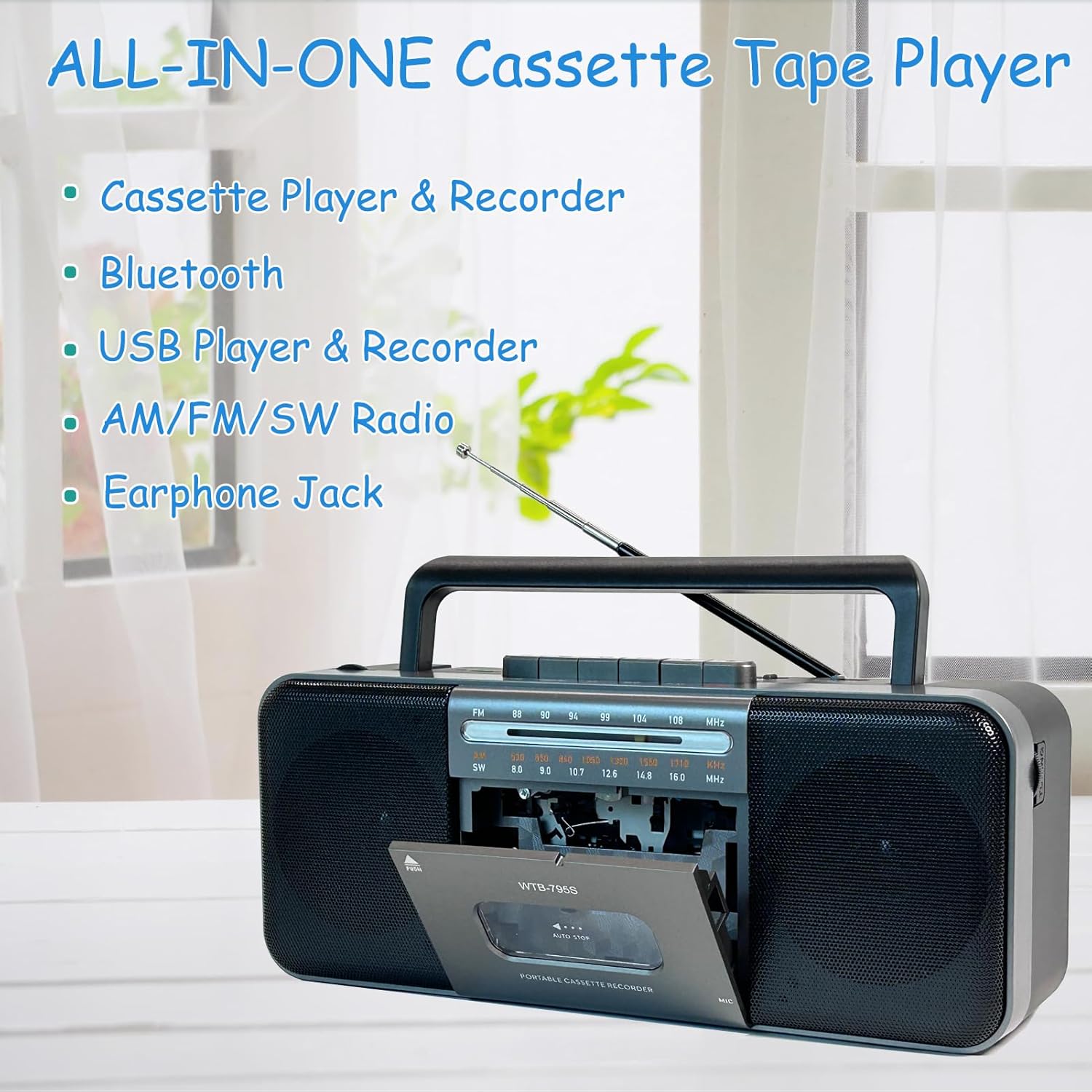
Image: Diagram highlighting the all-in-one features of the WTB-795S, including Cassette Player & Recorder, Bluetooth, USB Player & Recorder, AM/FM/SW Radio, and Earphone Jack.
المميزات الرئيسية:
- مشغل ومسجل أشرطة الكاسيت: Play and record audio to cassette tapes.
- AM/FM/SW Radio: Built-in tuner for receiving various radio bands.
- الاتصال عبر البلوتوث: بث الصوت لاسلكيًا من الأجهزة المتوافقة.
- USB/SD Card Playback & Recording: تشغيل الصوت files from USB drives and SD cards, and record to them.
- MP3 Converter: Convert cassette audio to MP3 format on USB/SD.
- ميكروفون مدمج: For direct voice recording.
- 10W Dual Speakers: Provides clear and powerful stereo sound (radio is mono).
- مدخل سماعة الأذن: للاستماع الخاص.
- يعمل بالتيار المتردد/المستمر: Operates with AC power cable or batteries for portability.
يثبت
تشغيل الجهاز:
The WTB-795S can be powered by either AC electricity or batteries.
طاقة التيار المتردد:
- تأكد من إيقاف تشغيل الوحدة.
- Connect the supplied AC power cable to the AC input jack on the back of the unit.
- Plug the other end of the AC power cable into a standard wall outlet.
طاقة البطارية:
For portable use, the unit requires 4 x D-size batteries (not included) or 2 x 18650 button-top rechargeable batteries (not included).

الصورة: الخلفية view of the WTB-795S showing the battery compartments for 4 D-size batteries and 2 18650 button-top rechargeable batteries, along with the AC power input. Note: Only button-top 18650 batteries are compatible.
- افتح غطاء حجرة البطارية الموجود في الجزء الخلفي من الجهاز.
- Insert 4 D-size batteries or 2 18650 button-top rechargeable batteries, observing the correct polarity (+/-) as indicated inside the compartment.
- أغلق غطاء حجرة البطارية جيدًا.
- ملحوظة: The 18650 battery compartment only accommodates button-top battery models. Flat-top battery models cannot be used.
الهوائي:
Extend the telescopic antenna for optimal FM and SW radio reception. For AM reception, rotate the unit for best signal.
تعليمات التشغيل
1. Cassette Playback and Recording

Image: A person holding a cassette tape, with the WTB-795S in the foreground showing the open cassette deck, illustrating its cassette playback and recording function.
تشغيل شريط كاسيت:
- اضغط على توقف / إخراج زر لفتح باب الكاسيت.
- قم بإدخال شريط الكاسيت مع توجيه الحافة المفتوحة لأعلى.
- أغلق باب الكاسيت.
- اضغط على يلعب زر لبدء التشغيل.
- ضبط مقدار اضبط المقبض على المستوى المطلوب.
- يستخدم التقديم السريع (FF) or إعادة تشغيل (REW) الأزرار للتنقل عبر الشريط.
- يضعط توقف / إخراج لإيقاف التشغيل.
التسجيل على شريط كاسيت:
You can record from the built-in microphone, radio, or external sources (via Bluetooth/USB/SD).
- أدخل شريط كاسيت فارغًا أو قابلًا للتسجيل.
- Select the desired source (e.g., Radio, Bluetooth, USB/SD).
- اضغط على سِجِلّ الزر (عادة ما يكون باللون الأحمر) في نفس الوقت مع يلعب button. The recording will begin.
- For microphone recording, ensure the microphone is unobstructed.
- يضعط توقف / إخراج لإنهاء التسجيل.
2. Radio Operation (AM/FM/SW)

Image: An elderly man smiling while listening to the WTB-795S, which has its telescopic antenna extended, demonstrating its radio function.
- اضبط مفتاح الوظيفة على راديو.
- Select the desired band: AM, FM، أو SW using the band selector switch.
- Extend the telescopic antenna for FM and SW reception. Rotate the unit for optimal AM reception.
- تدوير ضبط knob to find your desired station.
- ضبط مقدار مقبض الباب.
3. وضع بلوتوث

Image: A hand holding a smartphone displaying a music app, with the WTB-795S on a table in the background, indicating Bluetooth connectivity.
- اضبط مفتاح الوظيفة على بلوتوث. The unit will enter pairing mode, indicated by an audible prompt or flashing indicator.
- على جهازك المزود بتقنية البلوتوث (الهاتف الذكي، الجهاز اللوحي، إلخ)، ابحث عن الأجهزة المتاحة.
- Select "WTB-795S" from the list to pair.
- Once paired, you can stream audio from your device to the WTB-795S.
- Adjust volume on both the unit and your connected device.
4. USB/SD Card Playback and Recording

Image: The WTB-795S with a red USB flash drive inserted into its USB port, demonstrating its USB playback and recording capabilities.
Playing from USB/SD:
- أدخل ذاكرة فلاش USB في منفذ USB أو بطاقة SD في فتحة بطاقة SD.
- اضبط مفتاح الوظيفة على يو اس بي/اس دي.
- ستقوم الوحدة تلقائيًا باكتشاف وتشغيل الصوت المتوافق files (MP3 format).
- Use the playback control buttons (Play/Pause, Next, Previous) to manage your audio.
- ملحوظة: Compatible with FAT32 file systems only. NTFS is not supported.
Recording to USB/SD (MP3 Conversion):
You can convert audio from cassette tapes to MP3 format on a USB drive or SD card.
- Insert a USB flash drive or SD card.
- Insert the cassette tape you wish to convert.
- اضغط على يلعب button on the cassette deck.
- اضغط على سِجِلّ button (often labeled 'USB/SD Record' or similar, refer to unit markings) to start converting the cassette audio to MP3 on the inserted USB/SD media.
- يضعط قف to end the conversion.
5. جاك سماعة الأذن

Image: A woman wearing headphones and listening to the WTB-795S, illustrating the use of the earphone jack for private listening.
Plug standard 3.5mm headphones into the earphone jack for private listening. The main speakers will be muted when headphones are connected.
صيانة
تنظيف الوحدة:
- امسح الجزء الخارجي بقطعة قماش ناعمة وجافة.
- لا تستخدم المنظفات أو المذيبات الكاشطة.
- For the cassette head and pinch roller, use a cotton swab lightly dampened with isopropyl alcohol. Clean gently to remove tape residue.
Cassette Tape Care:
- Store tapes away from direct sunlight and extreme temperatures.
- Avoid touching the tape surface.
- Periodically fast forward and rewind tapes to prevent sticking.
استكشاف الأخطاء وإصلاحها
| مشكلة | السبب المحتمل | حل |
|---|---|---|
| لا يوجد طاقة | كابل التيار المتردد غير موصول؛ البطاريات فارغة أو تم إدخالها بشكل غير صحيح. | Check AC cable connection; Replace or correctly insert batteries. |
| لا يوجد صوت | مستوى الصوت منخفض جدًا؛ سماعات الرأس موصولة؛ تم اختيار وضع غير صحيح. | ارفع مستوى الصوت؛ افصل سماعات الرأس؛ حدد وضع الوظيفة الصحيح. |
| استقبال الراديو ضعيف | الهوائي غير ممتد، الإشارة ضعيفة. | Extend telescopic antenna; Rotate unit for better signal. |
| Cassette playback distorted/slow | Tape head dirty; Tape worn out; Batteries low. | Clean tape head; Try a different tape; Replace batteries. |
| لا يعمل منفذ USB/SD | غير صحيح file format; Incompatible file system (NTFS); Media not inserted correctly. | يضمن files are MP3; Format media to FAT32; Reinsert USB/SD card. |
| البلوتوث غير متصل | Unit not in pairing mode; Device too far; Bluetooth off on source device. | Ensure unit is in Bluetooth mode; Bring devices closer; Enable Bluetooth on source device. |
تحديد
| ميزة | التفاصيل |
|---|---|
| نموذج | WTB-795S |
| أبعاد المنتج (الطول × العرض × الارتفاع) | 11 × 5 × 2 بوصة (27.9 × 12.7 × 5.1 سم) |
| وزن العنصر | 3.41 رطل (1.55 كجم) |
| تكنولوجيا الاتصال | بلوتوث، يو اس بي |
| نوع السماعة | Stereo (2 x 5W) |
| مصدر الطاقة | AC Power (included adapter) or DC Battery (4 x D-size or 2 x 18650 button-top, not included) |
| ترددات الراديو | AM: 530-1710kHz, FM: 88-108MHz, SW: 8.0-16.0MHz |
| USB/SD Compatibility | نظام الملفات FAT32 file system, MP3 format |
الضمان والدعم
WIITHINK is committed to customer satisfaction. This product comes with an 18-month replacement policy and lifetime technical support.
الاتصال بالدعم:
For any inquiries or issues, please contact WIITHINK customer support through your purchase platform (e.g., Amazon Buyer-Seller Message) or refer to the contact information provided with your product packaging.
خطط الحماية الاختيارية:
Extended protection plans may be available for purchase separately:
- خطة الحماية لمدة عامين
- خطة الحماية لمدة عامين
- حماية كاملة (خطة شهرية تغطي المشتريات المؤهلة)
Please refer to the specific terms and conditions of these plans at the time of purchase.


