1. المقدمة
The BOYA BY-V10 is a compact and lightweight wireless lavalier microphone system designed for use with USB-C compatible devices, including Android smartphones, iPhone 15/16, iPads, and laptops. It offers high-quality audio recording with features like one-click noise cancellation and stable wireless transmission, making it suitable for various content creation scenarios.

Image: The BOYA BY-V10 USB-C Wireless Lavalier Microphone system, showing the transmitter and receiver.
فيديو: أكثر منview of the BOYA BY-V10 Wireless Microphone, highlighting its ease of use for recording.
2. ماذا يوجد في الصندوق
تأكد من وجود جميع المكونات في الحزمة الخاصة بك:
- 1 × جهاز إرسال (TX)
- 1 x Receiver (RXU) with USB-C connector
- 1 × كابل شحن USB-A إلى USB-C
- 1 × حاجب الريح الرغوي
- 1 × حقيبة حمل
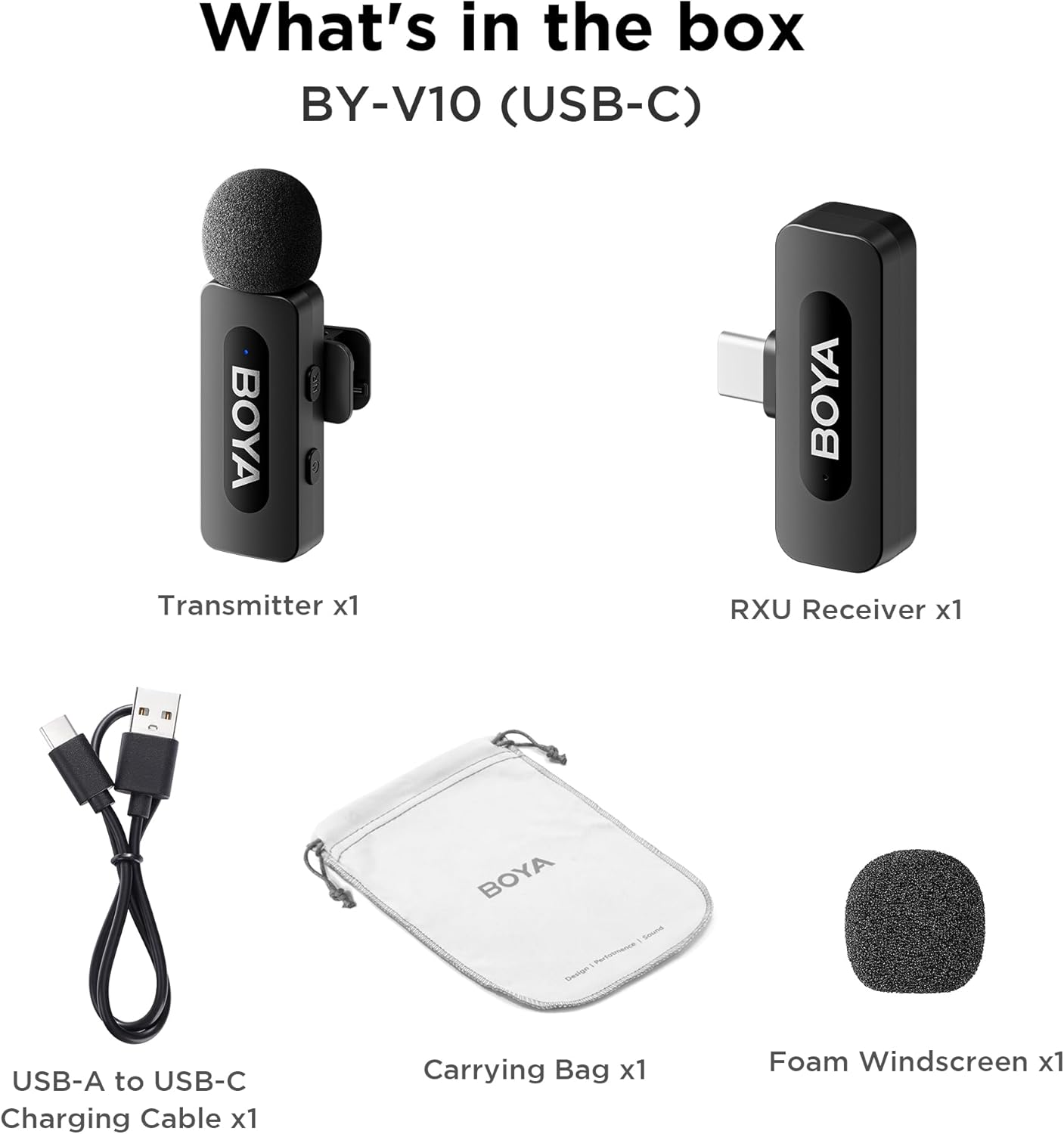
Image: The complete packing list for the BY-V10, showing all included accessories.
Video: An unboxing video demonstrating the contents of the BOYA BY-V Wireless Lavalier Microphone package.
3. دليل الإعداد
3.1 الشحن الأولي
Before first use, ensure the transmitter is fully charged using the provided USB-A to USB-C charging cable. The receiver does not require charging as it draws power directly from your connected device.

Image: Battery life and charging details for the BY-V10 transmitter.
3.2 الاتصال بجهازك
- Press and hold the power button on the Transmitter (TX) for 2 seconds to turn it on. The indicator light will blink.
- Plug the Receiver (RXU) directly into the USB-C port of your smartphone, iPad, or laptop.
- The Transmitter and Receiver will automatically pair within 10 seconds. The indicator light on both units will turn solid blue once successfully paired.
- ملاحظة لمستخدمي Android: Enable the "OTG" function in your device's settings before connecting the USB Type-C microphone.

Image: Visual instructions for the plug-and-play setup process.
3.3 توافق الجهاز
The BY-V10 is compatible with devices featuring a USB-C port, including:
- الهواتف الذكية التي تعمل بنظام أندرويد
- طرازات iPhone 15/16
- iPads with USB-C
- Laptops with USB-C
Please ensure your device supports external USB-C audio input.

Image: Visual representation of compatible devices for the BY-V10 microphone.
4. تعليمات التشغيل
4.1 ارتداء الميكروفون
The transmitter features a 360° rotatable clip for easy attachment to your clothing. For optimal sound capture, clip the microphone approximately 6-8 inches from your mouth.

Image: The compact size and clip-on design of the BY-V10 transmitter.
4.2 One-Click Noise Cancellation
To activate or deactivate the noise reduction mode, press the 'NR' button on the side of the transmitter. The indicator light will change to static green when noise reduction is enabled, and blink blue slowly when muted.

Image: Visual comparison of audio with and without noise cancellation enabled.

Image: Detailed explanation of the noise cancellation button and indicator lights.
4.3 وظيفة كتم الصوت
To mute the microphone, briefly press the power button on the transmitter. The indicator light will blink blue slowly. Press again to unmute.
4.4 نطاق ناقل الحركة
The BY-V10 offers a stable audio signal transmission range of up to 100 meters (328 feet) in open environments without obstacles or interference.

Image: Demonstration of the microphone's long-distance transmission capability.

Image: Further illustration of the extended transmission range.
4.5 الشحن أثناء التسجيل
The receiver allows you to charge your phone or connected device while recording, ensuring uninterrupted long sessions for streaming or course recording.

Image: The receiver connected to a smartphone, illustrating the ability to charge the phone during recording.

Image: Another visual of the 'Support Using While Charging' feature.
5. الصيانة
To ensure the longevity and optimal performance of your BOYA BY-V10 microphone, follow these maintenance guidelines:
- تنظيف: استخدم قطعة قماش ناعمة وجافة لتنظيف الميكروفون وجهاز الاستقبال. تجنب استخدام السوائل أو المنظفات الكاشطة.
- تخزين: Store the microphone system in its carrying bag when not in use to protect it from dust, moisture, and physical damage.
- العناية بالبطارية: Fully charge the transmitter before long periods of storage to maintain battery health.
- التعامل معها بحذر: Avoid dropping the devices or exposing them to extreme temperatures.
6. استكشاف الأخطاء وإصلاحها
If you encounter problems when using the unit, please refer to the following checklist. If the problem cannot be solved, please contact the seller for after-sales service.
- فشل الجهاز في الاقتران: تأكد من إقران جهاز الإرسال (أو أجهزة الإرسال) بجهاز استقبال واحد. في حال إقرانه بأكثر من جهاز استقبال، لا يمكن تحديد جهاز الاستقبال الذي سيتم إقرانه بجهاز الإرسال (أو أجهزة الإرسال).
- لا يصدر صوت من الوحدة أو لا يصدر صوت عند توصيلها بجهاز خارجي:
- تأكد من أن الموصل الموجود في جهاز الاستقبال متصل جيدًا بجهازك.
- تأكد من عدم كتم صوت جهاز الإرسال. إذا كان مؤشره يومض ببطء باللون الأزرق، فيجب على المستخدمين الضغط على زر الطاقة مرة واحدة لإلغاء كتم صوت جهاز الإرسال.
- نطاق تشغيل الوحدة محدود، والصوت متقطع في كثير من الأحيان: تأكد من عدم وجود أي تداخل بين جهاز الإرسال وجهاز الاستقبال. إذا استمر الصوت المتقطع بشكل متكرر، يُرجى التواصل معنا للحصول على خدمة ما بعد البيع.
- يتم إيقاف تشغيل الوحدة تلقائيًا: في حالة عدم الاقتران، سيتم إيقاف تشغيل جهاز الإرسال تلقائيًا بعد 10 دقائق.
- الجهاز لا يعمل: تأكد من أن الوحدة بها بطارية كافية لتشغيلها. حاول توصيل كابل شحن لتنشيط الدائرة.
- علبة الشحن لا تشحن الجهاز:
- تأكد من أن بطارية علبة الشحن ليست فارغة. حاول شحن العلبة.
- امسح نقاط التلامس الخاصة بالشحن في الوحدة ودبابيس الشحن في علبة الشحن بقطعة قماش نظيفة وتأكد من عدم وجود غبار يغطيها.
- حاول الضغط على الجهاز الموضوع في علبة الشحن حتى تتصل نقاط التلامس بالشاحن بشكل كامل. إذا لم يتم شحن الجهاز بعد ذلك، فقد يكون المغناطيس قديمًا. يرجى التواصل معنا للحصول على خدمة ما بعد البيع.

Image: A troubleshooting guide with solutions for common operational problems.
7. المواصفات
| ميزة | التفاصيل |
|---|---|
| ماركة | بويا |
| اسم الموديل | BY-V10(USB-C) |
| عامل شكل الميكروفون | لافاليير |
| تكنولوجيا الاتصال | USB |
| نوع الموصل | يو إس بي من النوع سي |
| النمط القطبي | متعدد الاتجاهات |
| حساسية الصوت | 42 ديسيبل |
| إشارة إلى نسبة الضوضاء | 80 ديسيبل |
| وزن العنصر | 1.76 أونصة (0.05 كجم) |
| أبعاد المنتج | 3.27 × 4.45 × 1.38 بوصة |
| مصدر الطاقة | يعمل بالبطارية (جهاز الإرسال) |
| عمر البطارية (جهاز الإرسال) | تصل إلى 9 ساعة |
| وقت الشحن (جهاز الإرسال) | حوالي 2 ساعات |
| ميزة خاصة | Mute Function, One-Click Noise Cancellation |
| الأجهزة المتوافقة | كمبيوتر محمول، هاتف ذكي (USB-C) |
8. الضمان والدعم
For warranty information, technical support, or any inquiries regarding your BOYA BY-V10 microphone, please refer to the official BOYA website or contact the seller directly through your purchase platform. Keep your proof of purchase for warranty claims.


