1. المقدمة
شكرا لك على الشراءasing the MISTRAL Horizon Twilight MHV7123DR-TL 7-inch DC High Velocity Fan. This manual provides essential information for the safe operation, installation, and maintenance of your fan. Please read it thoroughly before use and retain it for future reference.

الصورة 1.1: أمام view of the MISTRAL Horizon Twilight MHV7123DR-TL fan, showcasing its compact design and the fan head with the Mistral logo. A remote control is visible to the right of the fan.
2. تعليمات السلامة
لتقليل خطر نشوب حريق أو التعرض لصدمة كهربائية أو الإصابة، اتبع دائمًا احتياطات السلامة الأساسية التالية:
- تأكد من حجم امدادات الطاقةtagيتطابق الحرف e مع ملصق التصنيف الموجود على المروحة.
- لا تقم بتشغيل المروحة إذا كان السلك أو القابس تالفًا. في حالة التلف، اتصل بفني صيانة مؤهل.
- Keep fingers and other objects away from the fan blades and moving parts during operation.
- لا تستخدم المروحة في الرطب أو دamp الأماكن، مثل الحمامات أو مناطق الغسيل.
- افصل المروحة عن مأخذ الطاقة قبل التنظيف أو إجراء أي صيانة.
- لا يُقصد استخدام هذا الجهاز من قبل الأشخاص (بما في ذلك الأطفال) ذوي القدرات البدنية أو الحسية أو العقلية المحدودة، أو الذين يفتقرون إلى الخبرة والمعرفة، ما لم يتم الإشراف عليهم أو إعطائهم تعليمات فيما يتعلق باستخدام الجهاز من قبل شخص مسؤول عن سلامتهم.
- يجب مراقبة الأطفال والتأكد من عدم لعبهم بالجهاز.
3. محتويات العبوة
تأكد من وجود جميع العناصر في العبوة:
- MISTRAL Horizon Twilight MHV7123DR-TL Fan Unit
- جهاز التحكم عن بعد
- دليل المستخدم (هذا المستند)
4. انتهى المنتجview
Familiarize yourself with the components of your fan:
4.1 Fan Unit
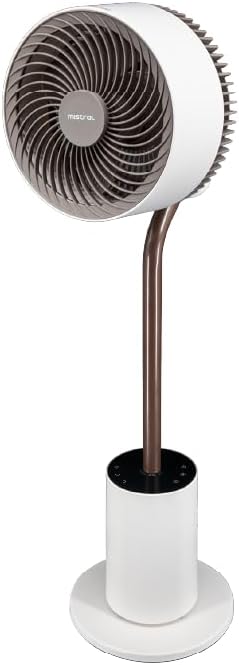
الصورة 4.1: واجهة أمامية مفصلة view of the fan, highlighting the fan head, stand, and control base. This image provides a clear perspective of the fan's overall structure.
- رأس المروحة: Contains the fan blades and motor.
- Front Guard: Protective cover for the fan blades.
- Rear Guard: Back cover of the fan head, housing the atmosphere light.
- يقف: Connects the fan head to the base.
- قاعدة التحكم: Houses the control panel and power input.
- سلك الطاقة: للاتصال بمأخذ كهربائي.
4.2 التحكم عن بعد
The remote control allows convenient operation of all fan functions from a distance. (Refer to Image 1.1 for a visual of the remote control.)
- زر الطاقة: تشغيل/إيقاف المروحة.
- زر السرعة: Adjusts fan speed (1-12 speeds + Booster).
- زر الوضع: Cycles through Normal, Natural, Sleeping, and ECO modes.
- زر التذبذب: Activates/deactivates 3D oscillation (horizontal and vertical).
- زر المؤقت: ضبط مؤقت التشغيل (حتى 12 ساعات).
- زر الضوء: Controls the atmosphere light (On/Off, brightness adjustment).
- Indicating Lights Off Button: Turns off the control panel's indicator lights.
5. الإعداد
The MISTRAL Horizon Twilight fan typically comes pre-assembled. Follow these steps for initial setup:
- فك التعبئة: قم بإزالة المروحة وجميع الملحقات من العبوة بعناية.
- الموقع: Place the fan on a stable, flat surface. Ensure there is adequate space around the fan for proper air circulation and oscillation.
- توصيل الطاقة: أدخل قابس الطاقة في مأخذ كهربائي مناسب.
- بطاريات جهاز التحكم عن بعد: Open the battery compartment on the remote control and insert the required batteries (not included, typically AAA). Ensure correct polarity.
6. تعليمات التشغيل
Operate your fan using either the control panel on the base or the remote control.
6.1 تشغيل/إيقاف التشغيل
- اضغط على قوة button on the control panel or remote control to turn the fan On or Off.
6.2 التحكم في السرعة
- اضغط على سرعة button to cycle through 12 fan speed settings.
- A Booster Speed setting is also available for maximum airflow.
6.3 وضعًا
اضغط على وضع button to select from the following operating modes:
- الوضع العادي: يوفر تدفق هواء ثابت بالسرعة المحددة.
- الوضع الطبيعي: يحاكي النسيم الطبيعي عن طريق تغيير سرعة المروحة بشكل متقطع.
- وضع النوم: يعمل بسرعة أقل وأكثر هدوءًا، تتناقص تدريجيًاasing over time for comfortable sleep.
- نمط الصدى: Adjusts fan speed automatically based on ambient temperature to optimize energy consumption.
6.4 3D Oscillation
The fan features 3D oscillation for wider air distribution.
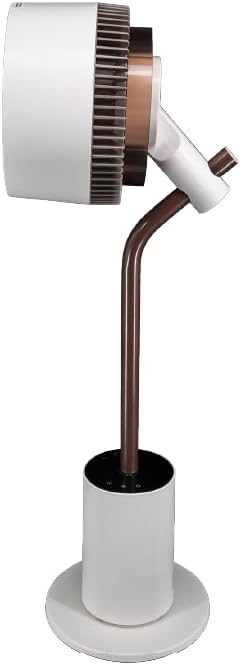
الصورة 6.4: جانب view of the fan, illustrating its ability to tilt vertically, which is part of its 3D oscillation feature. The fan head is angled upwards.
- اضغط على ذبذبة button to activate or deactivate the oscillation function.
- التذبذب الأفقي: Left and Right movement at 30°, 60°, 90°, or 120° angles.
- التذبذب العمودي: Up and Down movement at 50° or 90° angles.
- The fan can oscillate both horizontally and vertically simultaneously for 3D airflow.
6.5 وظيفة المؤقت
- اضغط على الموقت button to set the fan to automatically turn off after a specified period.
- The timer can be set for up to 12 hours. Each press typically increases the timer by 1 hour.
6.6 رائحة الناشر
The fan includes an aroma diffuser feature for a pleasant environment.
- Locate the aroma diffuser compartment (usually at the back of the fan head or base).
- Open the compartment and add a few drops of your preferred essential oil onto the provided pad (if applicable).
- Close the compartment. The fan's airflow will gently diffuse the aroma.
6.7 Inner Mood Lighting
The fan features an atmosphere light on the back of the rear guard.

الصورة 6.7: The MISTRAL fan with its inner mood lighting activated, casting a warm glow from behind the fan head. This demonstrates the adjustable atmosphere light feature.
- اضغط على ضوء button on the remote control to turn the mood light On/Off.
- اضغط على ضوء button repeatedly to cycle through 3 adjustable brightness levels.
6.8 Indicating Lights Off Function
- اضغط على Indicating Lights Off button on the remote control to turn off the control panel's indicator lights, which can be useful in dark environments like a bedroom.
7. الصيانة
سيضمن التنظيف والصيانة المنتظمان الأداء الأمثل وإطالة عمر المروحة.
- تنظيف الجزء الخارجي: امسح الأسطح الخارجية للمروحة بقطعة قماش ناعمة.amp القماش. لا تستخدم المنظفات أو المذيبات الكاشطة.
- تنظيف شفرات المروحة: Unplug the fan before attempting to clean the blades. If accessible, gently wipe the blades with a soft cloth to remove dust. Do not immerse the fan in water.
- Aroma Diffuser Pad: If using an aroma diffuser, regularly clean or replace the aroma pad to prevent residue buildup.
- تخزين: When not in use for extended periods, unplug the fan, clean it, and store it in a cool, dry place, preferably in its original packaging.
8. استكشاف الأخطاء وإصلاحها
إذا واجهت مشاكل مع المروحة لديك، راجع المشاكل والحلول الشائعة التالية:
| مشكلة | السبب المحتمل | حل |
|---|---|---|
| المروحة لا تعمل. | لا يوجد مصدر طاقة؛ زر التشغيل غير مضغوط؛ بطاريات جهاز التحكم عن بعد فارغة. | Check power cord connection and wall outlet; Press the Power button; Replace remote control batteries. |
| تدفق الهواء ضعيف. | Low speed setting; Fan blades are dirty. | Increase fan speed; Clean fan blades (refer to Maintenance section). |
| المروحة تصدر صوتا غير عادي. | Obstruction near blades; Fan not on a stable surface. | Unplug and check for obstructions; Place fan on a flat, stable surface. |
| جهاز التحكم عن بعد لا يعمل. | Batteries depleted or incorrectly inserted; Obstruction between remote and fan. | Replace batteries, ensuring correct polarity; Ensure clear line of sight to the fan's receiver. |
9. المواصفات
| ميزة | التفاصيل |
|---|---|
| نموذج | MHV7123DR-TL |
| نوع المروحة | 7-inch DC High Velocity Fan |
| نوع المحرك | محرك تيار مستمر بدون فرشاة |
| السرعات | 12 Speeds + Booster Speed |
| الأوضاع | Normal, Natural, Sleeping, ECO |
| ذبذبة | 3D Oscillation (Left/Right: 30°, 60°, 90°, 120°; Up/Down: 50°, 90°) |
| الموقت | 12 ساعة |
| المميزات الخاصة | Aroma Diffuser, Inner Mood Lighting (3 adjustable brightness), Indicating Lights Off Function, Remote Control |
| مصدر الطاقة | كهرباء سلكية |
| أبعاد المنتج | 25 سم عمق × 25 سم عرض × 90 سم ارتفاع |
| عامل الشكل | Stand / Floor Fan |
10. الضمان والدعم
MISTRAL products are manufactured to high-quality standards. For warranty information, please refer to the warranty card included with your purchase or visit the official MISTRAL website. For technical support or service inquiries, please contact MISTRAL customer service.
يرجى الاحتفاظ بإثبات الشراء الخاص بك لمطالبات الضمان.


