مقدمة
Thank you for choosing the Baseus Power Bank and 45W Charger bundle. This manual provides detailed instructions for the safe and efficient use of your new devices. Please read this manual thoroughly before use and retain it for future reference.

Image: The Baseus Power Bank (left) and the 45W Charger (right) with a USB-C to USB-C cable in the center, illustrating the complete product bundle.
المنتج انتهىview
This bundle includes two primary components: the Baseus Blade Laptop Power Bank and the Baseus PicoGo 45W Charger. Each component is designed for efficient and fast charging of a wide range of electronic devices.
بنك طاقة Baseus Blade لأجهزة الكمبيوتر المحمول
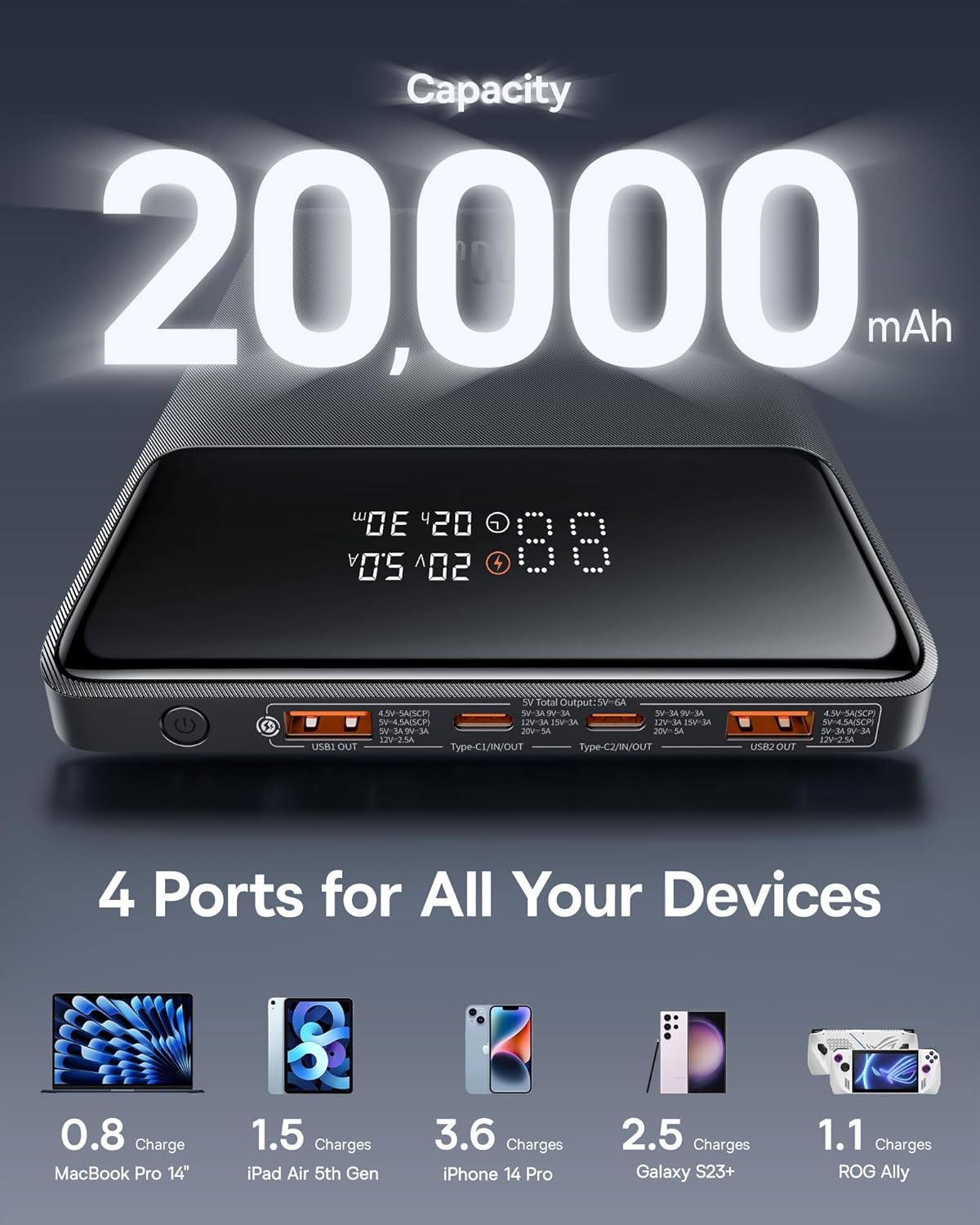
الصورة: لقطة مقربة view of the Baseus Blade Laptop Power Bank, highlighting its 20000mAh capacity and the four charging ports (2x USB-A, 2x USB-C) with their respective output specifications.
The power bank features a high capacity of 20000mAh and multiple output ports for simultaneous charging. It is equipped with a digital display to show remaining battery percentagه وحالة الشحن.
- سعة: 20000 مللي أمبير
- الموانئ: 2 x USB-C (PD In/Out), 2 x USB-A (Out)
- الحد الأقصى للإخراج: حتى 100 واط (USB-C)
- عرض: Digital screen for battery level and charging information.
Baseus PicoGo 45W Charger

Image: The compact Baseus PicoGo 45W Charger shown next to a larger, generic 30W charger, illustrating its significantly smaller size (54.2% smaller).
The 45W wall charger is designed for compact portability and efficient fast charging, particularly for smartphones and smaller devices.
- الإخراج: حتى 45 واط (USB-C)
- تكنولوجيا: PD 3.0 and PPS support
- تصميم: Mini and compact for travel.
يثبت
Before first use, it is recommended to fully charge the Baseus Blade Laptop Power Bank.
- أفرغ: قم بإزالة جميع المكونات بعناية من العبوة.
- فحص: Check both the power bank and charger for any visible damage.
- Initial Charge (Power Bank):
- Connect the included USB-C to C cable to one of the USB-C IN/OUT ports on the power bank.
- Connect the other end of the cable to the Baseus PicoGo 45W Charger.
- Plug the 45W Charger into a standard wall outlet.
- The digital display on the power bank will show the charging progress. Charge until it reaches 100%.
تعليمات التشغيل
Using the Baseus Blade Laptop Power Bank
The power bank can charge up to four devices simultaneously.

Image: The Baseus Power Bank connected via cables to a laptop, an iPad, an iPhone, and wireless earbuds, demonstrating its ability to charge four devices concurrently.
- توصيل الجهاز: Use an appropriate charging cable (USB-C to USB-C, USB-A to USB-C, etc.) to connect your device to one of the power bank's output ports (USB1 OUT, USB2 OUT, Type-C1 IN/OUT, Type-C2 IN/OUT).
- بدء الشحن: The power bank will automatically detect the connected device and begin charging. The digital display will show the output wattage and remaining battery.
- الشحن الأمثل: For laptops and devices requiring high power, use the USB-C ports for up to 100W Power Delivery.

Image: The Baseus Power Bank connected to a laptop, with text indicating "100W Laptop Fast Charging" and logos for design awards, emphasizing its high-power output capability.
Recharging the Baseus Blade Laptop Power Bank
To recharge the power bank, connect it to a wall charger using a USB-C to C cable. For fastest recharge, use a 65W or higher PD charger (not included, but the included 45W charger can be used).
- Connect the USB-C to C cable to either Type-C IN/OUT port on the power bank.
- Connect the other end to a compatible USB-C wall charger.
- The digital display will indicate input wattagه وحالة الشحن.
Using the Baseus PicoGo 45W Charger
The 45W charger is ideal for fast charging smartphones, tablets, and other USB-C compatible devices.

Image: The Baseus PicoGo 45W Charger plugged into a wall outlet and connected to an iPhone, with text highlighting "PD3.0 45W Max" and "3X Faster Charging" for iPhone 15 Pro.
- قم بالتوصيل: أدخل الشاحن في منفذ الحائط القياسي.
- توصيل الجهاز: Use a USB-C to C or USB-C to Lightning cable to connect your device to the charger's USB-C port.
- الشحن السريع: The charger will automatically deliver optimal power for fast charging compatible devices.
سمات
- 100W Power Delivery (Power Bank): Capable of fast charging high-power devices like laptops.
- 45W USB-C Fast Charging (Charger): Optimized for rapid charging of smartphones and tablets.
- 20000mAh High Capacity (Power Bank): يوفر شحنات متعددة لأجهزة مختلفة.
- Multi-Port Design (Power Bank): Two USB-C and two USB-A ports allow charging of up to four devices simultaneously.
- Digital Display (Power Bank): Real-time monitoring of battery level, input, and output power.
- تصميم صغير الحجم وخفيف الوزن: Both devices are designed for portability, making them ideal for travel.

Image: Infographic showing the Baseus Power Bank's dimensions, highlighting its thin (0.7 inches) and lightweight (1.08 lbs) profile, and comparing its size to an iPad Air.
- ميزات السلامة المتقدمة: Built-in protections against overcharge, over-discharge, overcurrent, short circuit, and overheating.
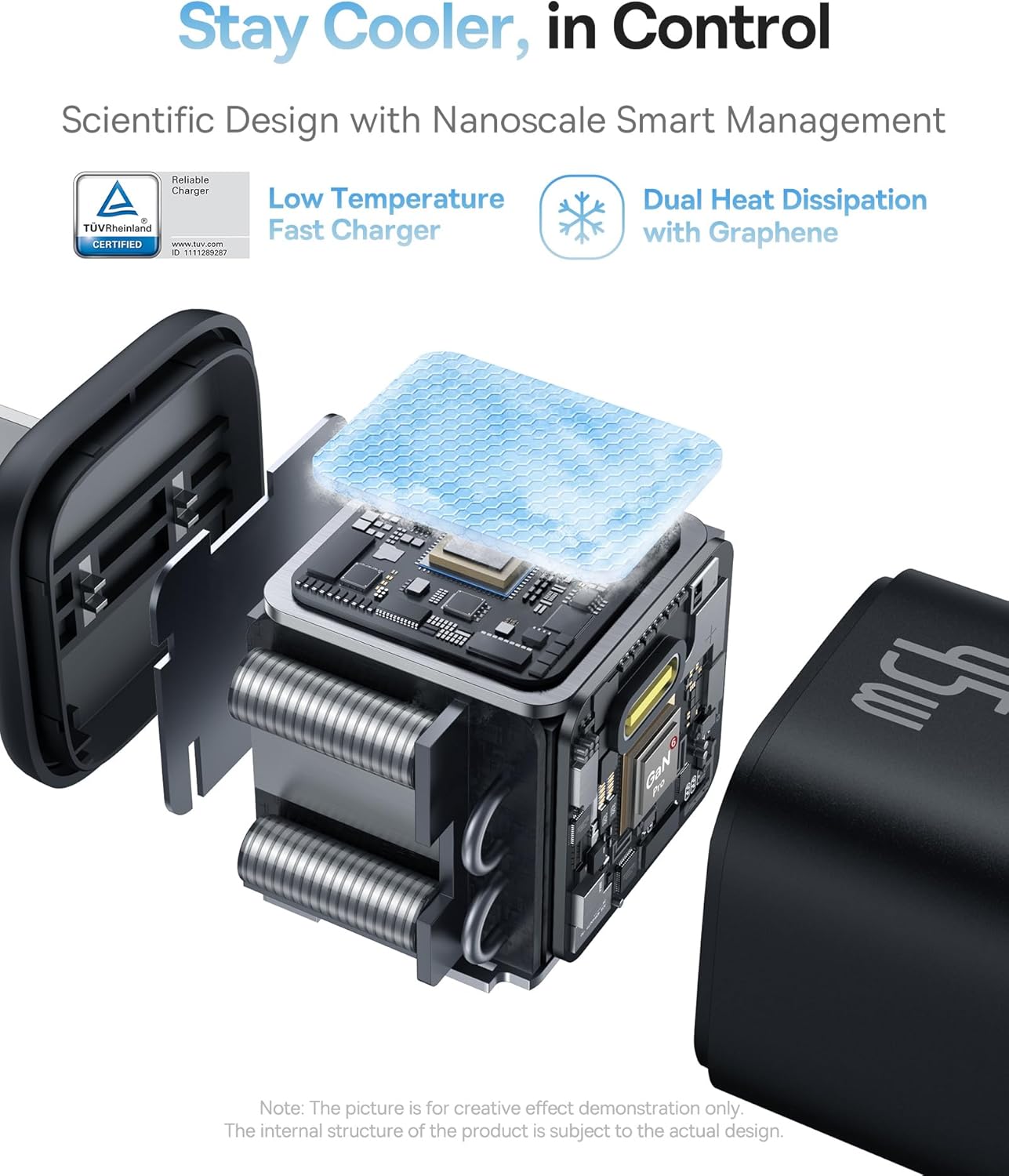
الصورة: انفجار view of the Baseus PicoGo 45W Charger, illustrating its internal components designed for low temperature operation and dual heat dissipation with graphene, certified by TÜV Rheinland.
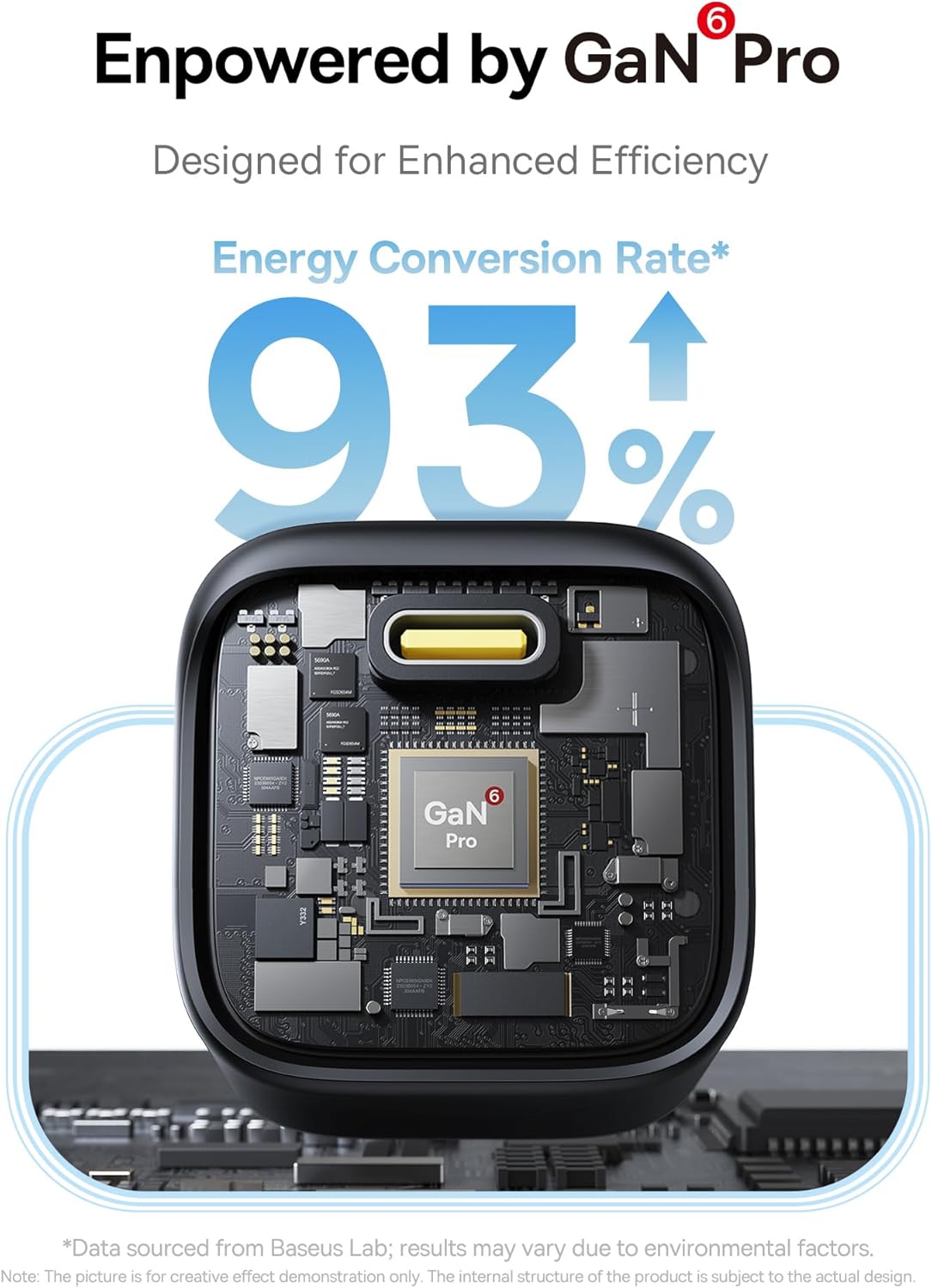
Image: A close-up of the internal GaN Pro chip within the Baseus PicoGo 45W Charger, indicating a 93% energy conversion rate for enhanced efficiency.
تحديد
| عنصر | مواصفة |
|---|---|
| بنك طاقة Baseus Blade لأجهزة الكمبيوتر المحمول | |
| سعة | 20000 مللي أمبير |
| USB-C1/C2 Input/Output | 5 فولت/3 أمبير، 9 فولت/3 أمبير، 12 فولت/3 أمبير، 15 فولت/3 أمبير، 20 فولت/5 أمبير (الحد الأقصى 100 واط) |
| مخرج USB1/USB2 | 4.5 فولت/5 أمبير، 5 فولت/4.5 أمبير، 5 فولت/3 أمبير، 9 فولت/2 أمبير، 12 فولت/1.5 أمبير (الحد الأقصى 22.5 واط) |
| الناتج الإجمالي | 5 فولت/6 أمبير |
| أبعاد | Approx. 0.7 inches thin |
| وزن | حوالي 1.08 رطل |
| Baseus PicoGo 45W Charger | |
| مدخل | AC 100-240V~, 50/60Hz, 1.5A Max |
| مخرج USB-C | 5 فولت/3 أمبير، 9 فولت/3 أمبير، 12 فولت/3 أمبير، 15 فولت/3 أمبير، 20 فولت/2.25 أمبير (الحد الأقصى 45 واط) |
| بروتوكولات الشحن السريع | PD3.0, PPS |
| نوع الموصل | يو اس بي نوع سي |
صيانة
- تنظيف: Wipe the devices with a soft, dry cloth. Do not use liquid cleaners or aerosols.
- تخزين: يُخزن في مكان بارد وجاف بعيدًا عن أشعة الشمس المباشرة ودرجات الحرارة القصوى.
- Battery Care (Power Bank): For optimal battery life, avoid fully discharging the power bank frequently. Recharge it when the battery level is low. If storing for extended periods, charge it to about 50-70% every 3-6 months.
- تجنب القطرات: Protect the devices from drops and impacts.
- التعرض للماء: Keep the devices away from water and high humidity.
استكشاف الأخطاء وإصلاحها
| مشكلة | السبب المحتمل | حل |
|---|---|---|
| الجهاز لا يتم شحنه من بنك الطاقة. | تم استنزاف بطارية بنك الطاقة. Incorrect cable or faulty cable. Device not compatible or drawing too much power. | اشحن بنك الطاقة. جرب كابل شحن مختلف ومعروف بجودته. Ensure device is compatible and within power bank's output limits. |
| بنك الطاقة لا يتم شحنه. | الشاحن لا يعمل. الكابل معيب. Power bank internal issue. | Try a different wall charger. Use the included USB-C to C cable or another known-good cable. اتصل بدعم العملاء إذا استمرت المشكلة. |
| 45W Charger not charging device. | مشكلة في مقبس الحائط. الكابل معيب. الجهاز غير متوافق. | جرب مقبس حائط مختلف. Use a different, known-good USB-C cable. Ensure device supports USB-C charging. |
| الشحن البطيء. | الكابل لا يدعم الشحن السريع. الجهاز لا يدعم الشحن السريع. Multiple devices connected (power bank). | استخدم كابلًا عالي الجودة مصممًا للشحن السريع. Verify device's fast charging compatibility. Disconnect other devices to maximize power to one. |
معلومات السلامة
- Do not expose the devices to extreme temperatures (above 45°C or below 0°C).
- Do not disassemble, modify, or repair the devices yourself. This will void the warranty and may cause damage or injury.
- يحفظ بعيدًا عن متناول الأطفال.
- Do not use the devices in wet environments or near water.
- تجنب إسقاط الأجهزة أو تعريضها لصدمات قوية.
- Dispose of the devices responsibly according to local regulations. Do not dispose of with household waste.
- If the devices become excessively hot, emit smoke, or show any signs of damage, discontinue use immediately and contact customer support.
الضمان والدعم
Baseus products typically come with a limited warranty. Please refer to the warranty card included with your purchase or visit the official Baseus webالموقع للحصول على شروط وأحكام الضمان التفصيلية.
للحصول على الدعم الفني، أو المساعدة في حل المشكلات، أو مطالبات الضمان، يرجى الاتصال بخدمة عملاء Baseus عبر موقعهم الرسمي. website or the retailer from whom you purchased the product. Have your product model number and purchase information ready when contacting support.
باسيوس الرسمي Webموقع: www.baseus.com


