1. انتهى المنتجview
The Tongtion Wireless HDMI Extender (Model H-1) provides a solution for extending HDMI video and audio signals wirelessly. It supports 1080P Full HD resolution at 60Hz and offers a transmission range of up to 1640 feet (500 meters) in line-of-sight conditions. Designed for plug-and-play operation, it eliminates the need for complex driver installations or software configurations, making it suitable for various applications including conference rooms, live events, and home theaters.
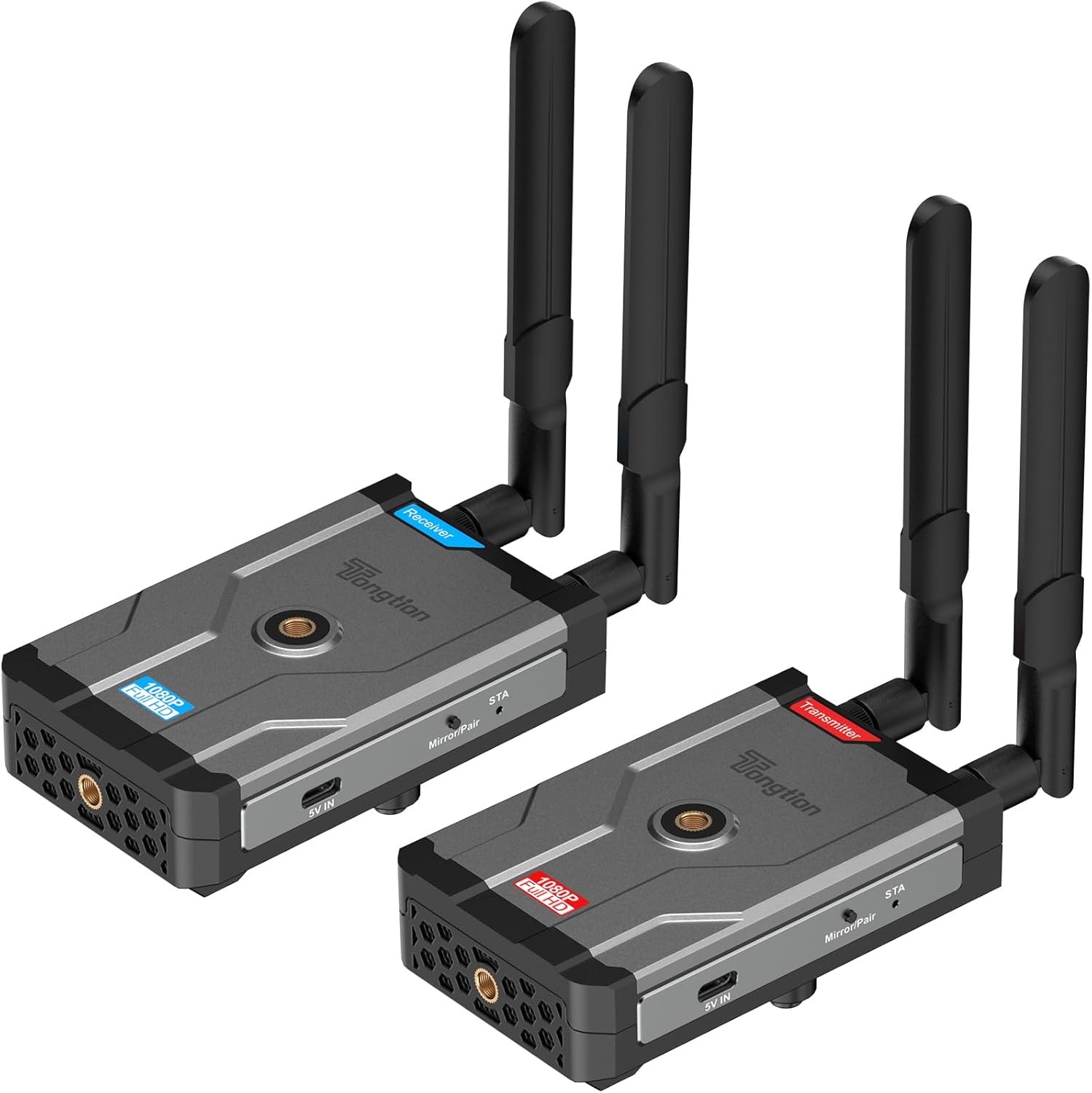
Image: The Tongtion Wireless HDMI Extender system, showing both the transmitter and receiver units with their antennas.
2. ماذا يوجد في الصندوق
تأكد من وجود جميع المكونات في العبوة:
- 1 × جهاز إرسال HDMI لاسلكي
- 1 × جهاز استقبال HDMI لاسلكي
- شنومكس x هوائيات
- 2 × محولات الطاقة
- كابلان طاقة USB-C
- 1 × دليل المستخدم
- كابلات HDMI

Image: A visual representation of the package contents, including the transmitter, receiver, antennas, power adapters, USB-C cables, and user guide.
3. المواصفات
| ميزة | التفاصيل |
|---|---|
| رقم الموديل | ح-1 |
| دعم الدقة | 1920×1080@60Hz (1080P Full HD) |
| انتقال المدى | Up to 500m (1640ft) Line-of-Sight |
| التردد اللاسلكي | 5 جيجا هرتز (802.11a/n) |
| تكوين الهوائي | 2T2R Dual-Antenna |
| معيار HDMI | HDMI1.4 / HDCP1.4 |
| خيارات الطاقة | Power bank, NP-F series batteries (not included), USB-C ports |
| لون | أسود |
| وزن العنصر | 1.17 رطل (0.53 كجم) |
| أبعاد المنتج | 5.87 × 3.74 × 0.96 بوصة (14.9 × 9.5 × 2.4 سم) |
| ميزة خاصة | معايرة تلقائية |
4. تعليمات الإعداد
The Tongtion Wireless HDMI Extender is designed for true plug-and-play operation, requiring no drivers or software installation.
- ربط الهوائيات: Screw the four provided antennas onto the designated ports on both the Transmitter and Receiver units. Ensure they are securely fastened.

الصورة: عن قرب view of the transmitter and receiver units, highlighting the antenna connection points.
- قم بتشغيل جهاز الاستقبال: Connect one end of a USB-C power cable to the Receiver unit's USB-C port and the other end to a power adapter. Plug the power adapter into an electrical outlet. Alternatively, use a power bank or compatible NP-F series battery (not included) for portable power.
- Connect Receiver to Display: Use an HDMI cable to connect the HDMI OUT port on the Receiver unit to the HDMI input port on your display device (e.g., TV, projector, monitor).
- قم بتشغيل جهاز الإرسال: Connect the second USB-C power cable to the Transmitter unit's USB-C port and the other end to its power adapter. Plug the power adapter into an electrical outlet. Similar to the receiver, a power bank or NP-F series battery can be used.
- Connect Transmitter to Source: Use an HDMI cable to connect the HDMI IN port on the Transmitter unit to the HDMI output port on your source device (e.g., laptop, camera, set-top box, PC, DV).

Image: A diagram illustrating the connection process: transmitter connected to a laptop and receiver connected to a television.
- الاقتران التلقائي: The Transmitter and Receiver units are designed to pair automatically within seconds. No manual pairing or software configuration is typically required. Wait for the connection indicator lights on both units to show a stable connection.
Note: For optimal performance, ensure a clear line of sight between the transmitter and receiver, especially for longer distances. Walls and other obstructions can reduce the effective transmission range.
5. تعليمات التشغيل
Once the setup is complete and the units are paired, the system operates automatically.
- تشغيل الطاقة: Ensure both the Transmitter and Receiver units are powered on.
- مخرجات جهاز المصدر: Ensure your source device (laptop, camera, etc.) is outputting video via its HDMI port.
- إدخال العرض: Set your display device (TV, projector) to the correct HDMI input channel where the Receiver is connected.
- انتقال الإشارة: The video and audio signal from your source device will be wirelessly transmitted to your display.
- One-Button Sync: If pairing is lost or you need to re-sync, press the sync button on both the Transmitter and Receiver units simultaneously.

Image: A visual representation of the extender in operation, showing a clear 1080P Full HD signal being transmitted wirelessly to a display.
5.1. توافق الأجهزة العالمي
The system is compatible with a wide range of HDMI-enabled devices:
- الأجهزة المصدر: Cameras, Laptops, Set-top boxes, Switchers, PCs, DVs.
- أجهزة العرض: Projectors, TVs, Monitors.
It supports HDMI1.4/HDCP1.4, allowing for protected content streaming from various platforms.

Image: An illustration demonstrating the broad compatibility of the wireless HDMI extender with various input and output devices.
5.2. Transmission Range and Performance
The device offers a long-range 5GHz dual-antenna transmission, minimizing interference and ensuring stable signal coverage.
- Line-of-Sight (LOS) Range: حتى 1640 قدم (500 متر).
- Through-Wall Penetration: Effective range is reduced when transmitting through walls or obstructions. Typical ranges are 164-295 feet (50-90 meters) through complex home environments.
- كمون: The system is designed for low latency, suitable for video streaming and presentations. Note: Not recommended for gaming due to potential minor latency.

Image: A graphic depicting the extensive transmission range of 1640 feet and the low latency of 0.15 seconds, with a visual of the transmitter and receiver units.

الصورة: صورة علوية view of a house layout illustrating the signal penetration capabilities through walls and the difference between line-of-sight and obstructed transmission ranges.
6. استكشاف الأخطاء وإصلاحها
إذا واجهت مشكلات، راجع خطوات استكشاف الأخطاء وإصلاحها الشائعة التالية:
- لا توجد إشارة على الشاشة:
- Ensure both Transmitter and Receiver are powered on and their power indicators are lit.
- Verify all HDMI cables are securely connected to the correct ports (HDMI IN on Transmitter, HDMI OUT on Receiver).
- تأكد من ضبط جهاز العرض الخاص بك على مصدر إدخال HDMI الصحيح.
- Ensure the source device is outputting an HDMI signal.
- Try pressing the sync button on both units simultaneously to re-establish pairing.
- Reduce the distance between the Transmitter and Receiver, and remove any obstructions.
- إشارة متقطعة / جودة رديئة:
- تأكد من تثبيت الهوائيات بشكل آمن وتوجيهها بشكل صحيح.
- Check for strong interference sources (e.g., Wi-Fi routers, microwaves) operating on the 5GHz band nearby.
- Move the units closer together or adjust their positions to improve line of sight.
- Verify that the power supply is stable and sufficient for both units.
- لا يوجد صوت:
- تحقق من إعدادات الصوت على جهازك المصدر.
- Ensure the display device's volume is not muted or set too low.
- Confirm HDMI cables are fully inserted.
- الوحدات غير قابلة للاقتران:
- تأكد من تشغيل كلا الوحدتين.
- Perform a manual sync by pressing the pairing button on both units.
- Power cycle both the Transmitter and Receiver units.
7. الصيانة
لضمان طول عمر جهاز تمديد HDMI اللاسلكي وأدائه الأمثل، اتبع إرشادات الصيانة التالية:
- تنظيف: استخدم قطعة قماش ناعمة وجافة لتنظيف الجزء الخارجي من الوحدات. لا تستخدم المنظفات السائلة أو البخاخات.
- تخزين: عند عدم استخدامها لفترات طويلة، قم بتخزين الوحدات في مكان بارد وجاف بعيدًا عن أشعة الشمس المباشرة ودرجات الحرارة القصوى.
- التعامل: Handle the units and antennas with care to avoid physical damage. Avoid dropping or subjecting them to strong impacts.
- تهوية: Ensure the units have adequate ventilation to prevent overheating, especially during prolonged operation. Do not block ventilation holes.
- مزود الطاقة: Always use the provided power adapters or compatible power sources to prevent damage.
8. الضمان والدعم
The Tongtion Wireless HDMI Extender comes with a ضمان لمدة سنتين من تاريخ الشراء.
Tongtion also provides دعم مدى الحياة for this product. If you encounter any issues or have questions that are not covered in this manual, please contact Tongtion customer support through their official channels or refer to the 24/7 troubleshooting guides mentioned in the product features.
لمزيد من المساعدة، قم بزيارة متجر تونغشن على أمازون.


