1. المقدمة
شكرا لك على الشراءasing the LONPOO Portable CD Player Boombox, model ZXG-608B. This device offers versatile audio playback options including CD, Bluetooth 5.3, FM radio, USB, and AUX input, along with a microphone port for added functionality. Its compact design and rechargeable battery make it suitable for various environments.
This manual provides essential information for safe operation, setup, and maintenance of your boombox. Please read it thoroughly before use and retain it for future reference.

Image 1.1: The LONPOO ZXG-608B Portable CD Boombox highlighting its multiple playback options: Bluetooth, CD, FM Radio, USB, MIC Port, and AUX-IN.
2. معلومات السلامة
- مصدر الطاقة: Use only the provided AC power cable or the internal rechargeable battery. Ensure the voltagيتوافق مع متطلبات الجهاز.
- الماء والرطوبة: Do not expose the device to rain, moisture, or immerse it in water. Avoid placing objects filled with liquids, such as vases, on the device.
- حرارة: أبقِ الجهاز بعيدًا عن مصادر الحرارة مثل المشعات، أو أجهزة التدفئة، أو المواقد، أو غيرها من الأجهزة التي تنتج الحرارة.
- تهوية: تأكد من التهوية الجيدة. لا تسد أي فتحات تهوية.
- تنظيف: Unplug the device from the power outlet before cleaning. Use a dry, soft cloth. Do not use liquid cleaners or aerosol cleaners.
- الخدمة: لا تحاول خدمة هذا المنتج بنفسك. قم بإحالة جميع أعمال الصيانة إلى أفراد الخدمة المؤهلين.
- التعامل مع الأقراص المضغوطة: Handle CDs by their edges. Avoid touching the data side. Keep CDs clean and free from scratches.
- سلامة البطارية: Do not disassemble, crush, or expose the built-in battery to extreme temperatures. Dispose of batteries according to local regulations.
3. محتويات العبوة
تأكد من وجود جميع العناصر في العبوة:
- 1x LONPOO Portable CD Player Boombox (Model ZXG-608B)
- 1 × كابل طاقة التيار المتردد
- 1x Remote Control (البطاريات غير متضمنة)
- 1x دليل المستخدم (هذه الوثيقة)

Image 3.1: Contents of the package, including the boombox, remote control, AC power cable, and user manual. The image also shows the product dimensions: 20 cm (7.8 inches) height, 23 cm (9 inches) width, and 15 cm (5.9 inches) depth, with a weight of 4.4 lbs.
4. انتهى المنتجview
تعرّف على المكونات الرئيسية وأدوات التحكم في جهاز الراديو المحمول الخاص بك.
4.1 ضوابط وشاشة اللوحة الأمامية

الصورة 4.1: الجبهة view of the boombox and its remote control. The front panel features a large LCD display, STANDBY button, MODE button, previous/next track buttons, a large volume knob, EQ button, and USB port.
- شاشة LCD: Shows track number, time, mode, and other status indicators.
- زر الاستعداد: يقوم بتشغيل الوحدة أو إيقاف تشغيلها.
- زر الوضع: Switches between CD, Bluetooth, FM Radio, USB, and AUX modes.
- Previous/Next Buttons (|<>|): Navigates tracks/stations.
- Play/Pause/Scan Button (▶/SCAN): Plays/pauses media or scans FM radio stations.
- STOP Button (■): يوقف التشغيل.
- مقبض الصوت: يضبط مستوى إخراج الصوت.
- زر EQ: Cycles through equalizer presets (Flat, Rock, Pop, Classic, Jazz).
- منفذ USB: For playing digital audio files من محرك أقراص فلاش USB.
- مقبس سماعة الرأس: للاستماع الخاص.
4.2 اتصالات اللوحة الخلفية
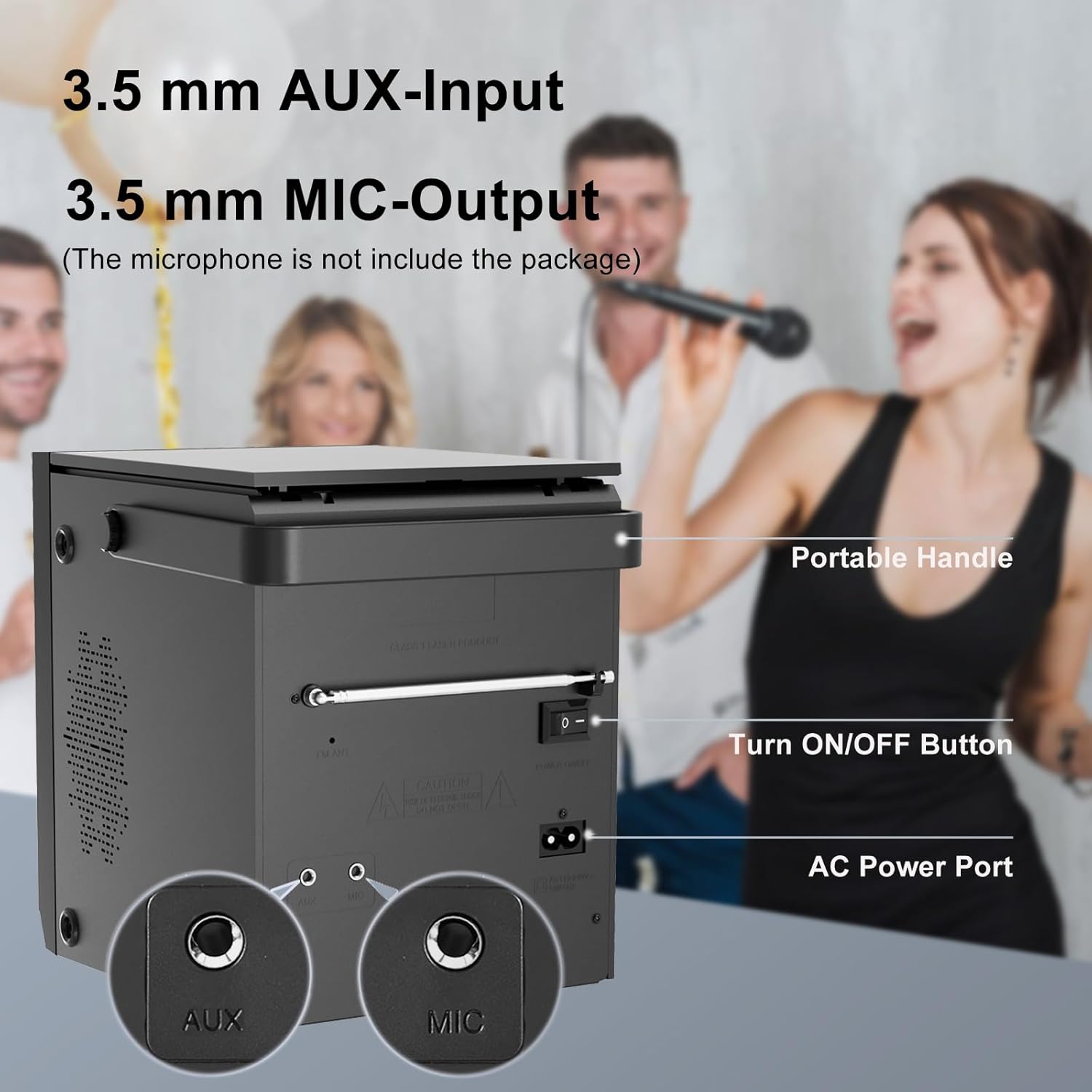
Image 4.2: Rear panel of the boombox, detailing the 3.5 mm AUX-Input, 3.5 mm MIC-Output, the main ON/OFF button, and the AC Power Port. A portable handle is also visible at the top.
- مدخل AUX (3.5 مم): قم بتوصيل أجهزة الصوت الخارجية.
- MIC Output (3.5mm): Connect a microphone for karaoke or voice input.
- زر التشغيل/الإيقاف: مفتاح الطاقة الرئيسي للوحدة.
- منفذ طاقة التيار المتردد: Connect the AC power cable for power and charging.
- هوائي FM: Extend for better FM radio reception.
4.3 Top-Loading CD Compartment

Image 4.3: The top-loading CD compartment shown open with a CD inside. Icons illustrate playback options: Play in order, Single cycle, Repeat all, and Random play.
The CD compartment is located on the top of the unit. Gently lift the lid to access it.
4.4 التحكم عن بعد
The included remote control allows for convenient operation from a distance. (Batteries not included. Requires 2x AAA batteries, typically.)
5. الإعداد
5.1 توصيل الطاقة
- طاقة التيار المتردد: Connect the supplied AC power cable to the AC Power Port on the rear of the boombox and then to a standard wall outlet.
- بطارية قابلة لإعادة الشحن: The boombox has a built-in 2000 mAh rechargeable battery, providing over 5 hours of continuous use at medium volume. The battery charges automatically when connected to AC power.

Image 5.1: The boombox powered by its internal rechargeable battery, capable of providing approximately 5 hours of playback.
5.2 التشغيل المبدئي
- Ensure the main ON/OFF switch on the rear panel is in the "ON" position.
- اضغط على تعليق قم بتشغيل الجهاز باستخدام الزر الموجود على اللوحة الأمامية أو جهاز التحكم عن بعد.
- The LCD display will illuminate.
6. تعليمات التشغيل
تشغيل أقراص مضغوطة 6.1
- اضغط على وضع button until "CD" mode is selected on the display.
- Open the CD compartment lid on top of the unit.
- Place a CD with the label side facing up. Gently close the lid.
- The boombox will read the CD, and playback should start automatically. If not, press the ▶/SCAN زر.
- استخدم |<>| أزرار لتخطي المسارات.
- اضغط على ▶/SCAN زر لإيقاف / استئناف التشغيل.
- اضغط على ■ توقف زر لإيقاف التشغيل.
- اضغط على يكرر button on the remote control to cycle through repeat modes (Single, All, Random).
6.2 وضع Bluetooth
ملحوظة: This device supports Bluetooth connection for audio input from external devices but does not support Bluetooth earphones.
- اضغط على وضع button until "BT" or "Bluetooth" is displayed. The unit will enter pairing mode, indicated by a flashing Bluetooth icon or "PAIR".
- على جهازك المزود بتقنية البلوتوث (مثل الهاتف الذكي أو الجهاز اللوحي)، قم بتمكين البلوتوث وابحث عن الأجهزة المتاحة.
- Select "LONPOO ZXG-608B" (or similar name) from the list.
- Once paired, the boombox will emit a confirmation sound, and the Bluetooth indicator will stop flashing.
- You can now play audio from your connected device through the boombox.

Image 6.1: Illustrates the process of pairing a smartphone with the boombox via Bluetooth for wireless audio streaming.
6.3 راديو FM
- Extend the FM antenna on the rear panel for optimal reception.
- اضغط على وضع اضغط على الزر حتى يتم تحديد وضع "FM".
- اضغط مع الاستمرار على ▶/SCAN زر لمسح وحفظ محطات FM المتوفرة تلقائيًا.
- استخدم |<>| أزرار للتنقل بين المحطات المحفوظة.
6.4 تشغيل USB
- قم بإدخال محرك أقراص فلاش USB في منفذ USB الموجود على اللوحة الأمامية.
- اضغط على وضع button until "USB" mode is selected.
- ستقوم الوحدة تلقائيًا باكتشاف وتشغيل الصوت المتوافق fileس (على سبيل المثال، MP3).
- استخدم |<>| أزرار لتخطي المسارات.
- اضغط على ▶/SCAN زر لإيقاف / استئناف التشغيل.
- اضغط على ■ توقف زر لإيقاف التشغيل.
6.5 مدخل ايه يو اكس
- Connect an external audio device (e.g., MP3 player, smartphone) to the AUX Input port on the rear panel using a 3.5mm audio cable (not included).
- اضغط على وضع اضغط على الزر حتى يتم تحديد وضع "AUX".
- يمكنك التحكم في التشغيل ومستوى الصوت من جهازك الخارجي المتصل.

Image 6.2: Demonstrates connecting external devices like a smartphone via AUX input and using the USB port for playback.
6.6 إدخال الميكروفون
- Connect a microphone (not included) to the MIC Output port on the rear panel.
- Adjust the volume using the main volume knob. The microphone input will mix with the currently playing audio source.

Image 6.3: Shows the boombox being used with a microphone, illustrating its karaoke function.
6.7 إعدادات المعادل (EQ)
اضغط على EQ button on the front panel or remote control to cycle through preset equalizer modes:
- مستوي
- صخر
- بوب
- كلاسيكي
- موسيقى الجاز

Image 6.4: Highlights the 20W stereo sound output and lists the available 3 repeat modes (Single, All, Random) and 5 EQ modes (Flat, Rock, Pop, Classic, Jazz).
7. الصيانة
- تنظيف: امسح الجزء الخارجي من الوحدة بقطعة قماش ناعمة وجافة. لا تستخدم منظفات أو مذيبات كاشطة.
- العناية بعدسة الأقراص المضغوطة: في حال حدوث مشاكل في تشغيل الأقراص المدمجة، استخدم قرص تنظيف عدسة الأقراص المدمجة المتوفر تجارياً.
- عمر البطارية: لإطالة عمر البطارية، تجنب تفريغها بالكامل بشكل متكرر. اشحن الجهاز بانتظام، حتى لو لم يكن قيد الاستخدام لفترات طويلة.
- تخزين: When storing the unit for a long time, ensure it is powered off and disconnected from the AC supply. Store in a cool, dry place.
8. استكشاف الأخطاء وإصلاحها
| مشكلة | السبب المحتمل | حل |
|---|---|---|
| لا يوجد طاقة | AC cable not connected; Main power switch off; Battery depleted. | Check AC connection; Ensure rear ON/OFF switch is ON; Charge the battery. |
| القرص المضغوط لا يعمل / خطأ "لا يوجد قرص" | CD inserted incorrectly; CD is dirty or scratched; CD lens is dirty; Incompatible CD format. | Reinsert CD label side up; Clean CD; Use a CD lens cleaner; Ensure CD is audio CD format. |
| البلوتوث غير مقترن | Boombox not in BT mode; Device too far; Bluetooth already connected to another device. | Select BT mode; Move device closer; Disconnect from other devices and try again. |
| استقبال راديو FM ضعيف | الهوائي غير ممتد، الإشارة ضعيفة. | Fully extend the FM antenna; Reposition the unit for better signal. |
| مشاكل تشغيل USB | لم يتم إدخال محرك أقراص USB بشكل صحيح؛ غير متوافق file تنسيق؛ محرك أقراص USB تالف. | أعد إدخال محرك أقراص USB؛ تأكد من files are MP3 or compatible; Try a different USB drive. |
| لا يوجد صوت من منفذ AUX | AUX cable not connected; Incorrect mode selected; Volume too low on external device. | Check AUX cable connection; Select AUX mode; Increase volume on external device. |
9. المواصفات
- نموذج: ZXG-608B
- ماركة: لونبو
- أبعاد المنتج (الطول × العرض × الارتفاع): 4.72 × 7.09 × 5.91 بوصة (12 × 18 × 15 سم)
- وزن السلعة: 5.63 رطل (2.55 كجم)
- مخرج السماعات: 20 واط RMS (10 واط × 2)
- الاتصال: Bluetooth 5.3, USB, AUX Input (3.5mm), MIC Port (3.5mm)
- مصدر الطاقة: AC Power (Corded Electric) / Built-in Rechargeable Battery
- سعة البطارية: 2000 مللي أمبير
- Playback Time (Battery): >5 hours (at medium volume)
- الوسائط المدعومة: Audio CD, CD-R/RW, USB (MP3)
- موالف الراديو: FM
- أوضاع EQ: Flat, Rock, Pop, Classic, Jazz
- الملحقات المتضمنة: AC Power Cable, Remote Control, User Manual
10. الضمان والدعم
LONPOO products are designed for reliability and performance. For warranty information, please refer to the warranty card included with your purchase or contact LONPOO customer support.
If you encounter any issues or have questions regarding your LONPOO Portable CD Player Boombox, please contact our customer support team for assistance. Contact details can typically be found on the official LONPOO webالموقع أو على عبوة المنتج.


