1. المقدمة
Thank you for choosing the EvoFox Ronin Wired Mechanical Gaming Keyboard. This manual provides detailed instructions for setting up, operating, and maintaining your keyboard to ensure optimal performance and longevity. The EvoFox Ronin is designed for a superior typing and gaming experience, featuring advanced sound dampening, customizable switches, and dynamic RGB lighting.

Image 1.1: EvoFox Ronin Wired Mechanical Gaming Keyboard (Black)
المميزات الرئيسية:
- 9-Layer Gasket Structure: Advanced design for reduced noise, improved stability, and enhanced tactile feedback.
- Hot-Swappable Outemu Red Silent Switches: Customizable, durable, and smooth typing experience with included switch puller.
- Per-Key RGB Backlighting: 21 effects and Audio Sync Mode for personalized and immersive lighting.
- مقبض مخصص للتحكم في مستوى الصوت: Convenient control over audio levels.
- Powerful Windows Software: Program keys, create macros, control backlighting, and manage profiles with onboard memory.
- التوافق بين المنصات: Easily switch between Windows and Mac modes.
- Detachable Braided USB-C Cable: Robust 1.5m cable with EMI ring for reliable connection and portability.
2. محتويات العبوة
يرجى التأكد من وجود جميع العناصر في الحزمة الخاصة بك:
- 1 x EvoFox Ronin Mechanical Gaming Keyboard
- 1 × ساحب غطاء المفتاح
- 4 x Outemu Red Switches (Spare)
- 1 × دليل المستخدم
3. انتهى المنتجview
3.1 بنية الحشية
The EvoFox Ronin features an advanced 9-layer gasket structure. This design incorporates silicone gaskets, a mounting plate, and multiple layers of vibration and sound dampening materials to provide a stable, quiet, and comfortable typing experience by minimizing unwanted noise and resonance.
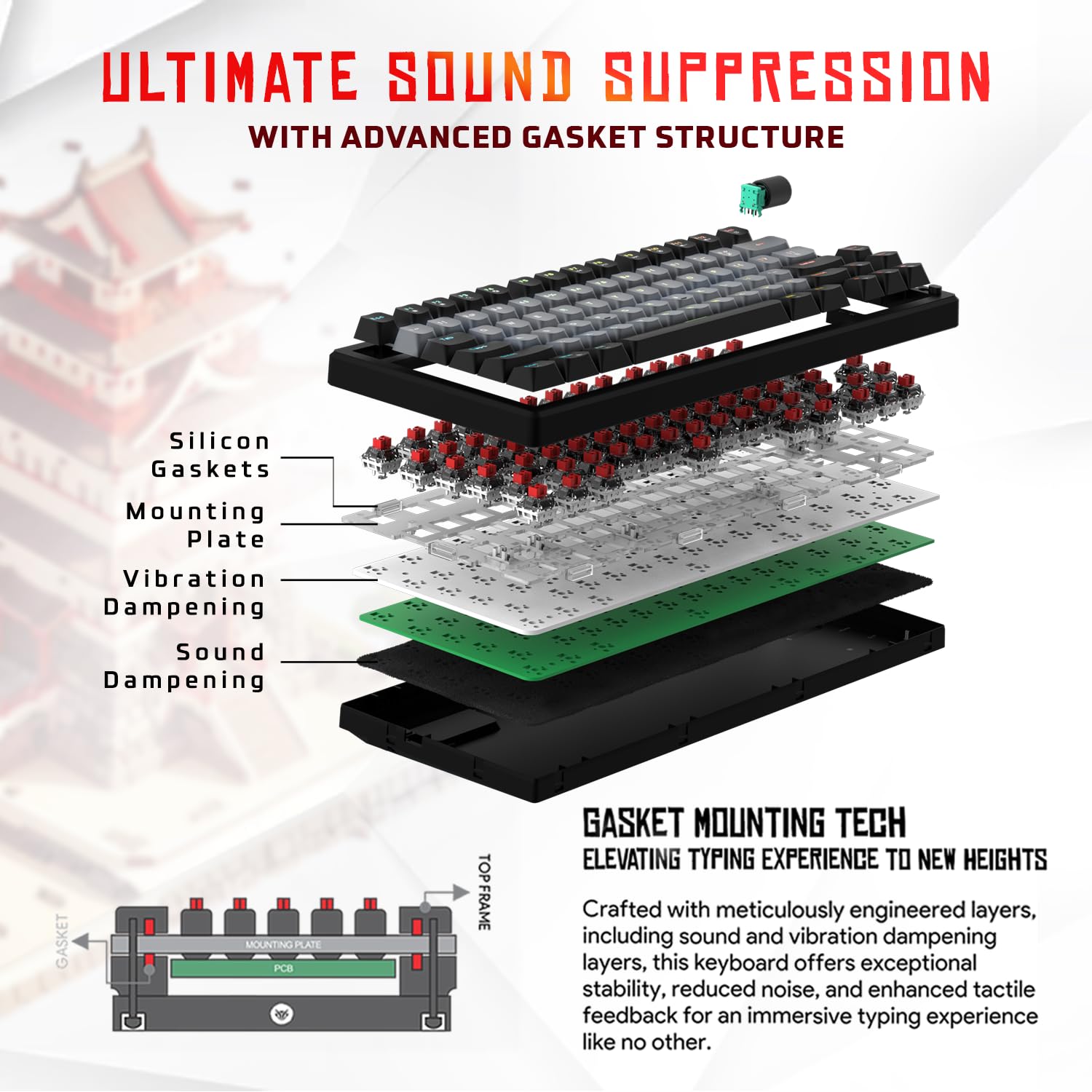
الصورة 3.1: انفجرت view of the 9-layer gasket structure, showing silicone gaskets, mounting plate, and dampطبقات مترابطة.
3.2 Outemu Red Silent Switches
The keyboard is equipped with Outemu Red Dust Proof Switches, known for their linear and silent operation. These switches are hot-swappable, allowing users to easily replace them with other compatible 3-pin mechanical switches without soldering, enabling full customization of the typing feel.
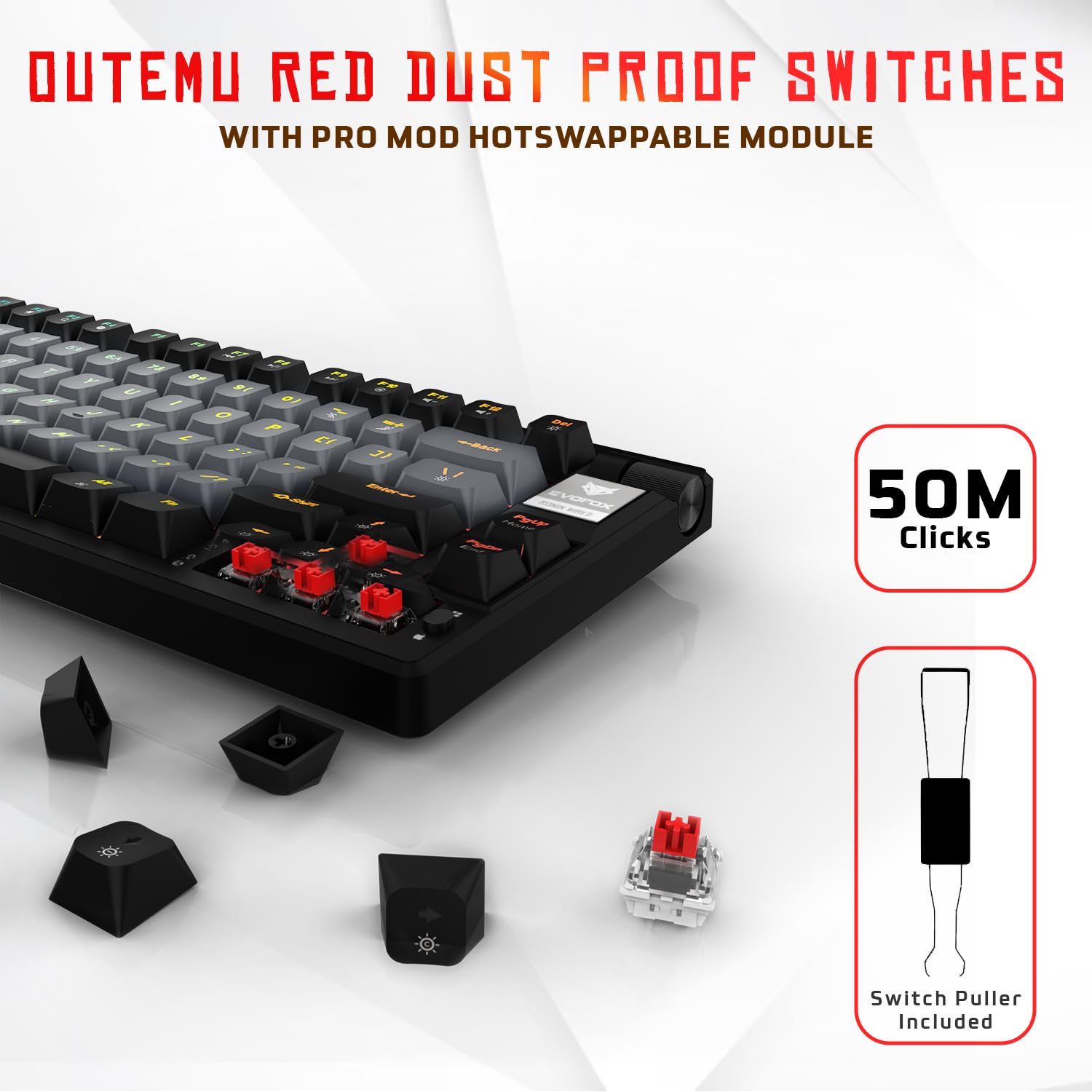
Image 3.2: Close-up of Outemu Red switches and the included switch puller, demonstrating hot-swappable functionality.
3.3 Per-Key RGB Backlighting
Each key on the EvoFox Ronin features individual RGB backlighting, offering 16 million colors and 21 pre-set lighting effects. The lighting can be customized directly on the keyboard or through the dedicated software, including an Audio Sync Mode that reacts to sound.

Image 3.3: The EvoFox Ronin keyboard showcasing its customizable per-key RGB backlighting.
3.4 Dedicated Volume Knob
A metal volume knob is integrated into the keyboard for quick and precise audio adjustments. Rotate to change volume, and press to mute/unmute.
3.5 Detachable USB-C Cable
The keyboard connects via a robust 1.5-meter braided USB-C cable, which is detachable for easy portability and storage. The cable includes an EMI ring to minimize signal interference.

Image 3.4: Features of the EvoFox Ronin, including the volume knob, detachable USB-C cable, and double-height adjustable legs.
4. تعليمات الإعداد
Follow these steps to set up your EvoFox Ronin keyboard:
- فك لوحة المفاتيح: قم بإزالة لوحة المفاتيح وجميع الملحقات من العبوة بعناية.
- قم بتوصيل كابل USB-C: قم بإدخال طرف USB-C الخاص بالكابل المقدم في المنفذ الموجود على الجزء الخلفي من لوحة المفاتيح.
- الاتصال بجهاز الكمبيوتر: قم بتوصيل طرف USB-A من الكابل بمنفذ USB متاح على جهاز الكمبيوتر الخاص بك (PC أو Mac).
- تثبيت برنامج التشغيل: لوحة المفاتيح تعمل بمجرد توصيلها. سيقوم نظام التشغيل الخاص بك بالكشف عنها وتثبيت برامج التشغيل اللازمة تلقائيًا.
- التثبيت الاختياري للبرنامج: For advanced customization, download the dedicated Windows software from the official EvoFox webموقع.
5. تعليمات التشغيل
5.1 الوظائف الأساسية الرئيسية
The EvoFox Ronin functions as a standard TKL (Tenkeyless) keyboard. All keys perform their labeled functions. The keyboard supports N-Key Rollover, ensuring every key press is registered accurately, even during rapid input.
5.2 مفاتيح الوسائط المتعددة والوظائف
Access multimedia and additional functions by pressing the Fn key in combination with the designated F-keys or other keys. Refer to the keycap legends for specific functions (e.g., Fn + F1 for media player, Fn + F2 for volume down).
5.3 التحكم في إضاءة RGB
You can control the RGB lighting directly from the keyboard:
- تأثيرات التغيير: يستخدم الجبهة الوطنية + \ | للتنقل بين 21 تأثيرًا ضوئيًا مختلفًا.
- ضبط السطوع: يستخدم Fn + سهم لأعلى لزيادة السطوع و الجبهة الوطنية + سهم لأسفل لتقليل السطوع.
- ضبط السرعة: يستخدم الجبهة الوطنية + سهم لليسار لتقليل سرعة التأثير و الجبهة الوطنية + السهم الأيمن لزيادة سرعة التأثير.
- Audio Sync Mode: Activate specific modes that react to audio input.
5.4 تخصيص البرامج
The dedicated Windows software allows for comprehensive customization:
- البرمجة الرئيسية: Remap any key to a different function.
- إنشاء الماكرو: قم بتسجيل وتعيين تسلسلات المفاتيح المعقدة لمفتاح واحد.
- Backlighting Effects: Fine-tune RGB colors, effects, brightness, and speed.
- محترفfile إدارة: إنشاء وحفظ العديد من المحترفينfiles لتطبيقات أو ألعاب مختلفة.
- معدل التصويت: Adjust the polling rate up to 1000Hz.

Image 5.1: Screenshot of the EvoFox Ronin's dedicated software, showing options for light settings, button settings, and macro management.
5.5 Cross-Platform Compatibility
The keyboard supports both Windows and Mac operating systems. Use the designated key combination (typically Fn + Win or similar, refer to keycap legends) to switch between modes, ensuring correct key mapping for your OS.
6. الصيانة
6.1 تنظيف لوحة المفاتيح
للحفاظ على مظهر لوحة المفاتيح ووظائفها:
- افصل لوحة المفاتيح عن الكمبيوتر قبل التنظيف.
- استخدم علبة من الهواء المضغوط لإزالة الغبار والحطام من بين أغطية المفاتيح.
- امسح أغطية المفاتيح وسطح لوحة المفاتيح بقطعة قماش ناعمة ورطبة قليلاً.amp القماش. تجنب الرطوبة الزائدة.
- لا تستخدم كيماويات مركزة أو منظفات كاشطة.
6.2 استبدال المفاتيح
The EvoFox Ronin features hot-swappable switches, allowing for easy replacement without soldering:
- افصل لوحة المفاتيح عن الكمبيوتر.
- استخدم أداة سحب أغطية المفاتيح المرفقة لإزالة غطاء المفتاح المطلوب برفق.
- Use the included switch puller to carefully grip the top and bottom clips of the switch and pull it straight up.
- قم بمحاذاة دبابيس المفتاح الجديد مع الفتحات الموجودة على لوحة الدوائر المطبوعة واضغط عليه برفق حتى تسمع صوت طقطقة. تأكد من عدم انحناء الدبابيس.
- استبدال غطاء المفتاح.

Image 6.1: A keycap being removed from the keyboard using a keycap puller.
7. استكشاف الأخطاء وإصلاحها
If you encounter issues with your EvoFox Ronin keyboard, refer to the following common solutions:
- لوحة المفاتيح لا تستجيب:
- تأكد من توصيل كابل USB-C بشكل آمن بكل من لوحة المفاتيح والكمبيوتر.
- حاول توصيل لوحة المفاتيح بمنفذ USB مختلف على جهاز الكمبيوتر الخاص بك.
- قم باختبار لوحة المفاتيح على جهاز كمبيوتر آخر لاستبعاد وجود مشكلة خاصة بالكمبيوتر.
- أعد تشغيل الكمبيوتر الخاص بك.
- إضاءة RGB لا تعمل/غير صحيحة:
- Check the on-board lighting controls (Fn key combinations) to ensure brightness is not set to zero or an effect is not disabled.
- If using the software, ensure it is running and the correct profile نشط.
- Reinstall the keyboard software if issues persist.
- المفاتيح غير مسجلة:
- تأكد من عدم وجود أي شوائب عالقة تحت غطاء المفتاح أو المفتاح.
- If a specific key is not working, try replacing its switch (refer to Section 6.2).
- Check for bent pins on the switch if you recently replaced one.
- Software Issues (e.g., Antivirus Flagging):
- Ensure you download the software from the official EvoFox website to avoid unofficial versions.
- If your antivirus flags the software, you may need to add an exception for the software's executable file. Proceed with caution and only if you trust the source.
- Contact EvoFox support for the latest software version or assistance.
8. المواصفات
| ميزة | التفاصيل |
|---|---|
| ماركة | إيفوفوكس |
| اسم الموديل | EvoFox Ronin TKL Wired |
| وصف لوحة المفاتيح | ميكانيكي |
| تكنولوجيا الاتصال | USB-C (سلكي) |
| المفاتيح | Outemu Red Silent Dust Proof Switches (Hot-Swappable) |
| الإضاءة الخلفية | Per-Key RGB (16 Million Colors, 21 Effects, Audio Sync Mode) |
| معدل التصويت | حتى 1000 هرتز |
| تدوير المفتاح | N-Key Rollover (All Anti-Ghosting Keys) |
| المميزات الخاصة | Advanced Gasket Structure, Compact TKL Design, Multimedia Keys, Pro Mod Hotswap Module, Powerful Windows Software, Dedicated Volume Controller |
| الأجهزة المتوافقة | كمبيوتر محمول ، كمبيوتر شخصي |
| منصة الأجهزة | نظام التشغيل ويندوز/ماك/لينكس/يونكس |
| طول الكابل | 1.5m Detachable Braided Type-C with EMI Ring |
| مادة | بلاستيك |
| أبعاد المنتج | 32 × 13.5 × 2.6 سم |
| وزن العنصر | 640 جرام |
| بلد المنشأ | الصين |
9. الضمان والدعم
The EvoFox Ronin Mechanical Gaming Keyboard comes with a standard manufacturer's warranty. Please refer to the warranty card included in your package for specific terms and conditions, including warranty period and coverage details.
For technical support, troubleshooting assistance, or warranty claims, please contact EvoFox customer support. You can find contact information on the official EvoFox website or through the manufacturer, Allied Electronics & Magnetics Private Limited.
الشركة المصنعة: Allied Electronics & Magnetics Private Limited
عنوان: C-64/4, Okhla Phase - 2, New Delhi - 110020


