1. المقدمة
The ELKO EP RFSAI-62B-SL/MT is a state-of-the-art switching actuator designed for smart home environments. This unit features two output relays, making it suitable for controlling various consumer appliances and lighting systems. It integrates seamlessly into Matter-compatible ecosystems through the Thread protocol, ensuring broad interoperability with other Matter-certified devices.
Beyond traditional switches and buttons, the RFSAI-62B-SL/MT can also be controlled using wireless wall switches like the RFGB-40-MT. Its robust design allows for a range of up to 200 meters in open air, providing flexible installation options. The device supports a maximum switching capacity of 2000 W (8 A) and utilizes an AgSnO2 + Zero Cross relay contact, optimized for switching lighting loads efficiently.
2. معلومات السلامة
Please read this manual carefully before installation and operation. Failure to follow these instructions may result in electric shock, fire, or other hazards.
- يجب أن يتم إجراء التثبيت بواسطة كهربائي مؤهل وفقًا لجميع القوانين الكهربائية المحلية والوطنية.
- افصل الطاقة من قاطع الدائرة قبل تركيب الجهاز أو صيانته.
- لا تعرض الجهاز للرطوبة أو درجات الحرارة العالية أو أشعة الشمس المباشرة.
- تأكد من استخدام الجهاز ضمن نطاق حجمه المحددtage and current ratings (AC 230 V, 8 A).
- لا تحاول إصلاح الجهاز أو تعديله. أحل جميع أعمال الصيانة إلى فنيين مؤهلين.
3. محتويات العبوة
تأكد من وجود جميع العناصر في العبوة:
- 1x ELKO EP RFSAI-62B-SL/MT Matter Switching Actuator
- 1x دليل المستخدم (هذه الوثيقة)
4. انتهى المنتجview
The RFSAI-62B-SL/MT is a compact unit designed for flush mounting. Below is an image of the device with key components highlighted.
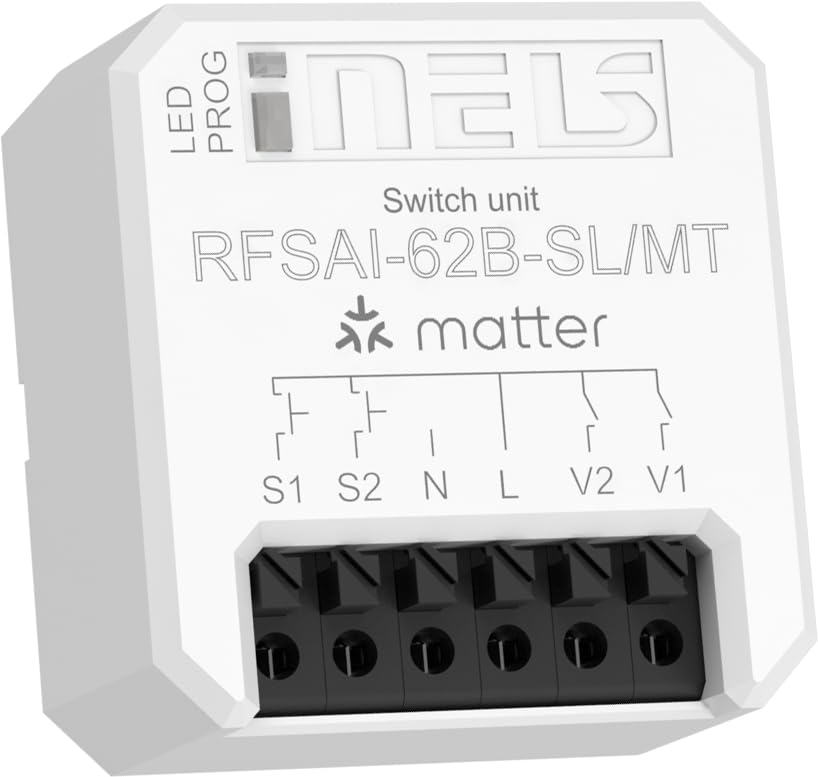
Figure 4.1: ELKO EP RFSAI-62B-SL/MT Matter Switching Actuator.
This image shows the ELKO EP RFSAI-62B-SL/MT Matter Switching Actuator. The device is white with black screwless terminals at the bottom. The top surface features the 'iNELS' logo, 'Switch unit', 'RFSAI-62B-SL/MT', and the 'matter' logo. There are labels for 'LED' and 'PROG' indicating an LED indicator and a program button. Wiring diagrams are printed above the terminals, labeled S1, S2, N, L, V2, and V1.
المكونات الرئيسية:
- مؤشر LED: يقدم معلومات عن حالة الخدمة.
- PROG (Program/RESET) Button: Used for pairing, resetting, and other programming functions.
- Screwless Terminals: For secure and easy wiring connections.
- س1، س2: Input terminals for external switches/buttons.
- N: Neutral wire connection.
- L: Live wire connection (AC 230V).
- V1 ، V2: Output terminals for controlled loads (e.g., lighting, appliances).
5. الإعداد والتثبيت
Before proceeding with installation, ensure power is disconnected at the main circuit breaker.
5.1 تعليمات الأسلاك
- انقطاع التيار الكهربائي: Turn off the main power supply to the circuit where the actuator will be installed. Verify with a voltagه اختبار.
- توصيل الطاقة:
- قم بتوصيل مباشر (L) wire (AC 230V) to the 'L' terminal on the actuator.
- قم بتوصيل محايد (ن) wire to the 'N' terminal on the actuator.
- توصيل الأحمال:
- Connect the load (e.g., light fixture) to the V1 و/أو V2 terminals. Ensure the neutral wire of the load is connected to the main neutral line.
- Connect External Switches (Optional):
- If using external push-buttons or switches, connect them to the S1 و S2 terminals. These inputs can be configured for various control modes.
- التثبيت الآمن: Place the actuator securely within a suitable electrical box or enclosure.
- اعادة الطاقة: بمجرد التأكد من أن جميع التوصيلات آمنة ومؤكدة، قم بإعادة التيار الكهربائي من قاطع الدائرة.
5.2 Matter Network Integration
To integrate the RFSAI-62B-SL/MT into your smart home system, you will need:
- One or more Thread Border Routers connected to your Wi-Fi network.
- A Matter-compatible hub (e.g., Home Assistant, Apple HomeKit, Google Home, Amazon Alexa).
- The associated mobile application for your chosen Matter hub.
Follow the pairing instructions provided by your Matter hub's application. Typically, this involves putting the device into pairing mode (often by pressing the PROG/RESET button for a specified duration) and scanning a QR code or entering a pairing code provided with the device.
6. تعليمات التشغيل
Once successfully integrated into your Matter network, the RFSAI-62B-SL/MT can be controlled in several ways:
- Via Matter Hub Application: Use your preferred Matter controller application (e.g., Home Assistant, Apple Home, Google Home) to remotely switch the connected loads ON or OFF.
- Via External Switches: If wired, the S1 and S2 inputs allow control via traditional wall switches or push-buttons. The functionality of these inputs can be configured within your Matter ecosystem.
- Via Wireless Wall Switches: Compatible wireless wall switches, such as the ELKO EP RFGB-40-MT, can be paired with the actuator for convenient local control without additional wiring.
- PROG/RESET Button: While primarily for pairing and resetting, the PROG button may also offer basic toggle functionality depending on the specific firmware and Matter configuration.
7. الصيانة
The ELKO EP RFSAI-62B-SL/MT is designed for maintenance-free operation. However, consider the following:
- تنظيف: If necessary, gently wipe the device with a dry, soft cloth. Do not use abrasive cleaners or solvents.
- تحديثات البرامج الثابتة: Periodically check your Matter hub's application for available firmware updates for the actuator to ensure optimal performance and security.
- الظروف البيئية: Ensure the device remains within its specified operating environment (temperature, humidity) to prevent damage.
8. استكشاف الأخطاء وإصلاحها
| مشكلة | السبب المحتمل | حل |
|---|---|---|
| الجهاز لا يستجيب. | No power; Not paired; Out of Thread network range. | Check power supply; Re-pair the device; Ensure it's within range of a Thread Border Router. |
| Cannot connect to Matter network. | Incorrect pairing procedure; Matter hub issue; Thread Border Router issue. | Refer to your Matter hub's pairing guide; Restart Matter hub and Thread Border Router; Try factory resetting the actuator (long press PROG/RESET button). |
| Connected load does not switch. | Incorrect wiring; Overload; Faulty load. | Verify wiring connections; Check load's power consumption against actuator's max rating (2000W/8A); Test the load independently. |
| External switch (S1/S2) not working. | Incorrect wiring; Switch type not compatible; Configuration issue in Matter app. | Check wiring to S1/S2; Ensure switch is compatible (e.g., momentary push-button vs. toggle); Verify input configuration in your Matter hub. |
9. المواصفات
| ميزة | التفاصيل |
|---|---|
| أبعاد المنتج (الطول × العرض × الارتفاع) | 4.3 x 4.4 x 2.2 cm (1.69 x 1.73 x 0.87 inches) |
| الشركة المصنعة | إلكو إب |
| رقم الموديل | 8975 (Internal), RFSAI-62B-SL/MT (Product) |
| وضع التشغيل | كهربائي |
| التقييم الحالي | 8 أمبير (بحد أقصى 2000 واط) |
| حجم التشغيلtage | 230 فولت (تيار متردد) |
| نوع الاتصال | Normally Closed (AgSnO2 + Zero Cross relay) |
| نوع الموصل | تدفق جبل |
| نوع المفتاح | Dimmer (Note: Product description indicates a switching unit, not a dimmer) |
| نوع المحطة الطرفية | Wago (Screwless terminals) |
| مادة | بلاستيك |
| بروتوكول الاتصالات | Matter (Application Protocol), Thread (Communication Protocol) |
| عدد المفاتيح | 2 (8 A/AC1) |
| يتراوح | Up to 200 m (open air) |
10. الضمان والدعم
ELKO EP products are manufactured to the highest quality standards. For warranty information and technical support, please refer to the official ELKO EP webالموقع أو اتصل بالموزع المحلي لديك.
لمزيد من المساعدة، يرجى زيارة: www.elkoep.com


