1. انتهى المنتجview
The MageGee LIGHT87 is a versatile 87-key wireless mechanical keyboard designed for gaming and productivity. It features a gasket-mounted structure for a creamy typing sound, hot-swappable switches, vibrant RGB backlighting, and multiple connectivity options including 2.4GHz wireless, Bluetooth 5.0, and USB-C wired mode. It is equipped with an 8000mAh battery and durable side-printed PBT keycaps.

الشكل 1: من أعلى إلى أسفل view of the MageGee LIGHT87 Wireless Mechanical Keyboard, showcasing its 87-key layout and RGB backlighting.

الشكل 2: انتهىview of the MageGee LIGHT87's key features, including 8000mAh battery, PBT keycaps, Win/Mac dual system support, gasket mount, 5 layers of silencing foams, 16.8 million RGB backlight, triple mode connection, custom hot-swappable switches, and 87-key anti-ghosting.
2. محتويات العبوة
قبل أن تبدأ، يرجى التأكد من وجود جميع العناصر في العبوة:
- MageGee LIGHT87 Wireless Mechanical Keyboard
- كابل USB-C إلى USB-A
- 2.4GHz استقبال USB
- كيكاب بولير
- تبديل مجتذب
- دليل المستخدم (هذا المستند)

Figure 3: Contents of the MageGee LIGHT87 keyboard package, including the keyboard, USB cable, keycap puller, switch puller, and user manual.
3. الإعداد والاتصال
The MageGee LIGHT87 keyboard offers three connection modes: USB-C wired, 2.4GHz wireless, and Bluetooth 5.0.
3.1 شحن لوحة المفاتيح
Before first use, it is recommended to fully charge the keyboard. Connect the provided USB-C cable to the keyboard's USB-C port and the other end to a USB power source (e.g., computer USB port, wall adapter). The keyboard features an 8000mAh large-capacity battery.

Figure 4: Illustration of the 8000mAh battery capacity, providing approximately 53 hours with RGB backlight on and 400 hours with RGB backlight off.

Figure 5: Detailed battery life estimates: 53 hours with backlight on, 400 hours with backlight off, and 450 hours of sleep standby time.
3.2 أوضاع الاتصال
The keyboard supports seamless switching between wired, 2.4GHz, and Bluetooth modes.
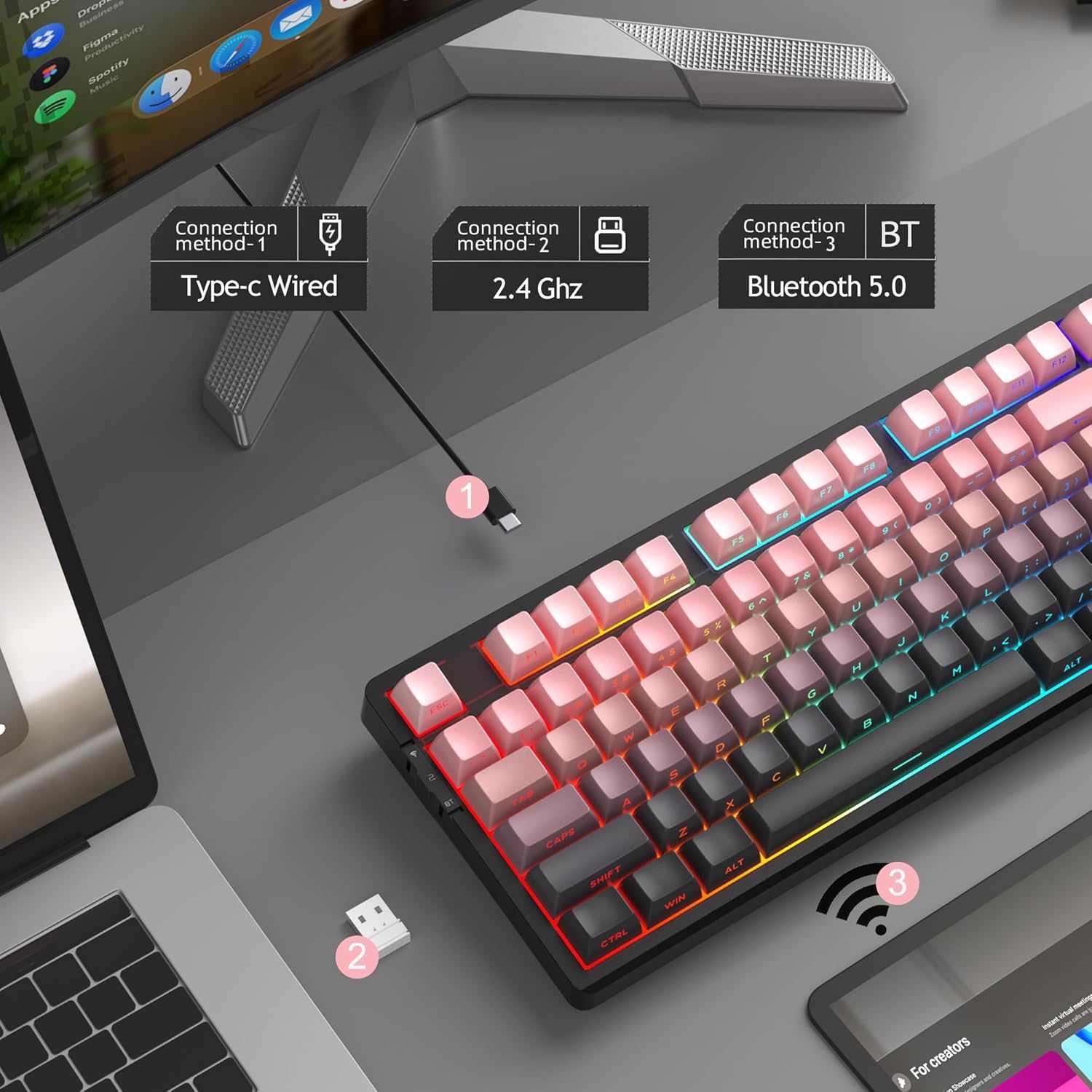
الشكل 6: تمثيل مرئي لطرق الاتصال الثلاث: الاتصال السلكي من النوع C، والاتصال اللاسلكي بتردد 2.4 جيجاهرتز، وتقنية Bluetooth 5.0.

Figure 7: Detailed instructions for switching between 2.4GHz, Bluetooth 5.0, and Type-C wired modes using the toggle switch and Fn key combinations.
3.2.1 وضع USB-C السلكي
- Connect the USB-C cable to the keyboard and your computer's USB port.
- Toggle the switch on the keyboard to the "2" position (wired mode).
- سيتم التعرف على لوحة المفاتيح تلقائيًا بواسطة نظامك.
3.2.2 الوضع اللاسلكي 2.4 جيجاهرتز
- حدد موقع مستقبل USB بتردد 2.4 جيجاهرتز (عادة ما يتم تخزينه في حجرة على لوحة المفاتيح).
- قم بتوصيل مستقبل USB بمنفذ USB متاح على جهاز الكمبيوتر الخاص بك.
- Toggle the switch on the keyboard to the "wifi" icon position (2.4G wireless mode).
- يضعط Fn + 4 to activate 2.4GHz mode. The keyboard should connect automatically.
3.2.3 وضع بلوتوث 5.0
يمكن توصيل لوحة المفاتيح بما يصل إلى ثلاثة أجهزة بلوتوث.
- Toggle the switch on the keyboard to the "BT" position (Bluetooth mode).
- اضغط مع الاستمرار Fn + 1, Fn + 2، أو Fn + 3 for 3-5 seconds to enter pairing mode for the desired channel. The indicator light will flash rapidly.
- On your device (PC, laptop, tablet, smartphone), enable Bluetooth and search for "MageGee LIGHT87".
- اختر لوحة المفاتيح المُراد إقرانها. بعد التوصيل، سيتوقف مؤشر الضوء عن الوميض.
- للتبديل بين أجهزة البلوتوث المقترنة، اضغط ببساطة على Fn + 1, Fn + 2، أو Fn + 3.
4. تعليمات التشغيل
4.1 التحكم في الإضاءة الخلفية RGB
The MageGee LIGHT87 features 16.8 million cool RGB backlight options with various effects.
- الجبهة الوطنية + أدخل: Toggle between approximately 20 different backlight modes/effects.
- الجبهة الوطنية + ←: Adjust light direction (for certain effects).
- الجبهة الوطنية + →: Adjust light color (for static modes or color cycling).
- الجبهة الوطنية + ↑:زيادة سطوع الإضاءة الخلفية.
- الجبهة الوطنية + ↓:تقليل سطوع الإضاءة الخلفية.
- Fn + =+: Increase backlight speed (for dynamic effects).
- Fn + -_: Decrease backlight speed (for dynamic effects).
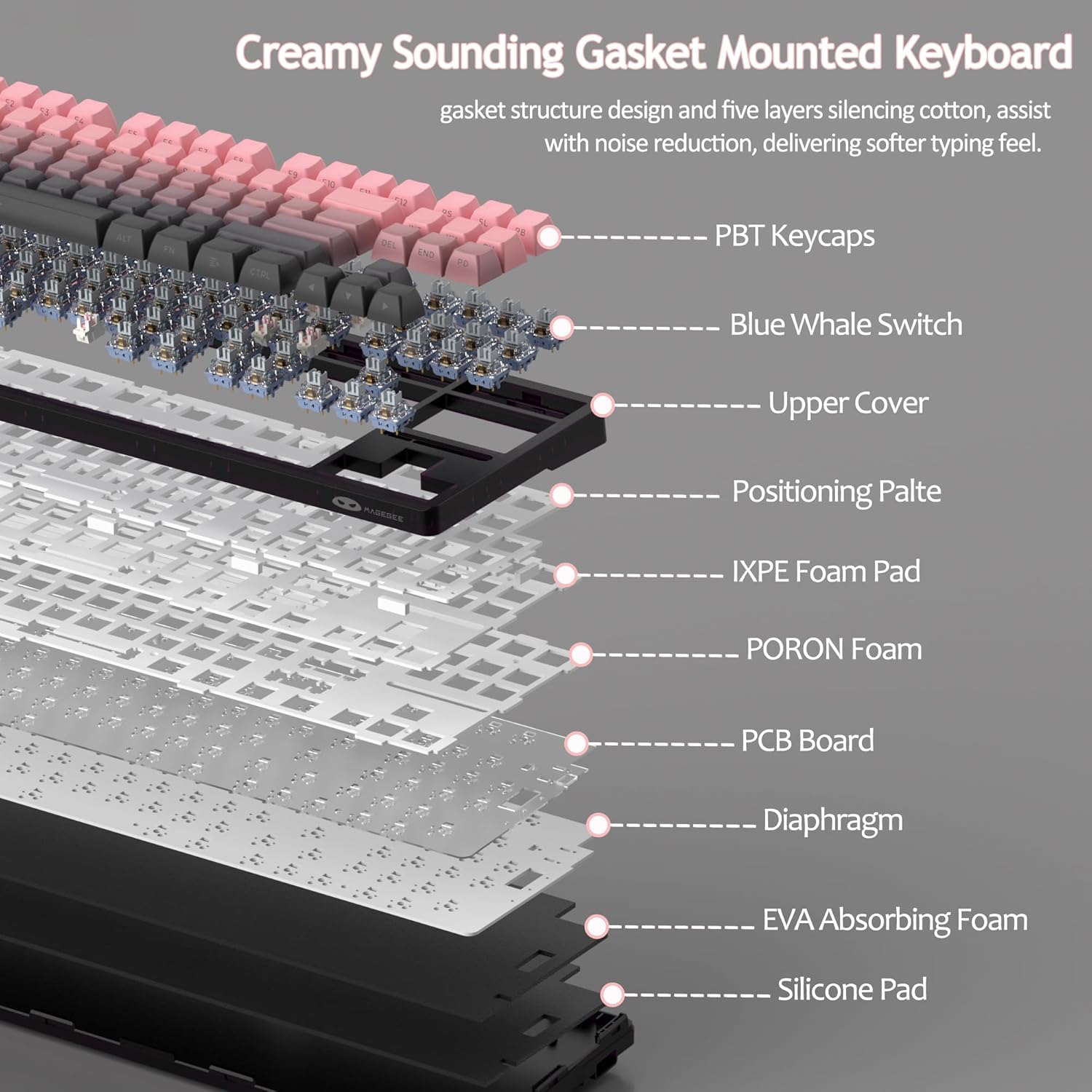
Figure 8: Visual guide to RGB backlight control key combinations.

Figure 9: Table summarizing RGB backlight functions and their corresponding Fn key combinations.
4.2 مفاتيح قابلة للتبديل السريع
The LIGHT87 keyboard features hot-swappable sockets, allowing you to change switches without soldering. It supports both 3-pin and 5-pin mechanical switches. The keyboard comes pre-installed with quiet linear Blue Whale switches.

Figure 10: Diagram illustrating the hot-swappable switch mechanism, showing compatibility with 3-pin and 5-pin switches and the pre-lubed Blue Whale switch.

Figure 11: Specifications of the Blue Whale Switch, including linear type, conduction stroke, total travel, operating force, material, and lifespan.
To Replace Switches:
- قم بإزالة غطاء المفتاح بعناية باستخدام أداة سحب غطاء المفتاح المتوفرة.
- Use the switch puller to gently grip the top and bottom clips of the switch.
- اسحب المفتاح لأعلى بشكل مستقيم لإزالته من لوحة الدوائر المطبوعة.
- قم بمحاذاة دبابيس المفتاح الجديد مع الفتحات الموجودة على لوحة الدوائر المطبوعة.
- Press the new switch firmly into place until it clicks. Ensure it is seated properly and not bent.
- استبدال غطاء المفتاح.
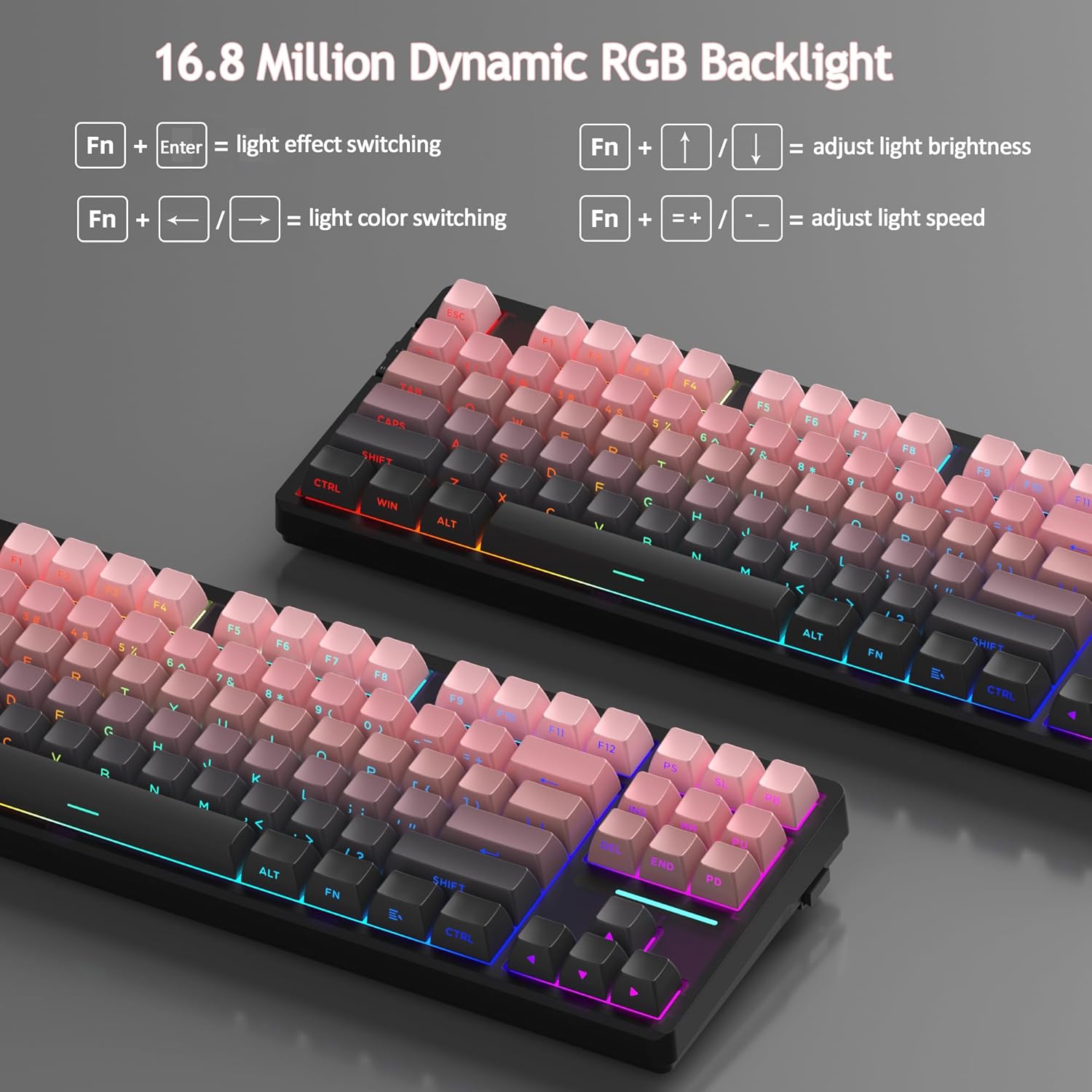
4.3 Gasket Structure and Sound Dampواحد
The LIGHT87 utilizes a gasket-mounted design, which provides a softer, more flexible typing feel and contributes to a "creamy thock" sound profile. Additionally, it incorporates five layers of sound-absorbing foams to effectively reduce noise and improve typing comfort.

الشكل 12: انفجرت view of the keyboard's internal components, highlighting the gasket structure and various foam layers (IXPE Foam Pad, PORON Foam, EVA Absorbing Foam, Silicone Pad) for sound dampning.
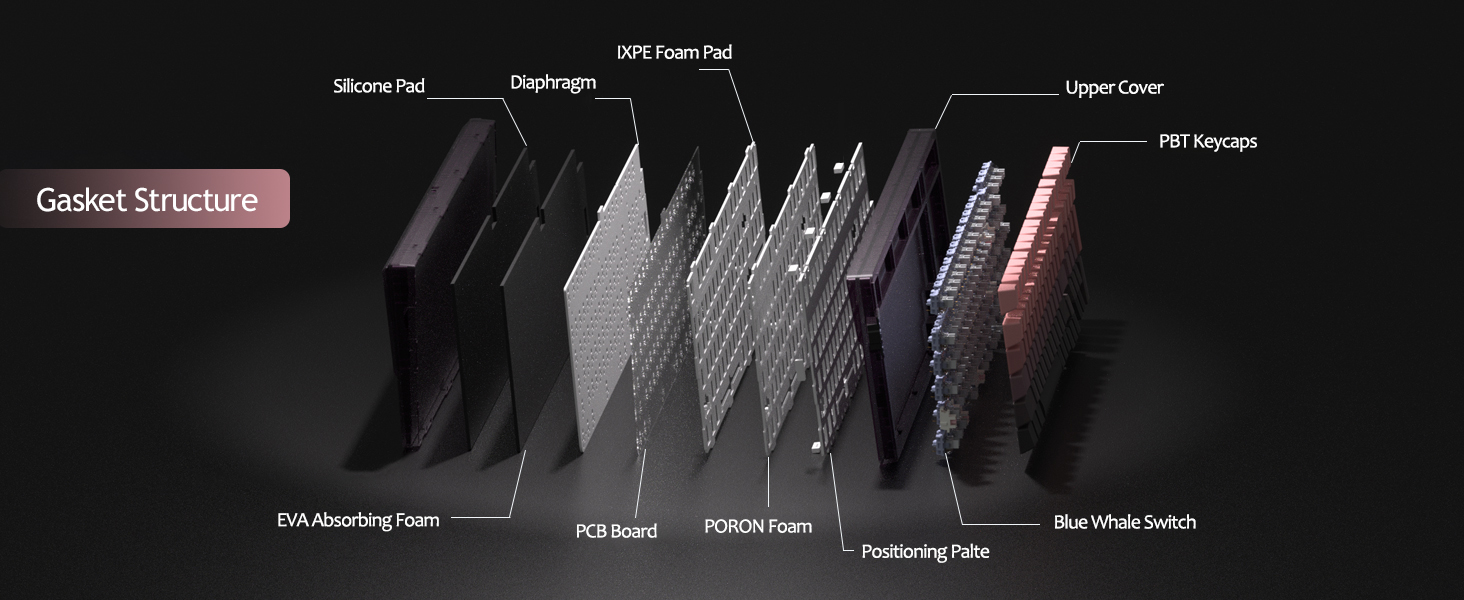
Figure 13: Detailed diagram of the gasket structure, showing how the plate is isolated from the case by gaskets, along with the various foam layers.
4.4 PBT Keycaps
The keyboard is equipped with durable PBT keycaps, known for their resistance to shine and wear over time. The legends are side-printed for a clean top surface aesthetic.
الشكل 14: الصورة عن قرب view of the keyboard's side-printed PBT keycaps.
4.5 Layout and Compatibility
The LIGHT87 features a compact 80% (TKL) layout with 87 keys, saving desktop space while retaining essential function and arrow keys. It supports both Windows and Mac operating systems, and all 87 keys feature 100% anti-ghosting for accurate input during intense gaming or typing sessions.
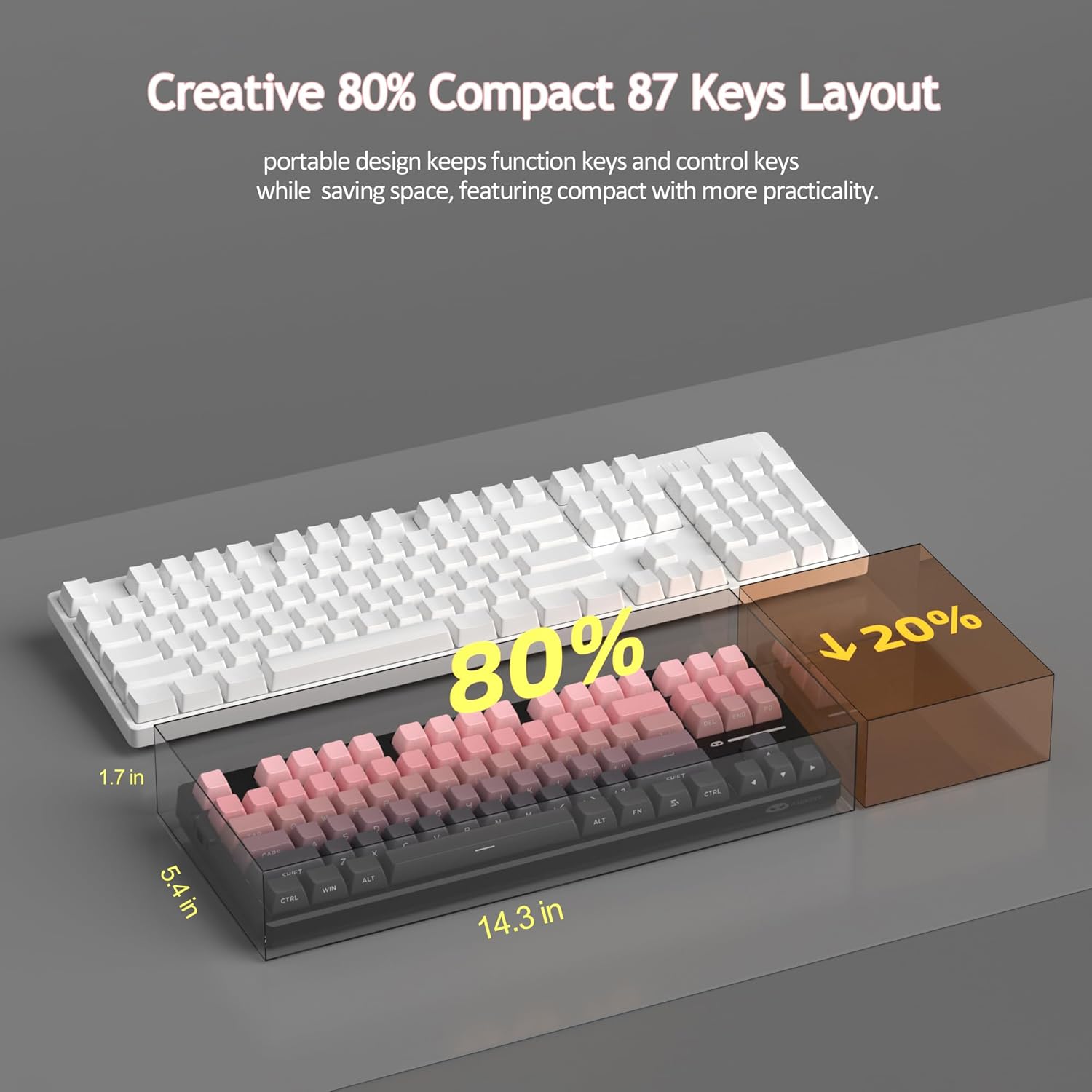
Figure 15: Comparison illustrating the compact 80% layout of the LIGHT87 keyboard compared to a full-size keyboard, highlighting space savings.

Figure 16: The MageGee LIGHT87 keyboard integrated into a desktop setup, demonstrating its use with a computer and monitor.
5. الصيانة
5.1 تنظيف لوحة المفاتيح
To maintain the performance and appearance of your keyboard, regular cleaning is recommended.
- افصل لوحة المفاتيح عن الكمبيوتر قبل التنظيف.
- استخدم فرشاة ناعمة أو هواءً مضغوطًا لإزالة الغبار والحطام من بين أغطية المفاتيح.
- For stubborn dirt, you can carefully remove keycaps using the provided keycap puller and clean the surface underneath with a slightly damp, lint-free cloth. Ensure the cloth is not dripping wet.
- Wipe the keycaps and keyboard surface with a dry, soft cloth.
- Do not use harsh chemicals, abrasive cleaners, or immerse the keyboard in liquid.

Figure 17: Image showing keycaps being removed from the keyboard, useful for cleaning or switch replacement.
5.2 ضبط زاوية لوحة المفاتيح
The keyboard features adjustable feet to customize your typing angle for ergonomic comfort.

Figure 18: Image demonstrating the adjustable feet on the underside of the keyboard for tilt customization.

الشكل 19: الجانب الإيجابيfile of the keyboard illustrating its ergonomic keycap profile للكتابة المريحة.
6. استكشاف الأخطاء وإصلاحها
| مشكلة | السبب المحتمل | حل |
|---|---|---|
| Keyboard not responding in wired mode. | Loose cable connection, incorrect mode selected, faulty USB port. | Ensure USB-C cable is securely connected. Check if the keyboard switch is set to "2" (wired mode). Try a different USB port on your computer. |
| 2.4GHz wireless not connecting. | USB receiver not plugged in, incorrect mode, low battery. | Ensure the 2.4GHz USB receiver is plugged in. Set the keyboard switch to "wifi" icon and press Fn + 4. Charge the keyboard. |
| Bluetooth pairing failed or connection unstable. | Incorrect pairing procedure, interference, device Bluetooth issues, low battery. | Ensure keyboard switch is set to "BT". Press and hold الجبهة الوطنية + 1/2/3 to re-enter pairing mode. Forget the device on your computer/device and re-pair. Move closer to the device. Charge the keyboard. Restart your device's Bluetooth. |
| Backlight not working or stuck. | تم إيقاف تشغيل الإضاءة الخلفية، البطارية منخفضة، خلل في البرنامج. | يضعط الجبهة الوطنية + ↑ to increase brightness. Charge the keyboard. Try cycling through backlight modes with الجبهة الوطنية + أدخل. |
| Certain keys not responding. | مفتاح مفكوك أو معيب، أو وجود شوائب تحت غطاء المفتاح. | Remove the keycap and check for debris. If hot-swappable, try reseating the switch or replacing it with a known working switch. |
7. المواصفات
| ميزة | التفاصيل |
|---|---|
| نموذج | LIGHT87 |
| ماركة | ماجي |
| الاتصال | 2.4 جيجاهرتز لاسلكي، بلوتوث 5.0، USB-C سلكي |
| تَخطِيط | 87-key (80% TKL) |
| المفاتيح | Hot-swappable (3-pin/5-pin compatible), Blue Whale Linear Switches |
| ازرار | Side-printed PBT |
| الإضاءة الخلفية | شنومك مليون رغب |
| سعة البطارية | 8000 مللي أمبير |
| عمر البطارية (مع تشغيل إضاءة RGB) | حوالي 53 ساعات |
| عمر البطارية (مع إيقاف تشغيل إضاءة RGB) | حوالي 400 ساعات |
| الأجهزة المتوافقة | جهاز كمبيوتر شخصي، جهاز كمبيوتر محمول، جهاز لوحي، هاتف ذكي، وحدة تحكم ألعاب |
| دعم نظام التشغيل | ويندوز، ماك أو إس |
| مكافحة التظليل | All 87 keys |
| الأبعاد (العبوة) | 15.91 × 7.17 × 2.6 بوصة |
| وزن العنصر | 2.72 رطل |
8. الضمان والدعم
MageGee products are designed for reliability and performance. For warranty information and customer support, please refer to the official MageGee webالموقع أو اتصل بالبائع مباشرة من خلال منصة الشراء الخاصة بك.
You can visit the official MageGee store on Amazon for more information and product updates: MageGee Amazon Store


