1. المقدمة
This manual provides essential information for the installation, operation, and maintenance of your ZOTAC GAMING GeForce RTX 4070 Ti SUPER SOLID OC 16GB graphics card. Please read this manual thoroughly before installation to ensure proper functionality and to prevent damage.

Image 1.1: ZOTAC GAMING GeForce RTX 4070 Ti SUPER SOLID OC 16GB Graphics Card and its retail packaging.
2. محتويات العبوة
تأكد من وجود جميع العناصر في العبوة:
- ZOTAC GAMING GeForce RTX 4070 Ti SUPER SOLID OC 16GB Graphics Card
- حامل دعم GPU
- دليل المستخدم (هذا المستند)
- Power Adapter Cable (if applicable, check your specific model)
3. متطلبات النظام
- لوحة أم متوافقة مع PCI Express مع فتحة رسومات واحدة مزدوجة العرض x16
- Minimum 750W power supply with three available 8-pin PCIe power connectors (or equivalent 12VHPWR connector)
- Minimum 16GB system memory
- Microsoft Windows 10/11 64-bit or Linux 64-bit operating system
- Internet connection for driver installation
4. دليل التثبيت
4.1. التحضير
- قم بإيقاف تشغيل الكمبيوتر وافصل كابل الطاقة.
- افتح علبة الكمبيوتر الخاص بك.
- Ground yourself to discharge any static electricity.
4.2. تركيب بطاقة الرسومات
- حدد فتحة PCI Express x16 المتوفرة على اللوحة الأم لديك.
- Remove the necessary expansion slot covers from your computer case.
- Carefully insert the graphics card into the PCIe x16 slot until it is fully seated. Ensure the retention clip locks into place.
- قم بتأمين بطاقة الرسوميات بالعلبة باستخدام البراغي.
- Connect the required power cables from your power supply to the graphics card. This model typically requires three 8-pin PCIe power connectors or a single 12VHPWR connector. Ensure all connections are secure.
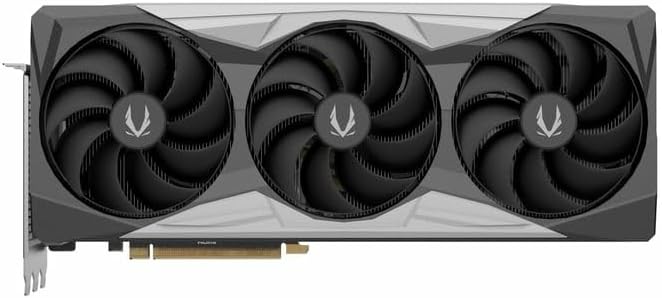
الصورة 4.1: الجبهة view صورة لبطاقة الرسومات، توضح تصميم المروحة الثلاثية.
4.3. Installing the GPU Support Stand
The included GPU support stand helps prevent sag and provides additional stability for the graphics card. Follow the instructions provided with the stand for proper installation within your PC case.
4.4. Closing the Case and Connecting Peripherals
- أغلق علبة الكمبيوتر.
- Connect your monitor(s) to the display outputs on the graphics card (DisplayPort or HDMI).
- Reconnect the power cable and other peripherals to your computer.

الصورة 4.2: خلفي view of the graphics card, showing three DisplayPort outputs and one HDMI output.
5. تعليمات التشغيل
5.1. تثبيت برنامج التشغيل
- قم بتشغيل جهاز الكمبيوتر الخاص بك.
- Once the operating system loads, download the latest graphics drivers from the official NVIDIA webموقع (www.nvidia.com/drivers) or the ZOTAC webموقع (www.zotac.com/support).
- اتبع التعليمات التي تظهر على الشاشة لإكمال تثبيت برنامج التشغيل. قد يلزم إعادة تشغيل النظام.
5.2. أدوات البرمجيات
ZOTAC provides utilities such as FireStorm for monitoring and adjusting graphics card settings, including fan speed control (Active Fan Control, FREEZE Fan Stop) and performance profiles. These can be downloaded from the ZOTAC webموقع.
6. الصيانة
- إزالة الغبار: Periodically clean dust from the graphics card fans and heatsink using compressed air. Ensure the computer is powered off and unplugged before cleaning.
- تحديثات برنامج التشغيل: Keep your graphics drivers updated to ensure optimal performance and compatibility.
- مراقبة درجة الحرارة: Use monitoring software to keep track of the graphics card's temperature during operation. Excessive temperatures can indicate poor airflow or dust buildup.

الصورة 6.1: بزاوية view of the graphics card, highlighting its robust cooling solution.
7. استكشاف الأخطاء وإصلاحها
- لا يوجد إخراج للعرض:
- تأكد من توصيل كابل الشاشة بشكل آمن ببطاقة الرسومات والشاشة.
- تأكد من أن بطاقة الرسومات مثبتة بالكامل في فتحة PCIe.
- Check that all power cables are properly connected to the graphics card.
- قم بإجراء الاختبار باستخدام شاشة أو كابل مختلف إذا كان ذلك ممكنًا.
- عدم استقرار النظام أو تعطلّه:
- Ensure graphics drivers are correctly installed and up to date.
- Check for adequate power supply capacity.
- راقب درجات الحرارة لمنع ارتفاع درجة الحرارة.
- تحقق من استقرار ذاكرة النظام (RAM).
- ضوضاء أو عطل في المروحة:
- قم بتنظيف الغبار من المراوح والمبدد الحراري.
- Ensure no cables are obstructing fan rotation.
- Use ZOTAC FireStorm utility to check fan speed settings.
8. المواصفات
| ميزة | التفاصيل |
|---|---|
| رقم الموديل | ZT-D40730R-10P |
| معالج الرسوميات | NVIDIA GeForce RTX 4070 Ti SUPER |
| ذاكرة الفيديو | 16 جيجابايت GDDR6X |
| واجهة الذاكرة | 256 بت |
| ساعة الذاكرة | 21000 MHz (Effective) |
| المحرك على مدار الساعة | تعزيز: 2640 ميجا هرتز |
| مخرجات العرض | 3 منافذ DisplayPort 1.4a، 1 منفذ HDMI 2.1a |
| HDCP الدعم | نعم |
| أقصى دقة رقمية | Up to 4K (7680x4320 @60Hz) |
| بي سي اي اكسبريس | منفذ PCI Express 4.0 x16 |
| يوصى بإمداد الطاقة | 750 واط |
| موصلات الطاقة | 1 x 12VHPWR (or 3 x 8-pin PCIe via adapter) |
| الأبعاد (الطول × العرض × الارتفاع) | 16.73 × 11.54 × 3.94 بوصة (تقريبًا) |
| وزن | 2.2 جنيه (تقريبًا) |
| نظام التبريد | IceStorm 2.0 Advanced Cooling, Triple 100mm Fans, FREEZE Fan Stop, Active Fan Control |
| سمات | NVIDIA DLSS 3.5, Ray Tracing, Metal Backplate, GPU Support Stand |
9. الضمان والدعم
للحصول على معلومات تفصيلية عن الضمان، يرجى الرجوع إلى بطاقة الضمان المرفقة مع المنتج أو زيارة موقع ZOTAC الرسمي website's support section. ZOTAC provides technical support and resources for their products.
- دعم زوتاك Webموقع: www.zotac.com/support
- تسجيل المنتج: Register your product on the ZOTAC webالموقع لتفعيل الضمان الخاص بك وتلقي تحديثات المنتج.


