مقدمة
The RadioShack Dual-Mode Wireless Bluetooth Mouse offers versatile connectivity and ergonomic comfort for various computing needs. This manual provides instructions for setting up, operating, and maintaining your mouse to ensure optimal performance.

الشكل 1: الجانب الأمامي view of the RadioShack Dual-Mode Wireless Bluetooth Mouse.
محتويات الحزمة
- RadioShack Dual-Mode Wireless Bluetooth Mouse
- مستقبل USB (مخزن داخل الماوس)
- كابل شحن USB
- دليل المستخدم (هذا المستند)
يثبت
1. شحن الماوس
The mouse features a built-in rechargeable battery. Before first use, or when the battery is low, connect the mouse to a USB power source using the provided USB charging cable. The charging port is located on the front side of the mouse.

الشكل 2: الجانب view of the mouse highlighting the USB charging port.

Figure 3: The mouse being charged via a USB connection to a laptop.
2. توصيل الماوس
The mouse supports dual-mode connectivity: 2.4G Wireless (via USB receiver) and Bluetooth 3.0. You can switch between these modes using the switch on the bottom of the mouse.
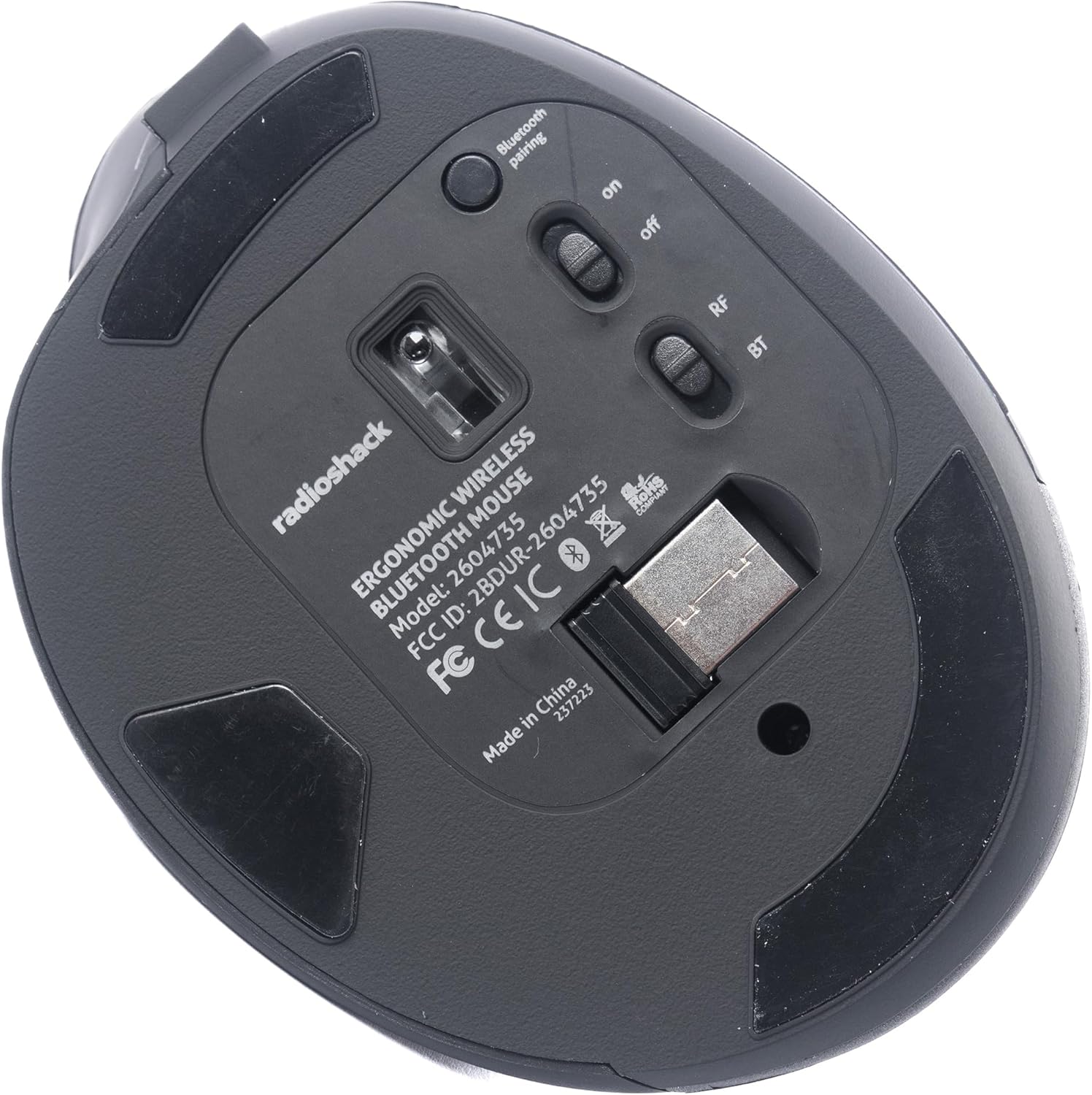
الشكل 4: القاع view of the mouse, indicating the power switch, mode switch (RF/BT), and USB receiver compartment.
2.1. 2.4G Wireless Mode (USB Receiver)
- حدد موقع مستقبل USB الموجود في الحجرة الموجودة أسفل الماوس.
- أدخل مستقبل USB في منفذ USB متاح على جهاز الكمبيوتر الخاص بك.
- Slide the mode switch on the bottom of the mouse to the "RF" position.
- Turn on the mouse using the ON/OFF switch. The mouse should connect automatically.
2.2. وضع بلوتوث
- حرك مفتاح الوضع الموجود أسفل الماوس إلى وضع "BT".
- قم بتشغيل الماوس باستخدام مفتاح التشغيل/الإيقاف.
- Press and hold the Bluetooth pairing button (usually located near the mode switch) for 3-5 seconds until the indicator light flashes, indicating it is in pairing mode.
- على جهاز الكمبيوتر الخاص بك أو جهازك، انتقل إلى إعدادات البلوتوث وابحث عن أجهزة جديدة.
- Select "RadioShack Mouse" (or similar name) from the list of available devices to pair.
- بمجرد الاقتران، سيتوقف ضوء المؤشر عن الوميض.

Figure 5: The mouse positioned wirelessly next to a laptop, ready for use.
تشغيل الماوس
الوظائف الأساسية
- الزر الأيسر: وظيفة النقر الأساسية.
- الزر الأيمن: وظيفة النقر الثانوية (قائمة السياق).
- عجلة التمرير: Scroll up/down, and can also function as a middle click button.
- أزرار التقدم/التراجع: تتيح هذه الأزرار، الموجودة على الجانب، التنقل السريع في web المتصفحات و file المستكشفون.
التبديل بين الأوضاع
To switch between 2.4G Wireless and Bluetooth modes, simply slide the mode switch on the bottom of the mouse to the desired position (RF for 2.4G, BT for Bluetooth).
تصميم مريح
The mouse is designed with a contoured shape and rubber grips to provide comfortable support for your hand and wrist, reducing strain during extended use.

Figure 6: A hand demonstrating the ergonomic grip on the mouse.
صيانة
تنظيف
- أطفئ الماوس قبل التنظيف.
- استخدم قطعة قماش ناعمة وجافة لمسح سطح الفأرة.
- بالنسبة للأوساخ العنيدة، قم بإزالة الأوساخ برفق.ampبللي قطعة القماش بالماء أو بمحلول تنظيف خفيف، ثم امسحيها لتجف على الفور.
- تجنب استخدام المواد الكيميائية القاسية أو المواد الكاشطة.
العناية بالبطارية
- اشحن الماوس بانتظام للحفاظ على صحة البطارية.
- تجنب تفريغ البطارية بالكامل بشكل متكرر.
- If storing the mouse for an extended period, charge it to about 50% capacity.
استكشاف الأخطاء وإصلاحها
- الفأرة لا تستجيب:
- تأكد من تشغيل الماوس.
- تحقق من مستوى البطارية وشحنها إذا لزم الأمر.
- For 2.4G mode, ensure the USB receiver is securely plugged into the computer and the mode switch is set to "RF".
- For Bluetooth mode, ensure Bluetooth is enabled on your device, the mouse is in "BT" mode, and it is properly paired. Try re-pairing if necessary.
- Try connecting the mouse to a different USB port or a different device to rule out port or device issues.
- حركة المؤشر غير منتظمة أو بطيئة:
- تأكد من أن مستشعر الماوس نظيف وخالٍ من العوائق.
- استخدم الماوس على سطح نظيف وغير عاكس.
- تحقق من عدم وجود تداخل من الأجهزة اللاسلكية الأخرى.
- الماوس لا يشحن:
- تأكد من توصيل كابل الشحن بشكل آمن بكل من الماوس ومصدر الطاقة.
- حاول استخدام كابل شحن USB أو محول طاقة مختلف.
- تأكد من أن مصدر الطاقة نشط.
تحديد
| ميزة | التفاصيل |
|---|---|
| رقم الموديل | 2604735 |
| تكنولوجيا الاتصال | 2.4G Wireless, Bluetooth 3.0 (Dual-Mode) |
| تقنية كشف الحركة | بصري |
| لون | الأسود والرمادي |
| مصدر الطاقة | بطارية ليثيوم أيون قابلة لإعادة الشحن (مرفقة) |
| وزن العنصر | 9.1 أونصات |
| أبعاد الحزمة | 8.66 × 6.3 × 2.95 بوصة |
| الشركة المصنعة | راديوشاك |
الضمان والدعم
For warranty information and customer support, please refer to the official RadioShack webيمكنك زيارة الموقع الإلكتروني أو الاتصال بخدمة العملاء مباشرةً. عادةً ما تجد تفاصيل تسجيل المنتج، ومطالبات الضمان، والمساعدة التقنية على صفحات دعم الشركة المصنعة.


