Mesqool Emergency Radio Instruction Manual
Model: e5a70cca-01be-4e29-bb91-9cfc7e32344
العلامة التجارية: ميسكول
1. المقدمة
This manual provides detailed instructions for the Mesqool Emergency Radio, a versatile device designed for emergency preparedness and outdoor activities. It features multiple power sources, including a large-capacity rechargeable battery, hand crank, and solar panel, along with AM/FM/SW radio reception, NOAA weather alerts, a powerful flashlight, a reading lamp, and a cell phone charging function.

Figure 1: Mesqool Emergency Radio in Gray Camo, demonstrating phone charging capability.
2. محتويات العبوة
يرجى تحديد المربع للعناصر التالية:
- راديو الطوارئ
- 5V 2A Adapter and Type C Cord
- معدن هوك
- Portable Belt
- دليل المالك
3. الميزات الرئيسية
- NOAA Weather Alert Radio: Receives 7 pre-programmed NOAA weather channels with automatic alert function for severe weather events.
- راديو متعدد النطاقات: Supports AM, FM, and Shortwave (SW) frequencies for broad reception.
- بطارية ذات سعة عالية: Equipped with a 12000mAh rechargeable Li-ion battery for extended operation and device charging.
- Five Power Sources: Rechargeable battery, USB-C input, hand crank, solar panel, and 3 AAA batteries (not included).
- الإضاءة الطارئة: Features a bright flashlight (150-300 Lumens) and a 2-level brightness reading lamp (120-250 Lumens).
- إنذار SOS: Activates a loud 116dB alarm with flashing red light for emergency signaling.
- Cell Phone Charger: Functions as a power bank to charge mobile devices via USB output.
- شاشة LCD: Large, backlit LCD displays radio station, time, and weather channels.
- متانة: IPX-3 waterproof and dust-proof rating.
4. الضوابط والمكونات
تعرّف على عناصر التحكم والمنافذ الخاصة بالراديو:

الشكل 2: الجبهة view of the radio highlighting the large LCD display and control buttons.
- زر الطاقة: اضغط لتشغيل الراديو أو إيقافه.
- زر الفرقة: Cycles through AM, FM, SW, and Weather Band (WB) modes.
- زر تنبيه الطقس: Activates or deactivates the NOAA weather alert function.
- أزرار التحكم في مستوى الصوت +/-: ضبط مستوى صوت الإخراج.
- أزرار الضبط +/-: Adjusts the radio frequency.
- زر القفل: يمنع الضغط على الأزرار عن طريق الخطأ.
- زر ضبط الوقت: Used to set the current time displayed on the LCD.
- زر الإضاءة الخلفية: Toggles the LCD screen backlight.
- مصباح يدوي: Located on the left side of the radio. Activated via a dedicated button.
- SOS Control Button: Activates the emergency SOS alarm.
- USB Output Charging Port: لشحن الأجهزة الخارجية.
- Type-C Input Charging Port: لشحن البطارية الداخلية للراديو.
- مقبس سماعة رأس مقاس 3.5 ملم: للاستماع الخاص.
- هوائي تلسكوبي: قم بتمديده لتحسين استقبال الراديو.
- لوحة الطاقة الشمسية: Located on the top, used for trickle charging.
- كرنك اليد: Foldable crank on the back for manual power generation.
- القراءة لamp: Located under the solar panel, flips up for illumination.
- حجرة بطاريات AAA: Located on the bottom, for optional AAA battery power.
- بوصلة: Integrated into the portable strap for navigation.

الشكل 3: الجانب view illustrating the SOS alarm and headphone jack.
5. Power Sources and Charging
The Mesqool Emergency Radio offers five flexible ways to ensure you always have power:
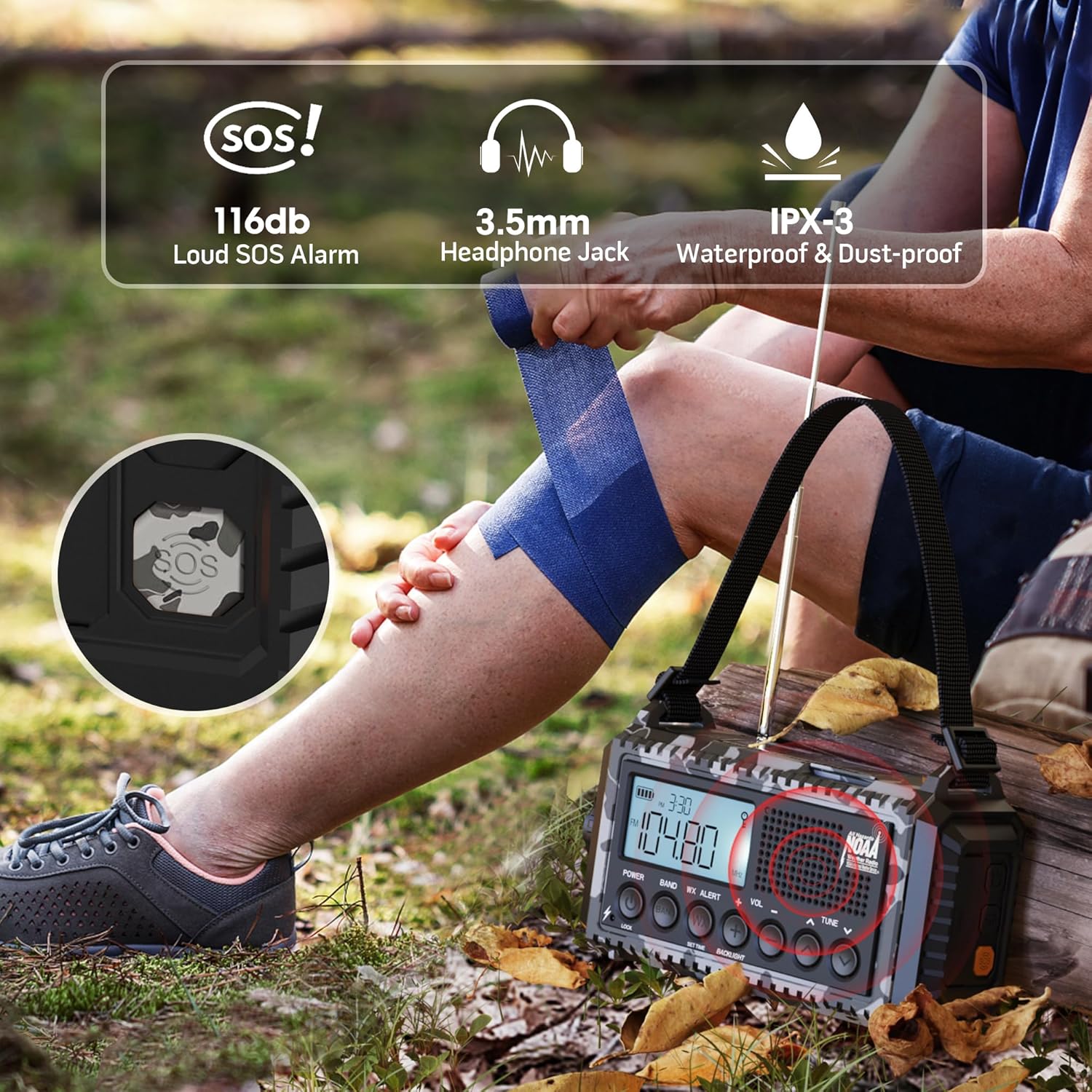
Figure 4: Visual representation of the five power options for the radio.
- 12000mAh Built-in Li-ion Battery: The primary power source. Ensure it is fully charged before extended use.
- Type-C Input (5V/2A): Connect the provided Type-C cable to a compatible USB adapter (not included) for the most efficient charging. The charging indicator lights will show progress.
- كرنك اليد: Rotate the hand crank clockwise or counter-clockwise at a steady pace (approx. 130-150 RPM) for 3-5 minutes to generate enough power for short-term use or to initiate charging.
- لوحة الطاقة الشمسية: Place the radio in direct sunlight. The solar panel provides trickle charging to maintain the battery level or extend playtime. It is not intended for full charging from a depleted state.
- 3 AAA Batteries (Not Included): Open the battery compartment on the bottom and insert 3 AAA batteries. This serves as a backup power source when the internal Li-ion battery is low or depleted.
The battery indicator on the LCD screen will show the current charge level. A flashing indicator typically means the battery is low and requires charging.
6. تشغيل الراديو
The radio supports AM, FM, SW, and NOAA Weather Bands.

Figure 5: The radio displaying NOAA Weather Alert functionality.
- تشغيل/إيقاف: اضغط على قوة زر لتشغيل الراديو أو إيقافه.
- اختيار الفرقة: اضغط على فرقة button repeatedly to cycle through AM, FM, SW, and WB (Weather Band).
- محطات الضبط: استخدم لحن +/- buttons to manually adjust the frequency. For automatic scanning, press and hold the لحن +/- button for 2 seconds. The radio will stop on the next available station.
- التحكم في مستوى الصوت: استخدم المجلد +/- أزرار لضبط مستوى الصوت.
- تنبيه الطقس من الإدارة الوطنية للمحيطات والغلاف الجوي:
- للتمكين ، اضغط على تنبيه WX button. The 'WX' icon will appear on the LCD.
- The radio will automatically scan 7 NOAA weather channels. When an alert is received, an audible alarm will sound, and the red alert light will flash.
- To disable, press the تنبيه WX الزر مرة أخرى.
7. مصباح يدوي وقارئamp عملية
The radio includes integrated lighting features for various situations.

Figure 6: The radio's reading lamp and flashlight in use.
- مصباح يدوي: Press the dedicated flashlight button on the side of the radio to turn it on. Press again to cycle through brightness levels (if applicable) or turn off.
- القراءة لamp: Flip up the solar panel to reveal the reading lampاضغط على زر القراءة lamp button (often located near the flashlight button) to turn it on. Press again to adjust brightness levels or turn off.
8. وظيفة إنذار الطوارئ
في حالات الطوارئ، يمكن تفعيل جهاز الإنذار SOS لجذب الانتباه.
- لتفعيل جهاز إنذار الطوارئ، اضغط على نداء استغاثة button (often a distinct yellow or red button, or integrated with a light button). A loud siren will sound, and a red flashing light will activate.
- لإلغاء التنشيط، اضغط على نداء استغاثة الزر مرة أخرى.
9. Cell Phone Charging
The radio can serve as an emergency power bank for your mobile devices.
- Connect your mobile device to the USB output charging port on the side of the radio using your device's charging cable.
- The radio's internal 12000mAh battery will provide power to your device.
- If the radio's battery is low, you may need to use the hand crank to generate initial power for charging.

Figure 7: The radio connected to a smartphone for charging.
10. المواصفات
| ميزة | التفاصيل |
|---|---|
| أبعاد المنتج | 3.7 × 2.48 × 6.8 بوصة |
| وزن العنصر | 1.46 رطل |
| نوع البطارية | 1 بطارية ليثيوم أيون (مضمنة) |
| مصدر الطاقة | Rechargeable Battery | Solar Panel | Hand Crank | Type-C Input 5V/2A |
| نطاقات الراديو المدعومة | AM/FM/7 Pre-Configured NOAA Stations |
| تكنولوجيا الاتصال | NOAA RADIO |
| المميزات الخاصة | Cellphone USB Charger, Flashlight, Reading Lamp, Strap, Lightweight, SOS Alarm, NOAA Weather Alert |
11. استكشاف الأخطاء وإصلاحها
- لا يوجد طاقة: Ensure the internal battery is charged. Try hand cranking for a few minutes or connecting to a USB power source. Check if AAA batteries are inserted correctly and have charge.
- استقبال الراديو ضعيف: Extend the telescopic antenna fully. Try repositioning the radio. For AM/SW, rotate the radio for optimal signal.
- NOAA Alert Not Working: Ensure the WX Alert function is enabled. Check if you are within range of a NOAA broadcast.
- الهاتف لا يشحن: Ensure the radio has sufficient power. Check the USB cable connection. Some devices may require more power than the radio can provide for rapid charging.
- الأزرار غير مستجيبة: Check if the Lock function is activated. Deactivate it if necessary.
12. الصيانة
- تنظيف: امسح الراديو بقطعة ناعمة ، دamp قماش. لا تستخدم مواد كيميائية قاسية أو منظفات كاشطة.
- تخزين: قم بتخزين الراديو في مكان بارد وجاف بعيدًا عن أشعة الشمس المباشرة ودرجات الحرارة القصوى.
- العناية بالبطارية: For optimal battery life, fully charge the internal Li-ion battery at least once every three months, even if not in use.
- مقاومة الماء: While IPX-3 rated (splash-proof), avoid submerging the radio in water. Ensure all port covers are securely closed when exposed to moisture.
13. الضمان والدعم
For warranty information, technical support, or service inquiries, please refer to the contact details provided on the product packaging or the official Mesqool webالموقع. احتفظ بإيصال الشراء كإثبات للشراء.


