مقدمة
Thank you for choosing the Mesqool CR1025 Digital Alarm Clock Radio. This device combines multiple functions including a digital alarm clock, Bluetooth 5.0 speaker, FM radio, night light, and dual USB charging ports. This manual provides detailed instructions to help you set up and operate your new device effectively.
محتويات الحزمة
- Mesqool CR1025 Digital Alarm Clock Radio
- محول الطاقة
- دليل المستخدم
- C Battery (for backup)
المنتج انتهىview
Familiarize yourself with the components and controls of your Mesqool CR1025 Digital Alarm Clock Radio.
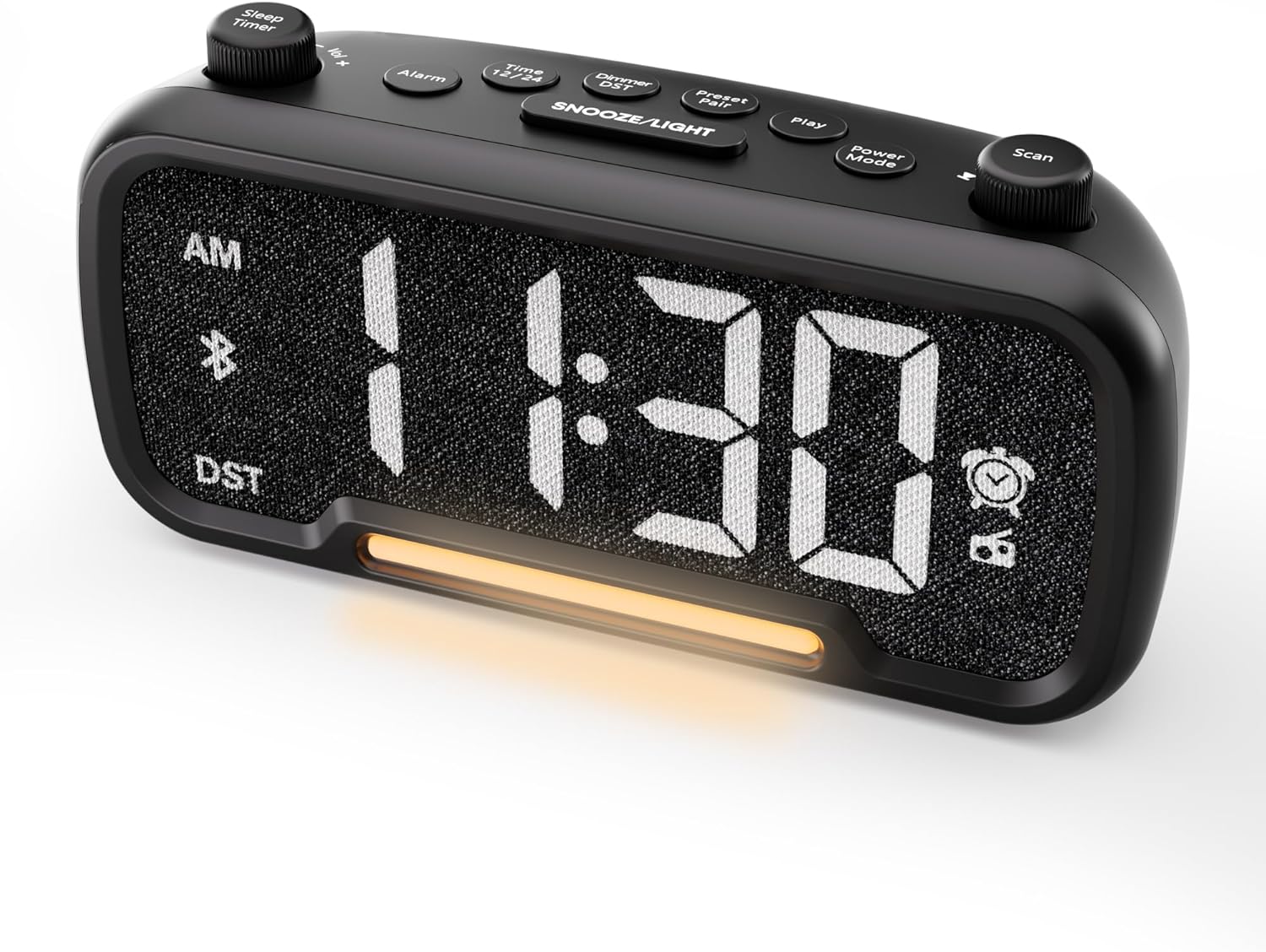

Control Buttons and Knobs:
- Sleep Timer / Vol +/- Knob (Left): Adjusts volume, sets sleep timer duration.
- زر التنبيه: Sets and activates/deactivates alarms.
- Time 12/24 Button: Switches between 12-hour and 24-hour time formats.
- Dimmer / DST Button: Adjusts display brightness, activates/deactivates Daylight Saving Time (DST).
- Preset / Pair Button: Saves FM radio presets, initiates Bluetooth pairing.
- زر التشغيل: Plays/pauses media in Bluetooth mode.
- زر وضع الطاقة: Cycles through operating modes (FM, Bluetooth, AUX).
- Scan / TU +/- Knob (Right): Scans FM radio stations, manually tunes FM frequency.
- زر الغفوة/الإضاءة: Activates snooze function, turns night light on/off.

يثبت
1. التشغيل الأولي
Connect the provided power adapter to the DC 5V IN port on the back of the alarm clock and plug it into a standard wall outlet. The display will light up. Ensure the C battery is installed for backup in case of power outage.

2 ضبط الوقت
- اضغط مع الاستمرار على الوقت 12/24 button for 2 seconds. The hour digits will begin to flash.
- تدوير الحجم +/- knob (left knob) to adjust the hour.
- اضغط على الوقت 12/24 اضغط على الزر مرة أخرى. ستبدأ أرقام الدقائق بالوميض.
- تدوير الحجم +/- مقبض لضبط الدقيقة.
- اضغط على الوقت 12/24 button once more to confirm the time setting.
Video demonstrating how to set the time on the Mesqool Digital Alarm Clock Radio.
3. تنسيق الوقت 12/24 ساعة
للتبديل بين تنسيقات الوقت 12 ساعة و24 ساعة، اضغط ضغطة قصيرة على الوقت 12/24 button. The display will change accordingly.
4. تعديل التوقيت الصيفي
To activate or deactivate DST, press and hold the Dimmer / DST button for 2 seconds. The time will adjust by one hour forward or backward, and the DST indicator will appear or disappear on the display.
تعليمات التشغيل
1. إعداد التنبيه
- اضغط مع الاستمرار على إنذار button for 2 seconds. The hour digits will flash.
- تدوير الحجم +/- knob to adjust the desired alarm hour.
- اضغط على إنذار اضغط على الزر مرة أخرى. ستومض أرقام الدقائق.
- تدوير الحجم +/- knob to adjust the desired alarm minute.
- اضغط على إنذار button again. The alarm sound selection will flash (bell icon for buzzer, radio icon for FM radio). Rotate the الحجم +/- knob to choose between buzzer or FM radio as the alarm sound.
- If FM radio is selected, press the إنذار button again. The volume level will flash (L01-L16). Rotate the الحجم +/- knob to set the desired alarm volume.
- اضغط على إنذار button once more to confirm and activate the alarm. The alarm icon will appear on the display.
To deactivate the alarm, short press the إنذار button. The alarm icon will disappear from the display.

قيلولة بعد الظهر وظيفة:
عندما يصدر صوت التنبيه ، اضغط على غفوة / ضوء button to activate the snooze function for 9 minutes. The alarm will sound again after 9 minutes. To turn off the alarm completely, press any other button except غفوة / ضوء.

2. تشغيل راديو FM
- اضغط على وضع الطاقة button repeatedly until the radio icon lights up on the display, indicating FM radio mode.
- Auto-Scan and Save Presets: اضغط على Scan / TU +/- knob (right knob) to automatically search for available FM stations and save them as presets (up to 20 stations). The display will show "P01", "P02", etc., as stations are saved.
- ضبط يدوي: تدوير Scan / TU +/- knob to manually browse frequencies.
- استدعاء الإعدادات المسبقة: اضغط لفترة قصيرة على مسبقا / زوج زر للتنقل بين المحطات المحفوظة مسبقاً.
- ضبط مستوى الصوت: تدوير الحجم +/- knob (left knob) to adjust the radio volume (L01-L16).

Video demonstrating how to set the FM radio alarm on the Mesqool Digital Alarm Clock Radio.
3. Bluetooth Speaker Operation
- اضغط على وضع الطاقة button repeatedly until the Bluetooth icon (bt) starts flashing on the display, indicating pairing mode.
- On your mobile device, enable Bluetooth and search for "CR1025" in the list of available devices.
- Select "CR1025" to pair. Once connected, the Bluetooth icon will stop flashing and remain solid.
- يمكنك الآن تشغيل الصوت من جهازك عبر مكبر صوت ساعة المنبه.
- استخدم الحجم +/- knob on the alarm clock or your mobile device to adjust the volume.
- اضغط على يلعب زر لتشغيل الصوت أو إيقافه مؤقتًا.

Video demonstrating how to set up Bluetooth on the Mesqool Digital Alarm Clock Radio.
4. تشغيل الإضاءة الليلية
The alarm clock features a gentle night light. To turn the night light on or off, short press the غفوة / ضوء زر.

5. Dimmer Setting
The display brightness can be adjusted to 5 levels. Short press the Dimmer / DST button to cycle through the brightness levels (L01-L05). Select the level that best suits your environment.

6. Sleep Timer Setting
The sleep timer allows you to set a duration for the FM radio or Bluetooth speaker to play before automatically turning off. This is useful for falling asleep to music or podcasts.
- While in FM radio or Bluetooth mode, press the مؤقت النوم button. The display will show the current sleep timer duration (e.g., "30" for 30 minutes).
- تدوير Sleep Timer / Vol +/- knob to select the desired duration: 15, 30, 60, 90, or 120 minutes. You can also select "OFF" to disable the sleep timer.
- The timer will start counting down, and the device will automatically turn off after the selected duration.
7. منافذ شحن USB
The alarm clock is equipped with two USB charging ports (Type-C and USB-A) on the back, each providing 5V/1A output. These ports can be used to conveniently charge your smartphone, tablet, or other USB-powered devices.

استكشاف الأخطاء وإصلاحها
| مشكلة | الحل المحتمل |
|---|---|
| شاشة الساعة فارغة. | تأكد من توصيل محول الطاقة بإحكام بكل من الساعة ومأخذ كهربائي يعمل. تحقق من أن المأخذ الكهربائي يعمل. |
| لا يصدر صوت الإنذار. | Verify that the alarm is set and activated (alarm icon visible on display). Check the alarm volume level. Ensure the correct alarm sound (buzzer or FM radio) is selected. |
| استقبال راديو FM ضعيف. | Extend the FM antenna fully. Try repositioning the antenna or the clock for better signal. Perform an auto-scan again to find stronger stations. |
| لا يمكن إقران جهاز بلوتوث. | Ensure the clock is in Bluetooth pairing mode (flashing 'bt' icon). Make sure Bluetooth is enabled on your mobile device and it is within range. Forget "CR1025" from your device's Bluetooth list and try pairing again. |
| منافذ شحن USB لا تعمل. | Confirm the alarm clock is powered on. Ensure the charging cables are properly connected to both the clock and your device. Try a different USB cable or device to rule out cable/device issues. |
تحديد
| ميزة | التفاصيل |
|---|---|
| ماركة | مسقول |
| رقم الموديل | سي آر 1025 |
| لون | أسود |
| نوع العرض | الصمام الرقمي |
| أبعاد المنتج | 6.61 بوصة طول × 3.31 بوصة عرض × 2.32 بوصة ارتفاع |
| مصدر الطاقة | كهربائي سلكي (محول التيار المتردد متضمن) |
| النسخ الاحتياطي للبطارية | 1 بطارية C (متضمنة) |
| نسخة البلوتوث | رقم V5.0 |
| تردد راديو FM | 87.5-108 ميجا هرتز |
| إعدادات FM المسبقة | ما يصل إلى 20 محطة |
| عرض باهتة | 5 مستويات |
| أصوات الإنذار | جرس، راديو إف إم |
| مدة الغفوة | 9 دقائق |
| مخرج شحن USB | Type-C & USB-A, 5V/1A each |
| مادة | بلاستيك |
| وزن العنصر | 0.48 رطل (حوالي 7.7 أونصة) |
صيانة
- نظّف الجهاز بقطعة قماش ناعمة وجافة. لا تستخدم المنظفات السائلة أو المواد الكاشطة.
- احفظ الجهاز بعيداً عن أشعة الشمس المباشرة ودرجات الحرارة القصوى والرطوبة العالية.
- تأكد من التهوية المناسبة حول الجهاز لمنع ارتفاع درجة الحرارة.
- If the device will not be used for an extended period, remove the backup battery.
معلومات السلامة
- لا تعرض الجهاز للماء أو الرطوبة.
- لا تحاول تفكيك الجهاز أو إصلاحه بنفسك. استشر فني صيانة مؤهلًا.
- احتفظ بالجهاز بعيدًا عن متناول الأطفال.
- استخدم فقط محول الطاقة المرفق. قد يؤدي استخدام محولات غير معتمدة إلى تلف الجهاز وإبطال الضمان.
- Avoid placing the device near heat sources or open flames.
الضمان والدعم
Specific warranty details are not provided in the product information. For warranty claims, technical support, or further assistance, please contact Mesqool customer service through their official website or the retailer where the product was purchased. Please retain your proof of purchase for any warranty-related inquiries.
Visit the Mesqool Store for more information: Mesqool Official Store


