مقدمة
This manual provides essential instructions for the setup, operation, and maintenance of your BLOW Portable Internet Radio RI 1. Please read this manual thoroughly before using the device to ensure proper functionality and to prevent damage.
معلومات هامة حول السلامة
- لا تعرض الجهاز للمطر أو الرطوبة.
- لا تفكّ الجهاز. أرسِل جميع أعمال الصيانة إلى فنيين مؤهلين.
- استخدم فقط محول الطاقة المقدم.
- تجنب درجات الحرارة القصوى وأشعة الشمس المباشرة.
- أبعد الجهاز عن المجالات المغناطيسية القوية.
محتويات الحزمة
تأكد من وجود جميع العناصر في العبوة:
- BLOW Internet Radio RI 1
- محول الطاقة
- User Manual (in Polish and English)

Image: The BLOW Internet Radio RI 1 packaging, showing the radio unit, power adapter, and user manual.
المنتج انتهىview
The BLOW Portable Internet Radio RI 1 offers a wide range of features for an enhanced audio experience. It includes internet radio access, FM tuner, Bluetooth connectivity, and a clear LCD display.

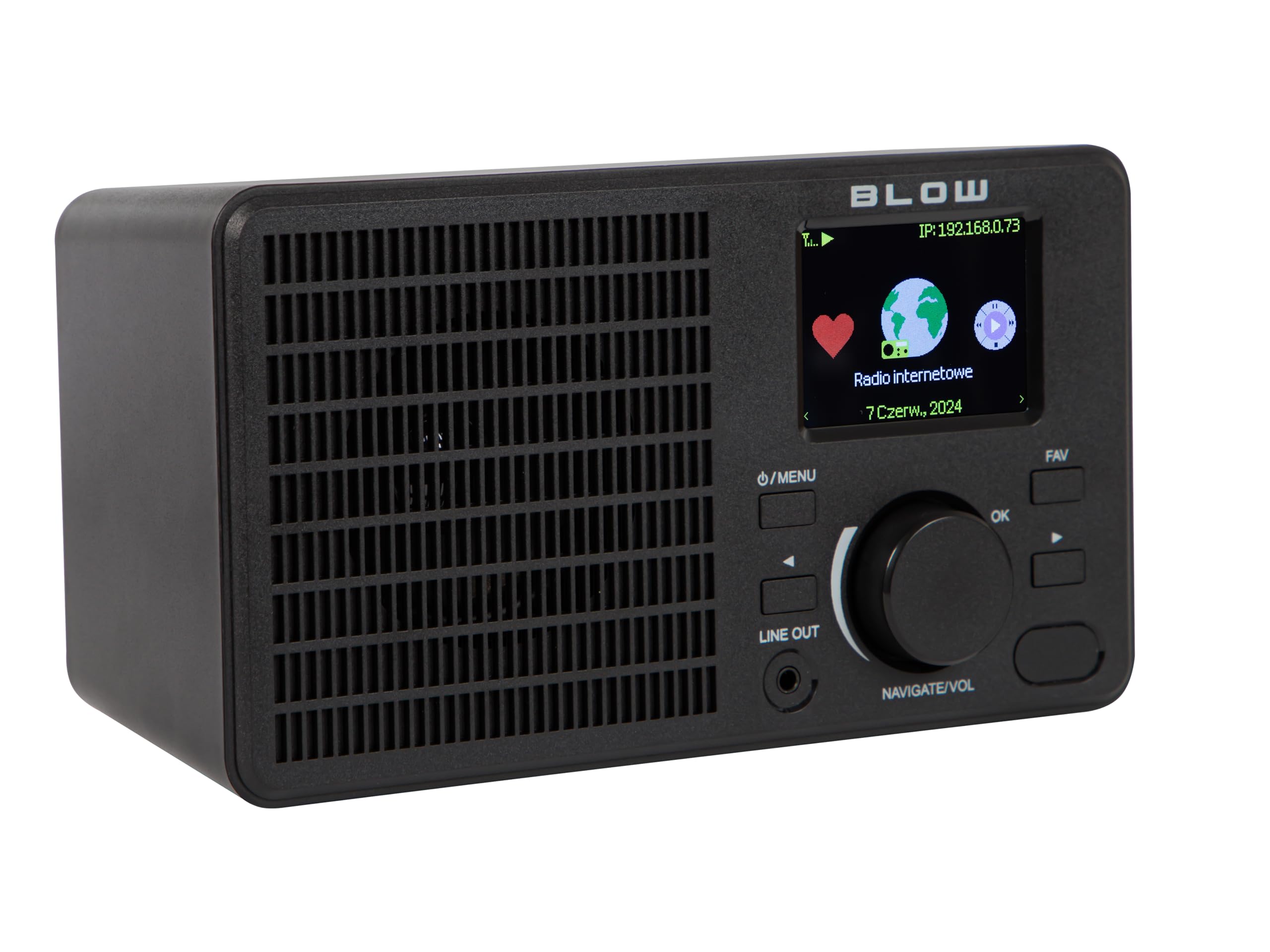
الصورة: الجبهة view of the BLOW Internet Radio RI 1, showcasing the display, speaker grille, and control buttons.
المميزات الرئيسية:
- راديو الإنترنت: Access thousands of stations worldwide via Wi-Fi.
- اتصال واي فاي: Wireless access to internet radio and network features.
- بلوتوث: Stream music from mobile devices.
- شاشة ملونة TFT مقاس 2.4 بوصة: Shows station information and track details.
- منبه مزدوج مع خاصية الغفوة: Wake up to music or news.
- خط خارج: الاتصال بـ amplifier or external audio system.
- تصميم مضغوط: Elegant black design suitable for various interiors.
- موالف FM: For local radio broadcasts.
الصورة: الخلفية view of the BLOW Internet Radio RI 1, showing the DC 5V power input and product information label.
يثبت
1. توصيل الطاقة
- قم بتوصيل محول الطاقة المرفق بمنفذ إدخال التيار المستمر 5 فولت الموجود في الجزء الخلفي من الراديو.
- قم بتوصيل محول الطاقة بمأخذ كهربائي قياسي.
- سيتم تشغيل الراديو تلقائيًا أو سيدخل في وضع الاستعداد.

Image: The power adapter included with the BLOW Internet Radio RI 1, showing the plug and DC connector.
2. الإعداد الأولي لشبكة الواي فاي
- عند تشغيل الجهاز لأول مرة، سيرشدك الراديو خلال عملية الإعداد الأولية.
- Use the navigation dial and OK button to select your preferred language.
- سيبحث الراديو عن شبكات Wi-Fi المتاحة. اختر شبكتك من القائمة.
- Enter your Wi-Fi password using the navigation controls. Confirm with the OK button.
- بمجرد الاتصال، سيعرض الراديو رسالة تأكيد.

Image: The BLOW Internet Radio RI 1 display showing the internet radio interface with network status.
تعليمات التشغيل
عناصر التحكم الأساسية
- زر التشغيل/القائمة: Press to turn on/off or access the main menu.
- Navigate/Volume Dial: Rotate to navigate menus or adjust volume. Press to confirm selection.
- زر موافق: يؤكد التحديدات.
- زر FAV: Accesses favorite stations.
- خط خارج: 3.5mm jack for connecting to external audio systems.

الصورة: لقطة مقربة view of the BLOW Internet Radio RI 1's control panel, highlighting the display and buttons.
وضع راديو الإنترنت
- من القائمة الرئيسية، اختر "راديو الإنترنت".
- تصفح المحطات حسب الموقع أو النوع أو ابحث بالاسم.
- Select a station and press OK to start playback.
- To save a station as a favorite, navigate to the station and press the FAV button.
وضع راديو FM
- من القائمة الرئيسية، اختر "راديو FM".
- Use the navigation dial to tune to a frequency or perform an auto-scan for stations.
- Press OK to select a station.
وضع بلوتوث
- من القائمة الرئيسية، اختر "بلوتوث". سيدخل الراديو في وضع الاقتران.
- On your mobile device (smartphone, laptop), enable Bluetooth and search for "BLOW RI 1".
- Select the radio to pair. Once connected, you can stream audio from your device to the radio.

Image: The BLOW Internet Radio RI 1 shown alongside a smartphone, illustrating Bluetooth connectivity for music streaming.
وظيفة المنبه
- Access the "Alarm" settings from the main menu.
- قم بإعداد ما يصل إلى جهازي إنذار مستقلين.
- Configure alarm time, source (buzzer, internet radio, FM), and snooze duration.
- Ensure the radio is connected to power for the alarm to function reliably.
صيانة
- تنظيف: استخدم قطعة قماش ناعمة وجافة لتنظيف سطح الراديو. لا تستخدم المنظفات السائلة أو المواد الكاشطة.
- تخزين: عند عدم استخدام الراديو لفترات طويلة، قم بتخزينه في مكان بارد وجاف.
- تحديثات البرامج: Periodically check for firmware updates through the radio's system settings to ensure optimal performance and access to new features.
استكشاف الأخطاء وإصلاحها
| مشكلة | الحل المحتمل |
|---|---|
| لا يوجد طاقة | Check if the power adapter is securely connected to the radio and the electrical outlet. Try a different outlet. |
| لا يمكن الاتصال بشبكة Wi-Fi | Ensure your Wi-Fi password is correct. Check if your router is working. Try restarting the radio and your router. Ensure the radio is within range of your Wi-Fi signal. |
| Internet radio stations not playing | Verify your internet connection is active. Some stations may be temporarily offline. Try other stations. |
| فشل اقتران البلوتوث | Ensure the radio is in Bluetooth pairing mode. Make sure Bluetooth is enabled on your mobile device and it's within range. Try unpairing and re-pairing. |
| استقبال FM ضعيف | Adjust the radio's position. Ensure there are no strong interference sources nearby. |
تحديد
| ميزة | التفاصيل |
|---|---|
| ماركة | ينفخ |
| نموذج | 5900804137467 |
| تكنولوجيا الاتصال | Wi-Fi, Bluetooth, Aux, Line Out |
| تقنية الموالف | FM |
| نوع العرض | LCD (2.4-inch TFT Color Display) |
| مصدر الطاقة | Corded Electric (AC: 100-240V, 50/60Hz; DC: 5V/1A) |
| الأجهزة المتوافقة | Smartphone, Laptop, Headphones |
| المميزات الخاصة | Lightweight, Portable, Dustproof, Built-in Clock, Dual Alarm with Snooze |
| أبعاد المنتج | 19.4 سم (الطول) × 8.8 سم (العرض) × 11 سم (الارتفاع) |
| لون | أسود |
الضمان والدعم
For warranty information and technical support, please refer to the contact details provided in the separate warranty card included with your product or visit the official BLOW webموقع.
الشركة المصنعة: ينفخ
Webموقع: www.blow.pl


