مقدمة
The Hetyre DY28S is a versatile 5-in-1 device combining a Bluetooth speaker, touch sensor LED lamp with 48 color-changing modes, digital alarm clock, MP3 player, and hands-free call function. This manual provides detailed instructions for setup, operation, and maintenance to ensure optimal performance and longevity of your device.
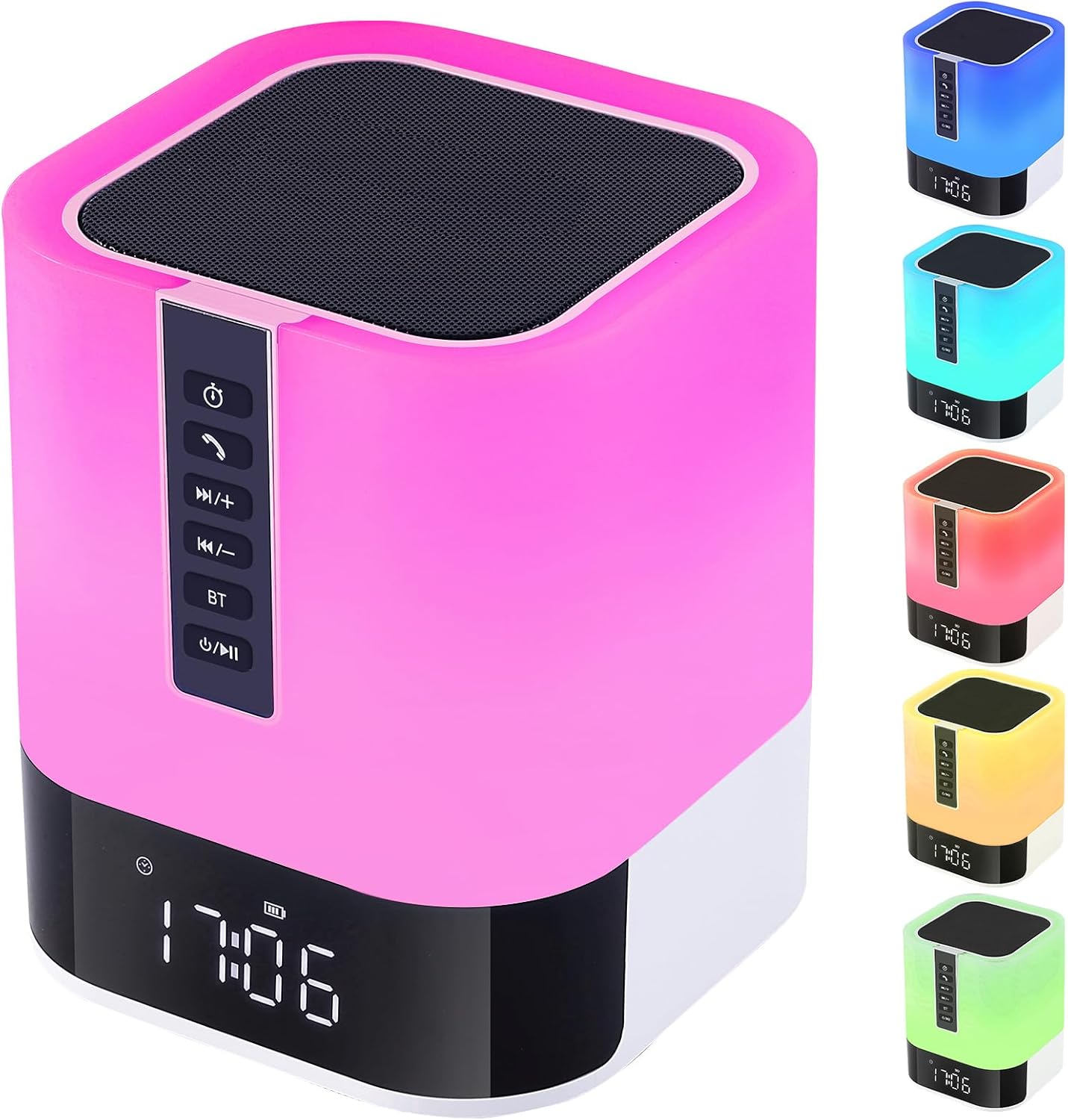
Image: The Hetyre DY28S device, showcasing its compact, square design with a speaker grille on top, control panel on the side, and a digital clock display at the base. The lamp portion is illuminated in pink, with smaller images on the right showing it in blue, cyan, red, yellow, and green.
ماذا يوجد في الصندوق
يرجى التحقق من محتويات العبوة عند فتح الصندوق:
- Hetyre DY28S Wireless Bluetooth Speaker & Bedside Lamp
- كابل الطاقة
- دليل المستخدم (هذا المستند)
الميزات الرئيسية
- 5 في 1 متعددة الوظائف: Integrates Bluetooth speaker, touch sensor LED lamp, alarm clock, MP3 player, and hands-free call capabilities.
- Dynamic LED Lamp: Features 48 color-changing modes and 3 levels of adjustable warm light. Colors can automatically change with music rhythm or be set to a single preferred color.
- ساعة المنبه الرقمية: Large 12/24H display with calendar, alarm, and snooze function. Supports custom alarm sounds from MicroSD card or USB disk.
- عمر بطارية ممتد: Built-in 2000mAh rechargeable battery provides 8-10 hours of music playback at max volume, or up to 1 week as a night light. Fully charges in 6-8 hours via USB.
- Multiple Music Playback Options: Connects via Bluetooth, or play music directly from USB flash drives and MicroSD cards.
- الاتصال بدون استخدام اليدين: ميكروفون مدمج لإدارة المكالمات بسهولة.

Image: The Hetyre DY28S device placed on a bedside table, emitting a soft pink light. A smartphone is shown wirelessly connected, illustrating its Bluetooth music playback and hands-free call features. Icons below highlight Bluetooth, Micro SD, USB Stick, Hands-free Call, and Music Rhythm Light functions.
دليل الإعداد
1. الشحن الأولي
Before first use, fully charge the device. Connect the provided power cable to the charging port on the speaker and the other end to a USB power adapter (not included) or a computer USB port. The charging indicator will show progress and turn off when fully charged. A full charge typically takes 6-8 hours.
2. تشغيل/إيقاف التشغيل
اضغط مع الاستمرار على الطاقة / التشغيل / الإيقاف المؤقت button (usually marked with a power symbol and play/pause icon) on the control panel for a few seconds to turn the device on or off.
تعليمات التشغيل
انتهت لوحة التحكمview

Image: A close-up of the Hetyre DY28S control panel, showing the buttons and their corresponding functions. From top to bottom: Sleep Timer, Answer Call, Volume Up/Next Track, Volume Down/Previous Track, Bluetooth Mode, Power/Play/Pause.
- زر مؤقت النوم: Press to enter sleep timer mode settings.
- زر الاتصال: Press to answer a call. Press twice to redial the last call.
- رفع مستوى الصوت / المسار التالي: Press to increase volume. Press and hold to play the next song.
- خفض مستوى الصوت / المسار السابق: Press to decrease volume. Press and hold to play the previous song.
- زر البلوتوث (BT): Press to enter Bluetooth mode. A prompt tone will indicate successful connection and disconnection.
- Power / Play / Pause: Short press to play/pause. Long press to shut down the software. Short press again to start the software.
1. وظيفة مكبر الصوت بتقنية البلوتوث
- تأكد من تشغيل مكبر الصوت.
- اضغط على BT button to enter Bluetooth pairing mode. The device will emit a prompt sound.
- On your smartphone, tablet, or other Bluetooth-enabled device, search for "DY28S" in the Bluetooth settings.
- Select "DY28S" to pair. Once connected, you will hear a confirmation sound.
- You can now play audio from your device through the Hetyre speaker.
2. الصمام Lamp عملية

Image: The Hetyre DY28S lamp demonstrating its three brightness levels: 30%, 60%, and 100%, illustrating how a slight tap on the top adjusts the light intensity.
- Adjusting Warm Light Brightness: Lightly tap the metal mesh on the top of the speaker to cycle through 3 levels of warm light brightness.
- وضع تغيير اللون: Press and hold the metal mesh on the top until the desired color appears, then release. The light can also automatically cycle through 48 colors or change with the rhythm of music when in music light mode.

Image: The Hetyre DY28S lamp illuminated in a vibrant blue, with musical notes floating around it, indicating its colorful lights mode. Text explains that multiple colors cycle automatically, and a specific color can be selected by pressing and holding the touch net.
3. وظيفة المنبه

Image: Two scenarios illustrating the alarm clock mode of the Hetyre DY28S. One shows a person stretching, labeled "A Gentle Way to Wake Up," and the other shows a person sleeping peacefully, labeled "A Sweet Way to Fall Asleep." The device's digital clock is visible.
- ضبط الوقت: Refer to the detailed instructions in the full manual for setting the 12/24H time format and current time.
- ضبط المنبه: Use the dedicated alarm setting buttons (refer to the full manual for specific button functions) to set your desired alarm time. You can choose to use built-in alarm sounds or select music from a MicroSD card or USB disk as your alarm.
- قيلولة بعد الظهر وظيفة: When the alarm rings, tap the top of the light lamp once to activate snooze. The alarm will ring again in 5 minutes.
- إيقاف الإنذار: To stop the alarm completely without snoozing, quickly tap the top of the device twice when the alarm rings.
4. MP3 Player Function
The device supports MP3 playback from a USB flash drive or MicroSD card.
- Insert a USB flash drive or MicroSD card containing MP3 audio fileقم بتوصيلها بالمنفذ المخصص لها على مكبر الصوت.
- سيقوم مكبر الصوت تلقائيًا باكتشاف جهاز التخزين والبدء في تشغيل الموسيقى.
- استخدم رفع الصوت / المسار التالي و خفض الصوت / المسار السابق buttons to navigate through your music.
5. الاتصال بدون استخدام اليدين
عند الاتصال بهاتفك الذكي عبر البلوتوث:
- الرد على مكالمة: اضغط على يتصل زر مرة واحدة للرد على مكالمة واردة.
- إنهاء المكالمة: اضغط على يتصل button once to end an ongoing call.
- إعادة الاتصال: اضغط على يتصل زر مرتين لإعادة طلب الرقم الأخير.
صيانة
- تنظيف: Use a soft, dry cloth to clean the surface of the device. Do not use abrasive cleaners, waxes, or solvents.
- تخزين: قم بتخزين الجهاز في مكان بارد وجاف بعيدًا عن أشعة الشمس المباشرة ودرجات الحرارة القصوى.
- العناية بالبطارية: لإطالة عمر البطارية، تجنب تفريغها بالكامل بشكل متكرر. اشحن الجهاز بانتظام، حتى في حال عدم استخدامه لفترات طويلة.
- مقاومة الماء: This device is NOT waterproof. Avoid exposure to water or high humidity.
استكشاف الأخطاء وإصلاحها
| مشكلة | السبب المحتمل | حل |
|---|---|---|
| الجهاز لا يعمل. | بطارية منخفضة أو لا يوجد شحن. | Connect the power cable and charge the device for at least 30 minutes before attempting to power on again. |
| لا يوجد صوت من مكبر الصوت. | Volume too low; Device not paired; Incorrect source. | Increase volume on both the speaker and the connected device. Ensure Bluetooth is connected or MP3 source is properly inserted. |
| فشل اتصال Bluetooth. | الجهاز بعيد جدًا؛ تداخل؛ ليس في وضع الاقتران. | Ensure devices are within 33 feet (10 meters). Move away from other wireless devices. Press the BT button to enter pairing mode. Forget "DY28S" on your device and re-pair. |
| لا يصدر صوت الإنذار. | Alarm not set; Volume too low. | Verify alarm settings and ensure alarm volume is not muted or too low. |
تحديد
| ميزة | التفاصيل |
|---|---|
| اسم الموديل | دي واي 28 إس |
| ماركة | هيتر |
| نوع السماعة | الصوت المحيطي |
| تكنولوجيا الاتصال | بلوتوث |
| تكنولوجيا الاتصالات اللاسلكية | بلوتوث |
| مصدر الطاقة | تعمل بالبطارية |
| سعة البطارية | 2000 مللي أمبير (تقريبًا) |
| الحد الأقصى لقوة خرج السماعة | 5 واط |
| طريقة التحكم | يلمس |
| أبعاد المنتج | 4.8 بوصة عمق × 4.8 بوصة عرض × 5.6 بوصة ارتفاع |
| وزن العنصر | 1.39 رطل |
| يشمل مشغل MP3؟ | نعم |
| مقاوم للماء | خطأ شنيع |
| نوع الضمان | محدود |
الضمان والدعم
This Hetyre product comes with a limited warranty. Please refer to the warranty card included in your package for specific terms and conditions. For technical support, troubleshooting assistance, or warranty claims, please contact Hetyre customer service through the retailer's platform or the official Hetyre webموقع.
For the most up-to-date support information, please visit the official Hetyre support page or contact your point of purchase.

