مقدمة
This manual provides instructions for the installation, operation, and maintenance of your Xtreme Smart Wi-Fi Window & Door Sensor. This device is designed to enhance home security by detecting the opening and closing of windows and doors, sending instant notifications to your smartphone.
معلومات السلامة
- لا تعرض الجهاز لدرجات حرارة قصوى أو لأشعة الشمس المباشرة أو للرطوبة.
- لا تحاول تفكيك الجهاز أو إصلاحه بنفسك. سيؤدي ذلك إلى إلغاء الضمان.
- احتفظ بالبطاريات بعيدًا عن متناول الأطفال. في حالة الابتلاع ، اطلب عناية طبية فورية.
- Dispose of batteries according to local regulations. Do not mix old and new batteries.
- Ensure the installation surface is clean and dry for proper adhesive attachment.
محتويات الحزمة
تأكد من وجود جميع العناصر في الحزمة الخاصة بك:
- Xtreme Smart Wi-Fi Window & Door Sensor (Main Unit)
- Xtreme Smart Wi-Fi Window & Door Sensor (Magnetic Contact)
- دليل المستخدم (هذا المستند)

Image: The main sensor unit and the smaller magnetic contact unit.
دليل الإعداد
1. تركيب البطارية
- Gently slide open the battery cover on the main sensor unit.
- أدخل بطاريتين AAA (غير مرفقتين) في الحجرة، مع التأكد من صحة القطبية (+/-).
- أغلق غطاء البطارية بشكل محكم.
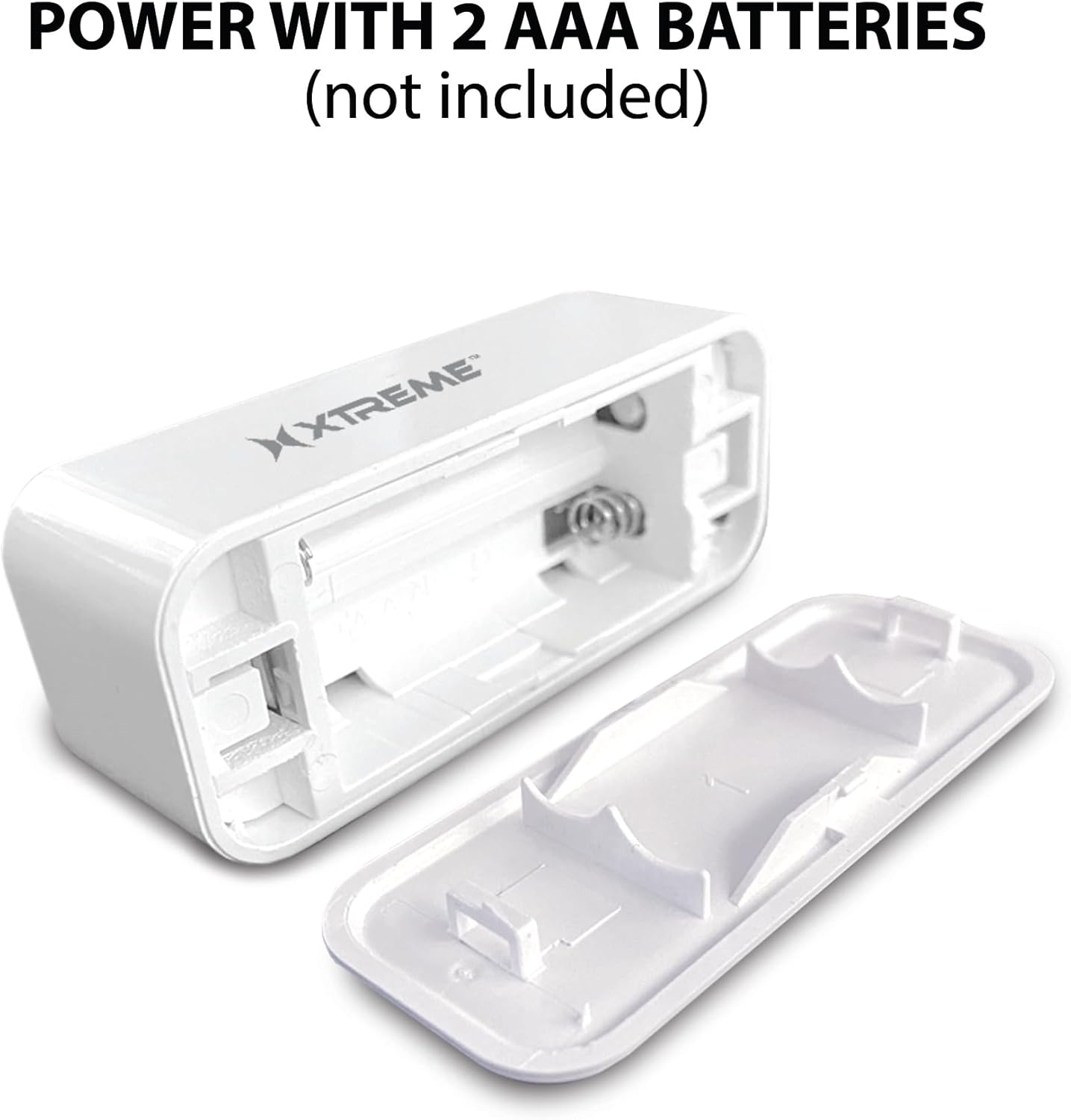
Image: The main sensor unit with its battery compartment open, showing where to insert two AAA batteries.
2. تنزيل التطبيق وإنشاء الحساب
- تنزيل Xtreme Connect Home App من متجر تطبيقات أبل (لنظام التشغيل iOS 11 أو أعلى) أو متجر جوجل بلاي (لنظام التشغيل أندرويد 7.0 أو أعلى).
- افتح التطبيق واتبع الإرشادات التي تظهر على الشاشة لإنشاء حساب جديد أو تسجيل الدخول إذا كان لديك حساب بالفعل.

Image: The product box illustrating the Xtreme Connect Home App download options for both iOS and Android devices.
3. إقران الجهاز
- تأكد من اتصال هاتفك الذكي بشبكة واي فاي بتردد 2.4 جيجاهرتز. لا يدعم المستشعر شبكات 5 جيجاهرتز.
- In the Xtreme Connect Home App, tap the "+" icon to add a new device.
- Select "Sensor" or "Door/Window Sensor" from the device list.
- Follow the app's instructions to put the sensor into pairing mode (usually involves pressing and holding a button on the sensor until an indicator light flashes).
- Confirm the Wi-Fi network and enter the password in the app. The sensor will then connect to your home network.
- Once successfully paired, you can name your sensor within the app (e.g., "Front Door," "Bedroom Window").
4. التثبيت المادي
The sensor consists of two parts: a main unit and a smaller magnetic contact. These two parts must be installed close to each other (within 1 cm) on a door or window frame.
- Choose a clean, dry, and flat surface on your door or window frame.
- Peel off the protective backing from the adhesive on both the main unit and the magnetic contact.
- Attach the main unit to the fixed part of the door/window frame.
- Attach the magnetic contact to the moving part of the door/window (the door or window itself), aligning it with the main unit so they are no more than 1 cm apart when the door/window is closed.
- Test the installation by opening and closing the door/window. The app should register the change in status.


Image: Left: The sensor installed on a window sill with the window closed. Right: The sensor detecting an open window, with the magnetic contact separated from the main unit.
عملية
Monitoring Door/Window Status
Once installed and paired, the Xtreme Smart Wi-Fi Window & Door Sensor will continuously monitor the open/closed status of your designated entry point. When the magnetic contact separates from the main unit (door/window opens), the sensor will detect this change.
الإشعارات الفورية
Upon detecting an open or close event, the sensor will send an instant notification to your smartphone via the Xtreme Connect Home App. Ensure app notifications are enabled in your phone's settings to receive these alerts.
الوصول عن بعد
أنت تستطيع view the current status of your sensor (open or closed) and review event history from anywhere using the Xtreme Connect Home App, provided your smartphone has an internet connection.
Smart Scenes Integration
The Xtreme Connect Home App allows you to create "Smart Scenes" to automate actions based on sensor activity. For exampعلى:
- "If door opens, then turn on living room lights."
- "If window opens after 10 PM, then send an alert to family members."
Explore the "Smart Scenes" section within the app to customize your home automation.
صيانة
استبدال البطارية
The sensor is powered by two AAA batteries. When the battery level is low, you may receive a notification via the Xtreme Connect Home App. To replace batteries:
- Gently slide open the battery cover on the main sensor unit.
- قم بإزالة البطاريات القديمة.
- قم بإدخال بطاريتين قلويتين جديدتين من نوع AAA، مع التأكد من القطبية الصحيحة (+/-).
- أغلق غطاء البطارية بشكل محكم.
Note: The sensor is designed for up to four months of battery life under normal usage conditions.
تنظيف
Wipe the sensor with a soft, dry cloth. Do not use liquid cleaners or abrasive materials, as these can damage the device.
استكشاف الأخطاء وإصلاحها
| مشكلة | السبب المحتمل | حل |
|---|---|---|
| لا يتصل المستشعر بشبكة الواي فاي. | Incorrect Wi-Fi password; 5GHz network used; sensor too far from router. | Ensure correct 2.4GHz Wi-Fi network and password. Move sensor closer to the router. Re-attempt pairing. |
| لم يتم استلام أي إشعارات. | App notifications disabled; sensor offline; app not running in background. | Check phone's notification settings for the Xtreme Connect Home App. Verify sensor status in the app. Ensure app is allowed to run in the background. |
| Sensor not detecting open/close. | Sensor parts misaligned; dead batteries. | Ensure the main unit and magnetic contact are within 1 cm when closed. Replace batteries if low. |
| عمر البطارية قصير. | Frequent activations; poor quality batteries. | Use high-quality alkaline batteries. Reduce unnecessary activations if possible. |
تحديد
| ميزة | التفاصيل |
|---|---|
| رقم الموديل | XHS7-2001-WHT |
| مصدر الطاقة | 2 بطاريات AAA (غير مدرجة) |
| نوع البطارية | قلوي |
| المجلدtage | 1.5 فولت (تيار مستمر) |
| الاتصال | 2.4GHz 802.11n Wi-Fi, Bluetooth 4.0 (optional) |
| طريقة التحكم | App (Xtreme Connect Home) |
| نظام التشغيل المتوافق | الروبوت شنومكس +، دائرة الرقابة الداخلية شنومكس + |
| نوع التركيب | Adhesive / Wall Mount |
| أبعاد المنتج | 2.7 × 2.4 × 4.6 بوصة |
| وزن العنصر | 2.39 أونصات |
| لون | أبيض |
| رمز المنتج الموحد | 805106232399 |
الضمان والدعم
For warranty information and technical support, please refer to the documentation included with your purchase or visit the official Xtreme Digital Lifestyle Accessories website. Do not attempt to return the product to the retailer without first contacting customer support, as per manufacturer guidelines.
الشركة المصنعة: إكستريم
ماركة: XTREME DIGITAL LIFESTYLE ACCESSORIES


