1. المقدمة
This manual provides comprehensive instructions for the safe and efficient use of your MEDION S66884 Shower Radio. This device is designed to provide audio entertainment in wet environments, featuring Bluetooth 5.0 for wireless music streaming, an FM radio with automatic station search, and a hands-free function. It is equipped with an integrated lithium polymer battery for portability and an LED display for essential information.
2. معلومات السلامة
- الجهاز لديه تصنيف IPX6, providing protection against strong water jets. Do not immerse the device in water.
- Use only the provided USB-C charging cable to prevent damage and ensure safety.
- احتفظ بالجهاز بعيدًا عن متناول الأطفال.
- لا تحاول تفكيك الجهاز أو إصلاحه أو تعديله بنفسك. اتصل بفنيي الصيانة المؤهلين للحصول على المساعدة.
- Avoid exposing the device to extreme temperatures, direct sunlight, or open flames.

3. محتويات العبوة
يرجى التأكد من أن جميع العناصر موجودة وفي حالة جيدة:
- MEDION S66884 Shower Radio (MD43884)
- كابل شحن USB-C
- دليل التعليمات
4. الإعداد
4.1 شحن الجهاز
- Connect the supplied USB-C charging cable to the charging port on the side of the shower radio.
- Connect the other end of the USB-C cable to a suitable USB power adapter (not included) or a computer's USB port.
- The LED display will indicate the charging status. A full charge typically takes a few hours.
4.2 تركيب الجهاز
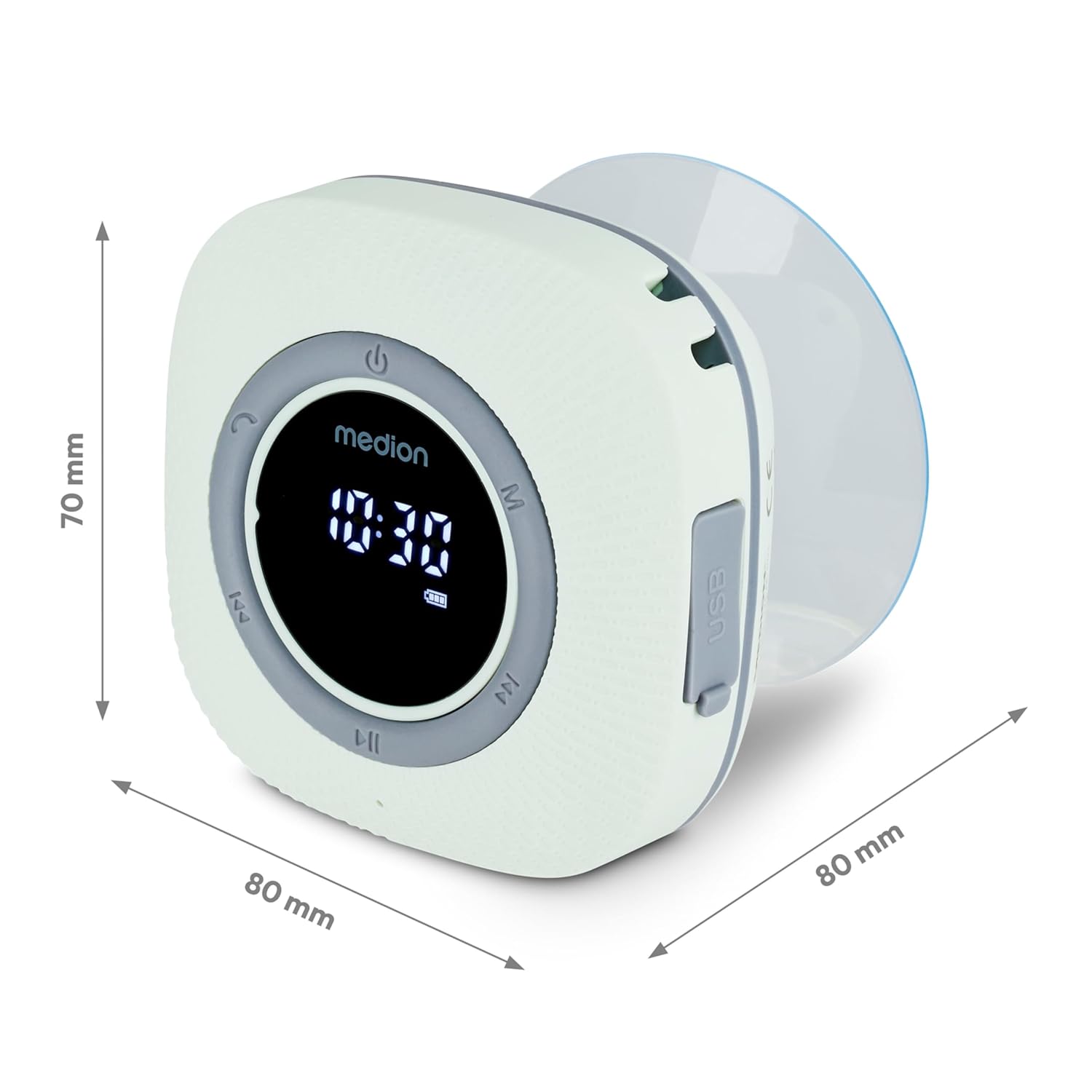
The shower radio comes with a removable suction cup for easy mounting on smooth surfaces.
- Ensure the desired mounting surface (e.g., shower wall, tile) is clean, dry, and smooth.
- Press the suction cup firmly against the surface until it adheres securely.
- Attach the shower radio to the suction cup.
5. تعليمات التشغيل
5.1 تشغيل/إيقاف التشغيل
- ل تشغيل الطاقة the device, press and hold the power button (U symbol) until the LED display illuminates.
- ل اغلاق الطاقة the device, press and hold the power button again until the display turns off.
5.2 اقتران بلوتوث
The shower radio supports wireless music transmission from your smartphone or tablet via Bluetooth 5.0, with a range of approximately 10 meters (depending on environmental conditions).
- Ensure the shower radio is powered on and sufficiently charged.
- The device will automatically enter Bluetooth pairing mode, indicated by a flashing Bluetooth icon on the LED display.
- On your smartphone or tablet, navigate to the Bluetooth settings and enable Bluetooth.
- بحث عن available devices and select "MEDION S66884" (or similar) from the list to pair.
- Once paired, the Bluetooth icon on the radio's display will become solid, and you can begin streaming audio.

تشغيل راديو 5.3 FM
The device features an FM radio with automatic station search.
- Press the 'M' button to switch to FM radio mode. The display will show the radio frequency.
- To perform an automatic station search, press and hold the Play/Pause button (►► symbol). The radio will scan and save available stations.
- Use the 'Previous' (◀◀) and 'Next' (►►) buttons to navigate through the saved stations.

5.4 وظيفة التحدث الحر
When connected to your smartphone via Bluetooth, the shower radio can be used for hands-free calls.
- ل الرد على مكالمة واردة, press the Play/Pause button.
- ل انهاء المكالمة, press the Play/Pause button again.
- ل رفض مكالمة واردة, press and hold the Play/Pause button.
5.5 وظيفة الساعة والمنبه
The LED display shows the current time, and an alarm function is available.
- Refer to the specific button combinations in the quick start guide (if provided separately) for setting the clock and alarm. Typically, this involves pressing and holding a dedicated button (e.g., 'C' or 'M') to enter time setting mode, then using the track skip buttons to adjust values.
5.6 التحكم في مستوى الصوت
- Use the dedicated volume buttons (often integrated with track skip buttons or separate +/- buttons) to adjust the audio volume.
6. الصيانة
6.1 التنظيف
- امسحي الجهاز بحركة ناعمة قليلاًamp قطعة قماش.
- لا تستخدم المنظفات الكاشطة أو المذيبات أو المواد الكيميائية القوية، لأنها قد تتلف السطح أو المكونات الداخلية.
- Ensure the charging port cover is securely closed before cleaning or exposing to water.
6.2 العناية بالبطارية
- The integrated lithium polymer battery provides up to 12 hours of music playing time.
- An acoustic signal will indicate a low battery level. Recharge the device promptly.
- للحصول على عمر بطارية مثالي، تجنب تفريغ البطارية بالكامل بشكل متكرر.
6.3 التخزين
- عند عدم استخدام الجهاز لفترات طويلة، قم بتخزينه في مكان بارد وجاف بعيدًا عن أشعة الشمس المباشرة ودرجات الحرارة القصوى.
7. استكشاف الأخطاء وإصلاحها
| مشكلة | السبب المحتمل | حل |
|---|---|---|
| الجهاز لا يعمل. | تم تفريغ البطارية. | Charge the device using the supplied USB-C cable. |
| لا يوجد صوت أو مستوى الصوت منخفض. | Volume is too low; Bluetooth not connected; FM signal weak. | Increase volume; Re-pair Bluetooth device; Adjust radio position or perform auto-scan for FM stations. |
| لا يمكن لجهاز البلوتوث الاتصال. | الجهاز ليس في وضع الاقتران؛ خارج النطاق؛ متصل بالفعل بجهاز آخر. | Ensure radio is in pairing mode (flashing Bluetooth icon); Move device closer; Disconnect from other devices and try again. |
| لا يثبت كوب الشفط. | Surface is dirty, uneven, or porous. | Clean the surface thoroughly; Ensure surface is smooth and non-porous; Slightly moisten the suction cup before applying. |
8. المواصفات
| ماركة | MEDION |
| نموذج | MD43884 (P66096) |
| تكنولوجيا الاتصال | بلوتوث 5.0 |
| حماية المياه | IPX6 (الحماية ضد نفاثات الماء القوية) |
| نوع البطارية | بوليمر الليثيوم |
| عمر البطارية | Up to 12 hours music playing time |
| مخرج الصوت | 30 W max. (3 W RMS) |
| تقنية الموالف | FM |
| نوع العرض | قاد |
| الأبعاد (الطول × العرض × الارتفاع) | 8 × 8 × 7 سم |
| وزن العنصر | 290 جرام |
| مصدر الطاقة | تعمل بالبطارية |
| واجهة الشحن | يو اس بي نوع سي |
9. الضمان والدعم
For warranty information or technical support, please refer to the warranty card included with your product or visit the official MEDION website. You can also contact MEDION customer service directly for assistance with product inquiries, troubleshooting, or service requests.


