1. المقدمة وما فوقview
The Infinity Smart Watch for Women is designed to seamlessly integrate into your daily life, offering a blend of elegance and advanced functionality. Featuring a vibrant AMOLED 1.1" screen, this smartwatch provides comprehensive health and fitness tracking, communication features, and smart notifications. It is compatible with both iOS and Android phones.

الشكل 1: الجبهة view of the Infinity Smart Watch for Women, showcasing its elegant design and vibrant AMOLED display.
2. ماذا يوجد في الصندوق
- Infinity Smart Watch (Model WS_BLK)
- كابل الشحن
- دليل المستخدم
3. الإعداد
3.1 الشحن الأولي
Before first use, fully charge your smartwatch. Connect the magnetic charging cable to the charging points on the back of the watch and plug the USB end into a compatible power adapter (not included) or computer USB port. The watch display will indicate charging status.

Figure 2: The smartwatch connected to its magnetic charging cable, showing the battery charging indicator.
3.2 تثبيت التطبيق وإقرانه
- Scan the QR code provided in the manual or on the watch screen (if available) to download the companion app. Alternatively, search for the app name (e.g., 'VeryFit' or 'FitCloudPro' as seen in related videos) in your smartphone's app store (iOS App Store or Google Play Store).
- قم بتثبيت التطبيق على هاتفك الذكي.
- افتح التطبيق واتبع التعليمات التي تظهر على الشاشة لإنشاء حساب وإعداد حسابكfile.
- تأكد من تمكين Bluetooth على هاتفك الذكي.
- In the app, navigate to the device pairing section and select your Infinity Smart Watch from the list of available devices.
- قم بتأكيد طلب الاقتران على كل من هاتفك الذكي والساعة الذكية.
Video 1: Official product video demonstrating the Infinity Smart Watch for Women, including its features and design. This video provides a visual guide to the watch's capabilities.
4. تعليمات التشغيل
4.1 الملاحة الأساسية
- اسحب للاعلى: View recent notifications/messages.
- انتقد أسفل: Access quick settings (brightness, Do Not Disturb, flashlight, phone finder, settings).
- اسحب لليسار/اليمين: Scroll through main features like activity data, heart rate, sleep tracking, and weather.
- اضغط على الزر الجانبي: ارجع إلى واجهة الساعة أو ادخل إلى القائمة الرئيسية.
4.2 إجراء المكالمات والرد عليها
Once paired with your smartphone, you can make and answer calls directly from your smartwatch.
- لإجراء أتصال: Access the phone function from the main menu, use the dial pad or select a contact from your synced phonebook.
- للرد على مكالمة: عند ورود مكالمة، ستعرض الساعة هوية المتصل. انقر على الرمز الأخضر للرد أو الرمز الأحمر لرفض المكالمة.
4.3 الإشعارات الذكية
Receive alerts for incoming calls, text messages, and app notifications directly on your wrist. Configure notification preferences within the companion app.

Figure 3: The smartwatch interface showing options for Bluetooth calls, smart notifications, and voice assistant.
4.4 تخصيص واجهات الساعة
The smartwatch offers a variety of customizable watch faces to suit your style. You can change them directly on the watch or through the companion app, which provides over 200 options.
5. ميزات مراقبة الصحة
The Infinity Smart Watch is equipped with a comprehensive suite of health and fitness tracking features:
- رصد معدل ضربات القلب: يتتبع معدل ضربات قلبك بشكل مستمر طوال اليوم.
- مراقبة ضغط الدم: Provides on-demand blood pressure readings.
- مراقبة النوم: يحلل أنماط نومك، بما في ذلك النوم العميق والنوم الخفيف وأوقات الاستيقاظ.
- عداد الخطى: Counts your steps, distance traveled, and calories burned.
- أوضاع رياضية متعددة: Supports over 100 sports modes, allowing you to track specific workouts like walking, running, cycling, and swimming.
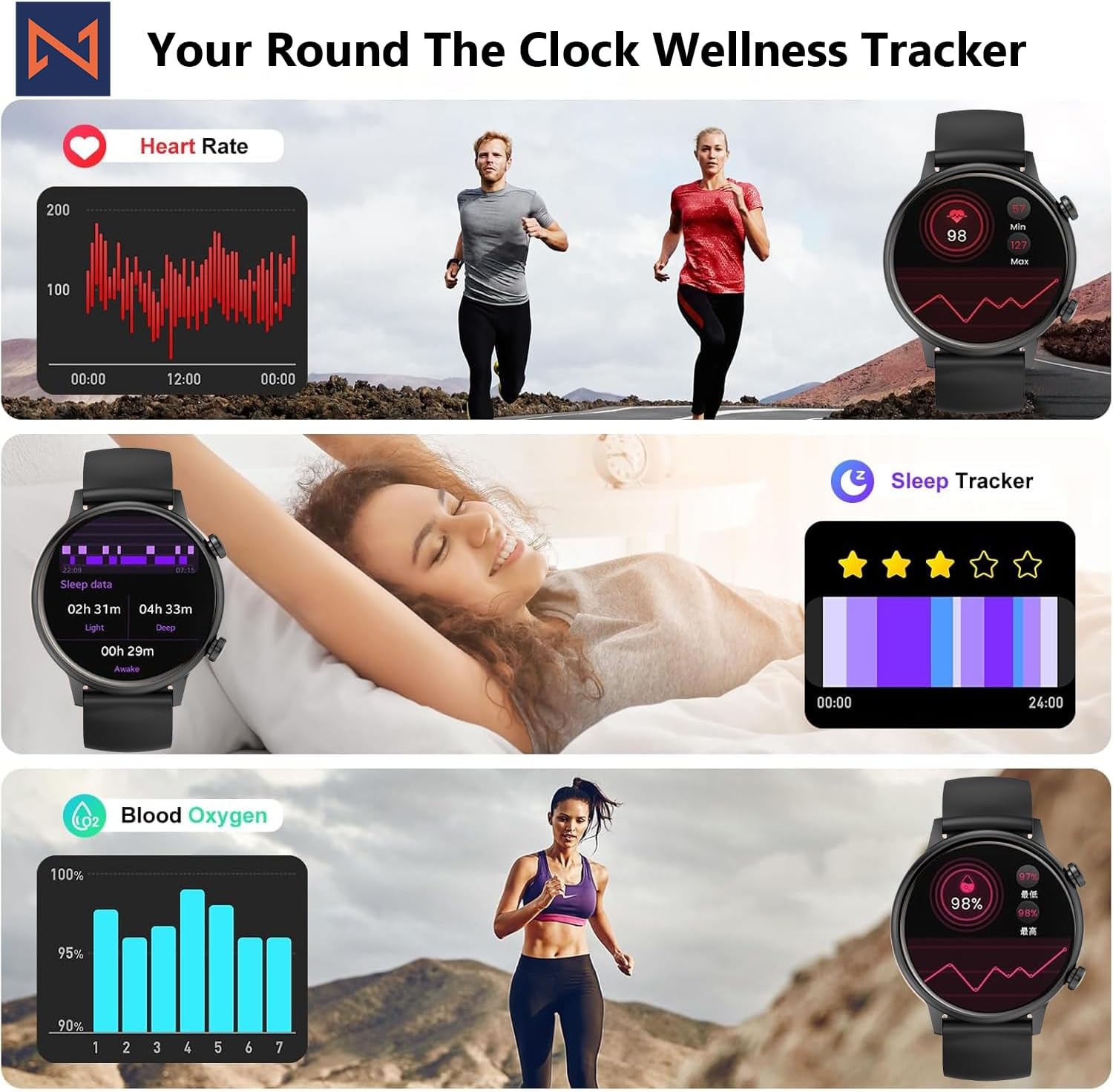
Figure 4: The smartwatch interface showing real-time heart rate, sleep tracking, and blood oxygen levels.

Figure 5: The smartwatch showing a selection of its multiple sports tracking modes.
6. مقاومة الماء
The Infinity Smart Watch has an IP68 waterproof rating, making it resistant to dust, sweat, and water. It is suitable for daily wear, including hand washing, face washing, and swimming. ملحوظة: Avoid using the watch in hot water (e.g., hot showers, saunas) or for deep-sea diving, as extreme temperatures or high-pressure water may compromise its water resistance.

Figure 6: The smartwatch demonstrating its IP68 waterproof capability during water exposure.
7. البطارية والشحن
The smartwatch features a 200 mAh Lithium Polymer battery. A full charge typically takes approximately 2 hours, providing 3-5 days of working time and up to 30 days of standby time, depending on usage.
8. المواصفات
| ميزة | التفاصيل |
|---|---|
| رقم الموديل | WS_BLK |
| حجم الشاشة | شاشة AMOLED مقاس 1.1 بوصة |
| تصنيف مقاومة الماء | IP68 |
| سعة البطارية | 200 مليamp ساعات (بوليمر الليثيوم) |
| الاتصال | بلوتوث |
| نظام التشغيل | أندرويد (متوافق مع نظام iOS) |
| سعة تخزين الذاكرة | 128 ميجا بايت |
| وزن العنصر | 5 أونصات |
| الشركة المصنعة | Kizzy Enterprises Inc |
9. استكشاف الأخطاء وإصلاحها
- الساعة لا تعمل: Ensure the watch is fully charged. Long-press the side button to power on.
- غير قادر على الاقتران بالهاتف: Ensure Bluetooth is enabled on your phone and the watch is within range. Restart both devices and try pairing again through the app.
- الإشعارات غير المستلمة: Check app settings on your phone to ensure notification permissions are granted for the smartwatch app. Also, verify that 'Do Not Disturb' mode is not active on the watch.
- قراءات صحية غير دقيقة: Ensure the watch is worn snugly on your wrist, not too tight or too loose. Clean the sensors regularly. Note that the blood pressure monitor may not be medically accurate and is for reference only.
- تجميد الشاشة: Restart the smartwatch by long-pressing the side button until it powers off, then power it back on. If the issue persists, check for app updates.
10. الضمان والدعم
For warranty information, technical support, or service inquiries, please refer to the contact details provided on the product packaging or the manufacturer's official webالموقع. احتفظ بإيصال الشراء الخاص بك كإثبات للشراء في حالة مطالبات الضمان.


