1. المقدمة
This manual provides detailed instructions for the installation, operation, and maintenance of your ZENEC Z-N538 2-DIN Multimedia Receiver. Please read this manual thoroughly before using the device to ensure proper functionality and to prevent damage.
The ZENEC Z-N538 is a versatile multimedia system designed for vehicles with a 2-DIN bay. It features a 6.75-inch capacitive TFT LCD touchscreen, DAB+ digital radio, and seamless integration with smartphones via wireless Android Auto and Apple CarPlay.
2. معلومات السلامة
- Always operate the device in a safe manner. Avoid distractions while driving.
- لا تحاول تفكيك الوحدة أو تعديلها. فقد يتسبب ذلك في تلفها وإلغاء الضمان.
- تأكد من التهوية المناسبة حول الوحدة لمنع ارتفاع درجة الحرارة.
- Consult a professional for installation if you are unsure about any steps. Incorrect installation can lead to vehicle damage or malfunction.
- احتفظ بالوحدة بعيدًا عن الماء والرطوبة الزائدة.
3. محتويات العبوة
تأكد من وجود جميع العناصر في العبوة:
- ZENEC Z-N538 Multimedia Receiver Unit
- ميكروفون بلوتوث خارجي
- هوائي نظام تحديد المواقع العالمي (GPS)
- شنومكس x أوسب الكابلات
- Various Connection Cables and Adapters
- إطار تركيب معدني
- أداة التفكيك
4. الإعداد
4.1 التثبيت
The Z-N538 is designed for standard 2-DIN vehicle bays. Professional installation is recommended. Ensure all wiring connections are secure and correctly matched to your vehicle's electrical system.
The unit features multi-color key illumination, allowing you to match the device's button lighting to your vehicle's cockpit illumination.
4.2 التشغيل الأولي
After installation, turn on your vehicle's ignition. The Z-N538 should power on automatically. Follow any on-screen prompts for initial setup, such as language selection and time zone.
4.3 Connecting Steering Wheel Remote Control
The Z-N538 includes an IR-In adapter for connecting to your vehicle's steering wheel remote control. Refer to your vehicle's manual and the Z-N538 wiring diagram for proper connection and configuration.
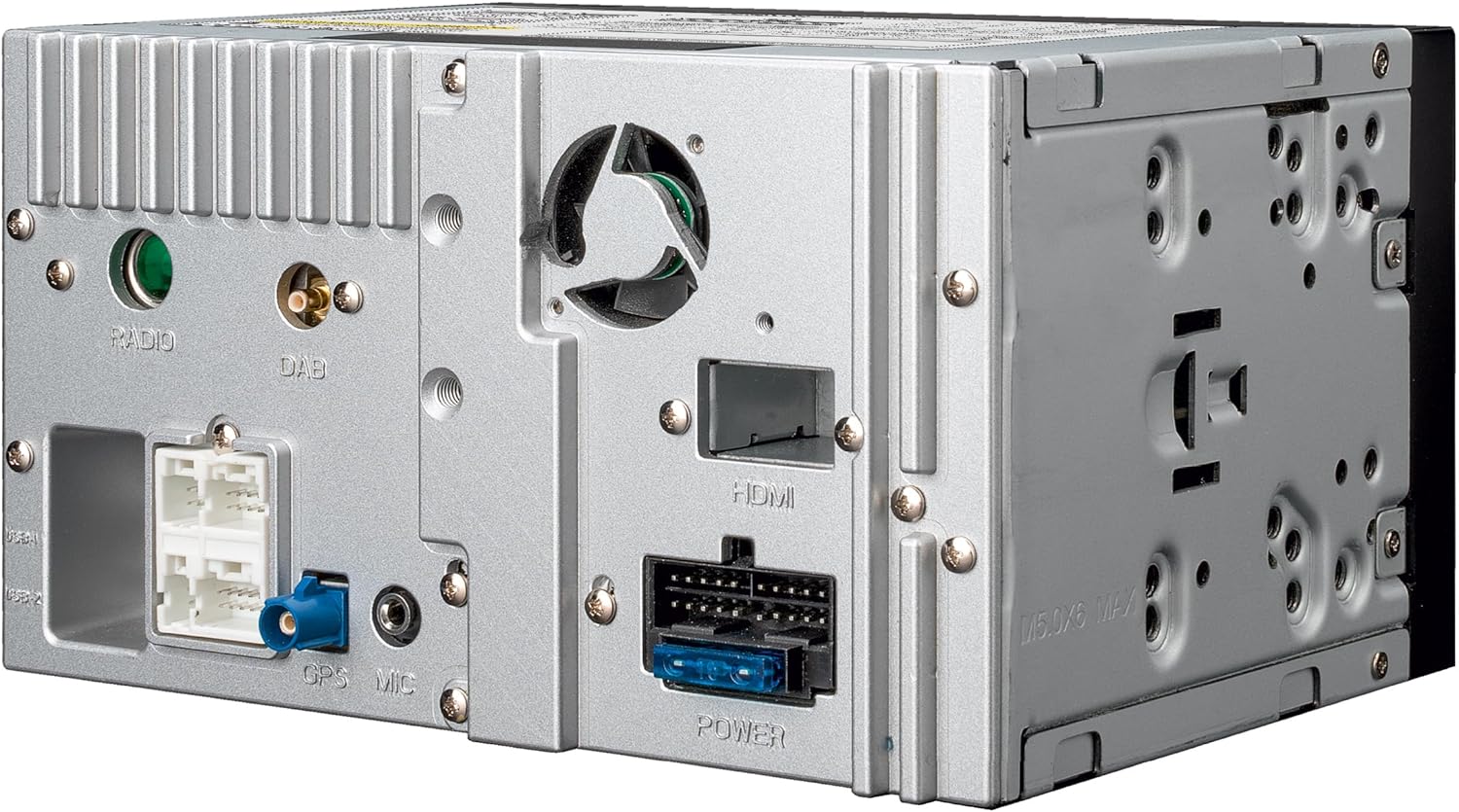
وصف الصورة: This image displays the rear panel of the ZENEC Z-N538 unit. Various ports are visible, including connections for Radio, DAB antenna, HDMI, GPS microphone, and power. These ports are essential for integrating the unit into a vehicle's electrical and antenna systems.
5. تعليمات التشغيل
5.1 General Interface Navigation
The Z-N538 features a responsive 6.75-inch capacitive touchscreen and large hard keys for intuitive operation. The home screen provides quick access to main functions.

وصف الصورة: This image shows the front of the ZENEC Z-N538 multimedia receiver. The touchscreen displays the main menu with large, clear icons for various functions such as USB, FM radio, DAB+ radio, Bluetooth, Apple CarPlay, and Android Auto. The physical buttons below the screen provide additional control.
5.2 Radio Functions (DAB+, FM)
The unit includes an integrated DAB+ Twin tuner for clear digital radio reception and a latest-generation automotive dual FM RDS tuner.
- راديو DAB+: Enjoy uninterrupted reception with DAB-FM and DAB-DAB Seamless Blending. Features include dynamic station lists, MOT Slideshow, and DLS Text.
- راديو FM: The dual FM RDS tuner ensures optimal reception. One tuner plays the current program while the second scans for alternative frequencies and provides a dynamic list of receivable stations.
5.3 Media Playback (USB, MicroSD)
The Z-N538 is equipped with two USB ports and a microSD card reader for A/V playback. Connect compatible storage devices to play audio and video files.
5.4 اتصال البلوتوث
Utilize Bluetooth for hands-free calling and A2DP music streaming. Pair your smartphone with the Z-N538 to make and receive calls safely and stream audio wirelessly.
5.5 Android Auto and Apple CarPlay (Wireless)
The Z-N538 supports wireless Android Auto and Apple CarPlay, connecting to your smartphone via WiFi or USB. This allows for seamless integration of smartphone features onto the receiver's display.
- ملاحة: Use Google Maps or Apple Maps for real-time route information and to find points of interest.
- تواصل: Make calls, send, and receive messages using voice commands (Siri, Google Voice Assistant) or the touchscreen.
- موسيقى: Access your favorite music streaming services and apps.

وصف الصورة: This image illustrates the ZENEC Z-N538 unit installed in a vehicle, displaying a navigation map on its main screen. Below the main image, two smaller insets show the distinct user interfaces for Android Auto and Apple CarPlay, highlighting their integration capabilities.

وصف الصورة: This image shows the ZENEC Z-N538 multimedia receiver seamlessly integrated into a car's dashboard. The screen displays a navigation map, indicating active route guidance. The view through the windshield shows a winding road, suggesting the unit's use during travel.
5.6 وظائف الكاميرا
The Z-N538 features two camera inputs (CVBS / AHD 720p) with a switched power supply and maneuver/switching function. You can activate and define guidelines that appear in the camera view for assistance during parking or maneuvering.
5.7 إعدادات الصوت
The unit offers sophisticated audio tuning capabilities:
- 5-Channel Digital Time Correction: Adjust audio timing for each speaker to optimize the soundstage.
- المعادل الرسومي ذو 16 نطاقات: Fine-tune audio frequencies to match your preferences and vehicle acoustics.
- Active 12 dB/oct High-Pass and Low-Pass Filters: Configure crossover points for speakers and subwoofers.

وصف الصورة: This image displays the ZENEC Z-N538's screen interface dedicated to advanced audio settings. It shows controls for 5-channel time correction, a detailed 16-band graphic equalizer for precise frequency adjustments, and crossover settings for managing high-pass and low-pass filters.
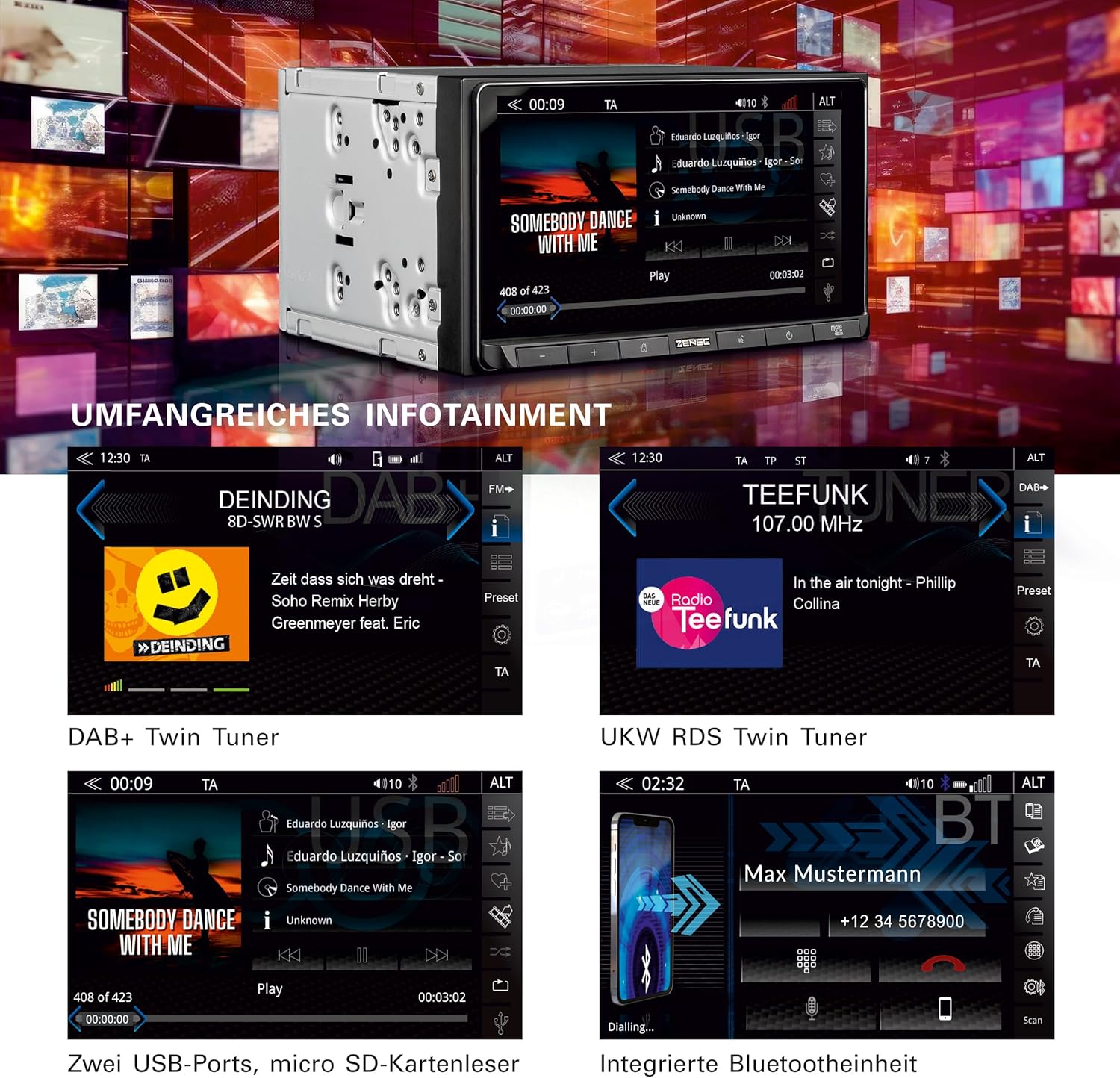
وصف الصورة: This image presents a collage of screenshots from the ZENEC Z-N538's display, showcasing its comprehensive infotainment features. It includes interfaces for DAB+ digital radio, UKW RDS FM radio, USB audio playback with track information, and the integrated Bluetooth hands-free calling screen.
6. الصيانة
6.1 تنظيف الشاشة
استخدم قطعة قماش ناعمة وخالية من الوبر لمسح شاشة اللمس برفق. لإزالة البقع الصعبة، امسحها برفق.ampen the cloth with water or a screen-safe cleaning solution. Avoid abrasive cleaners or solvents.
6.2 العناية العامة
Keep the unit free from dust and debris. Ensure no liquids are spilled onto the device. Periodically check connections for security.
7. استكشاف الأخطاء وإصلاحها
If you encounter issues with your Z-N538, refer to the following common problems and solutions:
| مشكلة | السبب المحتمل | حل |
|---|---|---|
| لا يوجد طاقة | الأسلاك غير صحيحة، فتيل منفوخ | Check power connections and vehicle fuses. Consult installation professional. |
| لا يوجد صوت | Volume too low, mute activated, speaker wiring issue | قم بزيادة مستوى الصوت، والتحقق من حالة كتم الصوت، والتحقق من توصيلات مكبر الصوت. |
| البلوتوث غير متصل | الجهاز ليس في وضع الاقتران، تداخل | Ensure Bluetooth is enabled on both devices and in pairing mode. Try restarting both devices. |
| Android Auto/CarPlay not launching | Incorrect connection, app not installed/updated | Ensure correct USB/WiFi connection. Verify Android Auto/Apple CarPlay app is installed and updated on your smartphone. |
8. المواصفات
| ميزة | التفاصيل |
|---|---|
| رقم الموديل | Z-N538 |
| ماركة | زينيك |
| حجم العرض | 6.75 بوصة |
| نوع العرض | Capacitive TFT LCD |
| دقة العرض | 1280 × 720 |
| الاتصال | Bluetooth, IR, USB, WiFi (for wireless CarPlay/Android Auto) |
| الأجهزة المتوافقة | هواتف آيفون وأندرويد الذكية |
| موالف الراديو | DAB+ Twin Tuner, Dual FM RDS Tuner |
| Ampإخراج مكبر الصوت | 4 × 50 واط |
| ميزات الصوت | 5-Channel Digital Time Correction, 16-Band Graphic Equalizer, Active 12 dB/oct High/Low-Pass Filters |
| مدخلات الكاميرا | 2 (CVBS / AHD 720p) |
9. الضمان والدعم
For warranty information, please refer to the warranty card included with your product or contact your authorized ZENEC dealer. Technical support may be available through the ZENEC webالموقع أو نقطة الشراء الخاصة بك.
يرجى الاحتفاظ بإثبات الشراء الخاص بك لمطالبات الضمان.


