1. المقدمة
This manual provides essential instructions for the safe and efficient operation, setup, maintenance, and troubleshooting of your Elation Professional Magmatic Magma Fog 1500IP-II Fog Machine. Please read this manual thoroughly before operating the device to ensure proper function and to prevent damage or injury. Keep this manual for future reference.
The Magma Fog 1500IP-II is a high-performance, 1500W water-based fog machine designed for professional applications. It features an IP67 rating, making it suitable for outdoor use, and offers a maximum output of 60,000 cubic feet per minute (CFM). Control options include an onboard LCD touchscreen and DMX-512/RDM.
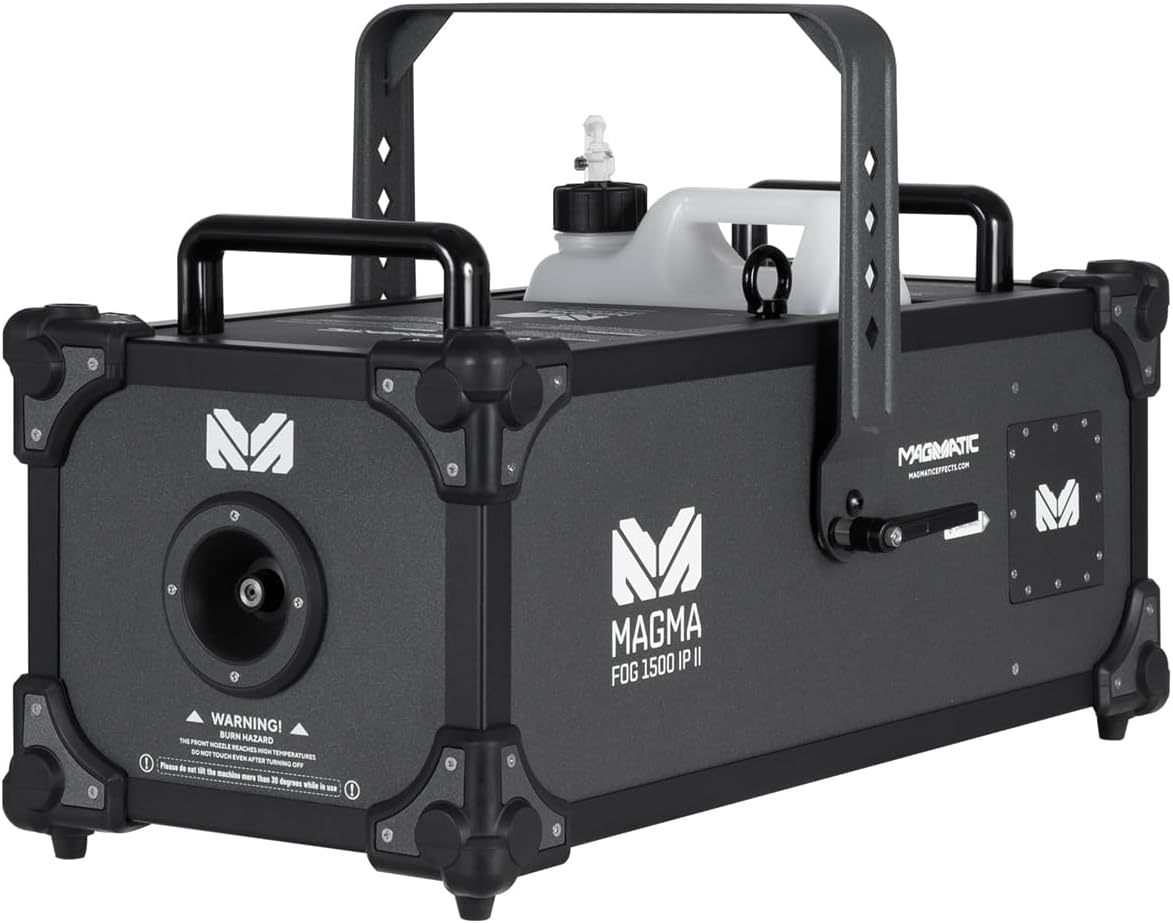
الشكل 1.1: الجانب الأمامي view of the Magmatic Magma Fog 1500IP-II Fog Machine, showcasing its robust design and integrated fluid tank.
2. معلومات السلامة
Always observe the following safety precautions to reduce the risk of electrical shock, fire, or personal injury.
- السلامة الكهربائية: تأكد من توصيل الوحدة بمأخذ طاقة مؤرض بالجهد الصحيحtage (120V, 60Hz). Disconnect power before performing any maintenance or cleaning.
- خطر الحرق: The front nozzle and surrounding areas become extremely hot during operation. WARNING! BURN HAZARD! THE FRONT NOZZLE REACHES HIGH TEMPERATURES. DO NOT TOUCH NOZZLE AFTER POWERING OFF. Allow sufficient cooling time (at least 30 minutes) after use.
- Fluid Safety: Use only approved water-based fog fluid. Do not ingest fog fluid. In case of contact with skin or eyes, rinse thoroughly with water. Keep out of reach of children.
- تهوية: تأكد من وجود تهوية كافية حول الجهاز. لا تسد فتحات التهوية.
- الموقع: Do not tilt the machine more than 30 degrees while in use. Place the machine on a stable, level surface. Keep flammable materials away from the unit.
- الاستخدام الخارجي: The unit is IP67 rated for outdoor use, but ensure all connections are properly sealed and protected from direct water spray into openings.

الشكل 2.1: الجبهة view highlighting the burn hazard warning label near the fog output nozzle. Always observe this warning.
3. انتهى المنتجview
The Magma Fog 1500IP-II is engineered for reliability and performance. Key components include:
- Fog Output Nozzle: يقع في المقدمة، حيث ينبعث الضباب.
- خزان السوائل: A 5-liter (1.32 gallon) removable tank for fog fluid.
- لوحة التحكم: Onboard LCD touchscreen for direct control and settings adjustment.
- مدخلات الطاقة: IP65 locking power connector.
- دمكس داخل/خارج: IP65 locking 5-pin XLR connectors for DMX-512 and RDM control.
- الإدخال عن بعد: For optional wired or wireless remote control.
- مقابض الحمل: Two heavy-duty handles for transport.
- قوس معلق: For truss mounting applications.

الشكل 3.1: خلفي view of the unit, displaying the LCD touchscreen control panel, power input, DMX connections, and remote input.
4. الإعداد
4.1 فك التعبئة
- Carefully remove the fog machine from its packaging.
- Inspect the unit for any signs of damage during shipping. Contact your dealer immediately if damage is found.
- احتفظ بالعبوة الأصلية لنقلها أو تخزينها مستقبلاً.
4.2 Fluid Tank Installation and Filling
- Locate the fluid tank compartment on the top of the unit.
- Remove the empty fluid tank.
- املأ الخزان بـ Magmatic brand water-based fog fluid only. Using other fluid types may damage the unit and void the warranty.
- Securely replace the fluid tank, ensuring the fluid hose is properly submerged and connected.
4.3 توصيل الطاقة
- Connect the supplied IP65 locking power cable to the power input on the rear of the unit.
- Connect the other end of the power cable to a suitable grounded electrical outlet (120V, 60Hz).
4.4 وصلة DMX (اختياري)
- For DMX control, connect a 5-pin DMX cable from your DMX controller to the DMX IN port on the fog machine.
- To daisy-chain multiple units, connect a DMX cable from the DMX OUT port of the first unit to the DMX IN port of the next unit.
- Ensure all DMX cables are IP65 rated for outdoor use if applicable.
4.5 التركيب
The unit includes a hanging bracket for truss mounting. Ensure the mounting surface or truss system can safely support the weight of the unit (74.3 lbs / 33.7 kg) and any accessories. Use appropriate clamps and safety cables (not included) for secure installation.
5. تعليمات التشغيل
5.1 التشغيل والتسخين
- After connecting power, the unit will begin its initial warm-up sequence.
- The thermally protected heat exchanger requires approximately 14 minutes to reach optimal operating temperature.
- The LCD touchscreen will display the warm-up status. The unit is ready for operation once the status indicates 'Ready'.
5.2 Onboard LCD Touchscreen Control
The intuitive LCD touchscreen allows direct control over various functions:
- Manual Fog Output: Activate fog output manually.
- إعدادات الموقت: Program timed fog bursts and intervals.
- التحكم في مستوى الصوت: Adjust the fog output intensity.
- عنوان DMX: Set the DMX start address for remote control.
- معلومات النظام: View operational data and status.
5.3 DMX-512 and RDM Control
The Magma Fog 1500IP-II supports DMX-512 and RDM (Remote Device Management) for integration into professional lighting and effects systems. Refer to the DMX chart in the appendix (if provided separately) for specific channel assignments and control values. RDM allows for remote configuration and monitoring of the device.
5.4 جهاز تحكم عن بعد اختياري
The unit is compatible with optional wired and wireless remote controls (sold separately). Connect the remote to the 'REMOTE IN' port on the rear of the unit. Consult the remote control's manual for specific operating instructions.
6. الصيانة
تضمن الصيانة الدورية الأداء الأمثل وتطيل عمر جهاز الضباب الخاص بك.
6.1 التنظيف
- الخارج: امسح الجزء الخارجيasing مع لينة، damp القماش. لا تستخدم المنظفات أو المذيبات الكاشطة.
- فوهة: Periodically check the fog nozzle for any blockages. If necessary, gently clean with a small brush after the unit has completely cooled.
- Fluid System: It is recommended to run a cleaning solution (specifically designed for fog machines) through the system every 200 hours of operation or before long periods of storage to prevent clogs.
6.2 Fluid Handling and Storage
- Always store fog fluid in a cool, dark place, away from direct sunlight and extreme temperatures.
- Ensure the fluid tank is securely capped when not in use.
- If storing the machine for an extended period (more than 30 days), empty the fluid tank and run a cleaning solution through the system.
7. استكشاف الأخطاء وإصلاحها
This section addresses common issues you might encounter. If a problem persists, contact qualified service personnel.
| مشكلة | السبب المحتمل | حل |
|---|---|---|
| لا يوجد خرج ضباب | No power; insufficient warm-up; empty fluid tank; clogged nozzle/pump | Check power connection; wait for 'Ready' status; refill fluid tank; clean nozzle/run cleaning solution. |
| انبعاث ضباب ضعيف | Low fluid level; partial clog; incorrect fluid type; low operating temperature | Refill fluid; run cleaning solution; ensure correct fluid; allow full warm-up. |
| لا يعمل التحكم عبر بروتوكول DMX | عنوان DMX غير صحيح؛ كابل DMX معيب؛ مشكلة في وحدة تحكم DMX | Verify DMX address on unit and controller; test DMX cable; check DMX controller settings. |
| الوحدة لا تعمل | No power from outlet; faulty power cable; internal fuse blown | Check power source; test power cable; consult service technician for fuse replacement. |
8. المواصفات
Detailed technical specifications for the Magmatic Magma Fog 1500IP-II.
| ميزة | مواصفة |
|---|---|
| رقم موديل العنصر | MSF047 |
| استهلاك الطاقة | 1500 واط |
| حجم الإخراج | 60,000 CFM (cu ft/min) |
| وقت الإحماء | حوالي 14 دقيقة |
| معدل استهلاك السوائل | 6.76 oz (200 ml/min) |
| سعة خزان السوائل | 5 لتر (1.32 جالون) |
| يتحكم | Onboard LCD Touchscreen, DMX-512, RDM, Optional Wired/Wireless Remote |
| تصنيف IP | IP67 |
| الأبعاد (الطول × العرض × الارتفاع) | 25.5 × 14.6 × 16.2 بوصة (64.8 × 37.1 × 41.1 سم) |
| وزن العنصر | 74.3 رطل (33.7 كجم) |
| مواد الإسكان | Durable Aluminum |
9. الضمان والدعم
For warranty information and technical support, please refer to the official Elation Professional webالموقع أو تواصل مع وكيلك المعتمد. احتفظ بإيصال الشراء كإثبات للشراء في حال وجود أي مطالبات بالضمان.
Elation Professional Customer Support: للحصول على المساعدة، قم بزيارة www.elationlighting.com/support أو اتصل بالموزع المحلي لديك.


