1. المقدمة
The LSC Smart Connect Solar IP Camera is designed to provide reliable outdoor surveillance with the convenience of solar power. This camera offers 1080p video recording, two-way audio, and night vision capabilities up to 10 meters. It integrates seamlessly with the LSC Smart Connect app, allowing for remote monitoring and control. Key features include a light and sound alarm, flash function, and privacy mode to enhance security.
This manual provides essential information for the proper setup, operation, and maintenance of your LSC Smart Connect Solar IP Camera, ensuring optimal performance and longevity.
2. محتويات الحزمة والإعداد
قبل البدء في التثبيت، يرجى التأكد من أن جميع المكونات موجودة وغير تالفة.

الصورة 2.1: The LSC Smart Connect Solar IP Camera packaging, showing the camera, solar panel, and app interface. This image represents the complete product package as received.
2.1 المكوناتview
The package typically includes the LSC Smart Connect Solar IP Camera unit, a solar panel for continuous power, and mounting accessories.
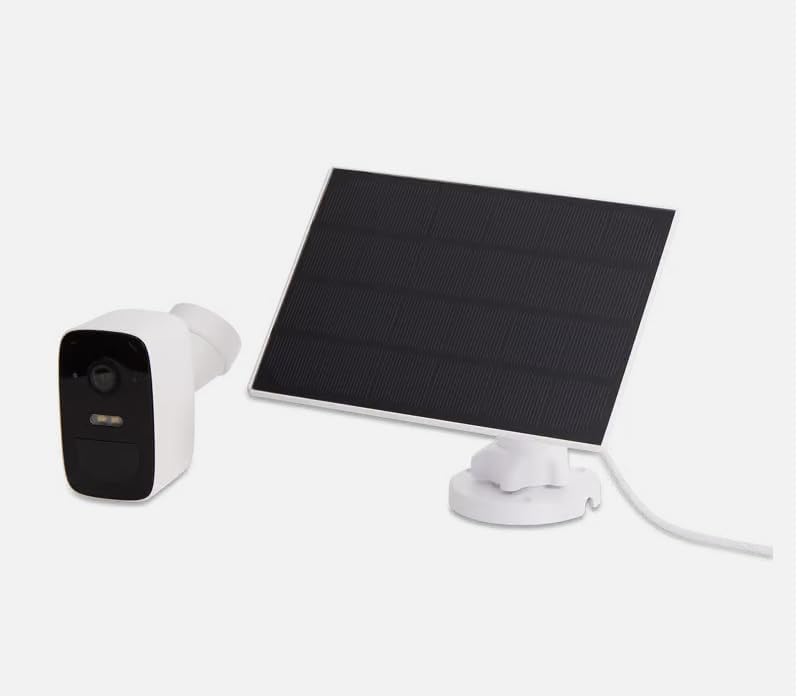
الصورة 2.2: The LSC Smart Connect Solar IP Camera shown alongside its separate solar panel. This illustrates the two main components of the surveillance system.
2.2 خطوات الإعداد الأولية
- تنزيل التطبيق: Download the "LSC Smart Connect" app from your smartphone's app store (iOS or Android).
- إنشاء حساب: افتح التطبيق وقم بالتسجيل للحصول على حساب جديد أو قم بتسجيل الدخول إذا كان لديك حساب بالفعل.
- تشغيل الكاميرا: Ensure the camera is charged or connected to the solar panel. The camera should enter pairing mode (indicated by an LED light).
- إضافة جهاز: In the app, select "Add Device" or the "+" icon. Follow the on-screen instructions to connect the camera to your 2.4GHz Wi-Fi network. Ensure your Wi-Fi signal is strong at the installation location.
- التركيب: Choose a suitable outdoor location for the camera and solar panel. The solar panel should receive direct sunlight for most of the day. Use the provided screws and mounting brackets for secure installation. The camera supports wall mounting.
For detailed mounting instructions, refer to the quick start guide included in your product packaging.
3. تعليمات التشغيل
Once your camera is set up and connected, you can begin monitoring and utilizing its features through the LSC Smart Connect app.
- يعيش View: افتح التطبيق وحدد الكاميرا الخاصة بك لـ view العلف المباشر.
- صوت ثنائي الاتجاه: Use the microphone icon in the app to speak through the camera and the speaker icon to hear audio from the camera's vicinity.
- الرؤية الليلية: The camera automatically switches to night vision in low-light conditions, providing clear images up to 10 meters.
- كشف الحركة والتنبيهات: Configure motion detection sensitivity and set up push notifications to receive alerts on your smartphone when activity is detected.
- وظائف التنبيه: Activate the light and sound alarm or flash function via the app to deter intruders.
- التسجيل والتشغيل: The camera supports local storage (e.g., microSD card, not included) or cloud storage (subscription may be required) for recording. Access recorded footage من خلال ميزة التشغيل في التطبيق.
- وضع الخصوصية: Utilize the privacy function to temporarily disable recording and live view for specific periods.
4. الصيانة
Regular maintenance ensures the optimal performance and longevity of your LSC Smart Connect Solar IP Camera.
- تنظيف: نظّف عدسة الكاميرا واللوحة الشمسية بشكل دوري باستخدام قطعة قماش ناعمة.amp cloth to remove dust, dirt, and debris. Avoid abrasive cleaners.
- كفاءة الألواح الشمسية: Ensure the solar panel is free from obstructions (e.g., leaves, snow) that could block sunlight and reduce charging efficiency.
- تحديثات البرامج الثابتة: Check the LSC Smart Connect app regularly for firmware updates. Keeping the camera's firmware updated ensures access to the latest features and security enhancements.
- فحص الاتصال: Periodically verify the Wi-Fi connection strength and camera status in the app.
5. استكشاف الأخطاء وإصلاحها
If you encounter issues with your LSC Smart Connect Solar IP Camera, refer to the following common troubleshooting steps:
- الكاميرا غير متصل:
- تحقق من قوة إشارة Wi-Fi في موقع الكاميرا.
- Ensure the camera is receiving adequate power from the solar panel or is sufficiently charged.
- أعد تشغيل جهاز توجيه Wi-Fi والكاميرا.
- Verify that the camera is connected to a 2.4GHz Wi-Fi network.
- ضعف جودة الصورة:
- تنظيف عدسة الكاميرا.
- تأكد من عدم وجود أي عوائق أمام العدسة.
- تحقق من سرعة اتصالك بالإنترنت.
- كشف الحركة لا يعمل:
- Verify motion detection settings in the app (sensitivity, detection zones).
- Ensure notifications are enabled on your smartphone and in the app.
- البطارية لا تشحن:
- تأكد من أن اللوحة الشمسية نظيفة وأنها تتعرض لأشعة الشمس المباشرة.
- تحقق من التوصيل بين اللوحة الشمسية والكاميرا.
If issues persist, consult the LSC Smart Connect app's help section or the manufacturer's support resources.
6. المواصفات
| ميزة | مواصفة |
|---|---|
| دقة تسجيل الفيديو | 1080 بكسل |
| لون | اسود/ابيض |
| تكنولوجيا الاتصالات اللاسلكية | واي فاي (2.4 جيجا هرتز) |
| نوع التثبيت | Screw-in / Wall Mount |
| نطاق الرؤية الليلية | 10 مترا |
| أبعاد العنصر (الطول × العرض × الارتفاع) | 15 × 6 × 15 سم |
| الشركة المصنعة | LSC |
| رقم الموديل | 3203968 |
| ASIN | B0D899HFXL |
| الاستخدام الموصى به للمنتج | الأمن الخارجي |
| تكنولوجيا الاتصال | لاسلكي |
| الأجهزة المتوافقة | الهاتف الذكي |
| نوع وحدة التحكم | SmartThings (via LSC Smart Connect App) |
| الاستخدام الداخلي والخارجي | في الهواء الطلق |
7. الضمان والدعم
For warranty information, please refer to the documentation included with your purchase or contact the retailer/manufacturer directly. Typically, products come with a limited warranty covering manufacturing defects.
For technical support, frequently asked questions, or further assistance, please visit the official LSC Smart Connect website or utilize the support section within the LSC Smart Connect mobile application.
الموارد المتاحة على الإنترنت:
- LSC Smart Connect App (available on iOS App Store and Google Play Store)
- Manufacturer's Official Website (for product updates and support)


