مقدمة
This manual provides essential information for the safe and efficient use of your ViewSonic VX2428A 24-inch Full HD IPS Gaming Monitor. Please read these instructions thoroughly before installation and operation.
المميزات الرئيسية:
- 24-inch Full HD (1920x1080p) IPS display
- معدل تحديث 180 هرتز
- 0.5ms (MPRT) response time
- AMD FreeSync technology
- Flicker-Free technology and Blue Light Filter
- HDR10 content support
- HDMI 1.4 and DisplayPort inputs
يثبت
1. ماذا يوجد في الصندوق
تأكد من وجود جميع المكونات:
- LCD Display (VX2428A Monitor)
- كابل الطاقة
- محول التيار المتردد/المستمر
- كابل HDMI
- دليل البدء السريع

Image: The image displays the ViewSonic VX2428A monitor along with its included accessories: a power cable, AC/DC adapter, HDMI cable, and a Quick Start Guide.
2. مجموعة الشاشة
اتبع هذه الخطوات لتجميع حامل الشاشة وتثبيته على لوحة العرض.

الصورة: واجهة view التابع ViewSonic VX2428A 24-inch gaming monitor, showcasing its thin bezels and sleek design.

الصورة: ViewSonic VX2428A monitor positioned on a desk with a keyboard and mouse, highlighting its narrow stand designed for compact setups.
3. توصيل أجهزتك
The VX2428A monitor offers multiple connectivity options:
- HDMI (x2): Connect to devices such as PCs, gaming consoles, or media players using an HDMI cable.
- منفذ العرض (x1): Connect to a computer or graphics card for high-resolution and high-refresh-rate output using a DisplayPort cable.
- مخرج صوت 3.5 ملم (x1): قم بتوصيل مكبرات الصوت الخارجية أو سماعات الرأس.
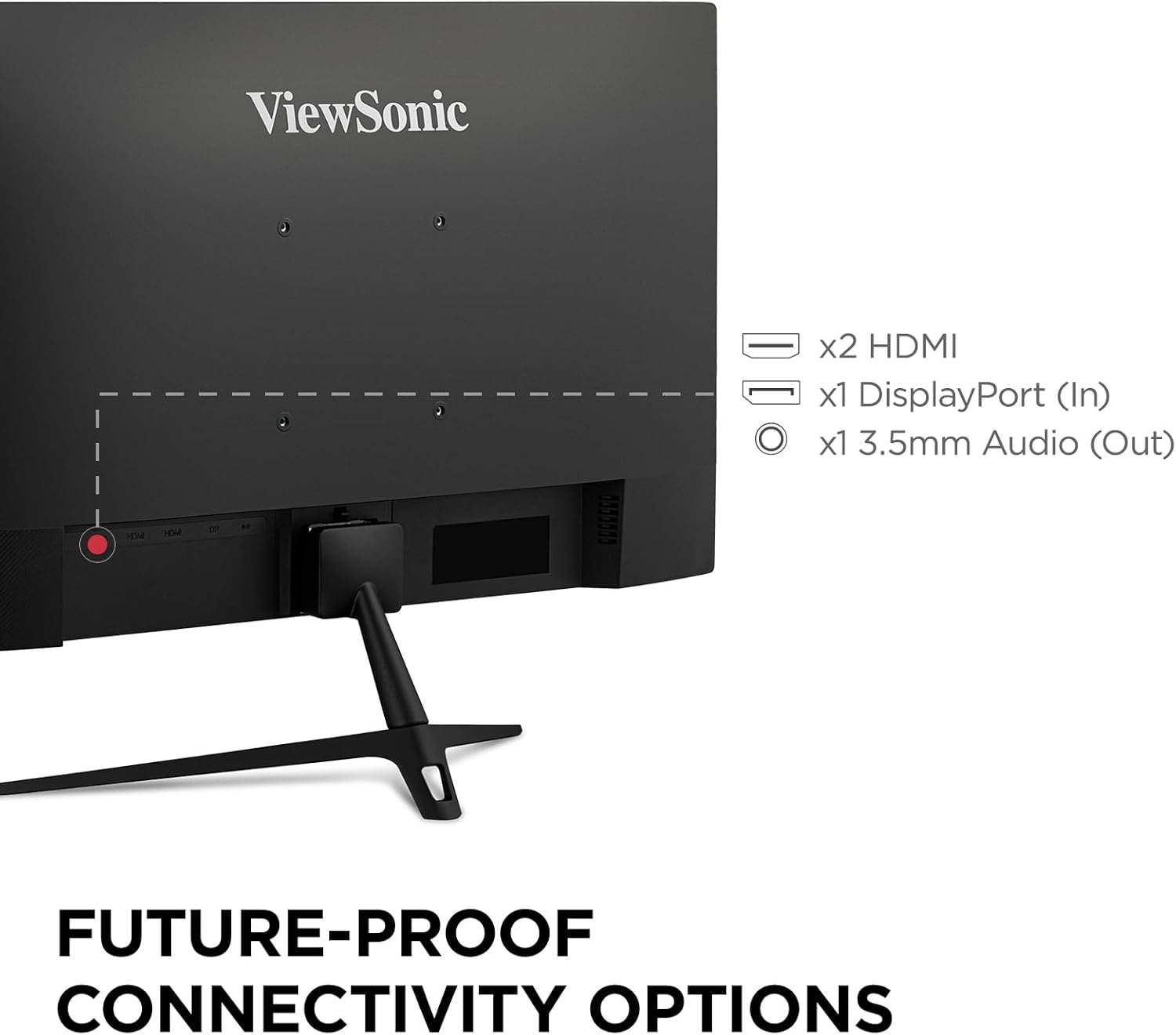
Image: The rear panel of the ViewSonic VX2428A monitor, clearly showing the two HDMI ports, one DisplayPort input, and a 3.5mm audio output jack.

Image: Graphic illustrating the available connectivity options: HDMI, DisplayPort, and Audio Out, with corresponding icons.
4. توصيل الطاقة
قم بتوصيل محول التيار المتردد/المستمر بمدخل الطاقة الخاص بالشاشة، ثم قم بتوصيل كابل الطاقة بمأخذ الحائط.
5. VESA Mount Compatibility
The monitor supports VESA mounting standard 100 x 100 mm for alternative mounting solutions (e.g., wall mounts, monitor arms).

Image: A monitor mounted on an adjustable arm, indicating its 100 x 100 mm VESA mount compatibility for flexible setup options.
تعليمات التشغيل
1. تشغيل/إيقاف التشغيل
Press the power button located on the monitor's bottom right bezel to turn the monitor on or off.
2. قائمة العرض على الشاشة (OSD)
The OSD menu allows you to adjust various monitor settings. Use the buttons on the monitor's bezel to navigate the menu.
Recommended Settings (from user feedback):
- View وضع: معيار
- مقابلة: 77
- سطوع: 100
- درجة حرارة اللون: User Color (for unbiased temperature)
- مجموعة الألوان: Full Range (ensure this matches your graphics card settings)
- فلتر الضوء الأزرق: 25 to 35 (adjust for comfort; higher values may affect white balance)
- الاستقرار الأسود: 70
- وقت الاستجابة: Advanced (Ultra Fast may introduce artifacts)
- Adaptive Sync (AMD FreeSync): On
- النطاق الديناميكي العالي: Set to On when using HDR content; otherwise, keep Off. If HDR is enabled on your device and Off on the monitor, colors may appear washed out. Note that some OSD settings may be greyed out when HDR is active.
3. Gaming Performance Features
The VX2428A is designed for an enhanced gaming experience:
- معدل تحديث 180 هرتز: Provides smoother motion and reduced input lag.
- زمن الاستجابة 0.5 مللي ثانية (MPRT): يقلل من ضبابية الحركة والظلال للحصول على حركة واضحة وسريعة الوتيرة.
- تقنية AMD FreeSync: يقوم بمزامنة معدل تحديث الشاشة مع معدل إطارات وحدة معالجة الرسومات الخاصة بك للقضاء على تمزق الشاشة وتقطعها.

الصورة: أ ViewSonic monitor displaying a gaming scene, emphasizing its 180Hz refresh rate, 0.5ms response time, and AMD FreeSync technology for improved gameplay.

Image: A visual comparison demonstrating the reduction in motion blur and improved clarity when using the monitor's 0.5ms response time and 180Hz refresh rate compared to standard settings.

Image: A split image illustrating the difference between FreeSync OFF (showing screen tearing) and FreeSync ON (showing smooth, tear-free visuals) during gameplay.
4. Eye Care Technology
The monitor incorporates Flicker-Free technology and a Blue Light Filter to reduce eye strain during extended use.
Image: A simulated image demonstrating the benefits of eye-care technology, comparing standard flicker and blue light emission with the monitor's reduced output.
صيانة
تنظيف الشاشة
لتنظيف شاشة العرض وasing:
- أوقف تشغيل الشاشة وافصل سلك الطاقة.
- امسح الشاشة برفق بقطعة قماش ناعمة وخالية من الوبر. لإزالة البقع الصعبة، امسح برفقampامسح قطعة القماش بالماء أو بمنظف شاشات خفيف وغير كاشط.
- امسح جasinباستخدام قطعة قماش ناعمة وجافة.
- Avoid using harsh chemicals, abrasive cleaners, or spraying liquids directly onto the screen or casing.
استكشاف الأخطاء وإصلاحها
إذا واجهت مشكلات مع شاشتك، فراجع المشكلات والحلول الشائعة التالية:
- لا يوجد طاقة: Ensure the power cable and AC/DC adapter are securely connected to both the monitor and a working power outlet.
- لا توجد تغطية: Verify that the video cable (HDMI or DisplayPort) is correctly connected to both the monitor and your source device. Ensure the correct input source is selected in the OSD menu.
- Washed Out Colors (with HDR): If HDR is enabled on your connected device but set to Off in the monitor's OSD, colors may appear dull. Enable HDR in the monitor's OSD settings. Note that some OSD settings may be inaccessible when HDR is active.
- Image Flickering/Tearing: Ensure AMD FreeSync is enabled on both your monitor (via OSD) and your graphics card settings.
- Motion Artifacts: If you observe ghosting or artifacts during fast motion, check the "Response Time" setting in the OSD. Setting it to "Ultra Fast" may sometimes introduce artifacts; try "Advanced" instead.
- No Sound from Monitor Speakers: Check the audio output settings on your connected device and the monitor's OSD. Ensure external speakers/headphones are properly connected to the 3.5mm audio out port if used.
- Missing HDMI Cable: Please note that while a DisplayPort cable is often included, an HDMI cable may not always be part of the standard package.
تحديد
| ميزة | التفاصيل |
|---|---|
| ماركة | Viewسونيك |
| رقم الموديل | VX2428A (VS19276) |
| حجم الشاشة | 24 بوصة (23.8 بوصة) Viewقادر) |
| دقة | 1920 × 1080 (دقة عالية كاملة) |
| نوع اللوحة | اي بي اس |
| معدل التحديث | 180 هرتز |
| وقت الاستجابة | 0.5 مللي ثانية (MPRT) |
| المزامنة التكيفية | تقنية AMD FreeSync |
| نسبة العرض إلى الارتفاع | 16:9 |
| الاتصال | 2x HDMI 1.4, 1x DisplayPort 1.2, 1x 3.5mm Audio Out |
| دعم HDR | النطاق الديناميكي العالي 10 |
| ميزات العناية بالعيون | فلتر الضوء الأزرق الخالي من الوميض |
| VESA Mount | 100 × 100 ملم |
| الأبعاد (الطول × العرض × الارتفاع) | 7.2 × 21.3 × 16.6 بوصة (18.3 × 54.1 × 42.2 سم) |
| وزن | 6.8 رطل (3.08 كجم) |
| لون | أسود |

الصورة: ViewSonic VX2428A monitor shown with its physical dimensions, including screen size (23.8 inches / 60.96 cm), width (21.3 inches / 54.1 cm), and depth (7.2 inches / 18.3 cm).
الضمان والدعم
معلومات الضمان
لك ViewSonic VX2428A monitor is covered by a ضمان محدود لمدة عامينيغطي هذا الضمان عيوب المواد والصناعة في ظل الاستخدام العادي.
دعم العملاء
For technical assistance, warranty claims, or product inquiries, please contact ViewSonic's US-based customer support. Refer to the Quick Start Guide or the official Viewسونيك webموقع للحصول على تفاصيل الاتصال.

Image: A graphic highlighting key customer benefits: a 3-Year Warranty, access to US-based Customer Support, environmentally friendly packaging, and integrated eye care features.


