1. المقدمة
شكرا لك على الشراءasing the ZEBRONICS VITA BAR 200 Mini Soundbar. This manual provides essential information for the proper setup, operation, and maintenance of your device. Please read this manual carefully before use to ensure optimal performance and to prevent damage.

Image 1.1: The ZEBRONICS VITA BAR 200 Mini Soundbar, showcasing its sleek design and integrated multicolor LED lighting.
2. ماذا يوجد في الصندوق
يرجى التحقق من محتويات الحزمة للتأكد من وجود جميع العناصر:
- Speaker - 1 Unit
- Charging Cable - 1 Unit (Type-C)
- AUX Cable - 1 Unit
- QR code Guide - 1 Unit
3. مواصفات المنتج
- إخراج قوي: Delivers a robust 24W RMS output for immersive sound.
- Dual Passive Radiators: Enhances bass performance for deeper, richer low-frequency sounds.
- الاتصال المتعدد: Supports Bluetooth v5.3, USB, and AUX for versatile audio source connections.
- برامج التشغيل المزدوجة: Provides clear, dynamic sound across a wide frequency range.
- مؤشر LED: Built-in LED provides visual cues for power and connectivity status.
- وقت لعب أطول: Integrated rechargeable battery offers up to 8 hours of playback (at 50% volume, LED off).
- متعدد الألوان LED: Customizable LED modes add vibrant visual effects.
- ضوابط بديهية: Easy adjustment of audio settings directly on the device.

Image 3.1: Illustration highlighting the 24W (12W + 12W) RMS output, dual passive radiators, and dual powerful drivers of the soundbar.

Image 3.2: The soundbar displaying various multicolor LED modes, enhancing the aesthetic appeal.

Image 3.3: Visual representation of the soundbar's built-in rechargeable battery, providing up to 8 hours of backup at 50% volume with LED off.
4. الإعداد
4.1 Charging the Soundbar
- Connect the provided Type-C charging cable to the charging port on the soundbar.
- قم بتوصيل الطرف الآخر من الكابل بمحول طاقة USB (غير متضمن) أو بمنفذ USB الخاص بالكمبيوتر.
- The LED indicator will illuminate to show charging status. It will change or turn off once fully charged.
4.2 تشغيل/إيقاف التشغيل
- لتشغيل الجهاز، حرك مفتاح التشغيل/الإيقاف إلى وضع "التشغيل".
- لإيقاف التشغيل، حرك مفتاح التشغيل/الإيقاف إلى وضع "إيقاف التشغيل".
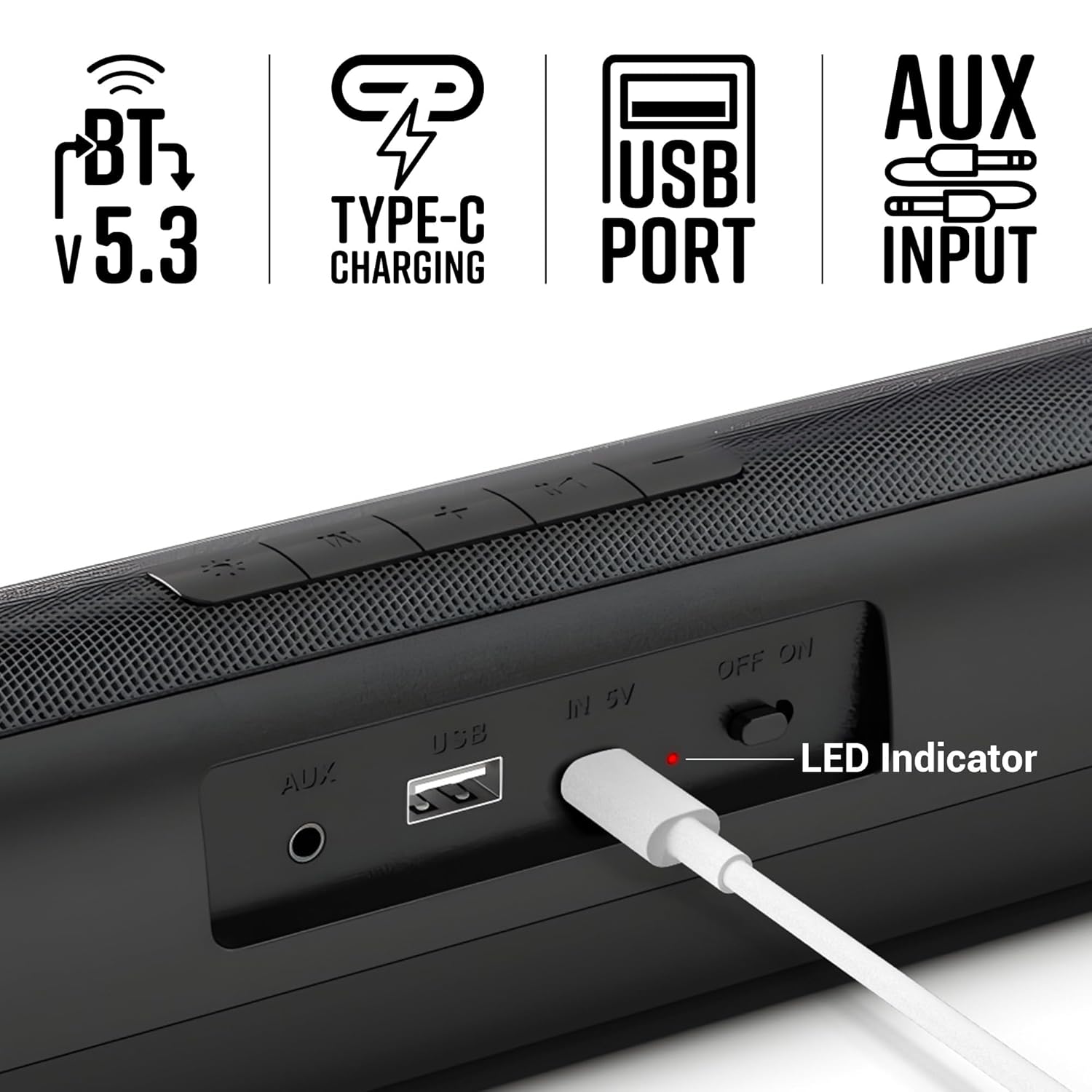
الصورة 4.1: عن قرب view of the soundbar's rear panel, showing the AUX input, USB port, Type-C charging port, ON/OFF switch, and LED indicator.
5. تعليمات التشغيل
5.1 وضع Bluetooth
- Turn on the soundbar. It will automatically enter Bluetooth pairing mode.
- قم بتمكين Bluetooth على هاتفك الذكي أو أي جهاز آخر.
- بحث عن "Zeb-VITA BAR 200" in the list of available devices and select it to pair.
- بمجرد الاتصال، سيشير مكبر الصوت إلى نجاح عملية الاقتران.
5.2 وضع USB
- أدخل محرك أقراص USB يحتوي على الصوت fileقم بإدخاله في منفذ USB الموجود على شريط الصوت.
- The soundbar will automatically switch to USB mode and begin playing audio.
5.3 وضع AUX
- Connect one end of the provided AUX cable to the AUX input on the soundbar.
- Connect the other end to the audio output of your device (e.g., smartphone, TV, computer).
- The soundbar will automatically switch to AUX mode.
5.4 عناصر التحكم
The soundbar features intuitive control buttons on its top panel:
- اخفض الصوت (-): يقلل الحجم.
- المسار السابق (<<): يتخطى إلى المسار السابق.
- تشغيل/إيقاف مؤقت (►▮▮): تشغيل أو إيقاف الصوت مؤقتًا.
- المسار التالي (>>): يتخطى إلى المسار التالي.
- رفع الصوت (+): يزيد الحجم.
- الوضع (م): Switches between Bluetooth, USB, and AUX modes.
- LED Light Control (☀): Toggles or changes multicolor LED modes.
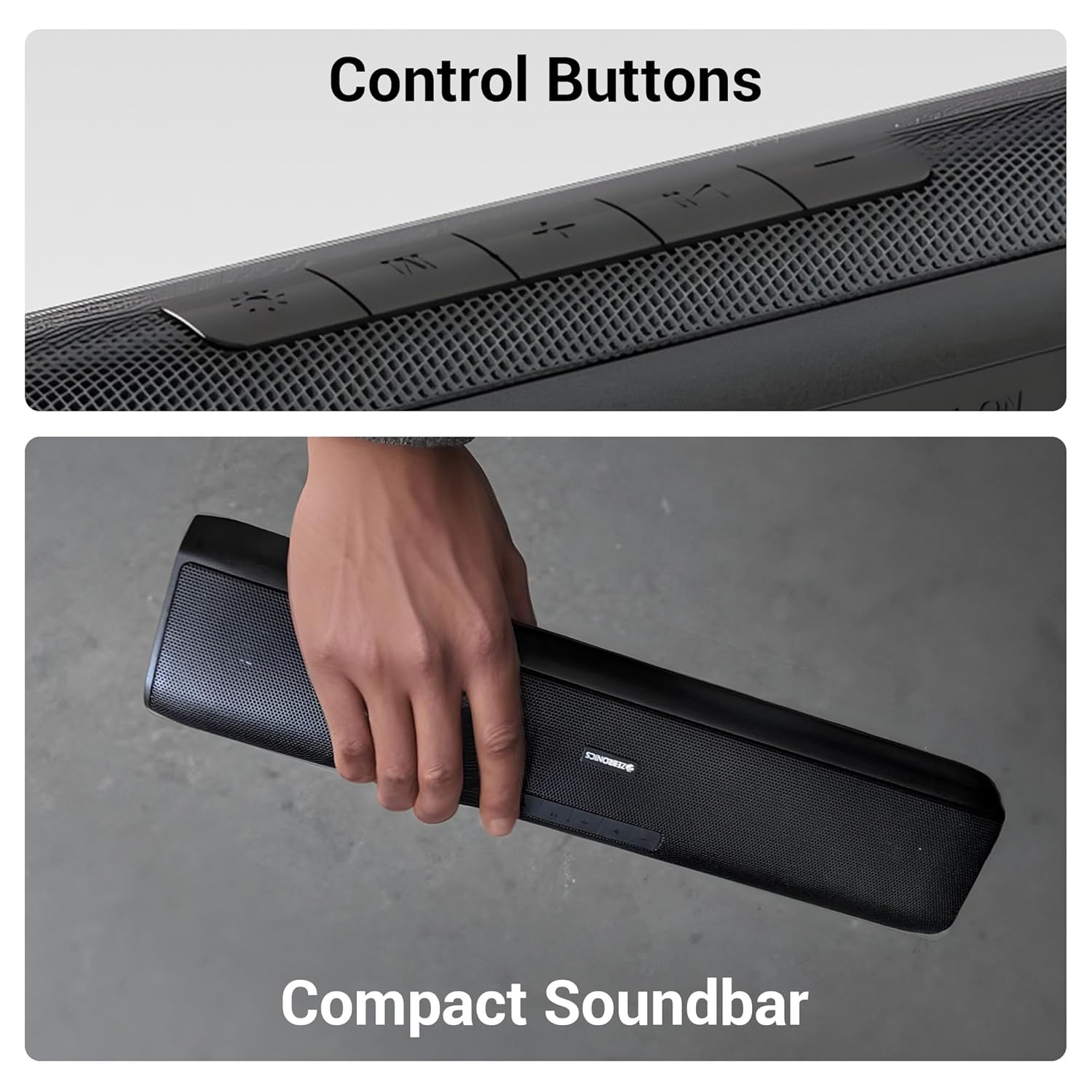
الصورة 5.1: تفصيلية view of the control buttons located on the top surface of the soundbar.
6. الصيانة
6.1 التنظيف
- Use a soft, dry cloth to clean the surface of the soundbar.
- لا تستخدم المنظفات السائلة أو البخاخات الهوائية مباشرة على الجهاز.
6.2 التخزين
- قم بتخزين شريط الصوت في مكان بارد وجاف بعيدًا عن أشعة الشمس المباشرة ودرجات الحرارة القصوى.
- في حالة تخزين البطارية لفترة طويلة، اشحنها بشكل دوري للحفاظ على سلامتها.
6.3 العناية بالبطارية
- تجنب تفريغ البطارية بالكامل بشكل متكرر.
- لا تعرض البطارية لدرجات حرارة عالية.
7. استكشاف الأخطاء وإصلاحها
| مشكلة | السبب المحتمل | حل |
|---|---|---|
| لا يوجد طاقة | البطارية مستنزفة | Charge the soundbar using the provided Type-C cable. |
| لا يوجد صوت | مستوى الصوت منخفض جدًا أو مكتوم | قم بزيادة مستوى الصوت على مكبر الصوت وجهازك المتصل. |
| البلوتوث غير متصل | Soundbar not in pairing mode or too far | Ensure the soundbar is in Bluetooth mode and within range (10 meters). Forget the device on your phone and re-pair. |
| صوت مشوه | Volume too high or poor source quality | خفّض مستوى الصوت. جرّب مصدر صوت مختلف أو file. Ensure AUX cable is fully inserted. |
8. المواصفات
| ميزة | التفاصيل |
|---|---|
| اسم الموديل | Zeb-VITA BAR 200 |
| نوع السماعة | مكبر صوت صغير |
| طاقة الإخراج | 24 واتس RMS |
| الاتصال | بلوتوث الإصدار 5.3، منفذ USB، منفذ AUX |
| عمر البطارية | Up to 8 Hours (at 50% volume, LED off) |
| نوع الشحن | النوع-C |
| أبعاد المنتج (العمق × العرض × الارتفاع) | 8.5 عمق × 41 عرض × 6.8 ارتفاع سنتيمتر |
| وزن العنصر | 857 جرام |
| مقاومة | 3 أوم |
| طريقة التحكم | زر |

Image 8.1: Diagram illustrating the physical dimensions of the ZEBRONICS VITA BAR 200 soundbar.
9. الضمان والدعم
The ZEBRONICS VITA BAR 200 Mini Soundbar comes with a standard manufacturer's warranty. Please refer to the warranty card included in your package for specific terms and conditions, including the warranty period and coverage details.
للحصول على الدعم الفني أو الخدمة أو مطالبات الضمان، يرجى الاتصال بخدمة عملاء زيبرونيكس من خلال موقعهم الرسمي. webالموقع أو معلومات الاتصال المقدمة في وثائق المنتج الخاص بك.
الشركة المصنعة: شركة زيبرونيكس إنديا الخاصة المحدودة
عنوان: رقم 13/7، طريق سميث، رويابيت، تشيناي - 600002


